Two Windows of Materials in Default Tray
-
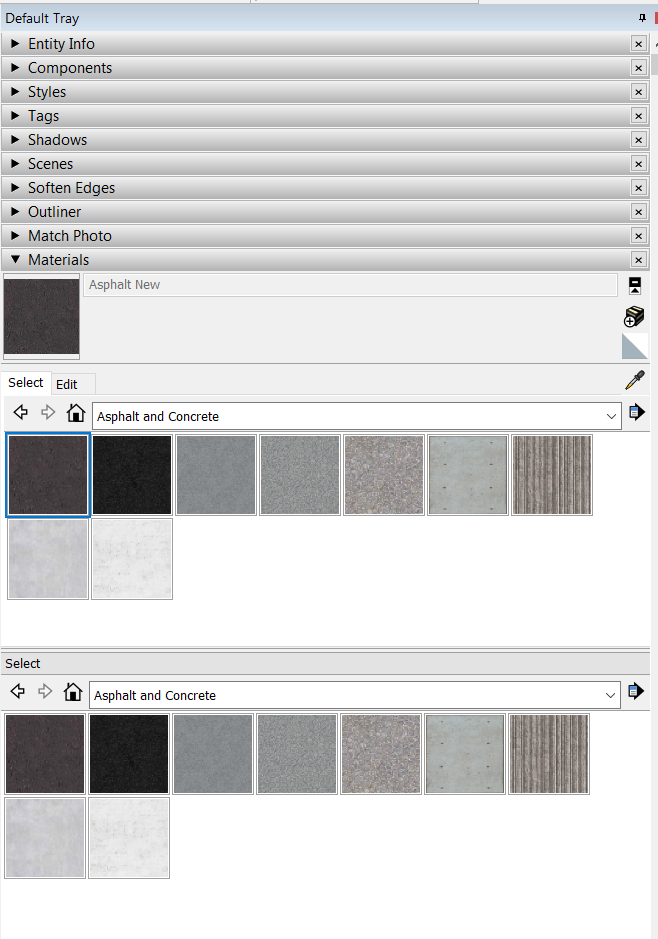
This isn't really a bug but a troubleshooting question. I don't know if I just randomly clicked something or wasn't paying attention but I suddenly started noticing that I have to materials windows in my default tray. Any idea what might have caused this?
-
That is there so you can drag and drop materials from folder to folder.
There is a little arrow and cross symbol top right with the Help info 'Display the secondary selection pane'.
Just click it and it will go away. -
@box said:
That is there so you can drag and drop materials from folder to folder.
There is a little arrow and cross symbol top right with the Help info 'Display the secondary selection pane'.
Just click it and it will go away.There it is! Thanks! Long day.
-
This doesn't belong in the Bug Reeporting category.



Hello! It looks like you're interested in this conversation, but you don't have an account yet.
Getting fed up of having to scroll through the same posts each visit? When you register for an account, you'll always come back to exactly where you were before, and choose to be notified of new replies (either via email, or push notification). You'll also be able to save bookmarks and upvote posts to show your appreciation to other community members.
With your input, this post could be even better 💗
Register Login


Advertisement