sketchucation logo sketchucation
    • Login
    Oops, your profile's looking a bit empty! To help us tailor your experience, please fill in key details like your SketchUp version, skill level, operating system, and more. Update and save your info on your profile page today!
    ⚠️ Update | Sketchucation Tools 5.0.8 released with licensing improvements and bugfixes Download

    Can't select the object I want. Always get extra points.

    Scheduled Pinned Locked Moved Newbie Forum
    sketchup
    12 Posts 4 Posters 6.2k Views 4 Watching
    Loading More Posts
    • Oldest to Newest
    • Newest to Oldest
    • Most Votes
    Reply
    • Reply as topic
    Log in to reply
    This topic has been deleted. Only users with topic management privileges can see it.
    • G
      GilliganU
      last edited by

      How can they be considered the same, I didn't group them, I just made them touch.

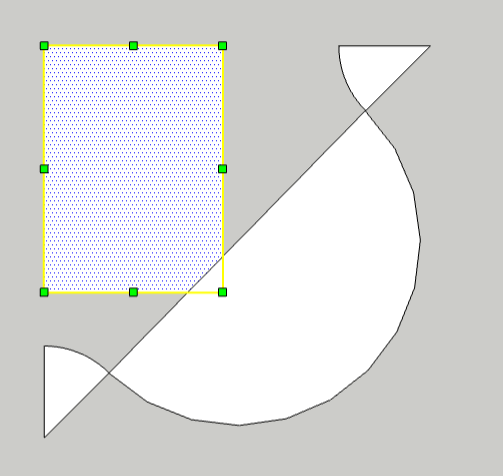
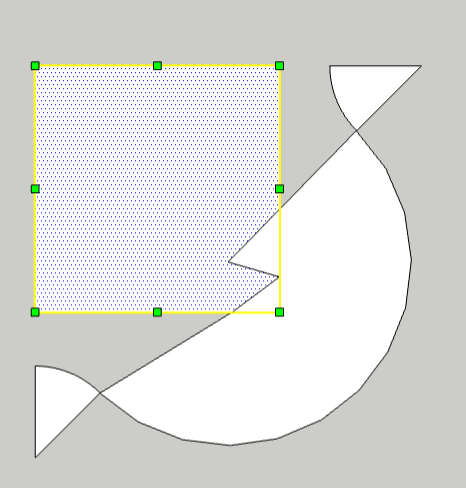
      See the three files. After the stretch down, several points are added to the selection that should NOT be there. After stretch right, you can see several points half circle moving. No points in the half circle should be selected!
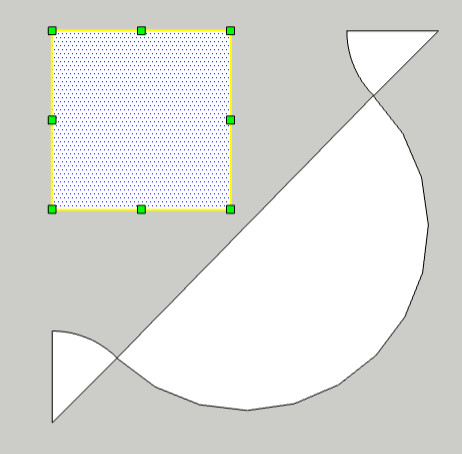
      Before Streatch


      After Stretch Down


      After Stretch Right

      1 Reply Last reply
      Reply Quote 0
      • Rich O BrienR
        Rich O Brien Moderator
        last edited by

        SketchUp 'Auto-heals' faces and edges that occupy the same plane/xyz coord.

        Where edges/faces overlap there they are merged.

        Download the free D'oh Book for SketchUp πŸ“–

        1 Reply Last reply
        Reply Quote 0
        • G
          GilliganU
          last edited by

          So, what is the vaccine for this "Auto Healing" BUG?

          (Which , by the way, sounds a lot like this Dr. Who episode: https://tardis.fandom.com/wiki/Nanogene#:~:text=Nanogenes%2C%20also%20known%20as%20nanobots,or%20guarding%20planets%20and%20technology.)

          1 Reply Last reply
          Reply Quote 0
          • R
            rv1974
            last edited by

            group things religeosly (via shortcut)

            1 Reply Last reply
            Reply Quote 0
            • Rich O BrienR
              Rich O Brien Moderator
              last edited by

              @gilliganu said:

              So, what is the vaccine for this "Auto Healing" BUG?

              Understanding how SketchUp works and following RV's advice. Wrap loose geometry in a container to prevent happy accidents πŸ˜„

              Download the free D'oh Book for SketchUp πŸ“–

              1 Reply Last reply
              Reply Quote 0
              • G
                GilliganU
                last edited by

                So, I made the totally independent object, the half circle a group with one object in it. This did prevent it from having its points from being auto-healed. I have to say, this seems inside out. Why not just let me group things when I'm ready to do that?

                What exactly is the group shortcut? I search the help and it would not say. It gave a list of default shortcuts, (a VERY short list) and group was not amount them.

                Finally, what is the un-group command? Searching help produces nothing useful.

                1 Reply Last reply
                Reply Quote 0
                • Rich O BrienR
                  Rich O Brien Moderator
                  last edited by

                  Assign a shortcut key for Group or select your desired geometry then Right Click > Group

                  https://i.imgur.com/n5PtGYV.png

                  To Ungroup use the Explode command under Right Click > Explode

                  https://i.imgur.com/uUaOdxz.png

                  Its called Explode because it apply to Groups and Components. Ungroup would make sense if SketchUp only dealt in Groups....but it doesn't so πŸ˜›

                  Download the free D'oh Book for SketchUp πŸ“–

                  1 Reply Last reply
                  Reply Quote 0
                  • BoxB
                    Box
                    last edited by

                    Shift g is the default for group, g the default for component.

                    1 Reply Last reply
                    Reply Quote 0
                    • G
                      GilliganU
                      last edited by

                      I have to say, it would be nice if the help system could translate un-group to explode, for me!

                      1 Reply Last reply
                      Reply Quote 0
                      • BoxB
                        Box
                        last edited by

                        Perhaps spending some time learning the basics would help you.
                        https://learn.sketchup.com/

                        1 Reply Last reply
                        Reply Quote 0

                        Hello! It looks like you're interested in this conversation, but you don't have an account yet.

                        Getting fed up of having to scroll through the same posts each visit? When you register for an account, you'll always come back to exactly where you were before, and choose to be notified of new replies (either via email, or push notification). You'll also be able to save bookmarks and upvote posts to show your appreciation to other community members.

                        With your input, this post could be even better πŸ’—

                        Register Login
                        • 1 / 1
                        • First post
                          Last post
                        Buy SketchPlus
                        Buy SUbD
                        Buy WrapR
                        Buy eBook
                        Buy Modelur
                        Buy Vertex Tools
                        Buy SketchCuisine
                        Buy FormFonts

                        Advertisement
