[Plugin] LordOfTheToolbars - v3.0a - 21 Apr 26




-
@rv1974 said:
Some strange behavior on toolbar editing: dropping new icons in the middle simultaneously delete existing ones in the bottom right corner. Playing with Nb of columns\rows in toolbar properties didn't help.
Is this only withese two command icons, or general, that is, if you insert another icon, the last one will disappear?
Also, can you go to the Default Parameters and check the field "Maximum number of icons for favorite palettes".
-
increasing 'maximum number of icons' param solved the issue- many thanks

-
Hello, after using the FREDO extention “Lordofthetoolbars” to hide and unhide all tool bar i can no more recover the status bar !!!??? any helps please
Thank u
-
@cinooo said:
Hello, after using the FREDO extention “Lordofthetoolbars” to hide and unhide all tool bar i can no more recover the status bar !!!??? any helps please
Does it persist when you restart Sketchup?
-
NEW RELEASE: LordOfTheToolbars v1.4a - 06 Jul 21
Requirements
- LibFredo6: v11.9a or above
- Sketchup version: SU2017 and above
LordOfTheToolbars 1.4a is a major release with more possibilities of configuration of the behavior of LOTT, as well as bug fixing and adjustments, especially
- Click Mode (versus Hover mode)
- More Options for the positioning of palettes
- Shortcuts for palettes and personal command
Home Page of LordOfTheToolbars for information and Download.
-
When I click on menu options it asks me to "Import LOTT COnfig from file." I hit cancel and the menu show ups.
-
@gus r said:
When I click on menu options it asks me to "Import LOTT COnfig from file." I hit cancel and the menu show ups.
Thanks for signaling. It will be fixed in the next version.
-
NEW RELEASE: LordOfTheToolbars v1.4b - 07 Jul 21
Requirements
- LibFredo6: v11.9a or above
- Sketchup version: SU2017 and above
LordOfTheToolbars 1.4b fixes a bug where, on first utilization, the Import dialog would display when clicking on the control button of the Vignette Stripe.
Home Page of LordOfTheToolbars for information and Download.
-
Thanks Fredo. All fixed.
-
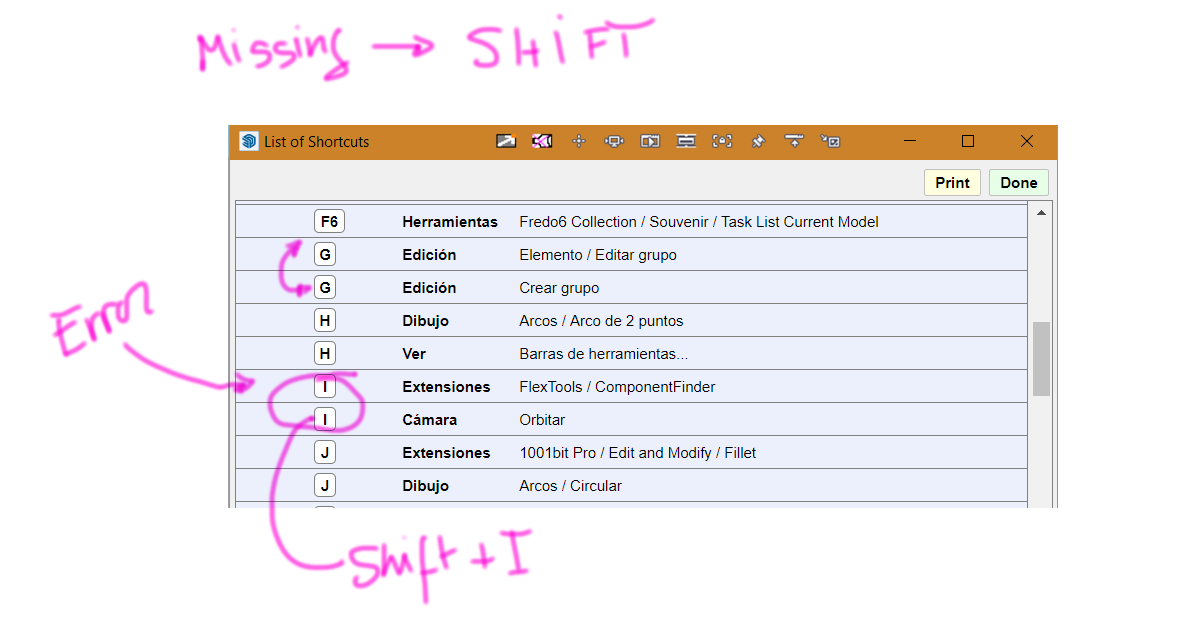
Hi fredo, thanks for listening, great job my congratulations. I want to indicate a possible error. Thanks in advance.
-
Hi Pedro,
Could you do me a favor.
Just open the Ruby Console and type
Sketchup.get_shortcuts. Then copy the output and paste it in your answer here.I suspect there are some local dependencies (Spanish in your case).
Thanks
Fredo
-
NEW RELEASE: LordOfTheToolbars v1.4c - 08 Jul 21
Requirements
- LibFredo6: v11.9b or above
- Sketchup version: SU2017 and above
LordOfTheToolbars 1.4c is for bug fixing and adjustments.
Home Page of LordOfTheToolbars for information and Download.
-
Is This?
"Add help menu!"
"create new"
"created"
#Sketchup::Menu:0x00000197fd20ff58
(eval):23: warning: calling URI.open via Kernel#open is deprecated, call URI.open directly or use URI#openSketchup.get_shortcuts
["Ctrl+Mayúsculas+E\tCámara/Ver modelo centrado", "Ctrl+Mayúsculas+W\tCámara/Ventana de zoom", "Mayúsculas+F1\tSketchUp/Ayuda contextual", "Ctrl+T\tEdición/Anular selección", "Ctrl+C\tEdición/Copiar", "Ctrl+Insertar\tEdición/Copiar", "Mayúsculas+Eliminar\tEdición/Cortar", "Ctrl+X\tEdición/Cortar", "Eliminar\tEdición/Eliminar", "Ctrl+V\tEdición/Pegar", "Mayúsculas+Insertar\tEdición/Pegar", "Ctrl+Y\tEdición/Rehacer", "Ctrl+A\tEdición/Seleccionar todo", "Ctrl+Mayúsculas+I\tEdición/Invertir selección", "Alt+Atrás\tEdición/Deshacer", "Ctrl+Z\tEdición/Deshacer", "Ctrl+N\tArchivo/Nuevo", "Ctrl+O\tArchivo/Abrir...", "Ctrl+P\tArchivo/Imprimir...", "Ctrl+S\tArchivo/Guardar", "AvPág\tVer/Animación/Escena siguiente", "RePág\tVer/Animación/Escena anterior", "X\tHerramientas/Escala", "Ctrl+Alt+G\tCámara/Girar", "Alt+S\tExtensiones/Mirror Selection", "B\tHerramientas/Borrar", "G\tEdición/Crear grupo", "Mayúsculas+D\tEdición/Desbloquear/Seleccionado", "I\tExtensiones/FlexTools/ComponentFinder", "Ctrl+I\tVentana/3D Warehouse", "N\tHerramientas/Texto", "Mayúsculas+G\tEdición/Elemento/Editar grupo", "F\tExtensiones/Start FrontFace[TM] Tool", "Ctrl+Q\tExtensiones/Multiple Offsets", "W\tHerramientas/Curic/Align View/Align View Current", "A\tCámara/Vistas estándar /Arriba", "Z\tCámara/Ver modelo centrado", "Mayúsculas+C\tDibujo/Formas/Círculo", "O\tEdición/Ocultar", "Ctrl+F\tEdición/Elemento/Add Faces [to Selected Edges]", "Mayúsculas+Z\tEdición/Elemento/Zoom a selección", "V\tVer/Estilo de arista/Aristas posteriores", "D\tHerramientas/Mover", "Mayúsculas+V\tEdición/Pegar en su sitio", "E\tHerramientas/Fredo6 Collection/JointPushPull/Thickener", "P\tVentana/Preferencias", "Q\tVer/Edición de componentes/Ocultar el resto del modelo", "R\tHerramientas/Rotar", "T\tEdición/Mostrar/Todas", "Y\tHerramientas/Ejes", "U\tEdición/Mostrar/Último", "C\tEdición/Crear componente...", "M\tHerramientas/Make Faces 1.4", "Fin\tArchivo/Salir", "Alt+3\tDibujo/Arcos/Arco de 3 puntos", "Alt+5\tDibujo/Formas/Polígono", "Alt+Q\tAyuda/- CADFATHER PACK/POWERBAR.../ Offset Edge [SD Mitch]", "Mayúsculas+E\tExtensiones/1001bit Pro/Edit and Modify /Offset edges ", "Mayúsculas+Q\tHerramientas/TIG.Smart_offset", "Alt+R\tDibujo/Formas/Rectángulo", "Alt+T\tDibujo/Herramientas 2D.../2D Texto", "Alt+P\tHerramientas/Fredo Tools/ThruPaint", "Alt+A\tDibujo/Arcos/Arco", "Alt+K\tExtensiones/CleanUp³/Clean…", "Alt+C\tHerramientas/Acotaciones", "Alt+M\tHerramientas/Medir", "Mayúsculas+R\tExtensiones/Enscape/Iniciar Enscape", "Alt+L\tDibujo/Líneas/Línea", "Alt+H\tVer/Barras de herramientas...", "Alt+E\tHerramientas/Equidistancia", "J\tExtensiones/1001bit Pro/Edit and Modify /Fillet ", "L\tExtensiones/1001bit Pro/Setting out /Align selected entities (3 points) ", "K\tExtensiones/1001bit Pro/Edit and Modify /Extend ", "F7\tCámara/Desplazar", "F2\tVer/Geometría oculta", "F3\tVer/Objetos ocultos", "Mayúsculas+P\tExtensiones/1001bit Pro/Draw /Draw perpendicular line (3D) ", "Alt+2\tDibujo/Circle from edge", "Ctrl+3\tExtensiones/3 point Rectangle/3 point Rectangle", "Ctrl+E\tHerramientas/Fredo6 Collection/JointPushPull/Quick Launcher...", "F6\tHerramientas/Fredo6 Collection/Souvenir/Task List Current Model", "F5\tHerramientas/Fredo6 Collection/Souvenir/Task List SketchUp", "F4\tHerramientas/Fredo6 Collection/Souvenir/Favorites", "Alt+Z\tCámara/Zoom", "Alt+F\tCámara/Vistas estándar /Frontal", "F12\tCámara/Vistas estándar /Abajo", "F11\tCámara/Anterior", "Alt+J\tHerramientas/Fredo6 Collection/JointPushPull/Joint Push Pull", "Mayúsculas+M\tEdición/Eliminar guías", "Espaciar\tHerramientas/Curic/Recall Command", "Alt+V\tCámara/Ventana de zoom", "Alt+0\tHerramientas/nz_Edge2Polygon/PolygonByEdge", "Ctrl+Mayúsculas+Z\tCámara/Aplicar zoom a fotografía", "`\tEdición/Mostrar/Último", "Ctrl+Alt+Mayúsculas+E\tHerramientas/Fredo6 Collection/JointPushPull/Joint Push Pull", "Mayúsculas+A\tExtensiones/1001bit Pro/Edit and Modify /Extend ", "F9\tVer/Objetos ocultos", "Alt+D\tCámara/Desplazar", "Mayúsculas+Espaciar\tHerramientas/Seleccionar", "S\tHerramientas/Sígueme", "Ctrl+L\tArchivo/Enviar a LayOut...", "Mayúsculas+N\tArchivo/Nuevo a partir de una plantilla...", "Ctrl+W\tArchivo/Exportar/Gráfico 2D...", "Ctrl+R\tArchivo/Generar informe...", "Mayúsculas+T\tHerramientas/Transportador", "Ctrl+Alt+P\tHerramientas/Pintar", "Alt+O\tVer/Objetos ocultos", "Alt+G\tArchivo/Guardar como...", "Alt+8\tArchivo/Guardar una copia como...", "Alt+9\tArchivo/Guardar como plantilla...", "Ctrl+Alt+E\tVentana/Extension Warehouse", "Ctrl+Alt+B\tEdición/Bloquear", "Ctrl+Alt+D\tEdición/Desbloquear/Todas", "Ctrl+D\tEdición/Cerrar grupo/componente", "Ctrl+J\tEdición/Intersecar caras/Con la selección", "Ctrl+K\tDibujo/Mostrar ejes", "Ctrl+M\tVer/Guías", "Ctrl+1\tVentana/Mostrar Sombras", "Ctrl+2\tVer/Estilo de arista/Aristas", "Ctrl+4\tVer/Estilo de arista/Perfiles", "Ctrl+5\tVer/Estilo de cara/Rayos X", "Ctrl+6\tVer/Estilo de cara/Alambre", "Ctrl+7\tVer/Estilo de cara/Líneas ocultas", "Ctrl+8\tVer/Estilo de cara/Sólido", "Ctrl+9\tVer/Estilo de cara/Sólido con texturas", "Ctrl+0\tVer/Estilo de cara/Monocromo", "Alt+W\tCámara/Proyección paralela", "Alt+Y\tCámara/Perspectiva", "Alt+U\tCámara/Vistas estándar /Abajo", "Ctrl+Alt+R\tHerramientas/Fredo6 Collection/SUClock/Configure Tracking Project", "Mayúsculas+W\tCámara/Vistas estándar /Izquierda", "Mayúsculas+Y\tCámara/Vistas estándar /Derecha", "Mayúsculas+U\tCámara/Vistas estándar /Isométrica", "Ctrl+Alt+A\tCámara/Vistas estándar /Atrás", "Mayúsculas+I\tCámara/Orbitar", "Alt+I\tArchivo/Importar...", "Mayúsculas+O\tCámara/Anterior", "Ctrl+Alt+C\tCámara/Caminar", "Ctrl+Mayúsculas+R\tDibujo/Formas/Rectángulo rotado", "Mayúsculas+H\tDibujo/Arcos/Arco de 2 puntos", "Mayúsculas+J\tDibujo/Arcos/Circular", "Mayúsculas+K\tDibujo/Herramientas 2D.../2D Z-Plano", "Alt+X\tDibujo/Herramientas 2D.../2D Estirar", "Ctrl+Alt+X\tExtensiones/FullScreen/Show UI", "Mayúsculas+1\tDibujo/Dibac/Muro", "Mayúsculas+2\tDibujo/Dibac/Muro paralelo", "Mayúsculas+3\tDibujo/Dibac/Prolongar muro", "Mayúsculas+4\tDibujo/Dibac/Puerta", "Mayúsculas+5\tDibujo/Dibac/Ventana", "Mayúsculas+6\tDibujo/Dibac/Armario", "Mayúsculas+7\tDibujo/Dibac/Elegir carpintería", "Mayúsculas+8\tDibujo/Dibac/Escalera", "Mayúsculas+9\tDibujo/Dibac/Cota continua", "Mayúsculas+0\tDibujo/Dibac/Convertir en 2D/3D", "Alt+1\tDibujo/Dibac/Get Dibac", "Alt+N\tHerramientas/Texto 3D", "Mayúsculas+B\tHerramientas/Caja de arena/Estampar", "Alt+4\tVentana/Información del modelo", "Ctrl+Alt+2\tVer/Restaurar ejes (entorno)", "Ctrl+Alt+1\tVer/Ejes", "Ctrl+Mayúsculas+C\tCámara/Caminar", "Ctrl+Alt+Mayúsculas+P\tCámara/Proyección paralela", "Mayúsculas+S\tHerramientas/Fredo6 Collection/Souvenir/Task List SketchUp", "Mayúsculas+F\tHerramientas/Fredo6 Collection/Souvenir/Favorites", "H\tVer/Barras de herramientas...", "Ctrl+Alt+J\tVentana/Mostrar Información de la entidad", "Ctrl+Alt+K\tVentana/Mostrar Esquema", "Ctrl+Alt+L\tVentana/Mostrar etiquetas", "'\tHerramientas/Fredo6 Collection/LordOfTheToolbars/Cycle through Palettes"] -
More errors detected: when you alternate the sketchup full screen with another window using a shortcut (ctrl + alt + tab) vignettes bar disappears, it only appears with popup the vignette stripe command.
The palette windows do not retain the custom size when a shortcut popup is opened with a shortcut key, they adjust automatically. -
Some minor inconvenience here:
I have some locked favorite toolbar put in some properplace before closing SU. After SU restarting I see it closed and I need to click the dedicated palette icon to restore the status. Could LOTT remember the toolbars position before SU closing?
PS Exporting config file before SU exit doesn't help. -
@rv1974 said:
Some minor inconvenience here:
I have some locked favorite toolbar put in some properplace before closing SU. After SU restarting I see it closed and I need to click the dedicated palette icon to restore the status. Could LOTT remember the toolbars position before SU closing?
PS Exporting config file before SU exit doesn't help.Thanks for signaling. Bug introduced in latest version (v1.4c) and fixed in next version.
-
@pedroe said:
More errors detected: when you alternate the sketchup full screen with another window using a shortcut (ctrl + alt + tab) vignettes bar disappears, it only appears with popup the vignette stripe command.
Which key combination do you use. I don't observe the problem with Alt-Tab and Ctrl-Alt-Tab
@pedroe said:
The palette windows do not retain the custom size when a shortcut popup is opened with a shortcut key, they adjust automatically.
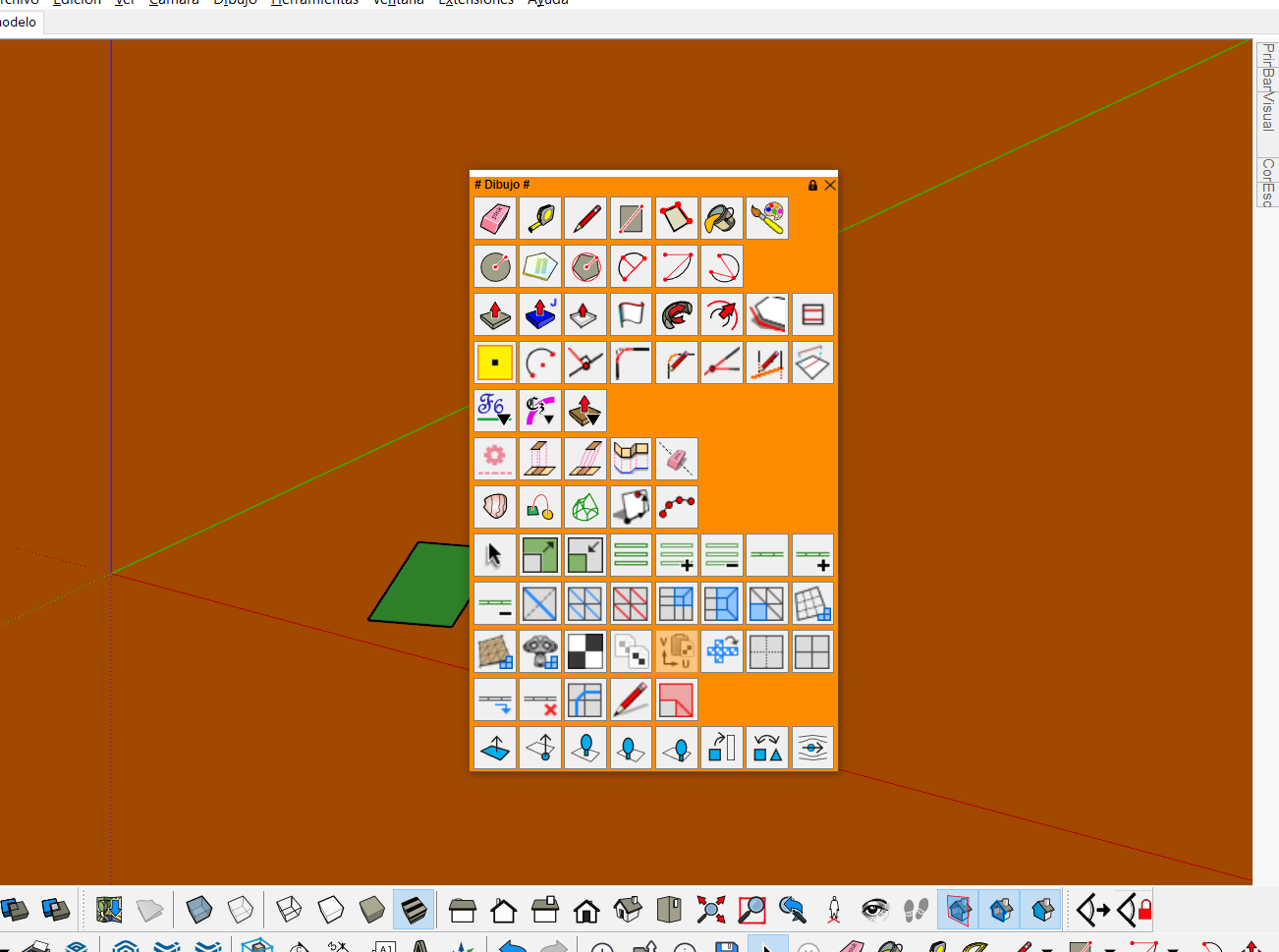
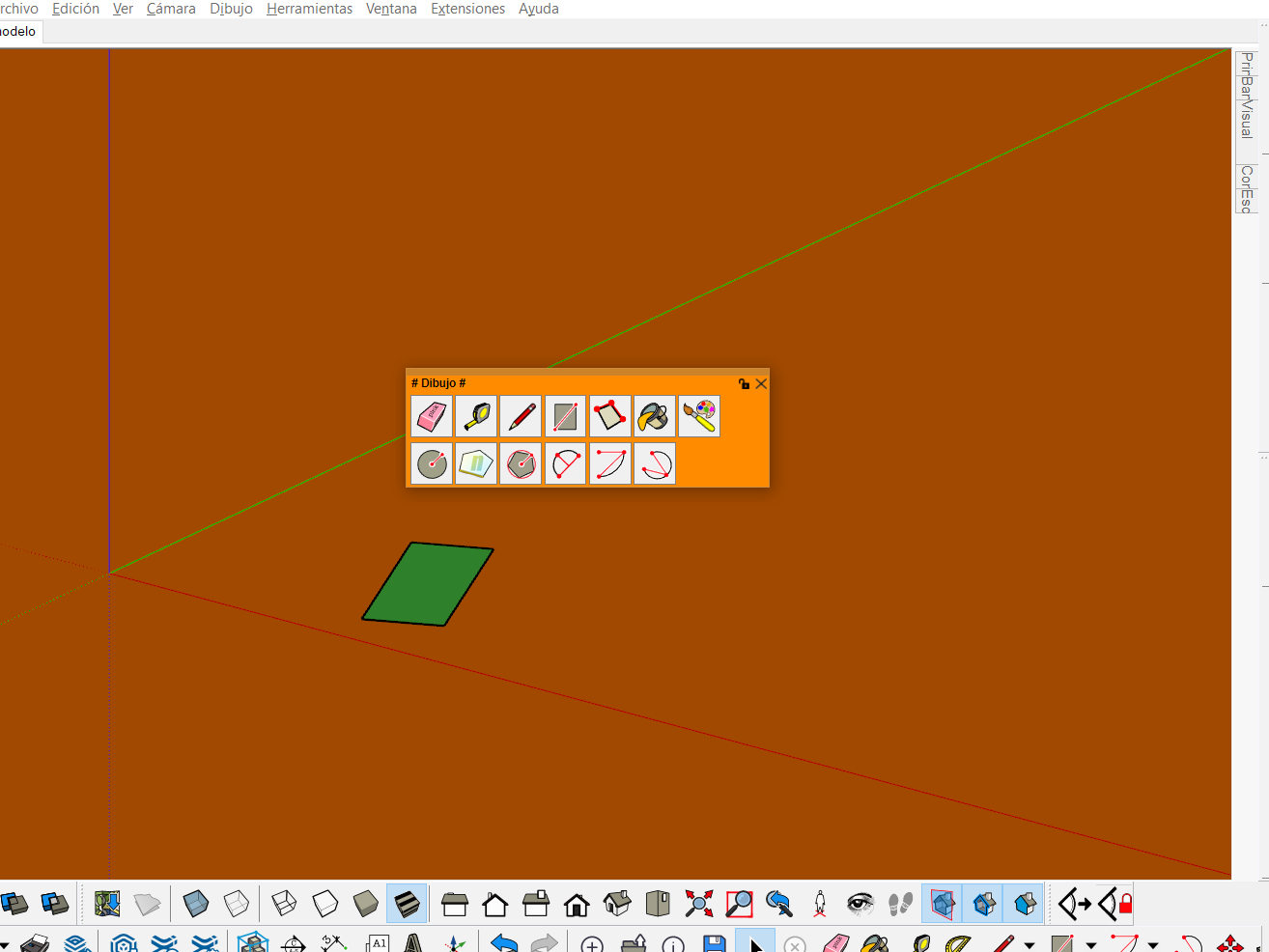
This is normal. When you use a shortcut to make a palette appear, LOTT display the palette expanded, so that you can see all command icons. When you click a command (or click in the empty space or press escape), the palette will automatically disappear.
-
@fredo6 said:
@pedroe said:
More errors detected: when you alternate the sketchup full screen with another window using a shortcut (ctrl + alt + tab) vignettes bar disappears, it only appears with popup the vignette stripe command.
Which key combination do you use. I don't observe the problem with Alt-Tab and Ctrl-Alt-Tab
@pedroe said:
The palette windows do not retain the custom size when a shortcut popup is opened with a shortcut key, they adjust automatically.
This is normal. When you use a shortcut to make a palette appear, LOTT display the palette expanded, so that you can see all command icons. When you click a command (or click in the empty space or press escape), the palette will automatically disappear.
The problem is when you have many buttons and the window can be excessively large, if you could keep a custom window size, the most used buttons would be visible and the rest would appear by sliding with the mouse wheel.
-
Then, I can make it an option.
Again, the shortcut is to make the palette temporarily show so that you can select a command icon. So, even if there are lot of icons, this is just for temporary selection.
-
NEW RELEASE: LordOfTheToolbars v1.4d - 10 Jul 21
Requirements
- LibFredo6: v11.9c or above
- Sketchup version: SU2017 and above
LordOfTheToolbars 1.4d fixes various bugs related to shortcuts, permanent showing of palettes at startup, ....
Home Page of LordOfTheToolbars for information and Download.


Hello! It looks like you're interested in this conversation, but you don't have an account yet.
Getting fed up of having to scroll through the same posts each visit? When you register for an account, you'll always come back to exactly where you were before, and choose to be notified of new replies (either via email, or push notification). You'll also be able to save bookmarks and upvote posts to show your appreciation to other community members.
With your input, this post could be even better 💗
Register Login


Advertisement