Edit Component with Material (Image) Outside Component
-
A newbie question but how can I edit a component with an image for tracing on a plane outside the component without that image fading to white when I enter the component to edit making it impossible to trace? If that's possible. I noticed it doesn't fade to white on a non-exploded image.
-
Exploded it's a texture. What's wrong with tracing over an unexploded image?
-
Nothing I suppose.
@pbacot said:
Exploded it's a texture. What's wrong with tracing over an unexploded image?
-
Someone had this same question recently. They were exploding the image after importing it, too. If you don't explode it, the image will show when the component is open for editing. I showed this as an example.
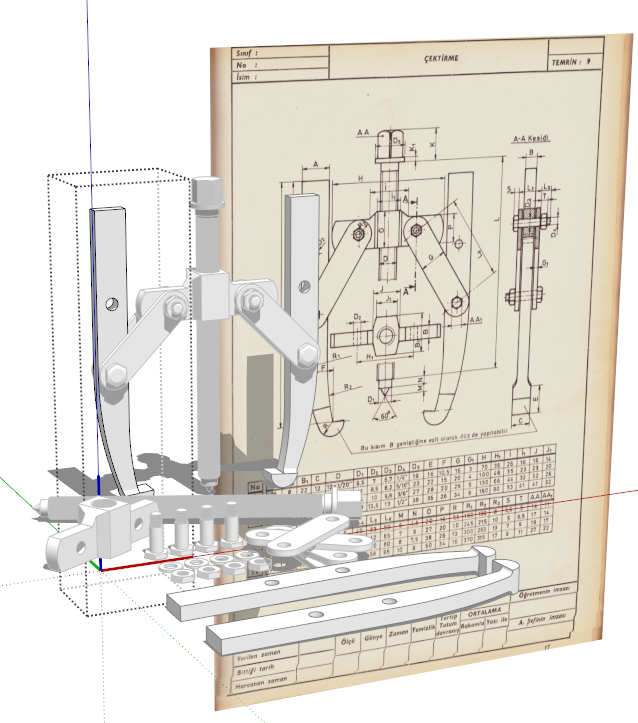
It's puzzling to me that users feel the need to explode images after importing them. If it's not going to be used as a texture there's no need to explode it. If it is going to be used as a texture, it makes more sense to import it as a texture in the first place.



Hello! It looks like you're interested in this conversation, but you don't have an account yet.
Getting fed up of having to scroll through the same posts each visit? When you register for an account, you'll always come back to exactly where you were before, and choose to be notified of new replies (either via email, or push notification). You'll also be able to save bookmarks and upvote posts to show your appreciation to other community members.
With your input, this post could be even better 💗
Register Login


Advertisement