Downloading issues
-
Hi
I'm trying to download JHS toolbar and each time I attempt it a new SketchUp model page opens with a dialog box telling me that "this appears not to be a model" which then as you click it, to get rid of the dialog box, sketch up closes. Any help appreciated,
Thanks Jo -
I watched the video on downloading the JHS toolbar, when I go to window, preferences extensions as instructed- there is no extensions option. can anyone advise.
Thanks -
Can you post the model that you want to load ?
-
When you download an extension [.RBZ file] your web-browser prompts of an action.
Typically this is to open the file or to save it.
If you [wrongly] choose to open it, and you have that RBZ file-type [wrongly] associated with SketchUp, then it will attempt to open in SketchUp ! But of course it's not a SKP file so you get that error message.
So you must choose to save it - typically the RBZ gets saved into your Downloads folder.
Then you need to install it in SketchUp...
Open the SketchUp "Extension Manager"***, and in its dialog use the red-button to "Install extension..."
Find the RBZ [in your Downloads folder ?]...
It will be automatically unpacked into the relevant files and subfolders within your User Plugins folder... then its loaded and creates the related menu and toolbar entries...
***In old SketchUp versions the Extensions were accessed through the Preferences menu item, but in the newer SketchUp versions there's a separate "Extension Manager" entry in the SketchUp Window menu list...If you have somehow sidestepped the web-browser's 'choices' prompt, e.g. so it goes directly to 'open' - then you should be able to change some options in your web-browser's settings to revert for the RBZ file-type to either saving directly to your Downloads folder or prompt for a save location etc...
Here's my Firefox options settings - always-save...
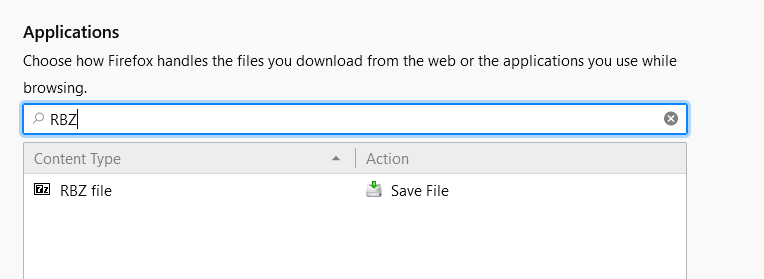
Other browsers will have similar set ups... -
search the PluginStore, locate extension, download onto local machine, install using the Extension Manager
-
@jo901 said:
Hi
I'm trying to download JHS toolbar and each time I attempt it a new SketchUp model page opens with a dialog box telling me that "this appears not to be a model" which then as you click it, to get rid of the dialog box, sketch up closes. Any help appreciated,
Thanks Jo



Hello! It looks like you're interested in this conversation, but you don't have an account yet.
Getting fed up of having to scroll through the same posts each visit? When you register for an account, you'll always come back to exactly where you were before, and choose to be notified of new replies (either via email, or push notification). You'll also be able to save bookmarks and upvote posts to show your appreciation to other community members.
With your input, this post could be even better 💗
Register Login


Advertisement