Extra geometry is driving me crazy
-
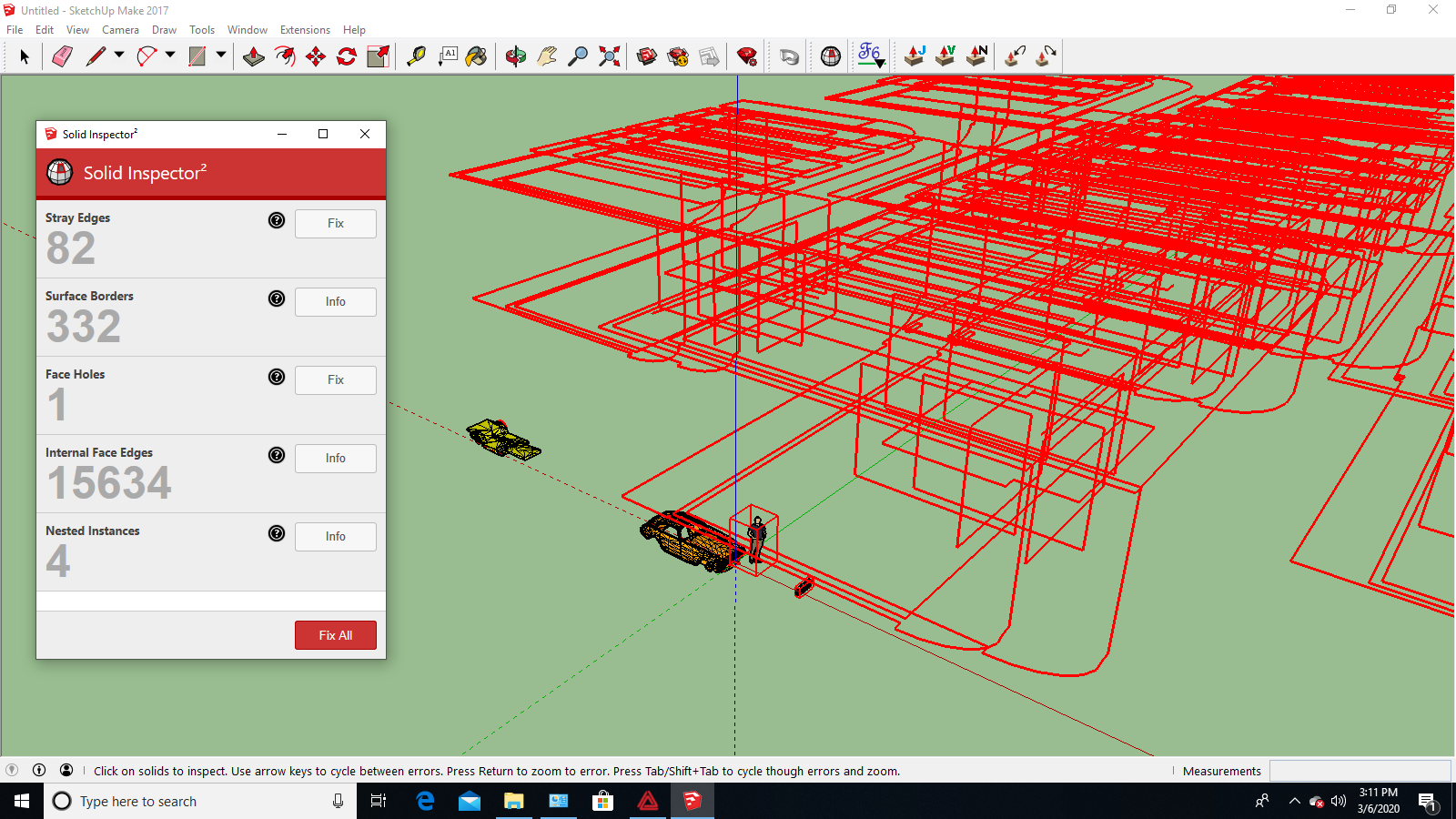
This extra geometry in red I can't get rid of. It only pops up when I use Solid Inspector 2 and there is so much of it, it slows my computer down. I think it must be left over from previous work on this model but I can't get rid of it. I've tried Cleanup 3 but no luck. I've tried to erase it but it disappears but comes back when I do Solid Inspector 2 again. What is it and how do I get rid of it? Thanks, Pico
-
Try turning on all layers and hidden geometry. Can you see it then?
-
basically a huge amount of junk.
Try turning on Hidden Geometry View/Hidden Geometry to see it. -
Layers??? Wow, where did all this stuff come from?? Easy to erase - thanks for the superfast answers. Made the rest of my day a lot easier. Pico


Hello! It looks like you're interested in this conversation, but you don't have an account yet.
Getting fed up of having to scroll through the same posts each visit? When you register for an account, you'll always come back to exactly where you were before, and choose to be notified of new replies (either via email, or push notification). You'll also be able to save bookmarks and upvote posts to show your appreciation to other community members.
With your input, this post could be even better 💗
Register Login


Advertisement