sketchucation logo sketchucation
    • 登入
    Oops, your profile's looking a bit empty! To help us tailor your experience, please fill in key details like your SketchUp version, skill level, operating system, and more. Update and save your info on your profile page today!
    🔌 Smart Spline | Fluid way to handle splines for furniture design and complex structures. Download

    [Plugin] Universal Importer - v1.2.6 - 30 July 2024

    已排程 已置頂 已鎖定 已移動 Plugins
    447 貼文 110 Posters 474.8k 瀏覽 110 Watching
    正在載入更多貼文
    • 從舊到新
    • 從新到舊
    • 最多點贊
    回覆
    • 在新貼文中回覆
    登入後回覆
    此主題已被刪除。只有擁有主題管理權限的使用者可以查看。
    • samuel_tS 離線
      samuel_t
      最後由 編輯

      1.1.1 version:

      • Copies only necessary files to temp dir.
      • Shows model face count during import.

      Download latest Universal Importer plugin from SketchUcation PluginStore.

      1 條回覆 最後回覆 回覆 引用 0
      • jujuJ 離線
        juju
        最後由 編輯

        @samuel_t said:

        1.1.1 version:

        • Copies only necessary files to temp dir.
        • Shows model face count during import.

        Download latest Universal Importer plugin from SketchUcation PluginStore.

        I'm getting this message when trying to download:

        "Sorry this plugin is not published at the moment. Probably under editing by the author. Please check later."

        Save the Earth, it's the only planet with chocolate.

        1 條回覆 最後回覆 回覆 引用 0
        • samuel_tS 離線
          samuel_t
          最後由 編輯

          @juju said:

          @samuel_t said:

          1.1.1 version:

          • Copies only necessary files to temp dir.
          • Shows model face count during import.

          Download latest Universal Importer plugin from SketchUcation PluginStore.

          I'm getting this message when trying to download:

          "Sorry this plugin is not published at the moment. Probably under editing by the author. Please check later."

          Please check now. It should be fine.

          1 條回覆 最後回覆 回覆 引用 0
          • samuel_tS 離線
            samuel_t
            最後由 編輯

            @tig said:

            It makes a folder 'Universal Importer/tmp' inside the main C:/ProgramData/ hidden-folder - not sure why ?
            What's wrong with the user's Temp folder ?

            User's temp folder can contain special chars which are not supported by program used by this plugin.

            @tig said:

            Permission muddles and other issues are almost inevitable !

            Famous plugins like Artisan and Skatter are using C:\ProgramData. This isn't a problem.

            @tig said:

            The importer then copies a seemingly random selection of files and subfolders into 'tmp' !
            It seems like these are from the same location as the file selected to import ?
            Currently about 17Gb !

            Textures can be associated to model. So I've no choice but to copy whole folder.
            Since 1.1.1 version of plugin, only necessary files are copied to temporary folder.

            @tig said:

            There's no auto-cleanup on completion, and so the 'tmp' folder will grow with each run of the importer !

            No. Plugin temporary folder is recycled on each new import. There's no risk to saturate disk.

            1 條回覆 最後回覆 回覆 引用 0
            • jujuJ 離線
              juju
              最後由 編輯

              @samuel_t said:

              @juju said:

              @samuel_t said:

              1.1.1 version:

              • Copies only necessary files to temp dir.
              • Shows model face count during import.

              Download latest Universal Importer plugin from SketchUcation PluginStore.

              I'm getting this message when trying to download:

              "Sorry this plugin is not published at the moment. Probably under editing by the author. Please check later."

              Please check now. It should be fine.

              Still can't download, not published.

              Save the Earth, it's the only planet with chocolate.

              1 條回覆 最後回覆 回覆 引用 0
              • samuel_tS 離線
                samuel_t
                最後由 編輯

                @juju said:

                @samuel_t said:

                @juju said:

                @samuel_t said:

                1.1.1 version:

                • Copies only necessary files to temp dir.
                • Shows model face count during import.

                Download latest Universal Importer plugin from SketchUcation PluginStore.

                I'm getting this message when trying to download:

                "Sorry this plugin is not published at the moment. Probably under editing by the author. Please check later."

                Please check now. It should be fine.

                Still can't download, not published.

                Yet it's published. Try following routines: Clear your browser cache. Reboot your Internet router.

                1 條回覆 最後回覆 回覆 引用 0
                • kenK 離線
                  ken
                  最後由 編輯

                  I still have the problem I have for some time.
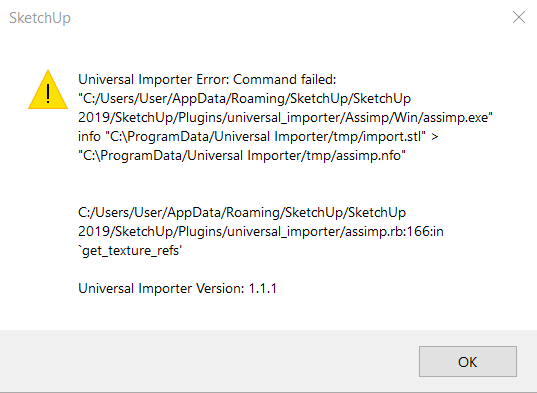

                  Image 314.png

                  Fight like your the third monkey on Noah's Ark gangway.

                  1 條回覆 最後回覆 回覆 引用 0
                  • samuel_tS 離線
                    samuel_t
                    最後由 編輯

                    @ken said:

                    I still have the problem I have for some time.

                    Reinstall Microsoft Visual C++ library (it can fix your error) then let me know if problem persists.

                    1 條回覆 最後回覆 回覆 引用 0
                    • samuel_tS 離線
                      samuel_t
                      最後由 編輯

                      1.1.2 version fixes loading of some OBJ files.

                      Download latest Universal Importer plugin from SketchUcation PluginStore.

                      1 條回覆 最後回覆 回覆 引用 0
                      • samuel_tS 離線
                        samuel_t
                        最後由 編輯

                        @ehc2000 said:

                        [...]
                        Mac OS X 10.11.6 , SU 18.0.16976

                        I think program used by this plugin (Assimp) is not compatible with MacOS X El Capitan (10.11). 😕
                        Plugin works for sure on macOS High Sierra (10.13) and potentially with macOS versions > 10.13.

                        @ehc2000 said:

                        [...]
                        Tried a very simple, small .stl file (750kb) and got:

                        *Universal Importer Error: No space left on device - write
                        /Applications/SketchUp 2018/SketchUp.app/Contents/Frameworks/Ruby.framework/Versions/2.2/lib/ruby/2.2.0/fileutils.rb:1393:in `copy_stream'

                        Universal Importer Version: 1.0.9*

                        Indeed, my HD is very full, but at the time of my import attempt, it had ca. 4GB free space, no other programs were running, aside from Chrome.

                        Does it need to make use of more than 4GB of temp space to import a file with only 7,500 vertices and 15,000 faces?

                        Don't select a model that is stored at root of /Users/$user/Desktop or /Users/$user/Downloads.
                        Since v1.1.1 of plugin, only necessary files are copied to temp directory: model and textures. Period.

                        @ehc2000 said:

                        [...]
                        • If I press Cancel after “Model Height” (i like this feature, by the way), it still (attempts) to opens the file... is that because it is then opening the file at whatever size it’s been set to previously? or is it supposed to cancel the import?

                        It's too late. Import process can't be aborted at this stage.

                        @ehc2000 said:

                        • I can’t double click a file name and have it import it (like if I were pressing "Open") (wheras I can when with the normal import dialog with other images and 3D models already supported by SU). it’s a minor thing, but double-clicking a file in any OSX UI opens it (or at least many do), so it's pretty ingrained in my workflow. 😉

                        I can't fix this problem. It seems related to SketchUp API.

                        1 條回覆 最後回覆 回覆 引用 0
                        • kenK 離線
                          ken
                          最後由 編輯

                          Well re-installing Microsoft Visual C++ library with stl files. Thanks for the help.

                          Fight like your the third monkey on Noah's Ark gangway.

                          1 條回覆 最後回覆 回覆 引用 0
                          • samuel_tS 離線
                            samuel_t
                            最後由 編輯

                            1.1.3 version allows you, during import, to reassign textures which are not referenced nor embedded in model.

                            Download latest Universal Importer plugin from SketchUcation PluginStore.

                            1 條回覆 最後回覆 回覆 引用 0
                            • samuel_tS 離線
                              samuel_t
                              最後由 編輯

                              @einstein said:

                              Hi, Samuel!

                              Hi Einstein! 😉

                              @einstein said:

                              I have reinstalled MS Visual C++ as you advised and now I can import stuff 😄 Thank you!

                              😎

                              @einstein said:

                              [...]

                              1. The plugin always asks how big the imported model should be. It doesn't preserve its original size.

                              Scaling feature doesn't work for all formats. 😕

                              @einstein said:

                              1. I was thinking of remesher tool as one working on selection, which would be more comfortable than remeshing entire model, as it goes now.
                                [...]

                              I tried to make it work with selection only but I don't know why it was VERY slow. So I gave up this idea...

                              @einstein said:

                              1. When I import a model with multiple textures, I can only select one texture file and that texture is applied.
                                Sometimes I can but another time I cannot have all textures included. Some models may be badly textured but I'm almost sure that I tried importing the same chair as TutorialsUp did with success, while I didn't get both textures (only one). I'm attaching both OBJ and FBX version of the model.

                              I inspected attached model. Indeed, it doesn't reference any texture. In this case: you have to remap textures in a external software before importing model in SketchUp. Since v1.1.3, it's no more an issue.

                              1 條回覆 最後回覆 回覆 引用 0
                              • samuel_tS 離線
                                samuel_t
                                最後由 編輯

                                @einstein said:

                                [...]
                                3. When I import a model with multiple textures, I can only select one texture file and that texture is applied.
                                Sometimes I can but another time I cannot have all textures included. Some models may be badly textured but I'm almost sure that I tried importing the same chair as TutorialsUp did with success, while I didn't get both textures (only one).
                                [...]

                                Einstein, your issue has been fixed with 1.1.3 version of plugin. 😉
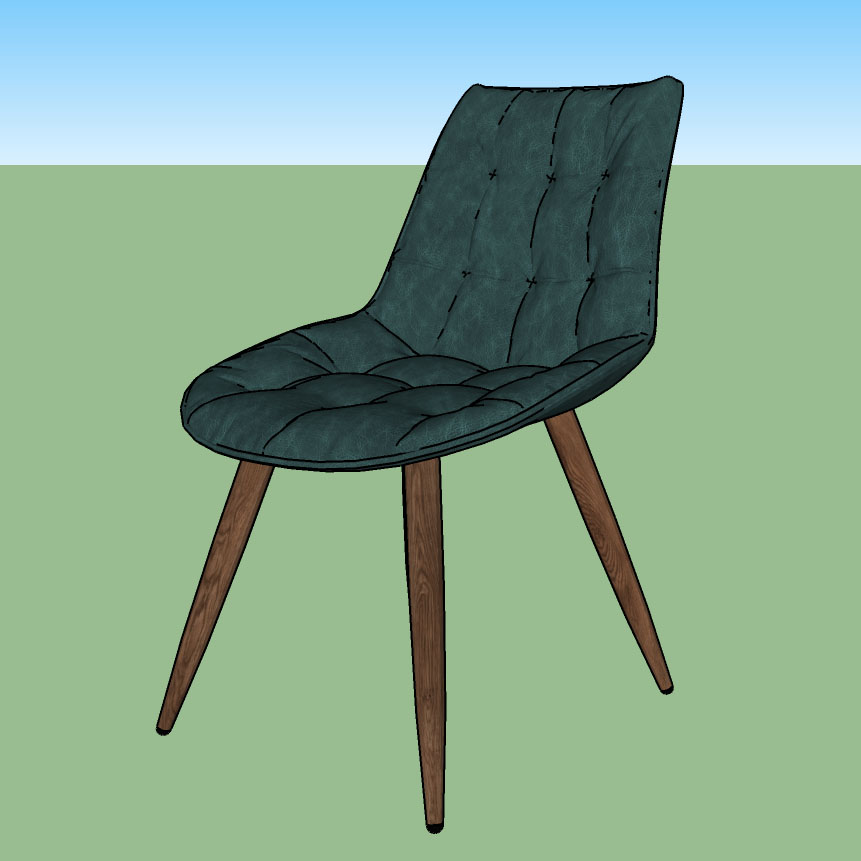
                                Rudolf Chair

                                1 條回覆 最後回覆 回覆 引用 0
                                • S 離線
                                  sibawal
                                  最後由 編輯

                                  hi samuel thanks a lot for this amazing plugin
                                  but sadly it seems not workin with me for some reason

                                  i try use the plugin for importing an .blend .obj and .dae but none of them work
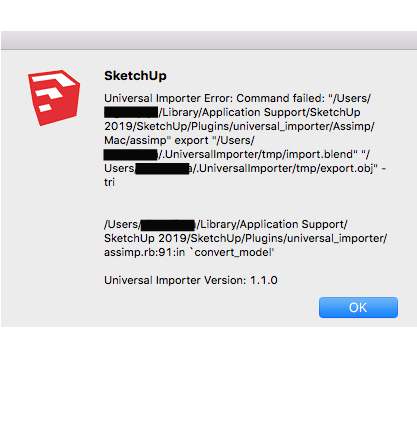
                                  and i got some error ( i attach the image error)

                                  if u not busy please help me and once again thanks a lot

                                  im using mac os high siera , sketchup 2019, and blender 2.81a
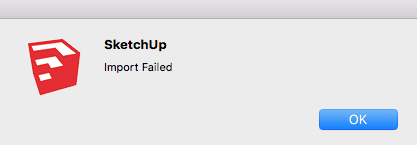

                                  dae and obj file


                                  blend file


                                  blend / obj with 1.1.3

                                  1 條回覆 最後回覆 回覆 引用 0
                                  • OxerO 離線
                                    Oxer
                                    最後由 編輯

                                    The .blend files of 2.80 don't work dought to changes in the API, try with .blend files of Blender 2.79, for me these work fine.

                                    "The result is the end what is important is the process" by Oxer
                                    http://www.oxervision.blogspot.com/

                                    1 條回覆 最後回覆 回覆 引用 0
                                    • OxerO 離線
                                      Oxer
                                      最後由 編輯

                                      Samuel , really the Model height (cm) option do something, I changed this parameter to different values but the imported model has the same dimensions always.

                                      "The result is the end what is important is the process" by Oxer
                                      http://www.oxervision.blogspot.com/

                                      1 條回覆 最後回覆 回覆 引用 0
                                      • samuel_tS 離線
                                        samuel_t
                                        最後由 編輯

                                        @oxer said:

                                        Samuel , really the Model height (cm) option do something, I changed this parameter to different values but the imported model has the same dimensions always.

                                        Hi Oxer! This feature works pretty well on Windows. I don't know why it doesn't work at all on macOS.

                                        1 條回覆 最後回覆 回覆 引用 0
                                        • samuel_tS 離線
                                          samuel_t
                                          最後由 編輯

                                          @sibawal said:

                                          [...]
                                          im using mac os high siera , sketchup 2019, and blender 2.81a
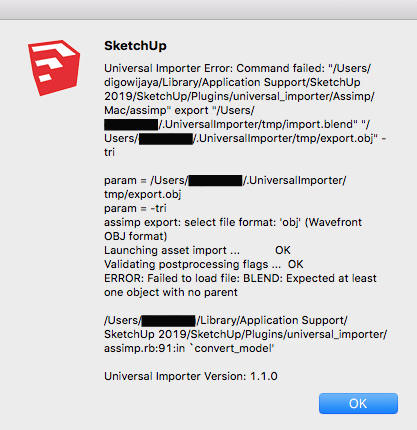
                                          This Blender is not supported. 😕 Export to .fbx or, as suggested by @Oxer, retry with Blender 2.79. 😉

                                          1 條回覆 最後回覆 回覆 引用 0
                                          • samuel_tS 離線
                                            samuel_t
                                            最後由 編輯

                                            1.1.4 version fixes rendering of some high-density models (typically trees).

                                            Download latest Universal Importer plugin from SketchUcation PluginStore.

                                            1 條回覆 最後回覆 回覆 引用 0
                                            • 1
                                            • 2
                                            • 3
                                            • 4
                                            • 5
                                            • 6
                                            • 7
                                            • 8
                                            • 22
                                            • 23
                                            • 6 / 23
                                            • 第一個貼文
                                              最後的貼文
                                            Buy SketchPlus
                                            Buy SUbD
                                            Buy WrapR
                                            Buy eBook
                                            Buy Modelur
                                            Buy Vertex Tools
                                            Buy SketchCuisine
                                            Buy FormFonts

                                            Advertisement