Poor Performance with Pretty High-End Hardware
-
As the titles says, why does SketchUp start to perform really slow with increased amount of detail in a model on pretty high-end hardware? I don't get this kind of performance hit when I use 3ds Max.
My system specs:
Core i7-6950X
128GB Memory
2-Way 1080 Ti in SLI
950 PRO M.2 NVMe SSD -
Nice computer! I am not an expert at all others may be able to answer your question more succinctly than myself. One thing is that SU only operates on a single core. That is a known bottle neck and a major deficiency, annoyance and severe limitation for sketchup users. Yes it seems to become virtually unusable with hign polly's and textures.
I had an SU model the other day and it felt like my screen was on Mars with the associated delay.
Imported it into Blender as a colada file with texture and I could spin the model around like a top.
Just to reiterate it is known a limitation of Sketchup.Just curious, how big is your model, Pollys amd MB's?
-
I noticed the group and component count impacts speed as well (interface can become realllly slow)
-
It's about 100MB big. I can still view and edit the model in SketchUp but the lag is just unbearable. I have to use another instance of SketchUp to work on a portion and then paste it into the original model.
-
That sounds about right. At the risk of stating the obvious, have you purged the model and have shadows turned off?
-
@l i am said:
One thing is that SU only operates on a single core. That is a known bottle neck and a major deficiency, annoyance and severe limitation for sketchup users.
That is a known bottle neck and a major deficiency, annoyance and severe limitation for every CAD system, at least for modeling operations which are in general single-threaded only. The mentioned 10-core CPU doesn't help here (Passmark-ST: 2,149 points), a much cheaper i7-9700K would be considerably faster (Passmark-ST: 2,825 points).
Besides of this and w/o knowing Blender I do assume, that the inference engine of Blender is not as slick as the one of SU, which simply consumes some processing ressources.
What does "Window > Model Information > Statistic > Entire Model" say? Does purging there help?
• SketchUp Help Center: Improving Performance
-
I purge all my models prior to saving them, so yes, I've purged it and made every possible duplicate geometry a component. I also never have shadows on at all.
EDIT: Also, I've always thought that SketchUp was more GPU intensive rather than CPU.
-
Are you using sketchup with the outliner open? With complex models, it can really slow sketchup down
-
@makro88 said:
Are you using sketchup with the outliner open? With complex models, it can really slow sketchup down
No, I don't have Outliner open while I use SketchUp.
-
I don't think you'll find an answer. This is a typical thread. SketchUp is not 3dsMax.
-
There can be various reasons for slow performance, from inefficient workflow to some flaw in the computer settings. Without seeing an example of your work we can only guess. A large file size doesn't always mean slow, I was working on a 415mb file only yesterday on a very low end laptop without any stutter. And I can create a 100kb file that will bring the best PC to it's knees.
A model to look at would help us to understand if it is your workflow or your system that would benefit from some tweaking. -
Mine models lately are over 200MB, and most of the lag I get from high poly models. I open each one in separated SU instance, clean them from unnecessary layers, geometry, materials. Smooth them. Purge them and then save them. Since I mostly make ArchViz I tend to use layers to show/hide furniture in rooms that I am finished with. For components that I have to model, I make the simple surface, make a component of it and then in another instance of SU make all modeling. In my main model, I use reload to reload component back to my main model. In the end, most of the whole models are around 300-400 MB before rendering. Since I use Enscape for rendering I make all heavy furniture models into proxies and then render all my scenes or videos.
-
What kind of model is it?
Have you imported highres models? In that case hide the edges if you are not modifying them. Set view to wireframe, select the edges and right click to hide.
Do you have lots of ungrouped geometry? I have noticed that SU is a lot faster if you group geometry than if it's lose edges and faces.
Also put groups on different layers and turn those layers off while working.
And NEVER model with shadows on.I regularly work with SU models that are up to 700 MB without much problem except long saving times.
EDIT: After downloading and checking your model I turned off Dashes and Profiles under Styles>Edit>Edge settings.
Then I could rotate without problem even on my old laptop.
You should consider putting stuff on different layers so you can hide them while working on other parts. -
Nice model by the way but...
Profiles should be off to begin with.
Make a working scene with low graphic drag, nothing fancy, monochrome, no profiles etc
Layers to turn on and off sections as you need them.
Most importantly, you have used a huge number of components to create grills and things. While this can reduce file size it can reduce performance. There is a balance that you need to find between file size and usability. You'll usually find that a grill of raw geometry holes made into a component/group, while being a larger file, will cause less drag on the graphics than the same grid made of components.
It also begs the question, do you need all that grid detail and holes in the graphic cards and such. They could be textures which would both reduce file size and increase performance.
You can always swap in high detail when you need super close ups.
So a lot depends on what your model is for, you have used incredible detail, but that comes at the expense of performance. -
Thanks for the tips, I'll give them a try when I get back home. As for using textures, I just don't like how they totally disappear when moving around on highly detailed models.
-
@gh0stp1rate said:
Thanks for the tips, I'll give them a try when I get back home. As for using textures, I just don't like how they totally disappear when moving around on highly detailed models.
If you dont like how slow it is now, if it had to render textures whilst panning/moving that would be a whole new magnitude of slow.
-
There is a significant difference between rendering a .png texture of a ventilation grill and rendering 3869 components that make up that grill.
-
Something else I noticed about your use of components, you are actually creating more edges for SU to deal with.
In this example from the rear panel you have used components for the walls of the holes, but not the holes themselves, this means SU has to render both the edges of the components and the edges of the geometry that make the holes, creating more work. You have made two full faces with all the hole geometry Plus all the components to make the sides.
See the highlighted sections, note that by exploding the components I have actually reduced the edge count.
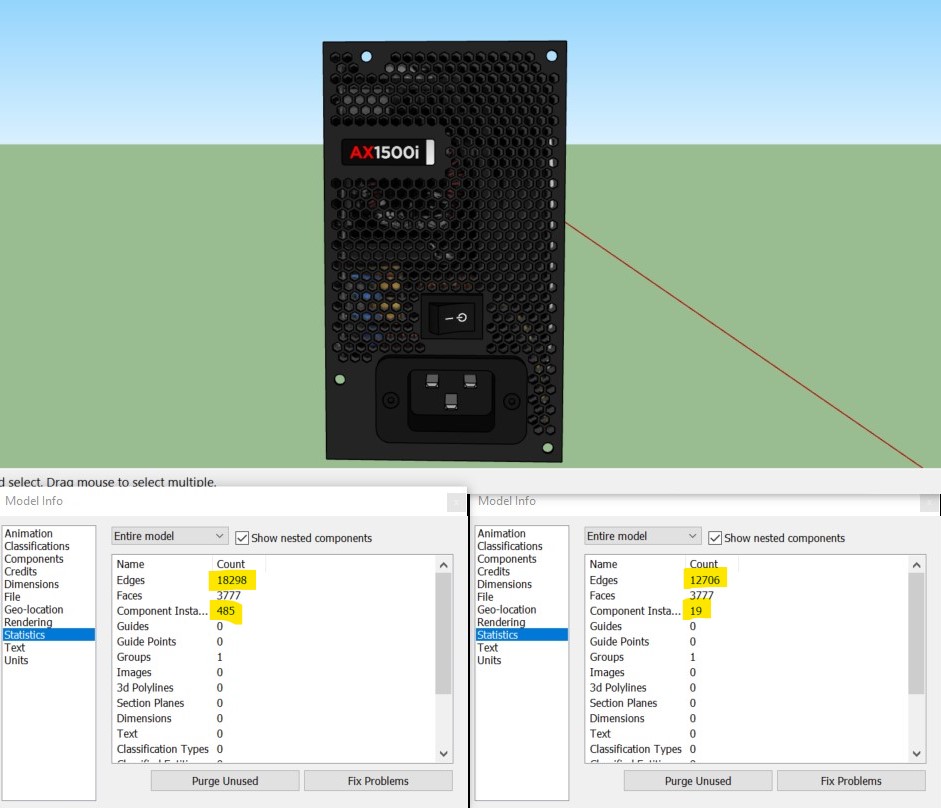
A more efficient way of making this type of structure, using components, would be to make a hole component, including the faces, as a square/rectangle, array those and hide the joining edges. -
@box said:
A more efficient way of making this type of structure, using components, would be to make a hole component, including the faces, as a square/rectangle, array those and hide the joining edges.
Thanks again! I've already started to do this with my models. I guess I was more concerned about the end file size rather than it being optimized for using, good to know.
-
I can say, that SU2016-2019 is clearly slower and less workable for me compared to v2015. The degradation kicks in earlier and the recovery time is longer (very annoying!). That's one reason why i'm still working with v2015.
I have a model (3.2 M edges, 1.7 M faces) which i can rotate and zoom in 2015 without any degradation with ~8-20fps (textures and hidden lines on, without shadows of course), while in 2019 the model already degrades and runs with only 4-9fps.
(i7 5960X@4.5GHz, GTX 970)(Texture display/recovery is clearly faster since 2016 - for a low poly model with many (small) textures (~12k edges, ~300 faces, ~300 textures/mats) almost instant, while 2015 is very slow with this model)






Advertisement