Export to DWG 2018 - Student version
-
When I export from layout 2019 to the DWG 2018 file format, AutoCAD reports it as a student version.
A student version of DWG will print a watermark onto all AutoCAD drawings.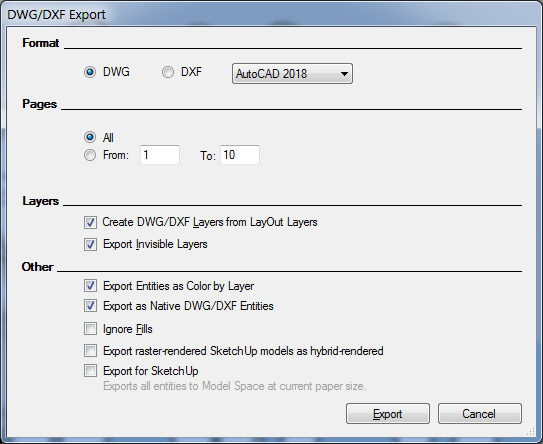
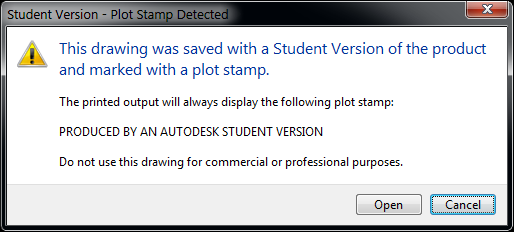
This issue doesn't appear when exporting to DWG r14 version
-
Not a LayOut bug. It was explained here
-
@dave r said:
Not a LayOut bug. It was explained here
Thanks for replying on this & the SketchUP forums.
I reckon it is a bug, as the Student Version watermark isn't created from Layout with other versions of DWG.
The watermark is like a virus, and "infects" any drawing that the student version DWG is inserted into.
We had a problem a number of years ago with a new start using presentation DWG blocks in production drawings that he created, while a student.
All looked fine till we started printing - when it looks like our business was using student copies of AutoCAD for business use. -
From what Trent has said in that post and elsewhere, if this is a bug, it is affecting more than just LayOut. Many other applications apparently have the same "bug".
-
Interesting. So SketchUp changed and now ACAD tags files to embarrass the SU user. So why can't SketchUp change back?
-
@pbacot said:
So SketchUp changed and now ACAD tags files...
It's not aimed at SketchUP users in particular, it's people using the "free" student version of AutoCAD in a business environment.
There was a spell that Autodesk didn't use the watermark, but they are back with the 2019 version of AutoCAD. -
@jga said:
@pbacot said:
So SketchUp changed and now ACAD tags files...
It's not aimed at SketchUP users in particular, it's people using the "free" student version of AutoCAD in a business environment.
There was a spell that Autodesk didn't use the watermark, but they are back with the 2019 version of AutoCAD.Well it seems to be targeting anyone making dwg files in some non-AutoDesk software.
OH I thought it was caused by later SU versions. In the explanation someone said "save it as 2013".
They mean save it as ACAD 2013 dwg, I guess, which is a good precaution. Otherwise your consultants will believe you are using a student version of AutoCAD.


Hello! It looks like you're interested in this conversation, but you don't have an account yet.
Getting fed up of having to scroll through the same posts each visit? When you register for an account, you'll always come back to exactly where you were before, and choose to be notified of new replies (either via email, or push notification). You'll also be able to save bookmarks and upvote posts to show your appreciation to other community members.
With your input, this post could be even better 💗
Register Login


Advertisement