Remove movements
-
Hi,
I've made a copy of a sketchup file, and I get all the previous movements.
How to remove them from the new file ?I removed eveything from the timeline, but the names still appear in the movement list.
Thanks in advance
-
@durandp said:
Hi,
I've made a copy of a sketchup file, and I get all the previous movements.
How to remove them from the new file ?I removed eveything from the timeline, but the names still appear in the movement list.
Thanks in advance
Just go to the Maintenance dialog box. Just click on the 'Wrench and screwdriver' button in the palette.
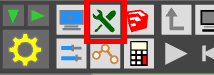
In the dialog box, use the "Purge unused" function
This will remove the Sequences. Remember that Animator is based on a model analog to Sketchup. In Sketchup, if you delete a component instance, its definition is still there in the model.
In Animator, Elementsyou see in the timeline are like 'instances', whereas Sequencesthat you edit with the Movement or camera Editor are like definitions, and can be removed by the Maintenance dialog box (provided there are not used in any film).Fredo

Hello! It looks like you're interested in this conversation, but you don't have an account yet.
Getting fed up of having to scroll through the same posts each visit? When you register for an account, you'll always come back to exactly where you were before, and choose to be notified of new replies (either via email, or push notification). You'll also be able to save bookmarks and upvote posts to show your appreciation to other community members.
With your input, this post could be even better 💗
Register Login


Advertisement