[Plugin] Physically-Based Rendering - v1.5.9 - 19 Apr. 2020
-
@jql said:
Hi,
I did what you suggested. Erased the pbr plugin and folder from my appdata's plugins folder, restarted everything and installed, following all your suggestions.
Still no good with 1.2.5:
Hi JQL, please follow these new instructions:
- Close SketchUp if it's open.
- Open Windows's File Explorer.
- Go to %APPDATA%\SketchUp\SketchUp 2018\SketchUp\Plugins\pbr
- Right click on web_server.cmd file. Choose "Edit" in contextual menu.
- Replace this line:
cd %~dp0 && cd Web Serverby this line:
cd /d "%~dp0%Web Server"- "File" > "Save".
- "File" > "Exit".
- Open SketchUp.
- "Extensions" > "Physically-Based Rendering" > "Open Viewport".
- Do you see SketchUp model in PBR Viewport?
-
@jql said:
Also, I found you removed support for emissive materials, which would be a shame, as I use them for all my lighting applications in Thea for Sketchup and would find them cool to test on this pbr plugin.
Today, I think it's better to implement glTF KHR_lights extension. So PBR plugin users could:
- Add and place lights in SketchUp (Maybe as hidden geometry? I'm looking for solutions.),
- Set light type (point, spot, etc.) and properties (color, intensity, etc.) again in SketchUp,
- Export lights (embedded in glTF file) to PBR Viewport and possibly to other platforms...
-
@jql said:
It's easier for most users to have a separated roughness and metallic maps as they are very common, instead of the metallic-roughness map required by the plugin. [...] is there any chance the separated maps could be implemeted?
~~I agree it's easier but it's not so much long to pack metallic and roughness maps in third-party software. For example, it takes less than one minute in Photoshop following these instructions:
- Open roughness map in Photoshop.
- Convert Grayscale to RGB Color.
- Unlock (roughness) layer.
- Select (roughness) layer. Open Blending options.
- Uncheck all Channels except G(reen).
- Place Embedded... metallic map.
- Select metallic layer. Open Blending options.
- Uncheck all Channels except B(lue).
- Save as... metallic-roughness map.~~
Update: Since PBR plugin v1.3.0, Metallic and Roughness maps are separated in PBR Material Editor.

-
@samuel_t said:
[*]Metallic & Roughness maps are separated in Material Editor.
Good news indeed. Will try it again.
-
Good news! PBR plugin becomes really handy with the new version (1.3.0).
Features
- Change environment map from SketchUp "Extensions" menu.
Tip : Changing environment map changes ambient light map. - Metallic & Roughness maps are separated in Material Editor.
- Access online help document translated in FR from Viewport.
Bugfixes
- Fixes pan (middle button) control issue in Viewport on Firefox.
- Fixes a little gamepad control bug. Improves maybe performance.
 As part of an update, remember to disable plugin before uninstalling-reinstalling it.
 - Change environment map from SketchUp "Extensions" menu.
-
Next PBR plugin version will include a (micro) library of royalty-free PBR materials.
These will be available in "Materials" tray. Render-example with "Wooden Palisade 01":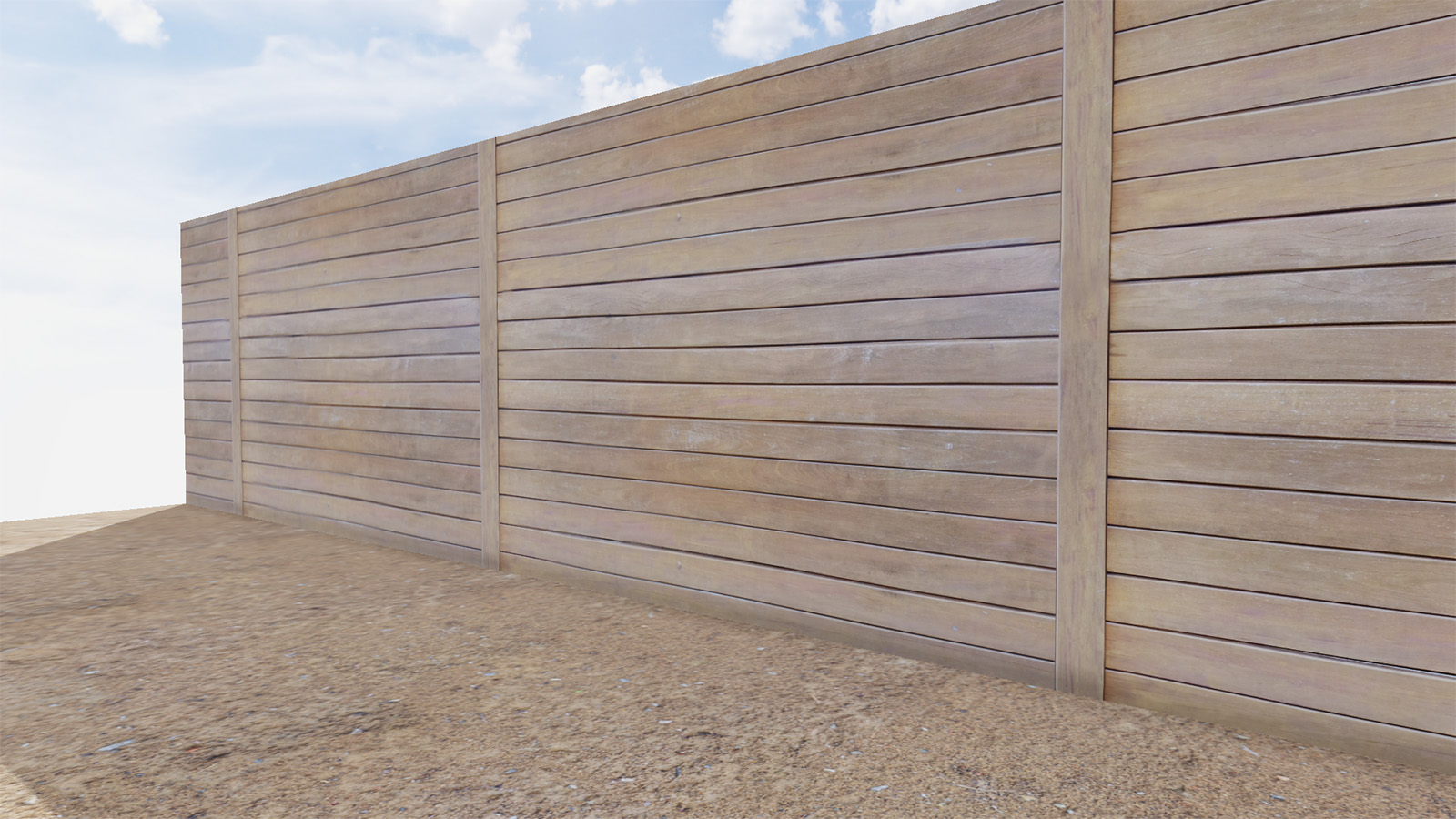
This should allow new users of plugin to become familiar with PBR materials.
-
Hi, I have one question.
What is stopping you in developing this plugin as synced rendering plugin for Sketchup (or maybe as an overlay to SU window)? Is this far-fetched for me to think like this? -
@nlipovac said:
Hi, I have one question.
What is stopping you in developing this plugin as synced rendering plugin for Sketchup (or maybe as an overlay to SU window)? Is this far-fetched for me to think like this?At dev. beginning, I've thinked about a PBR Viewport synced with SketchUp...
That implies using internal browser but external browser is more up-to-date. -
Thea has viewport rendering which, for single monitors brings sketchup to life. Your plugin, as it is realtime, would be amazing with viewport rendering.
-
Right like that JQL, I am quite impressed by this plugin and like to Blender is Eevee this would be a great plugin for SU if it would be implemented as an overlay to SU.
-
@nlipovac said:
Right like that JQL, I am quite impressed by this plugin and like to Blender is Eevee this would be a great plugin for SU if it would be implemented as an overlay to SU.
By "overlay", you mean a top window a bit like PBR Material Editor? Fullscreen or splitscreen?
-
This is Thea rendering in SU window, the same thing Vray have also.
-
-
It was just an idea, thank you for this that you already accomplished with this plugin.

-
Overlay feature request is out of my skills for now. Maybe another dev can, since code is open-source.
-
Thank you for your idea.
-
I will talk about this case with someone...
-
@jql said:
Thea has viewport rendering which, for single monitors brings sketchup to life. Your plugin, as it is realtime, would be amazing with viewport rendering.
Yeah. There is an expensive workaround: to buy several monitors.
 More seriously, I will try to find a way to synchronize PBR Viewport with SketchUp.
 -
@samuel_t said:
- Plugin comes with a tiny PBR materials library. Donate to make it grow!
Take a look at these websites for free (CC0) textures: Pixel-Furnace, CC0Textures, freepbr. You can provide link to these sites maybe?
I think you should indicate that we need to open a collection to use PBR materials you provided. People may not find PBR folder you generated easily.
In addition to 'saving, opening and creating' a model, when we "apply all changes" in the PBR material editor, Chromium pops-up and updates the view as well.
HDR images working fine
 Can we rotate them somehow? That would be cool
-
@filibis said:
@samuel_t said:
- Plugin comes with a tiny PBR materials library. Donate to make it grow!
Take a look at these websites for free (CC0) textures: Pixel-Furnace, CC0Textures, freepbr. You can provide link to these sites maybe?
Hello filibis, thanks a lot for these links.
@filibis said:
I think you should indicate that we need to open a collection to use PBR materials you provided. People may not find PBR folder you generated easily.
I added following sentence in official README:
Additionally, you should have a new "PBR" materials collection in "Materials" tray. Enjoy!@filibis said:
In addition to 'saving, opening and creating' a model, when we "apply all changes" in the PBR material editor, Chromium pops-up and updates the view as well.
You are right. I forgot to mention this case.
@filibis said:
HDR images working fine
Can we rotate them somehow? That would be cool I don't understand. You want to rotate HDRi?





Advertisement