sketchucation logo sketchucation
    • Login
    Oops, your profile's looking a bit empty! To help us tailor your experience, please fill in key details like your SketchUp version, skill level, operating system, and more. Update and save your info on your profile page today!
    ๐Ÿšจ Skimp | 25% Off until March 30 Buy Now

    [Plugin] ClothWorks v1.8.0 - 28 Apr 2024

    Scheduled Pinned Locked Moved Plugins
    704 Posts 162 Posters 681.2k Views 162 Watching
    Loading More Posts
    • Oldest to Newest
    • Newest to Oldest
    • Most Votes
    Reply
    • Reply as topic
    Log in to reply
    This topic has been deleted. Only users with topic management privileges can see it.
    • X Offline
      xinige @Anton_S
      last edited by

      @Anton_S Hello, Mr. Anton. I don't know when you will initiate the redevelopment of MSPhysics. As far as I know, countless people are looking forward to this project. Alternatively, you can develop a plugin that can partially implement certain functions.
      For example, a simulation tool that can implement simulation functions similar to fusion360 and SolidWorks may not require embedding a physics engine (I'm not sure), but only adding axes and motors, as well as collision detection. Used for designing machinery, mechanical gif diagrams, and checking the rationality of mechanical design in sketchup. I hope to receive your reply.

      A 1 Reply Last reply Reply Quote 0
      • R Offline
        rick149
        last edited by

        Anton
        ClothWorks is amazing
        I still use MSPhysics because nothing else is as good at what it does
        Can you supply me with code to

        1. turn layers on and off
        2. hide/unhide objects
          for me to use with my variables, keydown,, ontouch and ontick events in my MSPhysics scripts
          old msphysics video example here...
          https://www.youtube.com/watch?v=MTfpvgY1HBk
        1 Reply Last reply Reply Quote 0
        • N Offline
          Nicole_M_W Newcomers
          last edited by

          Hello

          i am a huge fan of the plug-in, however i ran into troubel. Recently when i try to use it, the UI Window its not visible - not sure if its opening, but the app runs and i can play the cloths. I allready try to reinstallations and restarts. Any idea whre can i find back my UI Window?
          I am using multiple screens - also unpluging and classical Windows 11 windows search didnt help.

          Rich O BrienR 1 Reply Last reply Reply Quote 1
          • Rich O BrienR Online
            Rich O Brien Moderator @Nicole_M_W
            last edited by

            @Nicole_M_W If click the toolbar icon fails to display the dialog then open the ruby console and click the icon and see it there are errors.

            But since we don't know what version of SketchUp or Clothworks you are running its hard to say more really.

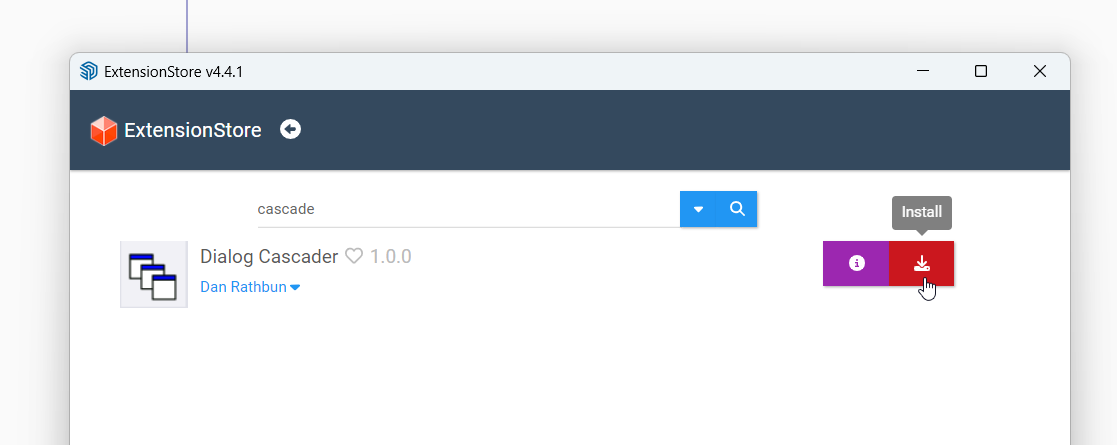
            The also an extension by Dan Rathbun that resets dialog positions if they are off screen. Its call Dialog Cascader. Search for cascade and you'll find it in our Sketchucation Tools in SketchUp
            36dcecf8-5d81-44c0-a259-132922a11d43-image.png

            Download the free D'oh Book for SketchUp ๐Ÿ“–

            N 1 Reply Last reply Reply Quote 1
            • N Offline
              Nicole_M_W Newcomers @Rich O Brien
              last edited by

              @Rich-O-Brien

              thank you! Excellent the Dialog Cascader solved my Problem right away. UI is back.

              I am on
              Clothworks 1.8.0a
              Skechup Pro เปฟSketchUp Model๏ปฟเซฟ{24.0.553

              just downloaded and installed the 24.0.0594 but i already applied your cascade solution so i can't tell if it was because of the missing update.

              thank you for your fast help!

              Rich O BrienR 1 Reply Last reply Reply Quote 0
              • Rich O BrienR Online
                Rich O Brien Moderator @Nicole_M_W
                last edited by

                @Nicole_M_W no probs. Dialogs playing hide and seek is common. Danโ€™s tool is a lifesaver

                Download the free D'oh Book for SketchUp ๐Ÿ“–

                1 Reply Last reply Reply Quote 0
                • A Offline
                  Anton_S @xinige
                  last edited by

                  @xinige said in [Plugin] ClothWorks v1.8.0 - 28 Apr 2024:

                  Thank you for this inspirational message! I got to get mpshysics back to life!

                  F 1 Reply Last reply Reply Quote 0
                  • F Offline
                    faust07 @Anton_S
                    last edited by

                    @Anton_S
                    Did I read that correctly? - "I got to get mpshysics back to life!"
                    Yes! Yes! Yes!
                    That would be fantastic. When will the time come?

                    1 Reply Last reply Reply Quote 0
                    • R Offline
                      rkdtlwo
                      last edited by

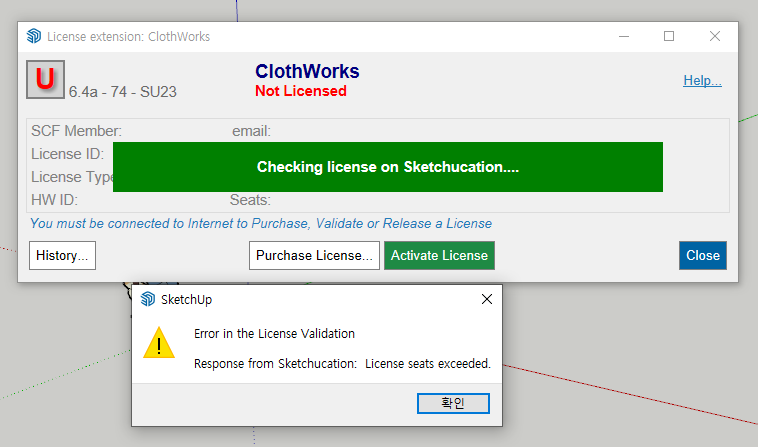
                      ์ปดํ“จํ„ฐ ํฌ๋ฉง์„ ํ•˜๊ณ ๋‚œํ›„๋กœ ๋ผ์ด์„ผ์Šค ์ธ์ฆ์ด ๋˜์งˆ์•ˆ๋„ค์š”
                      ํ•ด๊ฒฐ๋ฐฉ๋ฒ•์„ ์•Œ์ˆ˜ ์žˆ์„๊นŒ์š”?
                      ์บก์ฒ˜2.PNG ์บก์ฒ˜1.PNG
                      ์บก์ฒ˜.PNG

                      TIGT 1 Reply Last reply Reply Quote 0
                      • TIGT Online
                        TIG Moderator @rkdtlwo
                        last edited by

                        @rkdtlwo

                        All of the 3 seats are allocated, presumably using your old computer[s] details.
                        You need to free up the seats so that you can reactivate them for your new computer[s].
                        If you have the latest versions of the extension and the SketchUcation toolset [for the licensing] installed, and SketchUp restarted to sync, you should be able to do this using the submenu items for the extension under the Tools menu.
                        You can also manage each of your licenses by logging in to SketchUcation.com and using the menu item PluginStore > My Licenses... page...

                        3๊ฐœ์˜ ์ž๋ฆฌ๋Š” ๋ชจ๋‘ ํ• ๋‹น๋˜์—ˆ์œผ๋ฉฐ, ์•„๋งˆ๋„ ์ด์ „ ์ปดํ“จํ„ฐ์˜ ์„ธ๋ถ€ ์ •๋ณด๋ฅผ ์‚ฌ์šฉํ•˜๊ณ  ์žˆ์„ ๊ฒƒ์ž…๋‹ˆ๋‹ค.
                        ์ƒˆ ์ปดํ“จํ„ฐ์—์„œ ๋‹ค์‹œ ํ™œ์„ฑํ™”ํ•  ์ˆ˜ ์žˆ๋„๋ก ์ž๋ฆฌ๋ฅผ ๋น„์›Œ์•ผ ํ•ฉ๋‹ˆ๋‹ค.
                        ์ตœ์‹  ๋ฒ„์ „์˜ ํ™•์žฅ ํ”„๋กœ๊ทธ๋žจ๊ณผ SketchUcation ๋„๊ตฌ ์„ธํŠธ[๋ผ์ด์„ ์Šค์šฉ]๊ฐ€ ์„ค์น˜๋˜์–ด ์žˆ๊ณ  SketchUp์„ ๋‹ค์‹œ ์‹œ์ž‘ํ•˜์—ฌ ๋™๊ธฐํ™”ํ•œ ๊ฒฝ์šฐ ๋„๊ตฌ ๋ฉ”๋‰ด ์•„๋ž˜์— ์žˆ๋Š” ํ™•์žฅ ํ”„๋กœ๊ทธ๋žจ์˜ ํ•˜์œ„ ๋ฉ”๋‰ด ํ•ญ๋ชฉ์„ ์‚ฌ์šฉํ•˜์—ฌ ์ด ์ž‘์—…์„ ์ˆ˜ํ–‰ํ•  ์ˆ˜ ์žˆ์Šต๋‹ˆ๋‹ค.
                        SketchUcation.com์— ๋กœ๊ทธ์ธํ•˜์—ฌ ๋ฉ”๋‰ด ํ•ญ๋ชฉ PluginStore > ๋‚ด ๋ผ์ด์„ ์Šค... ํŽ˜์ด์ง€๋ฅผ ์‚ฌ์šฉํ•˜์—ฌ ๊ฐ ๋ผ์ด์„ ์Šค๋ฅผ ๊ด€๋ฆฌํ•  ์ˆ˜๋„ ์žˆ์Šต๋‹ˆ๋‹ค.

                        TIG

                        1 Reply Last reply Reply Quote 0
                        • S Offline
                          Sara37 Newcomers
                          last edited by

                          Amazing plugin, great job๐Ÿ‘ I wanted to purchase a 1 seat license, since I wont be using Sketchup that often, but it is not currently available on the list, would it be available maybe in future?
                          many thanks

                          Rich O BrienR 1 Reply Last reply Reply Quote 0
                          • Rich O BrienR Online
                            Rich O Brien Moderator @Sara37
                            last edited by

                            @Sara37 said in [Plugin] ClothWorks v1.8.0 - 28 Apr 2024:

                            but it is not currently available on the list, would it be available maybe in future?

                            Its here https://sketchucation.com/plugin-list.php

                            Download the free D'oh Book for SketchUp ๐Ÿ“–

                            1 Reply Last reply Reply Quote 0
                            • J Offline
                              jabledesign Newcomers
                              last edited by

                              ๊ฒฐ์žฌ ๊ด€๋ จ ์งˆ๋ฌธ์ด ์žˆ์Šต๋‹ˆ๋‹ค. ํšŒ์‚ฌ์— ๊ตฌ๋งค ์š”์ฒญ ์˜ˆ์ •์ธ๋ฐ ๊ฒฐ์ œํ•˜๋ฉด ๊ณ„์† ์‚ฌ์šฉ์ธ ๊ฐ€๋Šฅํ•œ ๊ตฌ๋งค ์„œ๋น„์Šค ์ธ๊ฐ€์š”? ์ผ์ •๊ธฐ๊ฐ„ ์‚ฌ์šฉ ํ›„ ์ถ”๊ฐ€๊ฒฐ์ œ๊ฐ€ ์ด๋ฃจ์–ด์ง€๋Š” ๊ตฌ๋… ์„œ๋น„์Šค ์ธ๊ฐ€์š”?

                              I have a question about payment. I am planning to request a purchase from the company. Is this a purchase service that I can continue to use after payment? Is this a subscription service that requires additional payment after a certain period of use?

                              Rich O BrienR 1 Reply Last reply Reply Quote 0
                              • Rich O BrienR Online
                                Rich O Brien Moderator @jabledesign
                                last edited by

                                @jabledesign License is perpetual with no ongoing payments.

                                Download the free D'oh Book for SketchUp ๐Ÿ“–

                                1 Reply Last reply Reply Quote 0
                                • A Offline
                                  ahmetcanb
                                  last edited by

                                  Hi there... I have SketchUp 2026 version, is there any other way to buy licence and install to my Windows ?

                                  1 Reply Last reply Reply Quote 0
                                  • V Offline
                                    Vitalina Newcomers
                                    last edited by

                                    Hello,

                                    I have a problem with ClothWorks.

                                    Everything is set correctly according to the manual:

                                    • Cloth is assigned
                                    • Pins are assigned on vertices
                                    • Simulation runs correctly

                                    But during simulation I cannot select pins.

                                    When I try to drag/select pins:

                                    • no yellow selection area appears
                                    • no gizmo appears
                                    • instead I only get a red dashed line (standard SketchUp drag)

                                    Pins can be selected only when simulation is OFF.
                                    During simulation they are not interactive.

                                    Because of this I cannot move pins to create folds (for curtains).

                                    What could be the reason?
                                    Is it a known bug or conflict with other plugins?

                                    Thank you.

                                    1 Reply Last reply Reply Quote 0
                                    • Rich O BrienR Online
                                      Rich O Brien Moderator
                                      last edited by

                                      When the simulation is running your cursor should be White and the box select has a slight yellow fill...
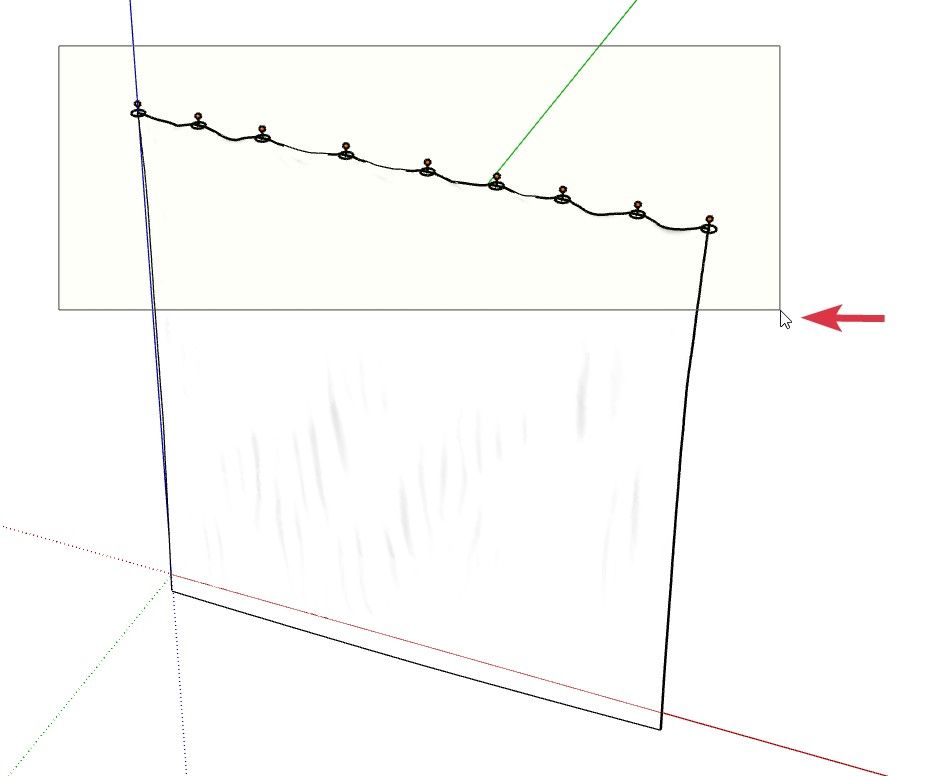
                                      Selecting Pins in Clothworks for SketchUp

                                      Download the free D'oh Book for SketchUp ๐Ÿ“–

                                      1 Reply Last reply Reply Quote 0
                                      • V Offline
                                        Vitalina Newcomers
                                        last edited by

                                        Yes, I understand that during simulation the cursor should turn white and a yellow selection box should appear.

                                        In my case the cursor does turn white, but the selection still does not work:

                                        • no yellow selection box appears
                                        • pins cannot be selected
                                        • no gizmo appears

                                        So the issue is not the cursor, but that selection is not functioning during simulation.

                                        1 Reply Last reply Reply Quote 0
                                        • Rich O BrienR Online
                                          Rich O Brien Moderator
                                          last edited by

                                          Share the file that fails. Also your version SketchUp and the OS you are using.

                                          For me its works on SketchUp 2023 to 2026 on Windows

                                          Download the free D'oh Book for SketchUp ๐Ÿ“–

                                          1 Reply Last reply Reply Quote 0
                                          • V Offline
                                            Vitalina Newcomers
                                            last edited by

                                            Thank you for your response. The issue is resolved.

                                            The problem was not the license itself. SketchUcationTools was either missing or not working correctly, so ClothWorks could not detect it and did not open the license window.

                                            I reinstalled SketchUcationTools and now everything works fine.

                                            1 Reply Last reply Reply Quote 1

                                            Hello! It looks like you're interested in this conversation, but you don't have an account yet.

                                            Getting fed up of having to scroll through the same posts each visit? When you register for an account, you'll always come back to exactly where you were before, and choose to be notified of new replies (either via email, or push notification). You'll also be able to save bookmarks and upvote posts to show your appreciation to other community members.

                                            With your input, this post could be even better ๐Ÿ’—

                                            Register Login
                                            • 1
                                            • 2
                                            • 3
                                            • 4
                                            • 5
                                            • 35
                                            • 36
                                            • 2 / 36
                                            • First post
                                              Last post
                                            Buy SketchPlus
                                            Buy SUbD
                                            Buy WrapR
                                            Buy eBook
                                            Buy Modelur
                                            Buy Vertex Tools
                                            Buy SketchCuisine
                                            Buy FormFonts

                                            Advertisement