sketchucation logo sketchucation
    • 登入
    Oops, your profile's looking a bit empty! To help us tailor your experience, please fill in key details like your SketchUp version, skill level, operating system, and more. Update and save your info on your profile page today!
    🔌 Smart Spline | Fluid way to handle splines for furniture design and complex structures. Download

    Medeek Wall Plugin

    已排程 已置頂 已鎖定 已移動 Plugins
    1.5k 貼文 27 Posters 1.1m 瀏覽 26 Watching
    正在載入更多貼文
    • 從舊到新
    • 從新到舊
    • 最多點贊
    回覆
    • 在新貼文中回覆
    登入後回覆
    此主題已被刪除。只有擁有主題管理權限的使用者可以查看。
    • medeekM 離線
      medeek
      最後由 編輯

      Does anyone have a good Tyvek house wrap material or texture that I can incorporate into the plugin?

      Nathaniel P. Wilkerson PE
      Medeek Engineering Inc
      design.medeek.com

      1 條回覆 最後回覆 回覆 引用 0
      • medeekM 離線
        medeek
        最後由 編輯

        Version 0.7.7b - 06.09.2018

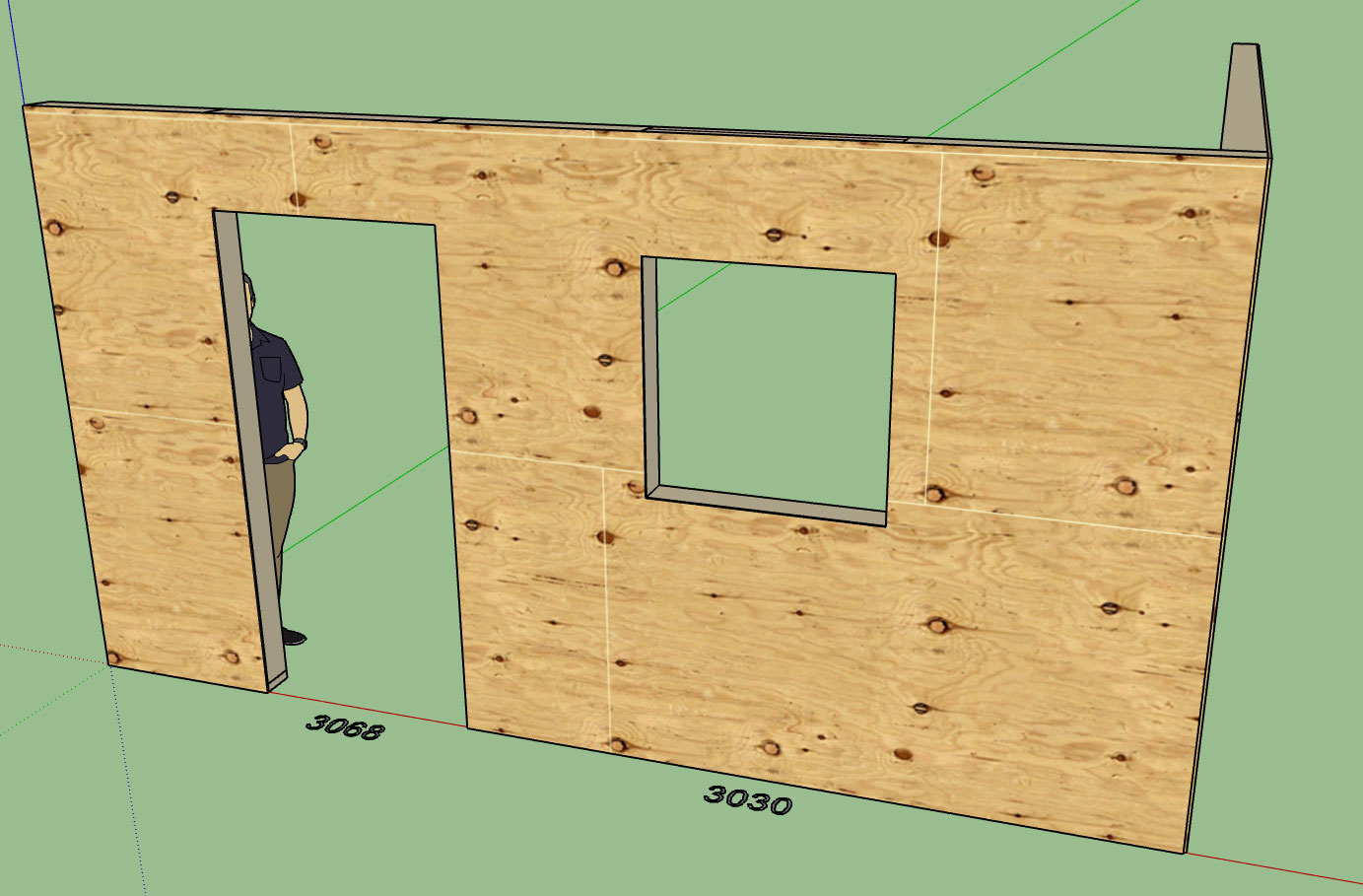
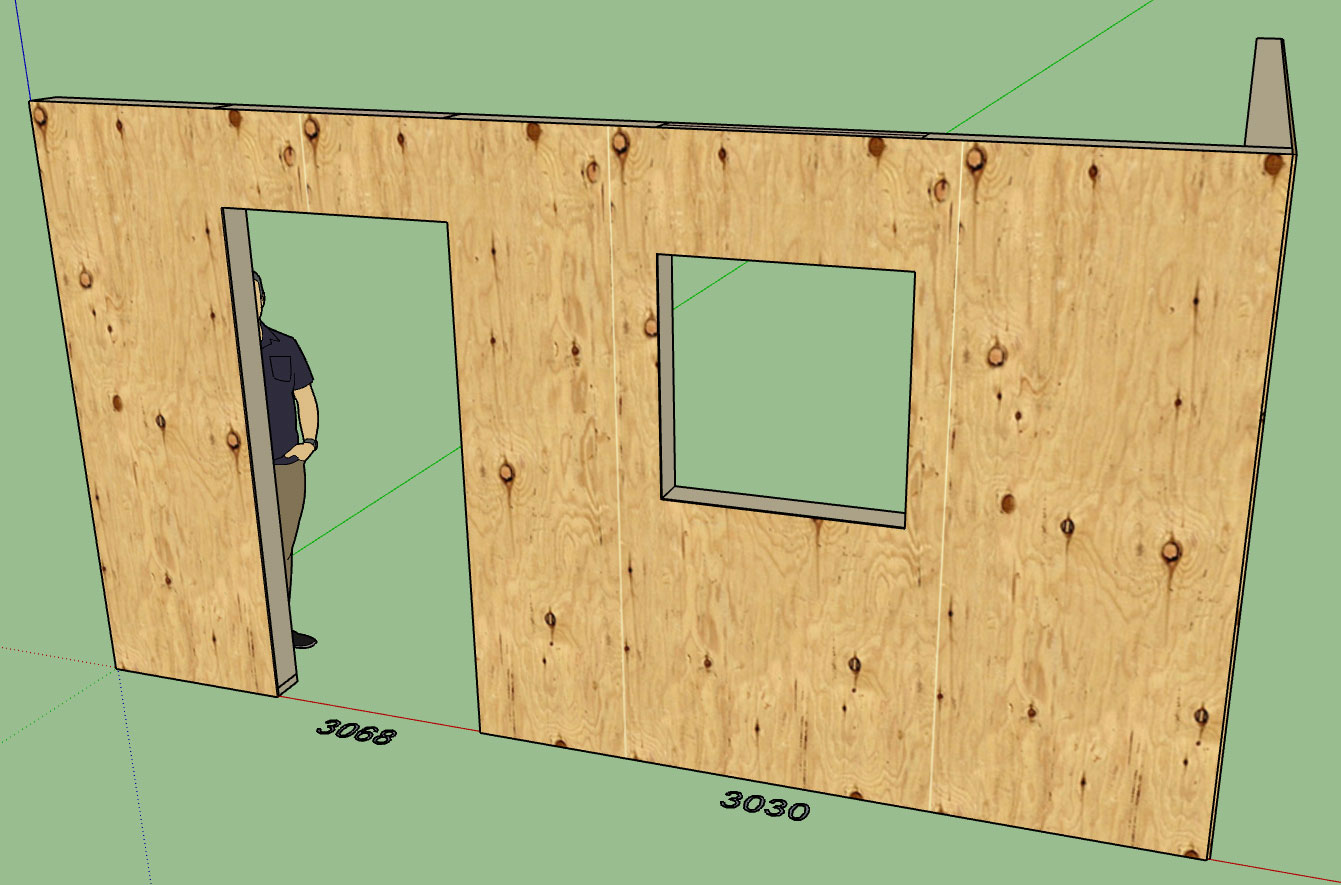
        • Horizontal and Vertical plywood sheathing materials added to the pre-installed plugin materials.
        http://design.medeek.com/resources/images/wall_su98_800.jpg

        http://design.medeek.com/resources/images/wall_su99_800.jpg

        I realize this a fairly insignificant item, but it was user requested and one of those things I could knock out in about 10 minutes or less.

        Nathaniel P. Wilkerson PE
        Medeek Engineering Inc
        design.medeek.com

        1 條回覆 最後回覆 回覆 引用 0
        • medeekM 離線
          medeek
          最後由 編輯

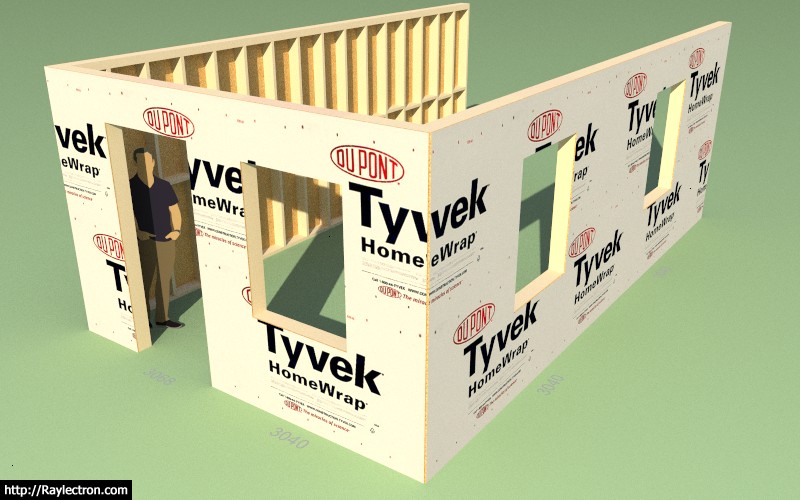
          I'm actually not a big fan of Tyvek, at least not in our marine environment on the beach out here in western Washington but I do know it gets used a lot. This is the OSB + TYVEK option:

          http://design.medeek.com/resources/images/wall_su100_800.jpg

          Only the outside face of the sheathing gets the Tyvek material and the sheathing group gets the generic OSB material.

          Nathaniel P. Wilkerson PE
          Medeek Engineering Inc
          design.medeek.com

          1 條回覆 最後回覆 回覆 引用 0
          • medeekM 離線
            medeek
            最後由 編輯

            The updated main toolbar:

            http://design.medeek.com/resources/images/wall_su_menu_active.jpg

            I'm adding one extra icon for estimating, this will allow the user to create a bill of materials for one or more (multiple) wall panels.

            At this point I am not interested in developing a sophisticated estimating program with the ability to associate costs to various materials etc... Basically I just want the estimating feature to be able to spit out a CSV file with a comprehensive parts list that can then be dropped into any spreadsheet software (ie. Excel) and the user can take it from there.

            As an engineer I use Excel for a number of things including very complicated calculators. Spreadsheets are pretty much the bread and butter of any design professional, or someone working in the construction industry. With that being said a CSV file makes the most sense to me.

            Nathaniel P. Wilkerson PE
            Medeek Engineering Inc
            design.medeek.com

            1 條回覆 最後回覆 回覆 引用 0
            • medeekM 離線
              medeek
              最後由 編輯

              Version 0.7.7c - 06.09.2018

              • Tyvek + OSB material added to the pre-installed plugin materials.
              • Added 2D construction line options for sheathing, cladding and gypsum within the global settings.
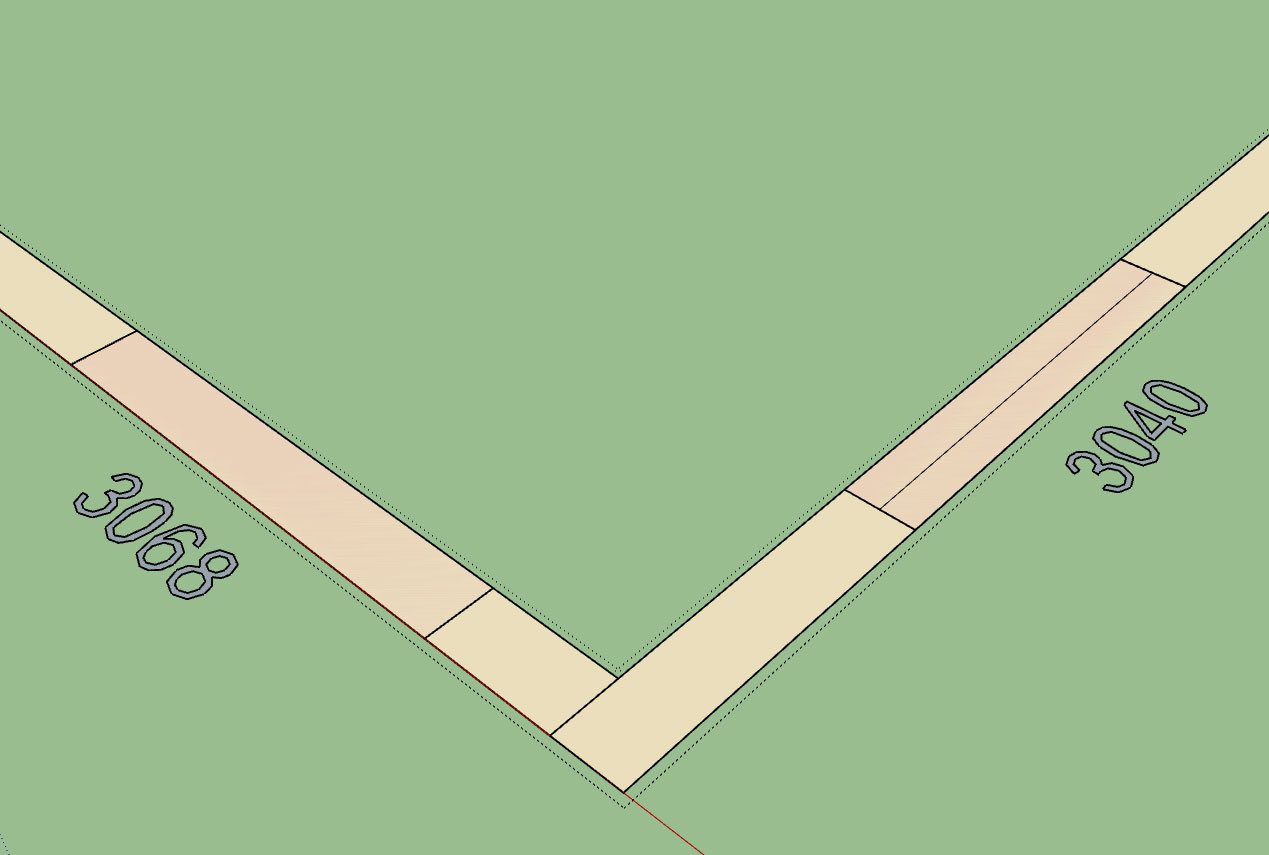
              http://design.medeek.com/resources/images/wall_su101_800.jpg

              Taking it a bit slow today, just a few minor items and some small fires to put out, catching a bit of a breather.

              Nathaniel P. Wilkerson PE
              Medeek Engineering Inc
              design.medeek.com

              1 條回覆 最後回覆 回覆 引用 0
              • C 離線
                Charlie__V
                最後由 編輯

                @medeek said:

                Version 0.7.7c - 06.09.2018

                • Added 2D construction line options for sheathing, cladding and gypsum within the global settings.

                Nice! Thanks Nathaniel

                Charlie

                Precision M1710/Win 7 Pro 64 bit/i-7 6920 Quad core 2.9 Ghz -3.8/16Gb ram/NVIDIA M5000M 8Gb

                1 條回覆 最後回覆 回覆 引用 0
                • A 離線
                  alpro
                  最後由 編輯

                  Still testing out to get a good feel for this plugin as I have a project that I would like to use it on along with the foundation and truss plugins. There definitely is an issue with the stud spacing algorithm, this time the bays worked but as you can see the outside corner didn't.
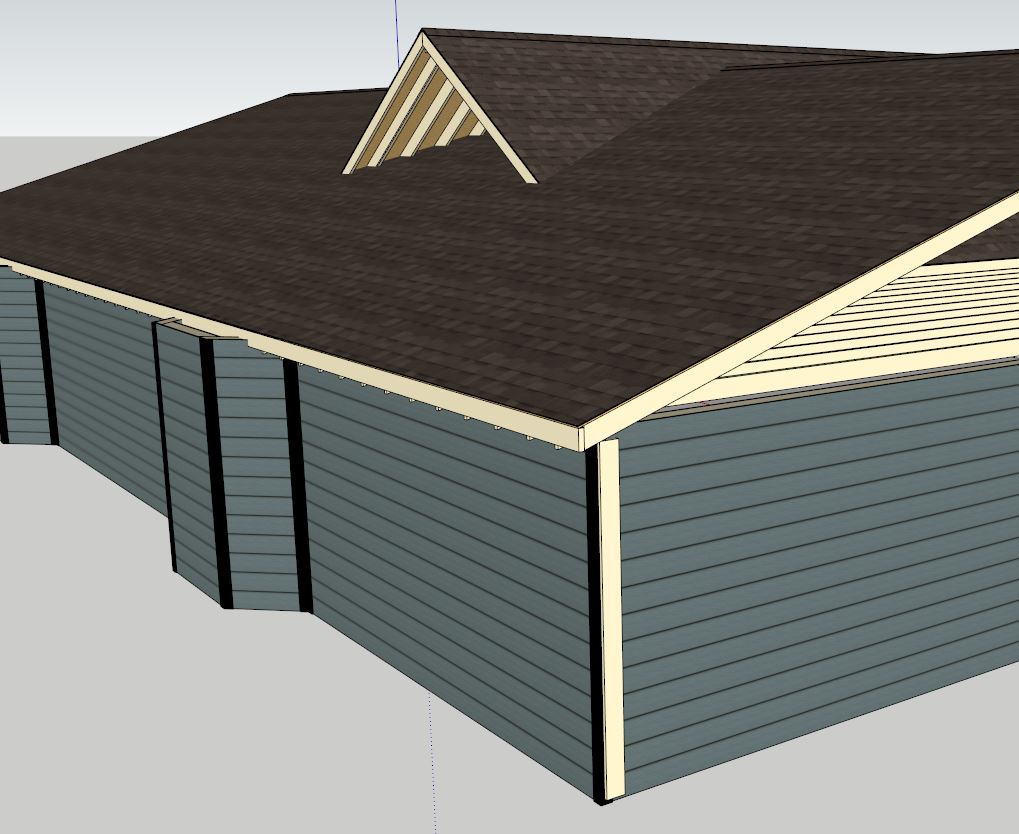

                  wall2.JPG

                  1 條回覆 最後回覆 回覆 引用 0
                  • C 離線
                    Charlie__V
                    最後由 編輯

                    @alpro said:

                    There definitely is an issue with the stud spacing algorithm, this time the bays worked but as you can see the outside corner didn't.

                    Edit the connecting walls in question and make sure the corner settings are correct.
                    I am on iPad now so no access to correct terminology from within plug-in.......but it should be corner of course and not T

                    Edit:
                    Also double ck walls as to their respective elevations & ht’s. (same/same)

                    Charlie

                    Precision M1710/Win 7 Pro 64 bit/i-7 6920 Quad core 2.9 Ghz -3.8/16Gb ram/NVIDIA M5000M 8Gb

                    1 條回覆 最後回覆 回覆 引用 0
                    • medeekM 離線
                      medeek
                      最後由 編輯

                      The latest release has not yet addressed the stud spacing algorithm issue. The reason being is that I have to test it in numerous states to verify all possible situations are calculating correctly, and even though I have made some critical changes to the algorithm I am not yet ready to push it out. I am looking at this right now and hopefully should have the fix out later this afternoon.

                      Nathaniel P. Wilkerson PE
                      Medeek Engineering Inc
                      design.medeek.com

                      1 條回覆 最後回覆 回覆 引用 0
                      • A 離線
                        alpro
                        最後由 編輯

                        Charlie pointed me in the right direction, end corner was set to inside corner though I was sure I had set it to outside corner, once I did that and updated all was good.
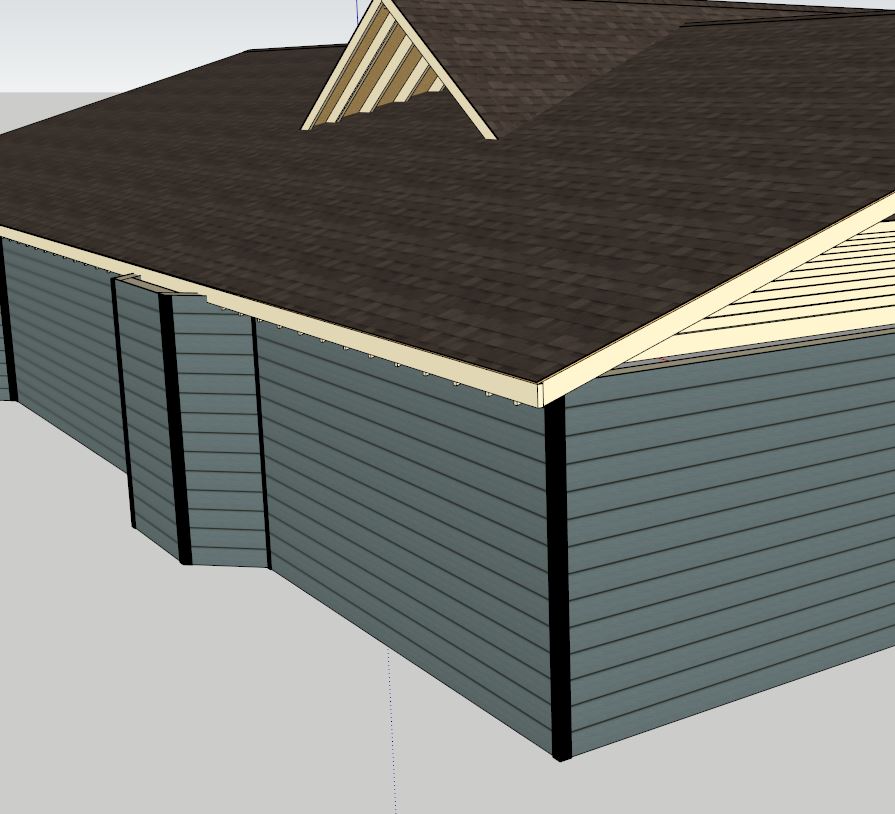

                        wall2.JPG

                        1 條回覆 最後回覆 回覆 引用 0
                        • medeekM 離線
                          medeek
                          最後由 編輯

                          Version 0.7.7d - 06.10.2018

                          • Added 2D (construction or solid) line options for sheathing, cladding and gypsum within the global settings.
                          • Fixed a bug within the corner trim module (trim width).
                          • Added additional standard metric stud sizes: 36x68, 36x98, 36x148, 36x198, 48x72, 48x98, 48x148, 48x198

                          Nathaniel P. Wilkerson PE
                          Medeek Engineering Inc
                          design.medeek.com

                          1 條回覆 最後回覆 回覆 引用 0
                          • medeekM 離線
                            medeek
                            最後由 編輯

                            This is the direction I am going with the Wall Edit Menu UI and Draw wall Tool:
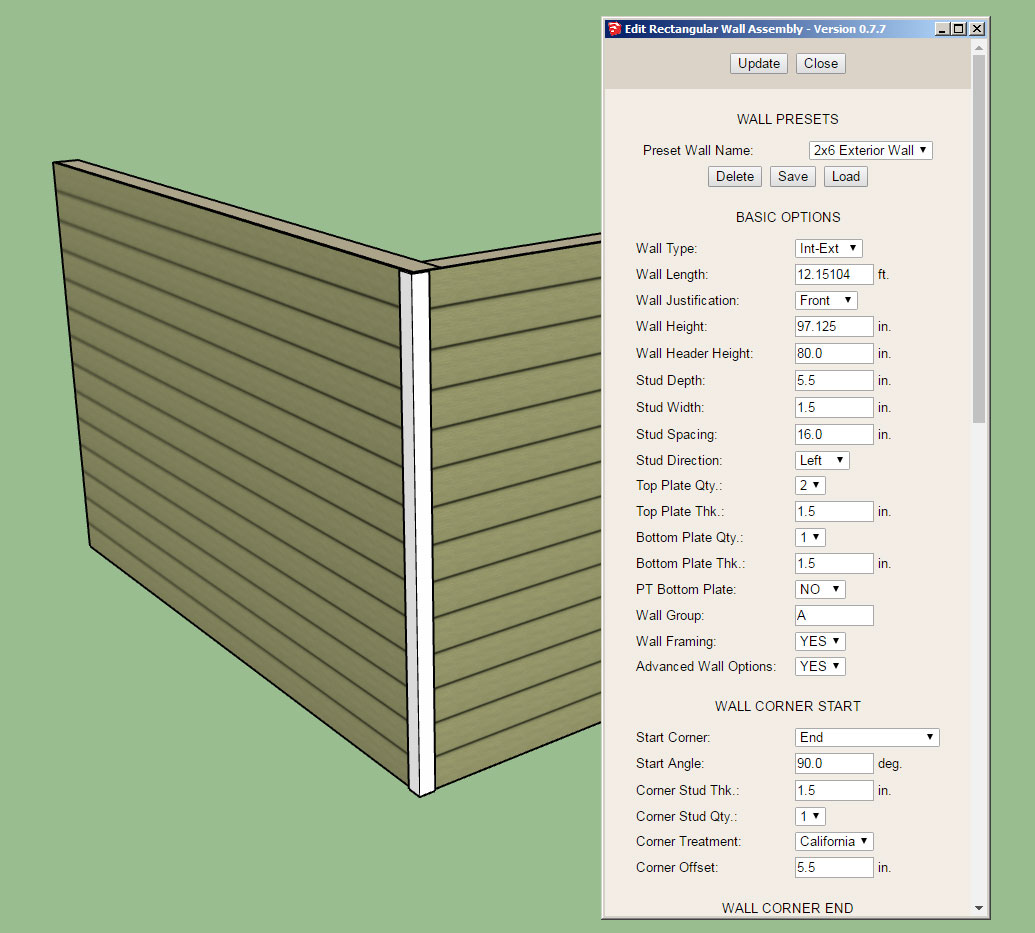
                            http://design.medeek.com/resources/images/wall_su102_800.jpg

                            Notice the wall presets section at the top of the UI, here you can delete, load or save a preset wall template.

                            The actual templates will be stored in a simple text file within a sub-folder called "presets", that way the user can also manually edit the wall preset file and even cut and paste presets from other users into their preset file. This solution offers the most flexibility and user control in my opinion.

                            Loading a preset will re-populate all of the parameters in the form below except for the excluded items.

                            The save function will create a new preset (with user entered name/description) based on the currently listed parameters in the form.

                            Does this make sense? and the better question, am I missing anything here?

                            Hopefully this new addition of presets will speed up the wall creation process and spare the user from having to recreate a specific wall type from scratch each time they start a new model or session.

                            I still have not fully arrived at what the excluded parameters should be in the wall preset functions so please provide any feedback in this regard.

                            Nathaniel P. Wilkerson PE
                            Medeek Engineering Inc
                            design.medeek.com

                            1 條回覆 最後回覆 回覆 引用 0
                            • C 離線
                              Charlie__V
                              最後由 編輯

                              1.) Since we can enter wall lengths as feet and inches while drawing can we please have the wall length editable in same format? TIA
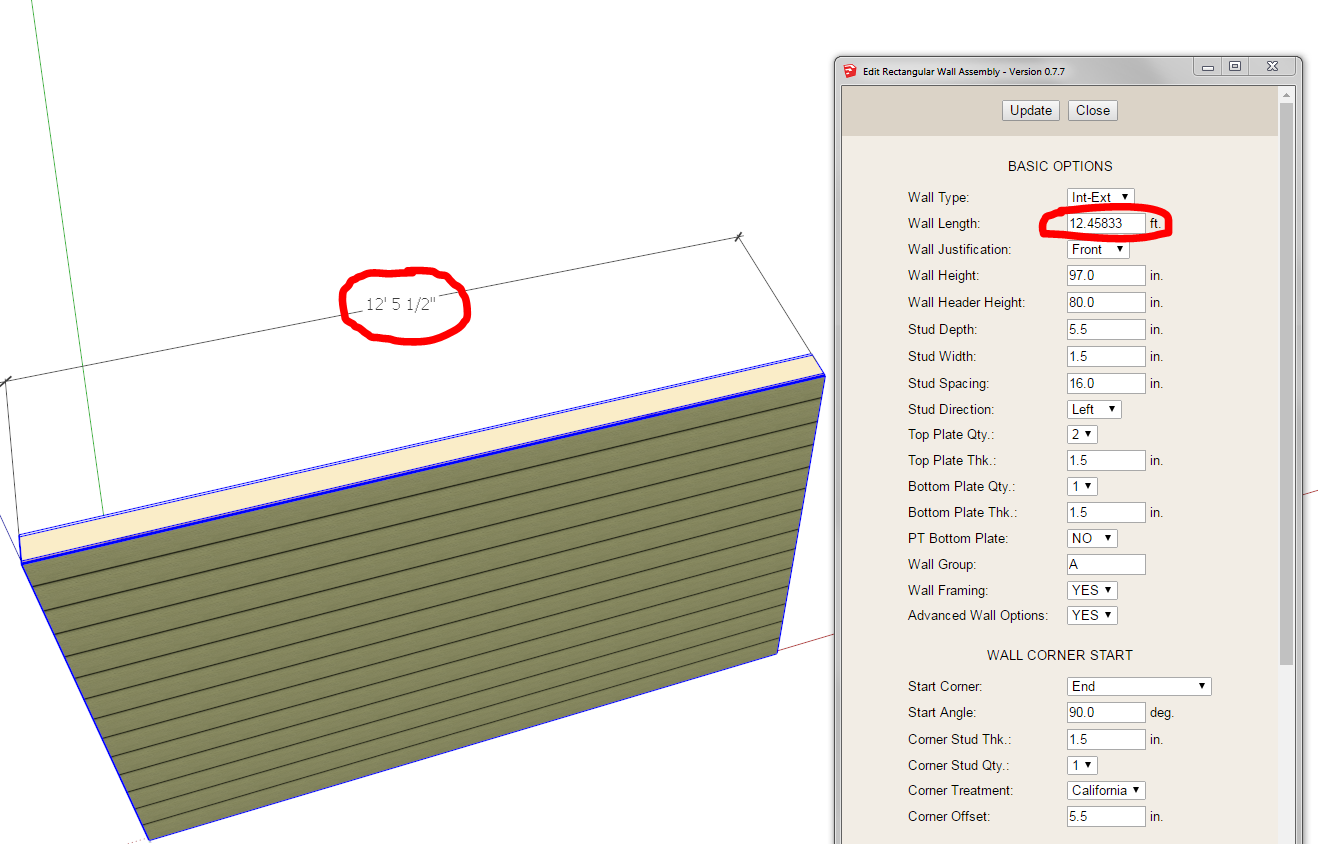
                              Wall length request in ft. & inch

                              2.)Are there any unforeseen/adverse effects of moving a wall using the native SU move tool?
                              (Realizing using the Medeek wall move tool will auto-heal/move existing walls if attached in a way they will follow/heal.)
                              But for other circumstances where this is not the case.

                              Charlie

                              Precision M1710/Win 7 Pro 64 bit/i-7 6920 Quad core 2.9 Ghz -3.8/16Gb ram/NVIDIA M5000M 8Gb

                              1 條回覆 最後回覆 回覆 引用 0
                              • medeekM 離線
                                medeek
                                最後由 編輯

                                @charlie__v said:

                                1.) Since we can enter wall lengths as feet and inches while drawing can we please have the wall length editable in same format? TIA

                                2.)Are there any unforeseen/adverse effects of moving a wall using the native SU move tool?
                                (Realizing using the Medeek wall move tool will auto-heal/move existing walls if attached in a way they will follow/heal.)
                                But for other circumstances where this is not the case.

                                Charlie

                                Funny as I have not really noticed that with the wall length until you pointed it out. Yes, we can switch it to feet-inches for imperial units.

                                Yes, you can move the walls with the SU move tool without any adverse issues (at least none to my knowledge currently). But as you have already stated manually moving a wall will disconnect it from any previously attached walls.

                                Nathaniel P. Wilkerson PE
                                Medeek Engineering Inc
                                design.medeek.com

                                1 條回覆 最後回覆 回覆 引用 0
                                • C 離線
                                  Charlie__V
                                  最後由 編輯

                                  @medeek said:

                                  This is the direction I am going with the Wall Edit Menu UI and Draw wall Tool:

                                  http://design.medeek.com/resources/images/wall_su102_800.jpg

                                  Notice the wall presets section at the top of the UI, here you can delete, load or save a preset wall template.

                                  The actual templates will be stored in a simple text file within a sub-folder called "presets", that way the user can also manually edit the wall preset file and even cut and paste presets from other users into their preset file. This solution offers the most flexibility and user control in my opinion.

                                  Loading a preset will re-populate all of the parameters in the form below except for the excluded items.

                                  The save function will create a new preset (with user entered name/description) based on the currently listed parameters in the form.

                                  Does this make sense? and the better question, am I missing anything here?

                                  I think the more information you can pre-set and leave out of initial "draw wall" window the better.

                                  IE:
                                  A 2x6 Ext.Wall_Horiz.Side_16_O.C. removes the need to specify stud width/depth/O.C./plates/etc. if wall name/definition states it.

                                  Or a 2x6 Ext.Wall_Horiz.Side_16_O.C.Trtd.plate has treated bottom plate only.

                                  An edit button for the active wall definition would be great to have too.(within initial "draw wall" window)

                                  Precision M1710/Win 7 Pro 64 bit/i-7 6920 Quad core 2.9 Ghz -3.8/16Gb ram/NVIDIA M5000M 8Gb

                                  1 條回覆 最後回覆 回覆 引用 0
                                  • C 離線
                                    Charlie__V
                                    最後由 編輯

                                    PS
                                    When using polyline it seems the draw wall tool is self aware enough it doesn't require the need to pre-select "start" and "end" type........so maybe that is not necessary on initial "draw window" either

                                    Precision M1710/Win 7 Pro 64 bit/i-7 6920 Quad core 2.9 Ghz -3.8/16Gb ram/NVIDIA M5000M 8Gb

                                    1 條回覆 最後回覆 回覆 引用 0
                                    • medeekM 離線
                                      medeek
                                      最後由 編輯

                                      @charlie__v said:

                                      PS
                                      When using polyline it seems the draw wall tool is self aware enough it doesn't require the need to pre-select "start" and "end" type........so maybe that is not necessary on initial "draw window" either

                                      You are correct. When the auto-corner configuration global setting is enabled the plugin will correctly sense the corner angles and configurations and take care of that automatically. If this global setting is enabled I should probably just gray out the appropriate parameters (at least in the draw tool GUI). One can always edit a wall and manually change these value which will override the auto behaviour.

                                      I like how you term it "self aware", I'm a huge fan of AI and a bit of an AI programmer myself but I wouldn't go quite so far as to call this AI or even self aware. Just a fairly complicated algorithm that tries to check for specific wall corner and tee intersections. As time goes on the algorithm will probably be revisited a few more times making it more robust and flexible, but it has no capacity to learn (ie. memory). Just a static set of instructions which it follows without variation.

                                      However, with that being said I have considered using some sort of adaptive behavior for the plugin that would slowly adapt to the users most commonly used values for certain parameters and try to predict what those values should be in the future. A good example of this would be header selection for interior walls. Over time it would begin to rank which header sizes/types are used the most and then within the drop down menus it could sort them so that the most commonly used sizes appear at the top of the list with the most commonly used one being selected as default.

                                      Again I don't know if I would call this AI but it would certainly be adaptive software and would tailor itself to the users habits.

                                      Nathaniel P. Wilkerson PE
                                      Medeek Engineering Inc
                                      design.medeek.com

                                      1 條回覆 最後回覆 回覆 引用 0
                                      • Bob JamesB 離線
                                        Bob James
                                        最後由 編輯

                                        Where are the updated versions located for downloading?

                                        Do just go to http://design.medeek.com/resources/medeekwallplugin.html and download the Trial?

                                        i7-4930K 3.4Ghz, 2x GTX780 6GB, 32GB DDR3-1600 ECC, OCZ Vertex 4 500GB, WD Black 3TB, 32TB NAS, 4x 27" Monitors, SpaceMouse Pro, X-keys XK-60

                                        1 條回覆 最後回覆 回覆 引用 0
                                        • medeekM 離線
                                          medeek
                                          最後由 編輯

                                          Login to the Account Manager and the download link will appear under the license listing.

                                          Link Preview Image
                                          Medeek Design Inc. - Login

                                          favicon

                                          (design.medeek.com)

                                          Nathaniel P. Wilkerson PE
                                          Medeek Engineering Inc
                                          design.medeek.com

                                          1 條回覆 最後回覆 回覆 引用 0
                                          • Bob JamesB 離線
                                            Bob James
                                            最後由 編輯

                                            Toolbar icons do not scale for 4K monitor.

                                            MedeekIcons-1.png

                                            i7-4930K 3.4Ghz, 2x GTX780 6GB, 32GB DDR3-1600 ECC, OCZ Vertex 4 500GB, WD Black 3TB, 32TB NAS, 4x 27" Monitors, SpaceMouse Pro, X-keys XK-60

                                            1 條回覆 最後回覆 回覆 引用 0
                                            • 1
                                            • 2
                                            • 72
                                            • 73
                                            • 74
                                            • 75
                                            • 76
                                            • 76 / 76
                                            • 第一個貼文
                                              最後的貼文
                                            Buy SketchPlus
                                            Buy SUbD
                                            Buy WrapR
                                            Buy eBook
                                            Buy Modelur
                                            Buy Vertex Tools
                                            Buy SketchCuisine
                                            Buy FormFonts

                                            Advertisement