sketchucation logo sketchucation
    • 登入
    Oops, your profile's looking a bit empty! To help us tailor your experience, please fill in key details like your SketchUp version, skill level, operating system, and more. Update and save your info on your profile page today!
    🔌 Smart Spline | Fluid way to handle splines for furniture design and complex structures. Download

    Medeek Wall Plugin

    已排程 已置頂 已鎖定 已移動 Plugins
    1.5k 貼文 27 Posters 1.1m 瀏覽 26 Watching
    正在載入更多貼文
    • 從舊到新
    • 從新到舊
    • 最多點贊
    回覆
    • 在新貼文中回覆
    登入後回覆
    此主題已被刪除。只有擁有主題管理權限的使用者可以查看。
    • medeekM 離線
      medeek
      最後由 編輯

      My biggest concern right now is that it is stable and runs rock solid. I have a fair bit more testing and I'm sure debugging and optimization ahead of me in the next few days.
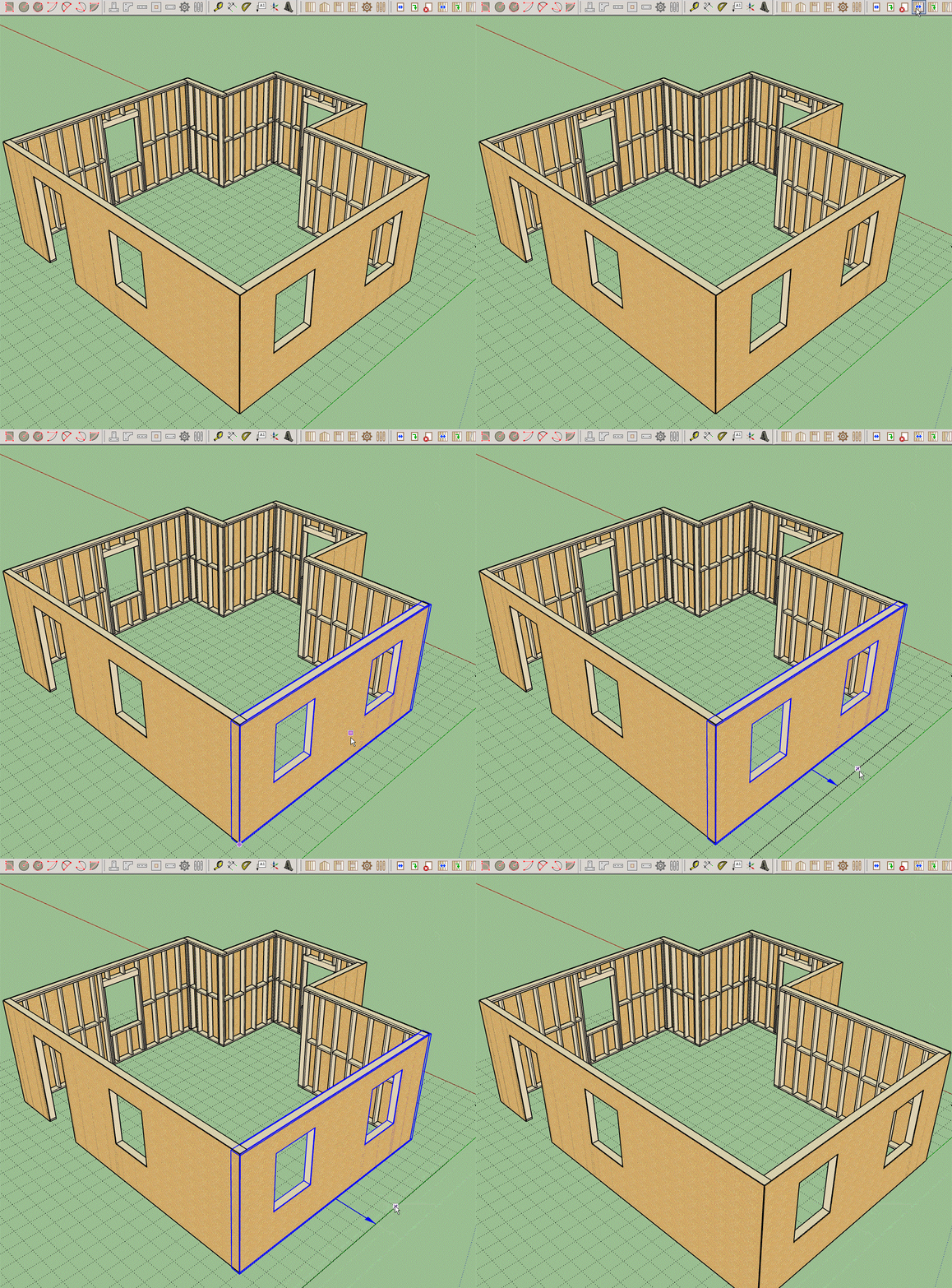
      wall_move_preview1.gif

      The wall move tool is working quite well, I just need to make sure the corners stay "glued" now. Click on image to view GIF animation.

      Nathaniel P. Wilkerson PE
      Medeek Engineering Inc
      design.medeek.com

      1 條回覆 最後回覆 回覆 引用 0
      • medeekM 離線
        medeek
        最後由 編輯

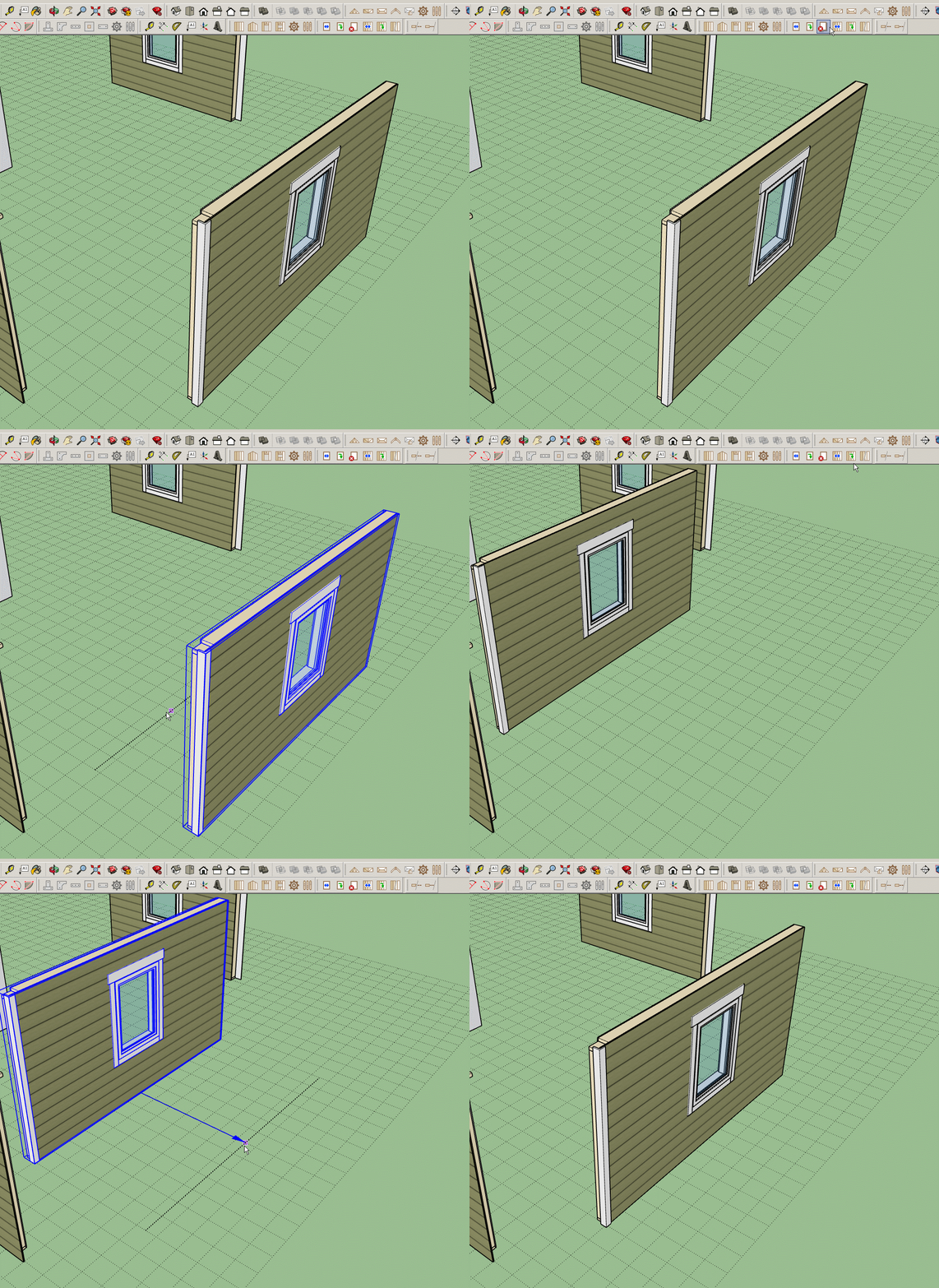
        wall_move_preview2.gif

        Progress has been made but I'm still working out a few kinks.

        Nathaniel P. Wilkerson PE
        Medeek Engineering Inc
        design.medeek.com

        1 條回覆 最後回覆 回覆 引用 0
        • FrederikF 離線
          Frederik
          最後由 編輯

          It looks very promising...! 👍

          Cheers
          Kim Frederik

          1 條回覆 最後回覆 回覆 引用 0
          • medeekM 離線
            medeek
            最後由 編輯

            @frederik said:

            It looks very promising...! 👍

            Thank-you for the vote of confidence. I'm sure the initial release will have its list of limitations and bugs but it certainly is a start in the right direction. Just remember it is just me programming this thing, I don't have a whole team of professional programmers working behind the scenes, creating the magic.

            Nathaniel P. Wilkerson PE
            Medeek Engineering Inc
            design.medeek.com

            1 條回覆 最後回覆 回覆 引用 0
            • medeekM 離線
              medeek
              最後由 編輯

              One of many wall move permutations that must be considered:

              https://discourse-cdn-sjc1.com/sketchup/uploads/default/optimized/3X/b/1/b17e9d610b6fe246adefaabd2c340fc00fb957dc_1_566x499.gif

              I also still need to fully vett the non-orthogonal wall possibilities, this is exhausting work.

              Nathaniel P. Wilkerson PE
              Medeek Engineering Inc
              design.medeek.com

              1 條回覆 最後回覆 回覆 引用 0
              • medeekM 離線
                medeek
                最後由 編輯

                Orthogonal walls are now pretty solid, onto non-orthogonals.

                As I'm testing this feature out it occurred to me that it might be useful to have the ability to move just one corner of a wall, this would allow for the changing of angles between walls. I have added this feature to the "todo" list for future consideration.

                Along with the split wall function it would also be useful to have a fuse or join wall function, where two wall panel that are inline with each other and butting up can be joined into a single wall panel.

                Nathaniel P. Wilkerson PE
                Medeek Engineering Inc
                design.medeek.com

                1 條回覆 最後回覆 回覆 引用 0
                • FrederikF 離線
                  Frederik
                  最後由 編輯

                  @medeek said:

                  Just remember it is just me programming this thing, I don't have a whole team of professional programmers working behind the scenes, creating the magic.

                  Yes, I'm fully aware which makes this even more impressive... 👍

                  Cheers
                  Kim Frederik

                  1 條回覆 最後回覆 回覆 引用 0
                  • medeekM 離線
                    medeek
                    最後由 編輯

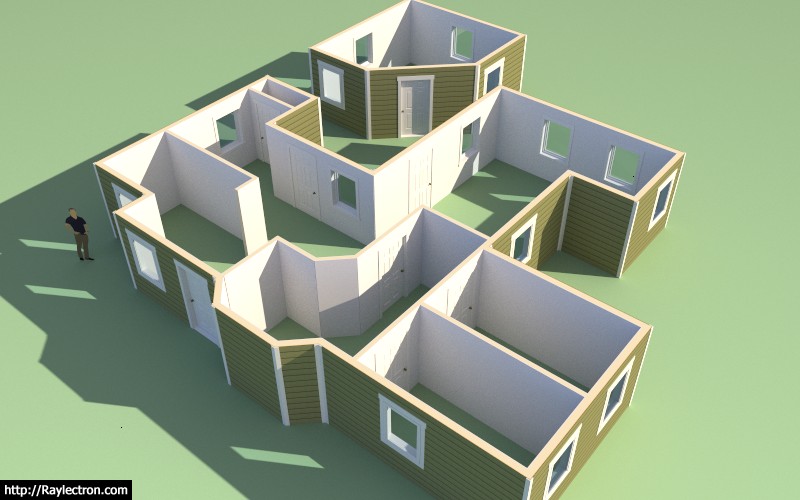
                    A preview of the Wall Move Tool:

                    View Model here:

                    Link Preview Image
                    3D Warehouse

                    3D Warehouse is a website of searchable, pre-made 3D models that works seamlessly with SketchUp.

                    favicon

                    (3dwarehouse.sketchup.com)

                    The primary items left to do before the release are:

                    • Interior Walls
                    • Global Settings (update)
                    • Web Page (update)

                    I will start on interior walls tomorrow.

                    I also have some additional testing to do with the no framing option to make sure it is working seamlessly with the other modes (2D and 3D).
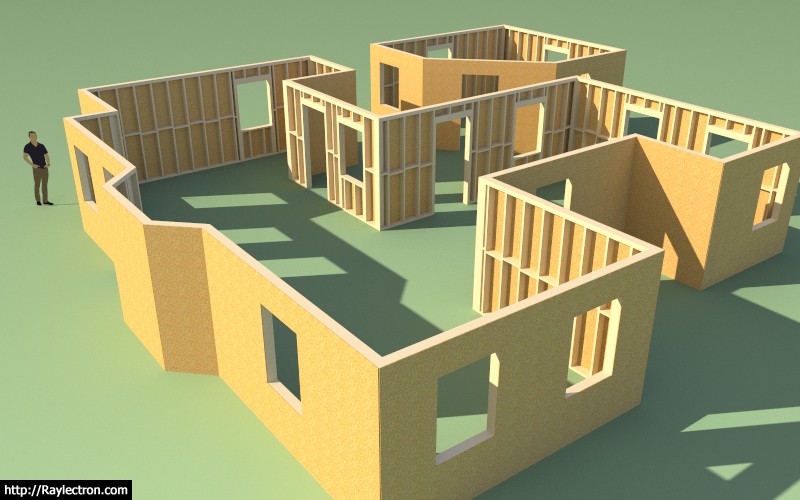
                    http://design.medeek.com/resources/images/wall_su70_800.jpg

                    Nathaniel P. Wilkerson PE
                    Medeek Engineering Inc
                    design.medeek.com

                    1 條回覆 最後回覆 回覆 引用 0
                    • Bob JamesB 離線
                      Bob James
                      最後由 編輯

                      Nathaniel,

                      Looking Good!

                      Will the door tool handle double doors (i.e. a house entry composed of two separate doors.)?

                      And closet sliding doors?

                      i7-4930K 3.4Ghz, 2x GTX780 6GB, 32GB DDR3-1600 ECC, OCZ Vertex 4 500GB, WD Black 3TB, 32TB NAS, 4x 27" Monitors, SpaceMouse Pro, X-keys XK-60

                      1 條回覆 最後回覆 回覆 引用 0
                      • medeekM 離線
                        medeek
                        最後由 編輯

                        @bob james said:

                        Nathaniel,

                        Looking Good!

                        Will the door tool handle double doors (i.e. a house entry composed of two separate doors.)?

                        And closet sliding doors?

                        Right now the door types are limited but yes I plan on adding all the various door types:

                        • sliding
                        • pocket
                        • bifold
                          etc...

                        In that regard I am also very interested in working with other plugin authors to somehow integrate other door and window plugins so that they can work seamlessly with the wall plugin. In order for this to work correctly I will need to setup a simple system that sends a signal to the third party window/door plugin letting it know if the opening size or location has changed that way the windows and doors will stay synchronized with the wall model and automatically move with it.

                        Nathaniel P. Wilkerson PE
                        Medeek Engineering Inc
                        design.medeek.com

                        1 條回覆 最後回覆 回覆 引用 0
                        • medeekM 離線
                          medeek
                          最後由 編輯

                          As I'm working on interior walls today it occurred to me that just as I've provided for a trim option with exterior walls I also need to provide an interior trim option for both interior (int-int) walls and exterior walls (int-ext).

                          I've added in one extra option in the advanced wall options to toggle interior trim. I will probably not full flesh this out until after the plugin release but interior trim will probably deal with the following key elements/options:

                          • Baseboard
                          • Crown Molding
                          • Chair Rail
                          • Wainscot

                          http://xboxhut.com/wp-content/uploads/2016/06/craftsman-house-interior-trim-scandinavian-compact.jpg

                          Nathaniel P. Wilkerson PE
                          Medeek Engineering Inc
                          design.medeek.com

                          1 條回覆 最後回覆 回覆 引用 0
                          • jujuJ 離線
                            juju
                            最後由 編輯

                            Nathaniel, I don't know if you should be putting those finishing trims in the plugin. So many variables and options, probably better if those were left to the designer to dictate / complete as per their design wishes?

                            Save the Earth, it's the only planet with chocolate.

                            1 條回覆 最後回覆 回覆 引用 0
                            • medeekM 離線
                              medeek
                              最後由 編輯

                              @juju said:

                              Nathaniel, I don't know if you should be putting those finishing trims in the plugin. So many variables and options, probably better if those were left to the designer to dictate / complete as per their design wishes?

                              You can always turn the option off and in the global settings you can always make it default to off so the preference of the designer is respected.

                              However, for those who just want a simple representation for the interior trim the option will exist at some point.

                              Nathaniel P. Wilkerson PE
                              Medeek Engineering Inc
                              design.medeek.com

                              1 條回覆 最後回覆 回覆 引用 0
                              • pbacotP 離線
                                pbacot
                                最後由 編輯

                                This is looking like a good solutions in a few ways. While you may keep adding alternate details and flexibility, this at least bring SU up to a lot of residential modeling for quick representation of basic contemporary homes, for example for remodels. I might not find it has enough options to work on most jobs I work on, but I might find it good for a quick model that will satisfy less sophisticated jobs and give that instant feel people now are half expecting due to the home remodel shows on TV (for better or worse). On the other hand the overall work is more important to builders to get to the framing and other take-offs, something I don't get involved in fortunately.

                                I like the work with the 2d plan, which updates the model. Refreshing!

                                MacOSX MojaveSketchUp Pro v19 Twilight v2 Thea v3 PowerCADD

                                1 條回覆 最後回覆 回覆 引用 0
                                • medeekM 離線
                                  medeek
                                  最後由 編輯

                                  @pbacot said:

                                  This is looking like a good solutions in a few ways. While you may keep adding alternate details and flexibility, this at least bring SU up to a lot of residential modeling for quick representation of basic contemporary homes, for example for remodels. I might not find it has enough options to work on most jobs I work on, but I might find it good for a quick model that will satisfy less sophisticated jobs and give that instant feel people now are half expecting due to the home remodel shows on TV (for better or worse). On the other hand the overall work is more important to builders to get to the framing and other take-offs, something I don't get involved in fortunately.

                                  I like the work with the 2d plan, which updates the model. Refreshing!

                                  You are just going to have to try it out and see if it works for you.

                                  My intent is to make it well suited for most typical conventional homes (residential work) being built today in the US and Canada. I am also providing metric on everything so it should work as well for the Europeans and Aussies and other international designers.

                                  Adding more flexibility and options also adds to the complexity, I am trying to strike some sort of balance there but as you can probably already tell I do like to dive into the details with just about everything.

                                  In addition to the 2D mode, after speaking with a couple of other designers, I think I'm also going to add an additional global setting called: "2D Layout in 3D"

                                  If the user toggles this to "ON" then the 2D representations for the windows and doors will be drawn on the top surface of the wall plate, the door swing(s) will be shown at the wall bottom and the text callouts will also be drawn at the wall bottom. The idea being that you can view the 3D model from the top down and still see the plan layout.

                                  Nathaniel P. Wilkerson PE
                                  Medeek Engineering Inc
                                  design.medeek.com

                                  1 條回覆 最後回覆 回覆 引用 0
                                  • medeekM 離線
                                    medeek
                                    最後由 編輯

                                    Interior Walls:

                                    http://design.medeek.com/resources/images/wall_su71_800.jpg

                                    A couple of items on today's todo list with regards to interior walls:

                                    • The wall move tool decouples interior wall corners from exterior wall corners, this is intended.
                                    • I still need to add in an algorithm which can sense when an interior wall is Teeing into an ext. or int. wall. This is important primarily for the move tool and wall creation tool.
                                    • Update interior door casing
                                    • Interior windows (windows that are embedded in an interior wall) are not very common, not sure exactly what to do in this case. Perhaps just treat as regular window installed in an exterior wall.
                                    • Interior framed openings (without installation of door or window): These need to be wrapped in gypsum to properly finish them out.
                                    • Added interior trim (baseboard, crown molding, chair rail, wainscoting) to the long term todo list.

                                    That should be it for now. I may be able to get all this done today if I really hustle and then on to the global settings tomorrow.

                                    Nathaniel P. Wilkerson PE
                                    Medeek Engineering Inc
                                    design.medeek.com

                                    1 條回覆 最後回覆 回覆 引用 0
                                    • medeekM 離線
                                      medeek
                                      最後由 編輯

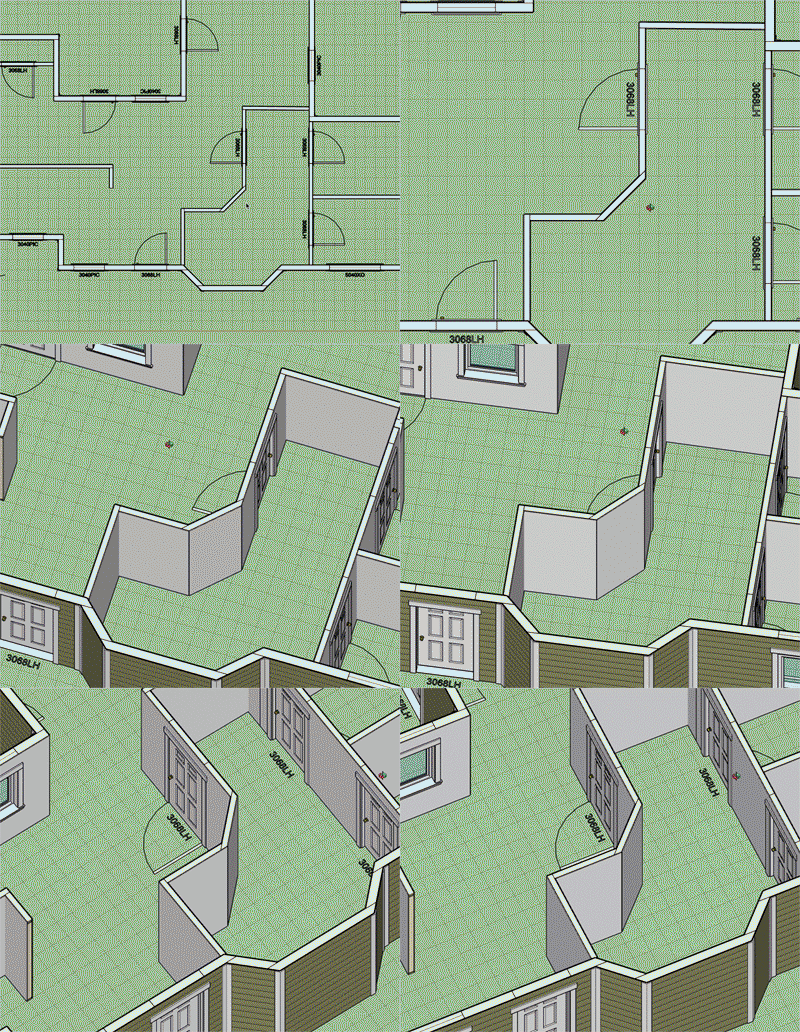
                                      wall_move_preview4.gif

                                      Window and Door callouts with the "2D Layout in 3D" option turned on.

                                      Notice that I have parallel projection turned on in SketchUp.

                                      I apologize for the strange coloration and quality of the image, I'm trying out some new software for taking screen grabs and turning them into animated GIFs.

                                      Nathaniel P. Wilkerson PE
                                      Medeek Engineering Inc
                                      design.medeek.com

                                      1 條回覆 最後回覆 回覆 引用 0
                                      • C 離線
                                        Charlie__V
                                        最後由 編輯

                                        Nathaniel,
                                        Been following your progress with great interest, your plug-in is really looking good now!
                                        Anxious to try it out, when ready of course. (No pressure)

                                        Best regards,
                                        Charlie

                                        Precision M1710/Win 7 Pro 64 bit/i-7 6920 Quad core 2.9 Ghz -3.8/16Gb ram/NVIDIA M5000M 8Gb

                                        1 條回覆 最後回覆 回覆 引用 0
                                        • A 離線
                                          alpro
                                          最後由 編輯

                                          @charlie__v said:

                                          Nathaniel,
                                          Been following your progress with great interest, your plug-in is really looking good now!
                                          Anxious to try it out, when ready of course. (No pressure)

                                          Best regards,
                                          Charlie

                                          Me too, looks like a very robust plugin. My question is will there be some kind of library that we could add our own window/door and trim styles to ? Would make it a much more useful tool to me as I have tons of Pella and Anderson speced windows already with quite a bit of modeling time invested.

                                          1 條回覆 最後回覆 回覆 引用 0
                                          • medeekM 離線
                                            medeek
                                            最後由 編輯

                                            @alpro said:

                                            Me too, looks like a very robust plugin. My question is will there be some kind of library that we could add our own window/door and trim styles to ? Would make it a much more useful tool to me as I have tons of Pella and Anderson speced windows already with quite a bit of modeling time invested.

                                            I've been giving this some more thought and I like the idea of designers being able to bring in their own pre-built components (dynamic or not) into the model via the plugin.

                                            Do you have an example window/door that I can examine and figure out the best way to create the ability to bring in such a pre-configured component.

                                            The plugin allows one to set the size and location of an opening and to adjust this at any time. The user would then need to select from their library of pre-configured windows/doors to select the correctly sized component and then it would be inserted automatically into the model at a specific insertion point.

                                            I guess the big question for me is where should this insertion point be located for a window or a door? Top center, bottom center and also how should it be centered within the wall depth?


                                            Nathaniel P. Wilkerson PE
                                            Medeek Engineering Inc
                                            design.medeek.com

                                            1 條回覆 最後回覆 回覆 引用 0
                                            • 1
                                            • 2
                                            • 3
                                            • 4
                                            • 5
                                            • 6
                                            • 75
                                            • 76
                                            • 4 / 76
                                            • 第一個貼文
                                              最後的貼文
                                            Buy SketchPlus
                                            Buy SUbD
                                            Buy WrapR
                                            Buy eBook
                                            Buy Modelur
                                            Buy Vertex Tools
                                            Buy SketchCuisine
                                            Buy FormFonts

                                            Advertisement