Solid objects and wall thickness
-
I've been pulling my hair out over this for days, so I appreciate any help.
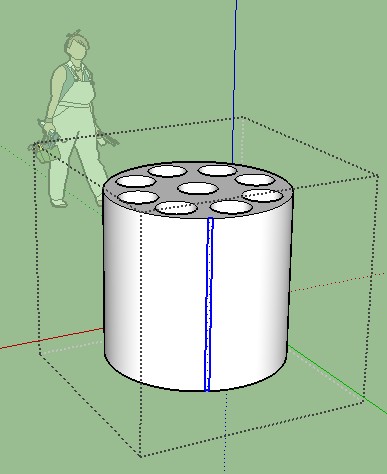
I'm trying to make a very simple part. Just a solid cylinder with 9 hollow cylinders running through it. Everything looks fine, entity info says that it is a solid group with a volume, but when I try to have Shapeways print it I'm told they can't print it because the walls are too thin. In Sketchup none of the lines are closer than 1mm, so I don't understand what I'm doing wrong. Please help! Thank you for your time.
-
The problem I see is: the solid object is nested into another group.
Open Window-Outliner and you can see the hierarchy. Explode the outside group so you only have the solid object.I would also move the object to the origin. That never hurts.
Edit: and if that doesn't help - contact the support people from the 3d printing company because I don't see any problems with the 1mm either. Sorry for your hair...
-
After a complete general Explode : this part was considered as Self-intersected
Solid Solver by Tig resolves that!
-
I very much appreciate the help. I have the whole object grouped. Entity info says "Solid Group". If I select the whole group, right click, and select "explode" I now have 7807 entities.
So I'm sorry, but I'm not really sure what you're asking me to do.
-
Hi Corey, check that the model is uploaded at the correct scale on Shapeways. I uploaded your model without any changes, and it shows up fine for me, so that's the only thing I can think of!

Hello! It looks like you're interested in this conversation, but you don't have an account yet.
Getting fed up of having to scroll through the same posts each visit? When you register for an account, you'll always come back to exactly where you were before, and choose to be notified of new replies (either via email, or push notification). You'll also be able to save bookmarks and upvote posts to show your appreciation to other community members.
With your input, this post could be even better 💗
Register Login


Advertisement