Wish list for Sketchup 2018
-
I often have multiple SU sessions open at the same time. It's almost impossible to know which "Default Tray" goes with a given instance. Can the file name be added to the Default Tray top bar? Not the whole path, just the file name.
-
The toolbar that displays iso, left, right, front and back views should have the graphics replaced by the verbiage. Getting tired of mousing over some of these icons to seee what they represent.
-
I wish Layout was smart enough to know that I invariably want to save a file with the same name as the Skp.
-
I wish a table in s a SU would show the LO files it is linked in, and you could just click to open them, like you can open the SU file from LO.
-
-
I wish the layers I've set up in SU (as per the pages visibility setup) would translate verbatim to LO, which then would be able to export those (together with the additional ones created in LO) to DWG/DXF, ending up with a DWG/DXF like we're used to in the construction industry. This would probably mean a better layer manager in LO as well.
-
I wish that LO would import DWG/DXF, without losing any information, so I can do overlays and coordinate.
-
I wish these would happen before I have to renew my maintenance and support, yet again, towards the end of November.
-
-
Most of my wishes are repeated every year. and i repeat again:
- MULTIPLE VIEWPORT
- every serious modeler (at least for most 3d platform) use multi-viewport. It is a feature that is essential to most 3d package . Hopefully we get an extra window that can be assigned left, right, top etc.
-
QUADs
I hope there's a quad-mode feature that can be turned on that will prevent triangulation when modifying quad geometries. I hope to really be able to work in quads without any complication. -
More solid all-in-one UVW, UNWRAPPING & TEXTURE BAKING solution all within SU.
-
@john sayers said:
I would like the Windows version to have 2 or more files open at once - I gather the Mac version already has this feature.
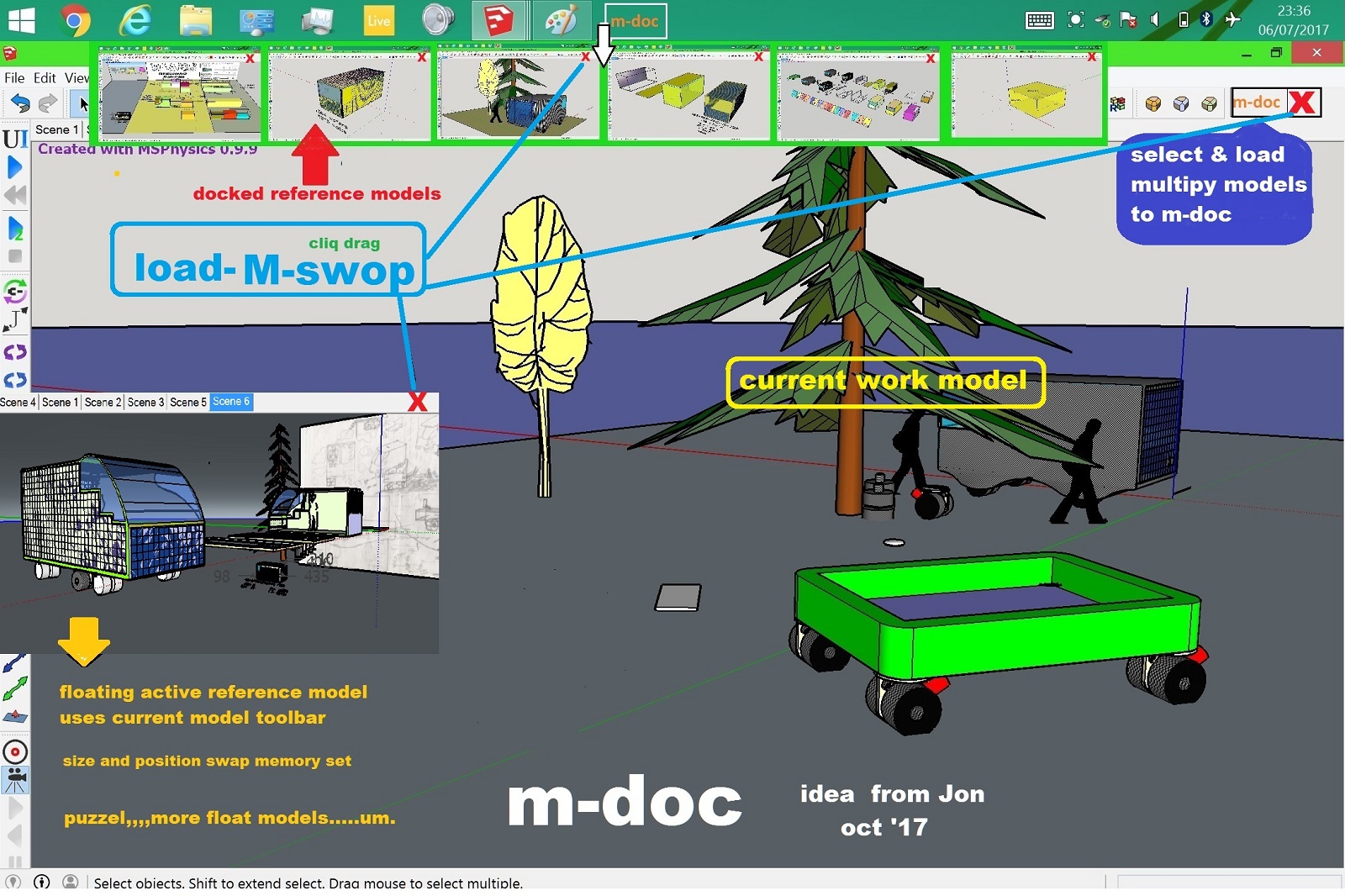
see if this works , if I try and move it I PROBARBLY loose it ,,my relavent post is in DEVELOPERS FORUM headed DOC MULTIPLE MODELS the NEW (full) pic did not upload and I am short of line time from Jon
I would try ,,cross reference organiser tho 14 day trial would not load ,,probarbly more than a single user needs,, I still work with my collage A3 drawing board , and can often have many drawings to hand,, multiple SU opened has no flow ,,so here is an idea of how it could possibly work ,if one of those those magic programmer,s "clock it" Jon ,,,
docked models could have a user default size and window position so swapping is immediate ,,successive models ,,the same,, to unclutter the view ,floating model commands ,use the main toolbar choices,,>>> cliq M-doc,, > open doc models folder ( same as model folder) select 1 or more models > cliq open ,,this then loads all reference models needed to M-doc > float over doc to select,> this and a few more intracuss,s er might create a work flow JON ,,trying,,
-
It would be great if the PDF functionality on the Apple version of Sketchup can be had on Windows.
-
@mark_melb said:
It would be great if the PDF functionality on the Apple version of Sketchup can be had on Windows.
I may be wrong, but I think that is built into Mac OSX, not into the Mac OSX version of SketchUp.
-
Juju is correct. It would be great if Microsoft would add the same sort of functionality Apple has for PDF files.
-
Solve minor issue where you are being notified that you are about to modify a component ("do want to make this unique?"), when in fact, it's really a group. Other times when you attempt to modify a component, the warning does not appear.
-
Sometimes, when you launch LayOut - or already have it running, but decide to open an additional drawing, you wait and wait until you happen to notice the Windows taskbar icon turned blue, at which point you click it. Let's get that fixed.
-
@pipingguy said:
Solve minor issue where you are being notified that you are about to modify a component ("do want to make this unique?"), when in fact, it's really a group. Other times when you attempt to modify a component, the warning does not appear.
SketchUp doesn't warn you of modifying components natively. Are you sure you don't have a plugin/extension delivering that message?
AshScott's Edit Flag creates that popup message. You could uninstall it and satisfy one item on your wishlist.
-
to Dave's point...I will watch for the next time the edit warning pops up so i can screen-grab it.
-
@pipingguy said:
When re-scaling a group or component, the tape measure tool is used. However, more often than not, one needs to go thru the extra step of erasing the resultant guideline before closing the group or component. let's fix that.
Done correctly no guideline is created.
As I'm on my phone I cannot demonstrate it for you. -
When re-scaling (re-sizing) a group or component, the tape measure tool is used. However, more often than not, one needs to go thru the extra step of erasing the resultant guideline before closing the group or component. let's fix that.
-
@pipingguy said:
to Dave's point...I will watch for the next time the edit warning pops up so i can screen-grab it.
As it's not a native SketchUp function to bring up this message, it's within your capability to prevent it from showing.
-
@jonathonlt said:
@john sayers said:
I would like the Windows version to have 2 or more files open at once - I gather the Mac version already has this feature.
see if this works , if I try and move it I PROBARBLY loose it ,,my relavent post is in DEVELOPERS FORUM headed DOC MULTIPLE MODELS the NEW (full) pic did not upload and I am short of line time from Jon
I would try ,,cross reference organiser tho 14 day trial would not load ,,probarbly more than a single user needs,, I still work with my collage A3 drawing board , and can often have many drawings to hand,, multiple SU opened has no flow ,,so here is an idea of how it could possibly work ,if one of those those magic programmer,s "clock it" Jon ,,,
docked models could have a user default size and window position so swapping is immediate ,,successive models ,,the same,, to unclutter the view ,floating model commands ,use the main toolbar choices,,>>> cliq M-doc,, > open doc models folder ( same as model folder) select 1 or more models > cliq open ,,this then loads all reference models needed to M-doc > float over doc to select,> this and a few more intracuss,s er might create a work flow JON ,,trying,,
The Print screen above looks like a bad trip. Heaven forbid!

-
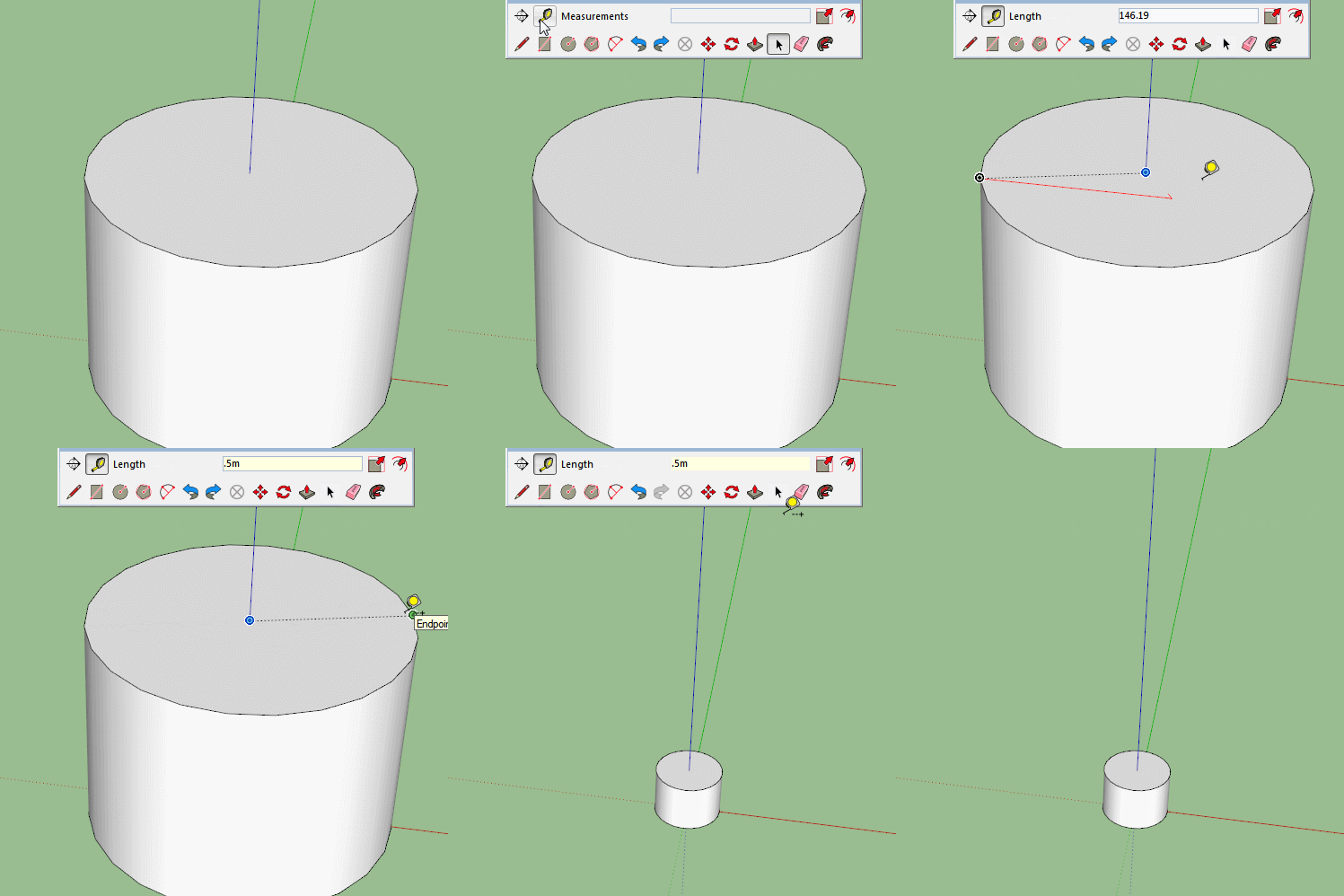
BOX suggests a guide need not be left as a remnant when resizing. I can understand that when the object is rectangular. Just drag the tape measure along an edge from a corner - but what if you wanted to resize a cylinder's diameter?
-
@pipingguy said:
BOX suggests a guide need not be left as a remnant when resizing. - but what if you wanted to resize a cylinder's diameter?








Advertisement