sketchucation logo sketchucation
    • Login
    Oops, your profile's looking a bit empty! To help us tailor your experience, please fill in key details like your SketchUp version, skill level, operating system, and more. Update and save your info on your profile page today!
    ⚠️ Update | Sketchucation Tools 5.0.8 released with licensing improvements and bugfixes Download

    SketchUcation Tools in 2017

    Scheduled Pinned Locked Moved SketchUp Discussions
    sketchup
    113 Posts 17 Posters 18.4k Views 17 Watching
    Loading More Posts
    • Oldest to Newest
    • Newest to Oldest
    • Most Votes
    Reply
    • Reply as topic
    Log in to reply
    This topic has been deleted. Only users with topic management privileges can see it.
    • B
      blue442
      last edited by

      Windows 10 pro with dual 4k displays.
      I get the thin box, enlarging doesn't help.
      Performed a fresh Installation after deleting 2017 registry keys and all files in folder. Same results. 2016 is still installed.

      stumped.


      sketchucation.jpg

      1 Reply Last reply
      Reply Quote 0
      • JQLJ
        JQL
        last edited by

        I'm also on a single 4k display, if it matters.

        www.casca.pt
        Visit us on facebook!

        1 Reply Last reply
        Reply Quote 0
        • N
          NickW
          last edited by

          I'm having the same problems too. Win 10 all up to date. I've tried the Regedit suggestion, and resizing the dialog but no joy.
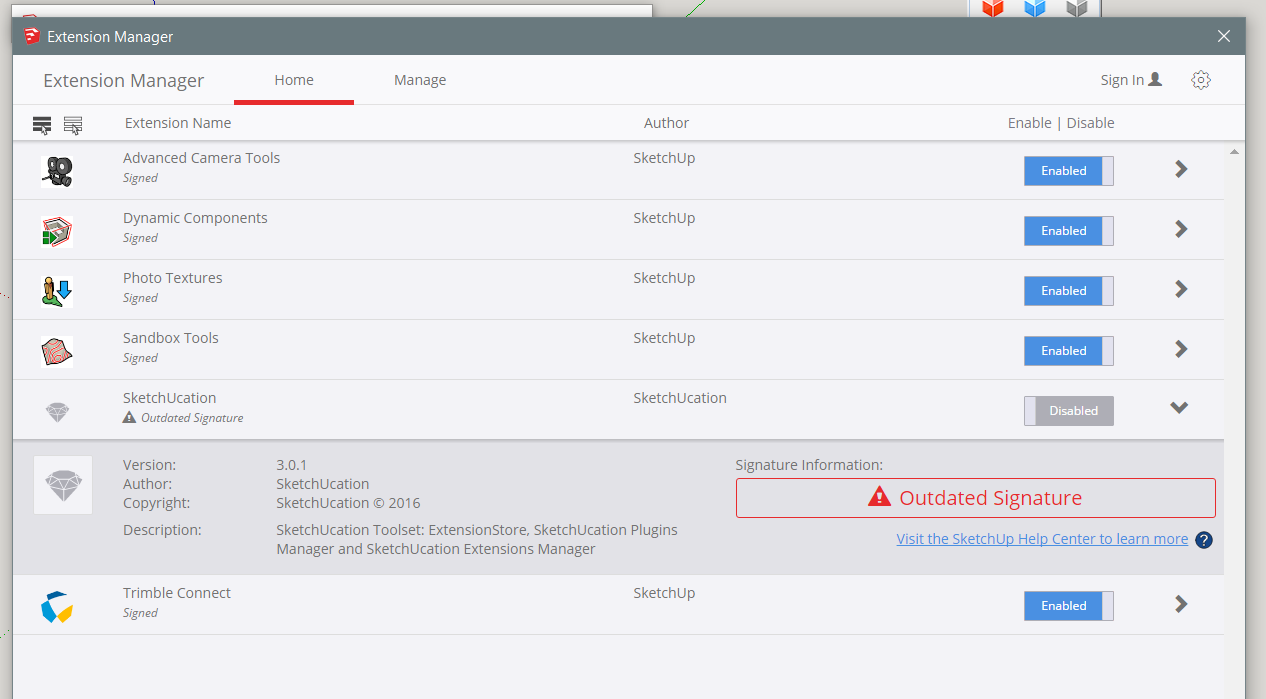
          Capture.PNG

          Interestingly the SU Extension Manager says the signature has expired - see attached screen capture.

          EDIT: But I see someone else has beaten me to that one. 😳

          1 Reply Last reply
          Reply Quote 0
          • TIGT
            TIG Moderator
            last edited by

            When the Extensions Manager says 'Outdated Signature' it means you do not have your Loading Policy in the Extensions Manager settings set to 'Unrestricted'...
            I think v2017 does not start off set like that - unlike v2016 ?

            For some reason v2017 is not accepting signed extensions unless they are re-signed.
            I'll do that and re-post the RBZ - BUT I do not expect that to be the the cause of the originally reported issue...

            One thought about the other issue...
            Those of you having the problem...
            Are you installing v2017 properly ?
            It is less forgiving than previous versions, and weirdness can pop up from nowhere...
            You do not need to Uninstall and the Install again, do this...
            Close v2017.
            Find the SketchUp v2017 installer's exe [or download a fresh copy].
            Select it and right-click > context-menu > Run as administrator...
            When prompted choose to 'Repair'.
            This should reset this correctly.

            SketchUp v2017 must be installed as an administrator - even if you have admin-powers this is NOT sufficient.
            Improper installation can cause all sorts of flay weirdness...
            I wonder if this is the case here - where those of us who did it right have no issues ??

            TIG

            1 Reply Last reply
            Reply Quote 0
            • JQLJ
              JQL
              last edited by

              Tig, tried your Registry steps and it didn't work. Sketchucation store did open as only the top bar but very small, I pushed it to the right and no buttons poped up.

              www.casca.pt
              Visit us on facebook!

              1 Reply Last reply
              Reply Quote 0
              • JQLJ
                JQL
                last edited by

                I didn't install it as administrator though I have administrator rights... I'll try it and then the registry again.

                www.casca.pt
                Visit us on facebook!

                1 Reply Last reply
                Reply Quote 0
                • BoxB
                  Box
                  last edited by

                  I can assure you, some of us that had the issue certainly installed it correctly.

                  In my case it seems that a specific device update fixed the issue.

                  1 Reply Last reply
                  Reply Quote 0
                  • TIGT
                    TIG Moderator
                    last edited by

                    @box said:

                    I can assure you, some of us that had the issue certainly installed it correctly.

                    In my case it seems that a specific device update fixed the issue.
                    Can you elaborate on your 'fix' - it might help others...

                    TIG

                    1 Reply Last reply
                    Reply Quote 0
                    • BoxB
                      Box
                      last edited by

                      I can only repeat what I posted earlier. And note that I left out the 't of can't in the second word..

                      @box said:

                      I can even confirm that anymore, as now it's working.
                      I just did a clean install (uninstall all versions of 2017 including plugin folder, then right click install as admin)on my Win10 machine after doing a full wacom driver update.
                      Then installed the toolset_v3.0.0b.rbz and nothing else and it's all looking good.

                      1 Reply Last reply
                      Reply Quote 0
                      • Rich O BrienR
                        Rich O Brien Moderator
                        last edited by

                        At Box is it v3.0.1 you are running? Your post says 3.0.0

                        Download the free D'oh Book for SketchUp πŸ“–

                        1 Reply Last reply
                        Reply Quote 0
                        • TIGT
                          TIG Moderator
                          last edited by

                          @Rich should have just received a v3.0.2 RBZ [by my email] it should be made available shortly.
                          Installing this newer RBZ will avoid any 'unsigned' or 'out of date signature' error messages in any Extension Loading Policy setting - i.e. it is now re-signed for full v2017 compatibility [as well as being backwardly compatible with v2016 etc].

                          TIG

                          1 Reply Last reply
                          Reply Quote 0
                          • Rich O BrienR
                            Rich O Brien Moderator
                            last edited by

                            3.0.2 available to download

                            404 Not Found

                            favicon

                            (sketchucation.com)

                            Can you try this?

                            Download the free D'oh Book for SketchUp πŸ“–

                            1 Reply Last reply
                            Reply Quote 0
                            • BoxB
                              Box
                              last edited by

                              @rich o brien said:

                              At Box is it v3.0.1 you are running? Your post says 3.0.0

                              That's why I made a point of typing the end of the file name.
                              I'm certain that was the last one that I downloaded, but I'll download again and see what happens.

                              1 Reply Last reply
                              Reply Quote 0
                              • TIGT
                                TIG Moderator
                                last edited by

                                @Box
                                It's now v3.0.2 [updated seconds ago to suit all loading policies in v2017]...
                                Please install and feedback...

                                TIG

                                1 Reply Last reply
                                Reply Quote 0
                                • N
                                  NickW
                                  last edited by

                                  Hi TIG,

                                  On my installation it has been running as "Unrestricted" from the get go.

                                  I have tried Repairing, Uninstalling and re-installing, all as Administrator, and all to no avail. I have also tried version 3.0.2 but still no joy I'm afraid.

                                  1 Reply Last reply
                                  Reply Quote 0
                                  • BoxB
                                    Box
                                    last edited by

                                    Ok, I have installed the latest, and it works for me. But then the .0b was working so I'm guessing it was something in my device update.

                                    1 Reply Last reply
                                    Reply Quote 0
                                    • TIGT
                                      TIG Moderator
                                      last edited by

                                      @nickw said:

                                      Hi TIG,

                                      On my installation it has been running as "Unrestricted" from the get go.

                                      I have tried Repairing, Uninstalling and re-installing, all as Administrator, and all to no avail. I have also tried version 3.0.2 but still no joy I'm afraid.
                                      So why is it showing as 'Disabled' ?
                                      Have you tried v3.0.2 of the RBZ ?

                                      TIG

                                      1 Reply Last reply
                                      Reply Quote 0
                                      • JQLJ
                                        JQL
                                        last edited by

                                        @rich o brien said:

                                        3.0.2 available to download

                                        404 Not Found

                                        favicon

                                        (sketchucation.com)

                                        Can you try this?

                                        Tried it. Failed.

                                        Tried ti after registry clean. Failed.

                                        Tried it after repairing 2017 with admin rights. Failed again.

                                        I'm sure it's 3.0.2

                                        www.casca.pt
                                        Visit us on facebook!

                                        1 Reply Last reply
                                        Reply Quote 0
                                        • TIGT
                                          TIG Moderator
                                          last edited by

                                          ... and v3.0.2 resulted in ?

                                          TIG

                                          1 Reply Last reply
                                          Reply Quote 0
                                          • N
                                            NickW
                                            last edited by

                                            @tig said:

                                            @nickw said:

                                            Hi TIG,

                                            On my installation it has been running as "Unrestricted" from the get go.

                                            I have tried Repairing, Uninstalling and re-installing, all as Administrator, and all to no avail. I have also tried version 3.0.2 but still no joy I'm afraid.
                                            So why is it showing as 'Disabled' ?
                                            Have you tried v3.0.2 of the RBZ ?

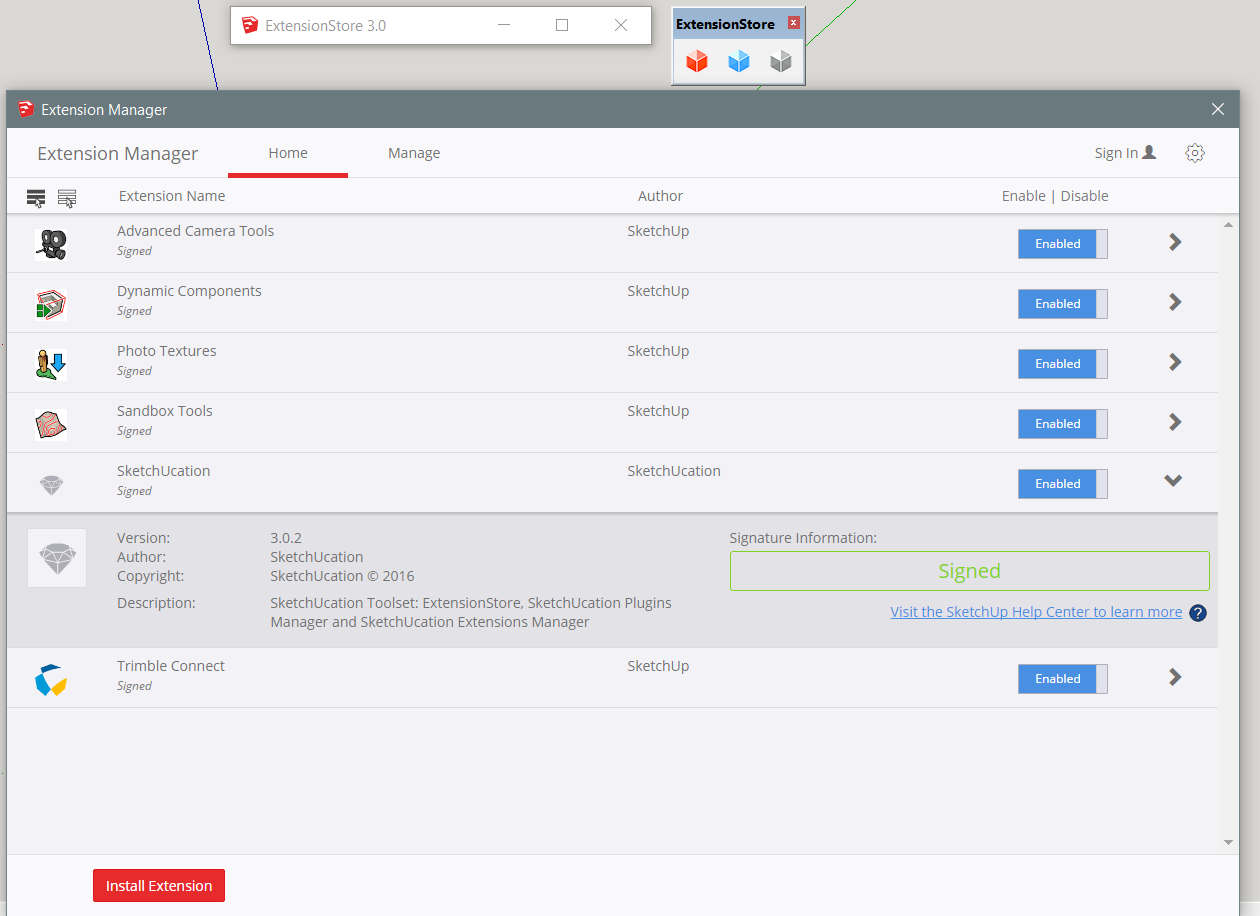
                                            It was showing as disabled because I set it that way - I can't remember quite what I was doing that for, but rest assured it is not disabled now.

                                            Yes, I have tried 3.0.2.
                                            Capture.PNG

                                            1 Reply Last reply
                                            Reply Quote 0

                                            Hello! It looks like you're interested in this conversation, but you don't have an account yet.

                                            Getting fed up of having to scroll through the same posts each visit? When you register for an account, you'll always come back to exactly where you were before, and choose to be notified of new replies (either via email, or push notification). You'll also be able to save bookmarks and upvote posts to show your appreciation to other community members.

                                            With your input, this post could be even better πŸ’—

                                            Register Login
                                            • 1
                                            • 2
                                            • 3
                                            • 4
                                            • 5
                                            • 6
                                            • 5 / 6
                                            • First post
                                              Last post
                                            Buy SketchPlus
                                            Buy SUbD
                                            Buy WrapR
                                            Buy eBook
                                            Buy Modelur
                                            Buy Vertex Tools
                                            Buy SketchCuisine
                                            Buy FormFonts

                                            Advertisement