sketchucation logo sketchucation
    • 登入
    Oops, your profile's looking a bit empty! To help us tailor your experience, please fill in key details like your SketchUp version, skill level, operating system, and more. Update and save your info on your profile page today!
    ⚠️ Important | Libfredo 15.6b introduces important bugfixes for Fredo's Extensions Update

    Automatically load a component.

    已排程 已置頂 已鎖定 已移動 Developers' Forum
    70 貼文 5 Posters 7.0k 瀏覽 5 Watching
    正在載入更多貼文
    • 從舊到新
    • 從新到舊
    • 最多點贊
    回覆
    • 在新貼文中回覆
    登入後回覆
    此主題已被刪除。只有擁有主題管理權限的使用者可以查看。
    • TNTDAVIDT 離線
      TNTDAVID
      最後由 編輯

      Hello, ☀

      I am a beginner in ruby, and I need your help.

      What code is used to import a component present in the Plugin, without
      hang the mouse pointer?

      The import should be automatic, each openings SketchUp, or a new scene.

      How to make the invisible component, and impossible to see from SketchUp?

      The goal is to protect my other "Dynamic components", with a parent component.

      Thank you in advance for your help.

      Cordially

      David

      [b:8wt9py2i]* Nouveau !!![/b:8wt9py2i] Découvrez notre nouveau Plugin [url=http://www.composant-dynamique.com/:8wt9py2i][color=#40FF00:8wt9py2i]C[/color:8wt9py2i][color=#77FF00:8wt9py2i]l[/color:8wt9py2i][color=#ADFF00:8wt9py2i]i[/color:8wt9py2i][color=#E4FF00:8wt9py2i]c[/color:8wt9py2i][color=#FFDB09:8wt9py2i]k[/color:8wt9py2i][color=#FF921B:8wt9py2i]-[/color:8wt9py2i][color=#FF492E:8wt9py2i]C[/color:8wt9py2i][color=#FF0040:8wt9py2i]u[/color:8wt9py2i][color=#ED2577:8wt9py2i]i[/color:8wt9py2i][color=#DA49AD:8wt9py2i]s[/color:8wt9py2i][color=#C86EE4:8wt9py2i]i[/color:8wt9py2i][color=#AD77FF:8wt9py2i]n[/color:8wt9py2i][color=#8965FF:8wt9py2i]e[/color:8wt9py2i] [color=#4040FF:8wt9py2i]2[/color:8wt9py2i][/url:8wt9py2i], pour créer vos cuisines 3D !

      1 條回覆 最後回覆 回覆 引用 0
      • TIGT 離線
        TIG Moderator
        最後由 編輯

        You can load a component into the model
        defn = model.definitions.load(path_to_skp)

        Then you can place an instance of that in the model.
        inst = model.active_entities(defn, some_transformation)

        However, you can't make it "invisible"...
        But you can assign it to an OFF layer or 'Hide' it.

        TIG

        1 條回覆 最後回覆 回覆 引用 0
        • TNTDAVIDT 離線
          TNTDAVID
          最後由 編輯

          Like this ?

          path=Sketchup.find_support_file "cube.skp","Components"
          model = Sketchup.active_model
          definitions = model.definitions
          componentdefinition = definitions.load path
          component = definitions[0]
          

          And that?

          coordinates = [10, 10, 10]
          model = Sketchup.active_model
          entities = model.entities
          point = Geom;;Point3d.new coordinates
          text = entities.add_text "This is a Test", point
          model = entities.model
          

          I found these codes in the API.

          I need your help to understand how to assemble these codes?

          I wish that the code works is each launch of SketchUp, with a fichier.rb

          Thank you

          David

          [b:8wt9py2i]* Nouveau !!![/b:8wt9py2i] Découvrez notre nouveau Plugin [url=http://www.composant-dynamique.com/:8wt9py2i][color=#40FF00:8wt9py2i]C[/color:8wt9py2i][color=#77FF00:8wt9py2i]l[/color:8wt9py2i][color=#ADFF00:8wt9py2i]i[/color:8wt9py2i][color=#E4FF00:8wt9py2i]c[/color:8wt9py2i][color=#FFDB09:8wt9py2i]k[/color:8wt9py2i][color=#FF921B:8wt9py2i]-[/color:8wt9py2i][color=#FF492E:8wt9py2i]C[/color:8wt9py2i][color=#FF0040:8wt9py2i]u[/color:8wt9py2i][color=#ED2577:8wt9py2i]i[/color:8wt9py2i][color=#DA49AD:8wt9py2i]s[/color:8wt9py2i][color=#C86EE4:8wt9py2i]i[/color:8wt9py2i][color=#AD77FF:8wt9py2i]n[/color:8wt9py2i][color=#8965FF:8wt9py2i]e[/color:8wt9py2i] [color=#4040FF:8wt9py2i]2[/color:8wt9py2i][/url:8wt9py2i], pour créer vos cuisines 3D !

          1 條回覆 最後回覆 回覆 引用 0
          • TIGT 離線
            TIG Moderator
            最後由 編輯

            To analyze your code...

            ' path' is set up as a reference to a skp in the standard SketchUp shipped 'Components' folder.
            You could alternatively set it to a skp inside a custom subfolder, from where your code is loading using __FILE__ you have used this idea in a separate thread last week...
            ...
            componentdefinition = definitions.load(path)
            gives a reference to the newly loaded component.
            However,
            component = definitions[0]
            gives a reference to the first definition in the model's list.
            That might not be the one you just loaded.
            An alternative definitions[-1] gives the last loaded definition but again this could be wrong - especially if the loaded skp contains multiple sub-component definitions as well...
            ...
            At this point you have not got an instance of that newly loaded component - just its definition loaded into the model's definitions list.
            ...
            To add an instance use
            instance = model.active_entities.add_instance(componentdefinition, transformation)
            Note that model.entities is the base level of the model, whereas model.active_entities might be that, but if the user is in an edit of a component or group it will be points at that other entities-collection...
            ...
            The ' transformation' determines the instance's, location, rotation, scaling etc...
            It can be as simple as ORIGIN or a more complex Geom::Transformation... - you need to read up on that...
            ...
            Your second part sets up an x/y/z array representing a point [the default units are inches, use 10.cm etc otherwise]
            Note the earlier comments about .entities versus .active_entities...
            You then add text at that point.
            There's no need to redefine model as it's already been set up earlier.
            ...


            There's lots to learn and consider...
            I find it best to write out in simple phrases what I hope the code to do at each logical step...
            Then code those steps in turn, until it's working as desired...

            TIG

            1 條回覆 最後回覆 回覆 引用 0
            • TNTDAVIDT 離線
              TNTDAVID
              最後由 編輯

              Thank you for the explanation of instances and definitions. 😉

              Now I want to write code that works with all these formulas.

              There are basic rules that I need to learn, for assemble without error all these formulas.

              For example :

              • When and how to "end" it should be added?

              • When a class opens and for what?

              *** Is there a website that explains all this?**

              I assembled the two code at random:

              module ClickWindow3D_Trial_mm
              
              path=Sketchup.find_support_file "cube.skp","Components"
              model = Sketchup.active_model
              definitions = model.definitions
              componentdefinition = definitions.load path
              component = definitions[0]
              coordinates = [10, 10, 10]
              entities = model.entities
              point = Geom;;Point3d.new coordinates
              text = entities.add_text "This is a Test", point
              model = entities.model
              
              end
              

              At launch SketchUp, I have this error message:

              @unknownuser said:

              Error Loading File C:/Users/DAVID/AppData/Roaming/SketchUp/SketchUp 2015/SketchUp/Plugins/TNT_ClickWindow3D_Trial_mm/logic.rb
              Error: #<TypeError: no implicit conversion of nil into String>
              C:/Users/DAVID/AppData/Roaming/SketchUp/SketchUp 2015/SketchUp/Plugins/TNT_ClickWindow3D_Trial_mm/logic.rb:6:in load' C:/Users/DAVID/AppData/Roaming/SketchUp/SketchUp 2015/SketchUp/Plugins/TNT_ClickWindow3D_Trial_mm/logic.rb:6:in module:ClickWindow3D_Trial_mm'
              C:/Users/DAVID/AppData/Roaming/SketchUp/SketchUp 2015/SketchUp/Plugins/TNT_ClickWindow3D_Trial_mm/logic.rb:1:in <top (required)>' C:/Program Files/SketchUp/SketchUp 2015/Tools/extensions.rb:197:in require'
              C:/Program Files/SketchUp/SketchUp 2015/Tools/extensions.rb:197:in load' C:/Users/DAVID/AppData/Roaming/SketchUp/SketchUp 2015/SketchUp/Plugins/TNT_ClickWindow3D_Trial_mm.rb:28:in register_extension'
              C:/Users/DAVID/AppData/Roaming/SketchUp/SketchUp 2015/SketchUp/Plugins/TNT_ClickWindow3D_Trial_mm.rb:28:in <module:ClickWindow3D_Trial_mm>' C:/Users/DAVID/AppData/Roaming/SketchUp/SketchUp 2015/SketchUp/Plugins/TNT_ClickWindow3D_Trial_mm.rb:18:in <top (required)>'

              Where are my errors, which seem obvious to you?

              Thank you for your help.

              cordially

              David

              [b:8wt9py2i]* Nouveau !!![/b:8wt9py2i] Découvrez notre nouveau Plugin [url=http://www.composant-dynamique.com/:8wt9py2i][color=#40FF00:8wt9py2i]C[/color:8wt9py2i][color=#77FF00:8wt9py2i]l[/color:8wt9py2i][color=#ADFF00:8wt9py2i]i[/color:8wt9py2i][color=#E4FF00:8wt9py2i]c[/color:8wt9py2i][color=#FFDB09:8wt9py2i]k[/color:8wt9py2i][color=#FF921B:8wt9py2i]-[/color:8wt9py2i][color=#FF492E:8wt9py2i]C[/color:8wt9py2i][color=#FF0040:8wt9py2i]u[/color:8wt9py2i][color=#ED2577:8wt9py2i]i[/color:8wt9py2i][color=#DA49AD:8wt9py2i]s[/color:8wt9py2i][color=#C86EE4:8wt9py2i]i[/color:8wt9py2i][color=#AD77FF:8wt9py2i]n[/color:8wt9py2i][color=#8965FF:8wt9py2i]e[/color:8wt9py2i] [color=#4040FF:8wt9py2i]2[/color:8wt9py2i][/url:8wt9py2i], pour créer vos cuisines 3D !

              1 條回覆 最後回覆 回覆 引用 0
              • TIGT 離線
                TIG Moderator
                最後由 編輯

                I don't see your entire code.
                E.G. loader .rb and main code .rb etc...
                Also you have ignored my advice about NOT running certain lines of text.

                As a principle I'd use the loader to run some code in this format

                module TNT
                  module SomeSubModule
                    def self.do_somethings()
                      ### the lines of code to run
                    end
                    self.do_somethings() ### this runs the code as it loads ### to use a menu is different...
                  end
                end
                

                You do NOT need to make your 'module' a 'class' unless you are going to call it somehow in other code, or if it is to be used as a 'Tool' - which means there is user interaction - like picking points etc...

                TIG

                1 條回覆 最後回覆 回覆 引用 0
                • Dan RathbunD 離線
                  Dan Rathbun
                  最後由 編輯

                  @tntdavid said:

                  Error Loading File C:/Users/DAVID/AppData/Roaming/SketchUp/SketchUp 2015/SketchUp/Plugins/TNT_ClickWindow3D_Trial_mm/logic.rb Error: #<TypeError: no implicit conversion of nil into String> C:/Users/DAVID/AppData/Roaming/SketchUp/SketchUp 2015/SketchUp/Plugins/TNT_ClickWindow3D_Trial_mm/logic.rb:6:inload'`

                  Where are my errors, which seem obvious to you?

                  The error message tells you where the error is:
                  "C:/Users/DAVID/AppData/Roaming/SketchUp/SketchUp 2015/SketchUp/Plugins/TNT_ClickWindow3D_Trial_mm/logic.rb:6:inload'`"

                  The error is in file: "logic.rb", at line 6, in the load() method call.

                  The error is: "TypeError: no implicit conversion of nil into String",...

                  ... which means your code is expecting a String object, but the object is a reference to nil instead.

                  I'm not here much anymore.

                  1 條回覆 最後回覆 回覆 引用 0
                  • TNTDAVIDT 離線
                    TNTDAVID
                    最後由 編輯

                    @tig said:

                    I don't see your entire code.

                    The code is complet. 💚

                    I just want to create a fichier.rb, which imports a component in each new scene, as "Steve" in "SKP 2015" or "Lisanne" in 2016.

                    @tig said:

                    E.G. loader .rb and main code .rb etc...
                    Also you have ignored my advice about NOT running certain lines of text.

                    I have great difficulty understanding your instructions!

                    This is not an unwillingness by my. 😳

                    It takes another file "loader .rb"?

                    You mean the file is in the "Plugins" folder, with copyright, the name of the developer?

                    @tig said:

                    module TNT
                      module SomeSubModule
                        def self.do_somethings()
                          ### the lines of code to run
                        end
                        self.do_somethings() ### this runs the code as it loads ### to use a menu is different...
                      end
                    end

                    Thank you for your example.

                    Beginner question:

                    def Toto2016
                    
                    Code ####
                    
                    end
                    

                    The interest of "def" is to give a personalized name to the code that follows?

                    We can subsequently call with an icon or an item or other?


                    Hello Dan Rathbun, Thanks for your participation.

                    In future I will be able to spot my mistakes and try to correct them. 👍

                    How to Write a "String Object"?

                    Or should it be written and how to use?

                    Thank you in advance for your answers.

                    David

                    [b:8wt9py2i]* Nouveau !!![/b:8wt9py2i] Découvrez notre nouveau Plugin [url=http://www.composant-dynamique.com/:8wt9py2i][color=#40FF00:8wt9py2i]C[/color:8wt9py2i][color=#77FF00:8wt9py2i]l[/color:8wt9py2i][color=#ADFF00:8wt9py2i]i[/color:8wt9py2i][color=#E4FF00:8wt9py2i]c[/color:8wt9py2i][color=#FFDB09:8wt9py2i]k[/color:8wt9py2i][color=#FF921B:8wt9py2i]-[/color:8wt9py2i][color=#FF492E:8wt9py2i]C[/color:8wt9py2i][color=#FF0040:8wt9py2i]u[/color:8wt9py2i][color=#ED2577:8wt9py2i]i[/color:8wt9py2i][color=#DA49AD:8wt9py2i]s[/color:8wt9py2i][color=#C86EE4:8wt9py2i]i[/color:8wt9py2i][color=#AD77FF:8wt9py2i]n[/color:8wt9py2i][color=#8965FF:8wt9py2i]e[/color:8wt9py2i] [color=#4040FF:8wt9py2i]2[/color:8wt9py2i][/url:8wt9py2i], pour créer vos cuisines 3D !

                    1 條回覆 最後回覆 回覆 引用 0
                    • TNTDAVIDT 離線
                      TNTDAVID
                      最後由 編輯

                      @dan rathbun said:

                      The error is: "TypeError: no implicit conversion of nil into String",...

                      ... which means your code is expecting a String object, but the object is a reference to nil instead.

                      Understand and resolve this error message is very important to me.

                      The only thing I find about "String Object" is on this page:

                      http://www.sketchup.com/intl/en/developer/docs/ourdoc/string

                      It does not allow me to solve my problem.

                      With the following code:

                      module TNTDAVID
                        module ClickWindow3D_Trial_mm
                          def self.auto_run_code()
                            path = Sketchup.find_support_file("cube.skp", "Components")
                            model = Sketchup.active_model
                            definitions = model.definitions
                            component_definition = definitions.load(path)
                            point = Geom;;Point3d.new(10, 20, 30)
                            transformation = Geom;;Transformation.new(point)
                            instance = entities.add_instance(component_definition, transformation)
                          end
                          self.auto_run_code()
                        end
                      end
                      

                      I get the same error message in the "Consol Ruby".

                      When I launch SketchUp, I have this message:

                      @unknownuser said:

                      Error Loading File C:/Users/DAVID/AppData/Roaming/SketchUp/SketchUp 2015/SketchUp/Plugins/TNT_ClickWindow3D_Trial_mm/logic.rb
                      Error: #<TypeError: no implicit conversion of nil into String>
                      C:/Users/DAVID/AppData/Roaming/SketchUp/SketchUp 2015/SketchUp/Plugins/TNT_ClickWindow3D_Trial_mm/logic.rb:7:in load' C:/Users/DAVID/AppData/Roaming/SketchUp/SketchUp 2015/SketchUp/Plugins/TNT_ClickWindow3D_Trial_mm/logic.rb:7:in auto_run_code'
                      C:/Users/DAVID/AppData/Roaming/SketchUp/SketchUp 2015/SketchUp/Plugins/TNT_ClickWindow3D_Trial_mm/logic.rb:12:in <module:TNTDAVID>' C:/Users/DAVID/AppData/Roaming/SketchUp/SketchUp 2015/SketchUp/Plugins/TNT_ClickWindow3D_Trial_mm/logic.rb:2:in module:ClickWindow3D_Trial_mm'
                      C:/Users/DAVID/AppData/Roaming/SketchUp/SketchUp 2015/SketchUp/Plugins/TNT_ClickWindow3D_Trial_mm/logic.rb:1:in <top (required)>' C:/Program Files/SketchUp/SketchUp 2015/Tools/extensions.rb:197:in require'
                      C:/Program Files/SketchUp/SketchUp 2015/Tools/extensions.rb:197:in load' C:/Users/DAVID/AppData/Roaming/SketchUp/SketchUp 2015/SketchUp/Plugins/TNT_ClickWindow3D_Trial_mm.rb:28:in register_extension'
                      C:/Users/DAVID/AppData/Roaming/SketchUp/SketchUp 2015/SketchUp/Plugins/TNT_ClickWindow3D_Trial_mm.rb:28:in <module:ClickWindow3D_Trial_mm>' C:/Users/DAVID/AppData/Roaming/SketchUp/SketchUp 2015/SketchUp/Plugins/TNT_ClickWindow3D_Trial_mm.rb:18:in <top (required)>'

                      Your help is essential to me to find a solution.

                      Thank you
                      David

                      [b:8wt9py2i]* Nouveau !!![/b:8wt9py2i] Découvrez notre nouveau Plugin [url=http://www.composant-dynamique.com/:8wt9py2i][color=#40FF00:8wt9py2i]C[/color:8wt9py2i][color=#77FF00:8wt9py2i]l[/color:8wt9py2i][color=#ADFF00:8wt9py2i]i[/color:8wt9py2i][color=#E4FF00:8wt9py2i]c[/color:8wt9py2i][color=#FFDB09:8wt9py2i]k[/color:8wt9py2i][color=#FF921B:8wt9py2i]-[/color:8wt9py2i][color=#FF492E:8wt9py2i]C[/color:8wt9py2i][color=#FF0040:8wt9py2i]u[/color:8wt9py2i][color=#ED2577:8wt9py2i]i[/color:8wt9py2i][color=#DA49AD:8wt9py2i]s[/color:8wt9py2i][color=#C86EE4:8wt9py2i]i[/color:8wt9py2i][color=#AD77FF:8wt9py2i]n[/color:8wt9py2i][color=#8965FF:8wt9py2i]e[/color:8wt9py2i] [color=#4040FF:8wt9py2i]2[/color:8wt9py2i][/url:8wt9py2i], pour créer vos cuisines 3D !

                      1 條回覆 最後回覆 回覆 引用 0
                      • K 離線
                        kaas
                        最後由 編輯

                        If I run your code I get the same error.

                        The component_definition = definitions.load(path) is expecting a path to that cube.skp (a string), instead it gets NIL because there is no cube.skp in SketchUp defaults components folder.

                        So; if you put a cube.skp in that folder this will work.

                        Edit: maybe have a look at some ruby training videos? (Lynda.com for instance has some). It might help in understanding the principles of Ruby coding. Could be helpful if you intend to sell (and support) your plugins.

                        1 條回覆 最後回覆 回覆 引用 0
                        • TIGT 離線
                          TIG Moderator
                          最後由 編輯

                          path = Sketchup.find_support_file("cube.skp", "Components")
                          either returns nil [no match]
                          or if it matches, something like
                          "C:\\Program Files\\SketchUp\\SketchUp 2015\\Components\\cube.skp"
                          To check if it works use:
                          puts "path = #{path}"
                          and
                          puts "path exist? #{File.exist?(path)}"
                          as it runs, or in the code itself, to abort early...
                          (UI.messagebox("Path does not exist\n#{File.exist?(path)}"); return nil) unless path && File.exist?(path)

                          I expect in the 'real' code you are setting the path to a skp in a components-subfodler within the extension's own subfolder - found using __FILE__ to get the rb's folder path etc...

                          TIG

                          1 條回覆 最後回覆 回覆 引用 0
                          • TNTDAVIDT 離線
                            TNTDAVID
                            最後由 編輯

                            I added "cube.skp" in "Components Sampler" folder, there is always the same error message.
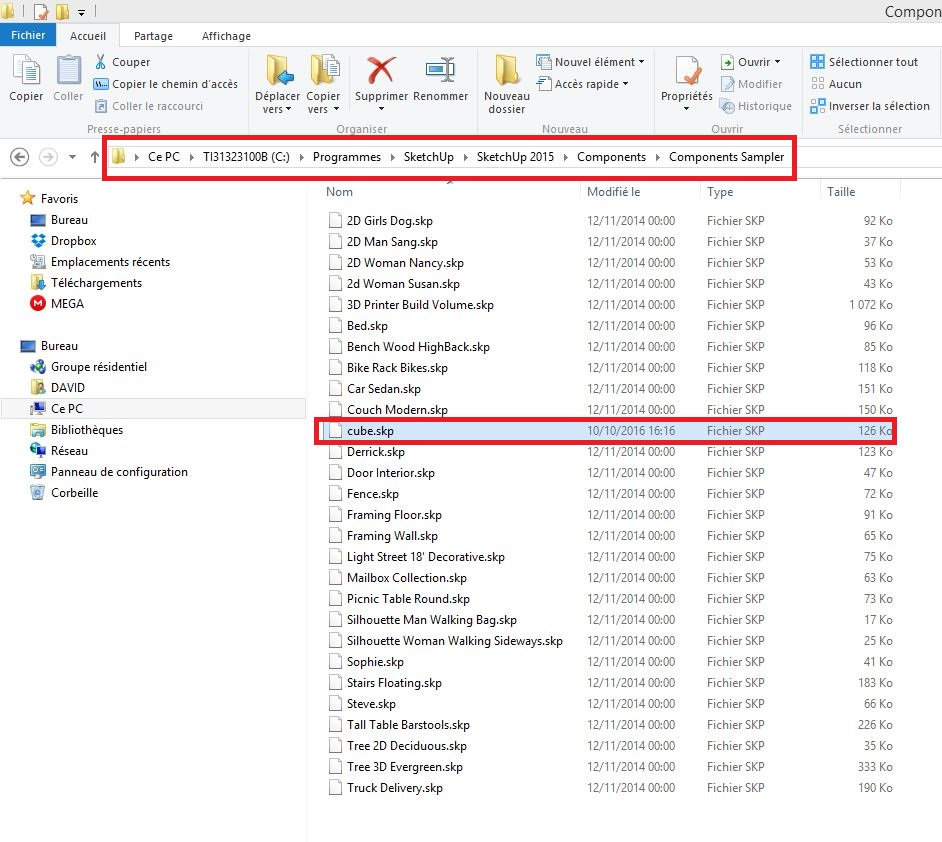

                            http://zupimages.net/up/16/41/i14l.jpg

                            module TNTDAVID
                              module ClickWindow3D_Trial_mm
                                def self.auto_run_code()
                                  path = Sketchup.find_support_file("cube.skp", "Components/Components Sampler")
                                  model = Sketchup.active_model
                                  definitions = model.definitions
                                  component_definition = definitions.load(path)
                                  point = Geom;;Point3d.new(10, 20, 30)
                                  transformation = Geom;;Transformation.new(point)
                                  instance = entities.add_instance(component_definition, transformation)
                                end
                                self.auto_run_code()
                              end
                            end
                            

                            @unknownuser said:

                            Error Loading File C:/Users/DAVID/AppData/Roaming/SketchUp/SketchUp 2015/SketchUp/Plugins/TNT_ClickWindow3D_Trial_mm/logic.rb
                            Error: #<NameError: undefined local variable or method entities' for TNTDAVID::ClickWindow3D_Trial_mm:Module> C:/Users/DAVID/AppData/Roaming/SketchUp/SketchUp 2015/SketchUp/Plugins/TNT_ClickWindow3D_Trial_mm/logic.rb:10:in auto_run_code'
                            C:/Users/DAVID/AppData/Roaming/SketchUp/SketchUp 2015/SketchUp/Plugins/TNT_ClickWindow3D_Trial_mm/logic.rb:12:in <module:ClickWindow3D_Trial_mm>' C:/Users/DAVID/AppData/Roaming/SketchUp/SketchUp 2015/SketchUp/Plugins/TNT_ClickWindow3D_Trial_mm/logic.rb:2:in module:TNTDAVID'
                            C:/Users/DAVID/AppData/Roaming/SketchUp/SketchUp 2015/SketchUp/Plugins/TNT_ClickWindow3D_Trial_mm/logic.rb:1:in <top (required)>' C:/Program Files/SketchUp/SketchUp 2015/Tools/extensions.rb:197:in require'
                            C:/Program Files/SketchUp/SketchUp 2015/Tools/extensions.rb:197:in load' C:/Users/DAVID/AppData/Roaming/SketchUp/SketchUp 2015/SketchUp/Plugins/TNT_ClickWindow3D_Trial_mm.rb:28:in register_extension'
                            C:/Users/DAVID/AppData/Roaming/SketchUp/SketchUp 2015/SketchUp/Plugins/TNT_ClickWindow3D_Trial_mm.rb:28:in <module:ClickWindow3D_Trial_mm>' C:/Users/DAVID/AppData/Roaming/SketchUp/SketchUp 2015/SketchUp/Plugins/TNT_ClickWindow3D_Trial_mm.rb:18:in <top (required)>'

                            Why, there's always this error message?


                            @tig said:

                            I expect in the 'real' code you are setting the path to a skp in a components-subfodler within the extension's own subfolder - found using FILE to get the rb's folder path etc...

                            I can use the File method to import a component from an icon.

                            module ClickWindow3D_Trial_mm
                            
                              class << self
                            
                                path_to_components = File.join(File.dirname(__FILE__), 'Components')
                                @@path_to_00 = File.join(path_to_components,'00-Control-Panel-Trial-mm.skp')
                            
                                def add_00
                                  Sketchup.active_model.import(@@path_to_00)
                                end
                                
                            if !file_loaded?(__FILE__)
                            
                            
                                    tb = UI;;Toolbar.new(%Q(Click-Window3D-Trial-mm))
                            
                                    command1 = UI;;Command.new("add Resources"){ ClickWindow3D_Trial_mm.add_00 }
                            
                                    command1.small_icon = File.join(@@path_to_resources,"add_00.png")
                            
                                    command1.large_icon = File.join(@@path_to_resources,"add_00.png")
                            
                                    tb.add_item(command1)
                            
                                    tb.restore
                            
                                    file_loaded(__FILE__)
                            
                                   end
                            
                               end
                            

                            How to change the code so that "cube.skp" is automatically imported on each SketchUp scene?

                            Thank you

                            [b:8wt9py2i]* Nouveau !!![/b:8wt9py2i] Découvrez notre nouveau Plugin [url=http://www.composant-dynamique.com/:8wt9py2i][color=#40FF00:8wt9py2i]C[/color:8wt9py2i][color=#77FF00:8wt9py2i]l[/color:8wt9py2i][color=#ADFF00:8wt9py2i]i[/color:8wt9py2i][color=#E4FF00:8wt9py2i]c[/color:8wt9py2i][color=#FFDB09:8wt9py2i]k[/color:8wt9py2i][color=#FF921B:8wt9py2i]-[/color:8wt9py2i][color=#FF492E:8wt9py2i]C[/color:8wt9py2i][color=#FF0040:8wt9py2i]u[/color:8wt9py2i][color=#ED2577:8wt9py2i]i[/color:8wt9py2i][color=#DA49AD:8wt9py2i]s[/color:8wt9py2i][color=#C86EE4:8wt9py2i]i[/color:8wt9py2i][color=#AD77FF:8wt9py2i]n[/color:8wt9py2i][color=#8965FF:8wt9py2i]e[/color:8wt9py2i] [color=#4040FF:8wt9py2i]2[/color:8wt9py2i][/url:8wt9py2i], pour créer vos cuisines 3D !

                            1 條回覆 最後回覆 回覆 引用 0
                            • Dan RathbunD 離線
                              Dan Rathbun
                              最後由 編輯

                              @tntdavid said:

                              The only thing I find about "String Object" is on this page:
                              http://www.sketchup.com/intl/en/developer/docs/ourdoc/string

                              David, The SketchUp Ruby API is an extension to standard Core Ruby, and
                              adds a few methods to the Ruby's core String class:
                              http://ruby-doc.org/core-2.0.0/String.html

                              You need to learn standard Ruby before you can really appreciate what SketchUp's API adds to Ruby.

                              Here is a set of lists that will help (at the official SketchUp forum):
                              [url=http://forums.sketchup.com/t/ruby-learning-resources-wikilists/22861:2epja1nk]Ruby Learning Resources [WikiLists][/url:2epja1nk]
                              (There is similar, but perhaps older list, here ar SCF as well.)

                              I'm not here much anymore.

                              1 條回覆 最後回覆 回覆 引用 0
                              • Dan RathbunD 離線
                                Dan Rathbun
                                最後由 編輯

                                @tntdavid said:

                                I added "cube.skp" in "Components Sampler" folder, there is always the same error message.

                                Why, there's always this error message?

                                David, code files need to be encoded as UTF-8 without BOM (BOM = Bit Order Mark.)

                                The first line of all SketchUp code files should also always be the "magic comment":
                                # encoding: UTF-8

                                See: Ruby Core docs: Encoding - Script encoding

                                I'm not here much anymore.

                                1 條回覆 最後回覆 回覆 引用 0
                                • TNTDAVIDT 離線
                                  TNTDAVID
                                  最後由 編輯

                                  Hello, kaas 😄

                                  My "cube.skp" is in the "Components" folder in my plugin.

                                  It should be placed in another folder?

                                  You can download HERE the full fichier.rbz.

                                  Thank you for your help.

                                  cordially

                                  David

                                  Ps: Thank you for your links.


                                  Edit: Small error in "TesteCube.rb" corrected.

                                  [b:8wt9py2i]* Nouveau !!![/b:8wt9py2i] Découvrez notre nouveau Plugin [url=http://www.composant-dynamique.com/:8wt9py2i][color=#40FF00:8wt9py2i]C[/color:8wt9py2i][color=#77FF00:8wt9py2i]l[/color:8wt9py2i][color=#ADFF00:8wt9py2i]i[/color:8wt9py2i][color=#E4FF00:8wt9py2i]c[/color:8wt9py2i][color=#FFDB09:8wt9py2i]k[/color:8wt9py2i][color=#FF921B:8wt9py2i]-[/color:8wt9py2i][color=#FF492E:8wt9py2i]C[/color:8wt9py2i][color=#FF0040:8wt9py2i]u[/color:8wt9py2i][color=#ED2577:8wt9py2i]i[/color:8wt9py2i][color=#DA49AD:8wt9py2i]s[/color:8wt9py2i][color=#C86EE4:8wt9py2i]i[/color:8wt9py2i][color=#AD77FF:8wt9py2i]n[/color:8wt9py2i][color=#8965FF:8wt9py2i]e[/color:8wt9py2i] [color=#4040FF:8wt9py2i]2[/color:8wt9py2i][/url:8wt9py2i], pour créer vos cuisines 3D !

                                  1 條回覆 最後回覆 回覆 引用 0
                                  • TNTDAVIDT 離線
                                    TNTDAVID
                                    最後由 編輯

                                    @dan rathbun said:

                                    David, code files need to be encoded as UTF-8 without BOM (BOM = Bit Order Mark.)

                                    The first line of all SketchUp code files should also always be the "magic comment":

                                    encoding: UTF-8

                                    Another thing I just learned. 😮

                                    Have you sample code # encoding: UTF-8?

                                    I supose that my error is because of that ?

                                    Thanks

                                    [b:8wt9py2i]* Nouveau !!![/b:8wt9py2i] Découvrez notre nouveau Plugin [url=http://www.composant-dynamique.com/:8wt9py2i][color=#40FF00:8wt9py2i]C[/color:8wt9py2i][color=#77FF00:8wt9py2i]l[/color:8wt9py2i][color=#ADFF00:8wt9py2i]i[/color:8wt9py2i][color=#E4FF00:8wt9py2i]c[/color:8wt9py2i][color=#FFDB09:8wt9py2i]k[/color:8wt9py2i][color=#FF921B:8wt9py2i]-[/color:8wt9py2i][color=#FF492E:8wt9py2i]C[/color:8wt9py2i][color=#FF0040:8wt9py2i]u[/color:8wt9py2i][color=#ED2577:8wt9py2i]i[/color:8wt9py2i][color=#DA49AD:8wt9py2i]s[/color:8wt9py2i][color=#C86EE4:8wt9py2i]i[/color:8wt9py2i][color=#AD77FF:8wt9py2i]n[/color:8wt9py2i][color=#8965FF:8wt9py2i]e[/color:8wt9py2i] [color=#4040FF:8wt9py2i]2[/color:8wt9py2i][/url:8wt9py2i], pour créer vos cuisines 3D !

                                    1 條回覆 最後回覆 回覆 引用 0
                                    • TIGT 離線
                                      TIG Moderator
                                      最後由 編輯

                                      It's a good idea to include that as the first line of all of your RB files.
                                      But, it's not essential - if you use Notepad++ exe you can set up its preferences so that all new files you create are set to be properly encoded UTF-8 [without BOM] - which is required by the newer versions of Ruby.
                                      Unfortunately the Windows bare-bones Notepad exe uses an inappropriate text encoding system - ANSI I think ?
                                      And if you have an existing RB file that is encoded 'wrongly' [e.g. ANSI] you can use Notepad++ to change its encoding to UTF-8, then save it - and it should then be permanently set to that proper encoding...

                                      Get Notepad++ exe v7 from here - it's free and has helpful Ruby syntax tools built in...
                                      https://notepad-plus-plus.org/download/v7.html
                                      There are 32 and 64 bit versions - I use the 64...

                                      TIG

                                      1 條回覆 最後回覆 回覆 引用 0
                                      • TNTDAVIDT 離線
                                        TNTDAVID
                                        最後由 編輯

                                        Thank you for the download link TIG. 👍

                                        I encoded my "rb" in "UTF-8", without BOM!

                                        It is not the cause of the error message.

                                        You can download HERE, the new "RBZ".

                                        Thank you in advance for your help.

                                        [b:8wt9py2i]* Nouveau !!![/b:8wt9py2i] Découvrez notre nouveau Plugin [url=http://www.composant-dynamique.com/:8wt9py2i][color=#40FF00:8wt9py2i]C[/color:8wt9py2i][color=#77FF00:8wt9py2i]l[/color:8wt9py2i][color=#ADFF00:8wt9py2i]i[/color:8wt9py2i][color=#E4FF00:8wt9py2i]c[/color:8wt9py2i][color=#FFDB09:8wt9py2i]k[/color:8wt9py2i][color=#FF921B:8wt9py2i]-[/color:8wt9py2i][color=#FF492E:8wt9py2i]C[/color:8wt9py2i][color=#FF0040:8wt9py2i]u[/color:8wt9py2i][color=#ED2577:8wt9py2i]i[/color:8wt9py2i][color=#DA49AD:8wt9py2i]s[/color:8wt9py2i][color=#C86EE4:8wt9py2i]i[/color:8wt9py2i][color=#AD77FF:8wt9py2i]n[/color:8wt9py2i][color=#8965FF:8wt9py2i]e[/color:8wt9py2i] [color=#4040FF:8wt9py2i]2[/color:8wt9py2i][/url:8wt9py2i], pour créer vos cuisines 3D !

                                        1 條回覆 最後回覆 回覆 引用 0
                                        • K 離線
                                          kaas
                                          最後由 編輯

                                          The error points you into the right direction: Error: #<NameError: undefined local variable or methodentities' for TNTDAVID::ClickWindow3D_Trial_mm:Module>`

                                          My guess is, the error refers to:
                                          instance = **entities**.add_instance(component_definition, transformation)

                                          If you change that line to:
                                          instance = model.entities.add_instance(component_definition, transformation)

                                          you might have more luck.

                                          1 條回覆 最後回覆 回覆 引用 0
                                          • TIGT 離線
                                            TIG Moderator
                                            最後由 編輯

                                            @Kaas is correct.
                                            Try...
                                            entities = model.active_entities instance = entities.add_instance(component_definition, transformation)

                                            There have been so many iterations of your code fragments across two threads it becomes hard to keep track !


                                            TIG

                                            1 條回覆 最後回覆 回覆 引用 0
                                            • 1
                                            • 2
                                            • 3
                                            • 4
                                            • 1 / 4
                                            • 第一個貼文
                                              最後的貼文
                                            Buy SketchPlus
                                            Buy SUbD
                                            Buy WrapR
                                            Buy eBook
                                            Buy Modelur
                                            Buy Vertex Tools
                                            Buy SketchCuisine
                                            Buy FormFonts

                                            Advertisement
