Extension toolbars do not appear in UI
-
I had SU 8 and usually when I installed a plugin there appeared new buttons in the interface. Now I'm using SU 2016 and some of them (e.g. Eneroth's 3D rotate and Smustard's Weld) appear only in the upper toolbar (File, Edit...) which is uncomfortable. To contrary, Fredo's tools still appear as separate toolbars, that's fine. Anybody knows how to show hidden buttons?
-
Assuming the extensions were installed correctly and they are shown as active in Preferences>Extensions, you should be able to turn on their toolbars in View>Toolbars. I don't use the Smustard Weld extension but just installed it to check that the toolbar shows in SU2016 and it does show up just fine.
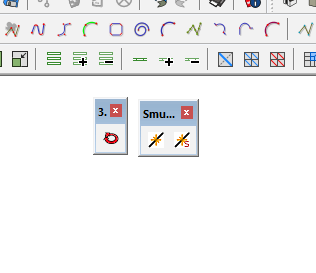
How did you install these extensions and where did you install them?
Did you look in the right place in the list of toolbars? Eneroth 3D Rotate shows up as 3D Rotate and Smustard Weld shows up as Smustard.

Hello! It looks like you're interested in this conversation, but you don't have an account yet.
Getting fed up of having to scroll through the same posts each visit? When you register for an account, you'll always come back to exactly where you were before, and choose to be notified of new replies (either via email, or push notification). You'll also be able to save bookmarks and upvote posts to show your appreciation to other community members.
With your input, this post could be even better 💗
Register Login


Advertisement