sketchucation logo sketchucation
    • 登入
    Oops, your profile's looking a bit empty! To help us tailor your experience, please fill in key details like your SketchUp version, skill level, operating system, and more. Update and save your info on your profile page today!
    🔌 Smart Spline | Fluid way to handle splines for furniture design and complex structures. Download

    Sections

    已排程 已置頂 已鎖定 已移動 Newbie Forum
    sketchup
    21 貼文 6 Posters 1.5k 瀏覽 6 Watching
    正在載入更多貼文
    • 從舊到新
    • 從新到舊
    • 最多點贊
    回覆
    • 在新貼文中回覆
    登入後回覆
    此主題已被刪除。只有擁有主題管理權限的使用者可以查看。
    • mootM 離線
      moot
      最後由 編輯

      @dave r said:

      A section plane does not cut geometry. It only gives the appearance of it being cut away. If you are actually trying to cut a flat on the side of your shape, you need to use something else. You can use a face intersected with the geometry or you could use an extension like Zorro2.

      Ok... I'll get that plugin/extension... I'll check the PluginStore...

      You can lead a horse to water, but you can't make 'em think!

      1 條回覆 最後回覆 回覆 引用 0
      • Dave RD 離線
        Dave R
        最後由 編輯

        @moot said:

        @dave r said:

        A section plane does not cut geometry. It only gives the appearance of it being cut away. If you are actually trying to cut a flat on the side of your shape, you need to use something else. You can use a face intersected with the geometry or you could use an extension like Zorro2.

        Ok... I'll get that plugin/extension... I'll check the PluginStore...

        You should also learn to do it with native tools.

        Etaoin Shrdlu

        %

        (THERE'S NO PLACE LIKE)

        G28 X0.0 Y0.0 Z0.0

        M30

        %

        1 條回覆 最後回覆 回覆 引用 0
        • mootM 離線
          moot
          最後由 編輯

          Really, that is what I am trying to do... maybe I'm getting to old... or just dumb... 😕

          You can lead a horse to water, but you can't make 'em think!

          1 條回覆 最後回覆 回覆 引用 0
          • Dave RD 離線
            Dave R
            最後由 編輯

            What exactly is it that you need out of this thing? What is the desired diameter of the cylinder? And the ring portion? How thick is the ring supposed to be and how long is the cylinder? AndHow are you locating the flat section?

            It would be easiest if you start this over. I'll show you but I'd like some actual dimensions so it can be drawn properly.

            Etaoin Shrdlu

            %

            (THERE'S NO PLACE LIKE)

            G28 X0.0 Y0.0 Z0.0

            M30

            %

            1 條回覆 最後回覆 回覆 引用 0
            • pbacotP 離線
              pbacot
              最後由 編輯

              @dave r said:

              @moot said:

              @dave r said:

              A section plane does not cut geometry. It only gives the appearance of it being cut away. If you are actually trying to cut a flat on the side of your shape, you need to use something else. You can use a face intersected with the geometry or you could use an extension like Zorro2.

              Ok... I'll get that plugin/extension... I'll check the PluginStore...

              You should also learn to do it with native tools.

              2-cts.: Not just the thing about native tools, but it seems more easily done without the making-and-then-chopping approach. The thickness may be more easily achieved from the start by extruding a "C" shaped surface etc.---approaching from another perspective.

              MacOSX MojaveSketchUp Pro v19 Twilight v2 Thea v3 PowerCADD

              1 條回覆 最後回覆 回覆 引用 0
              • Dave RD 離線
                Dave R
                最後由 編輯

                Does this come close to what you want?
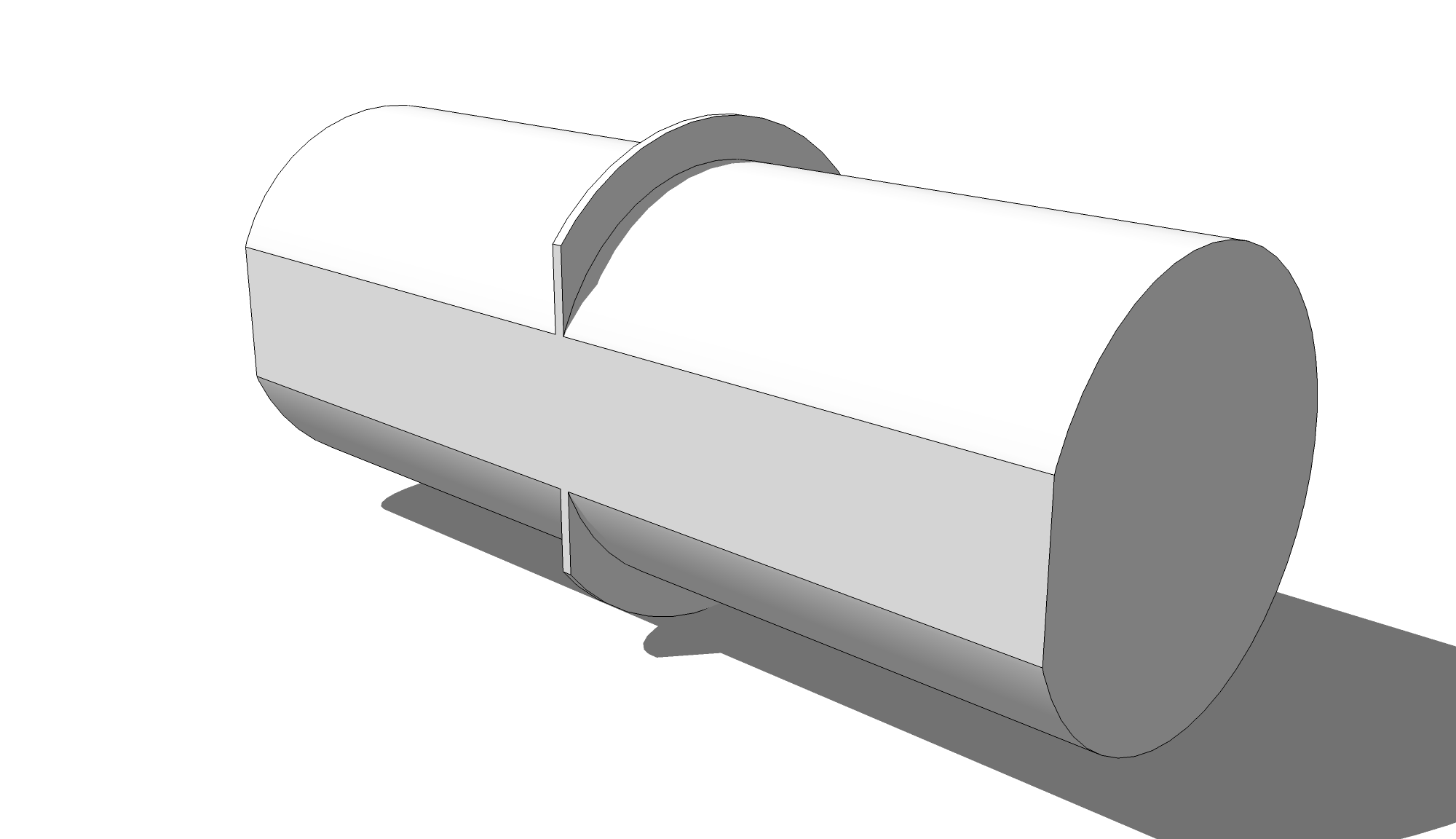
                Core and Ring.png

                Etaoin Shrdlu

                %

                (THERE'S NO PLACE LIKE)

                G28 X0.0 Y0.0 Z0.0

                M30

                %

                1 條回覆 最後回覆 回覆 引用 0
                • mootM 離線
                  moot
                  最後由 編輯

                  That would be it, a lot cleaner than what I came up with. Flat on core is nice, I was thinking of doing that because I plan on putting a stamp, 12.7mm deep in bottom of core.
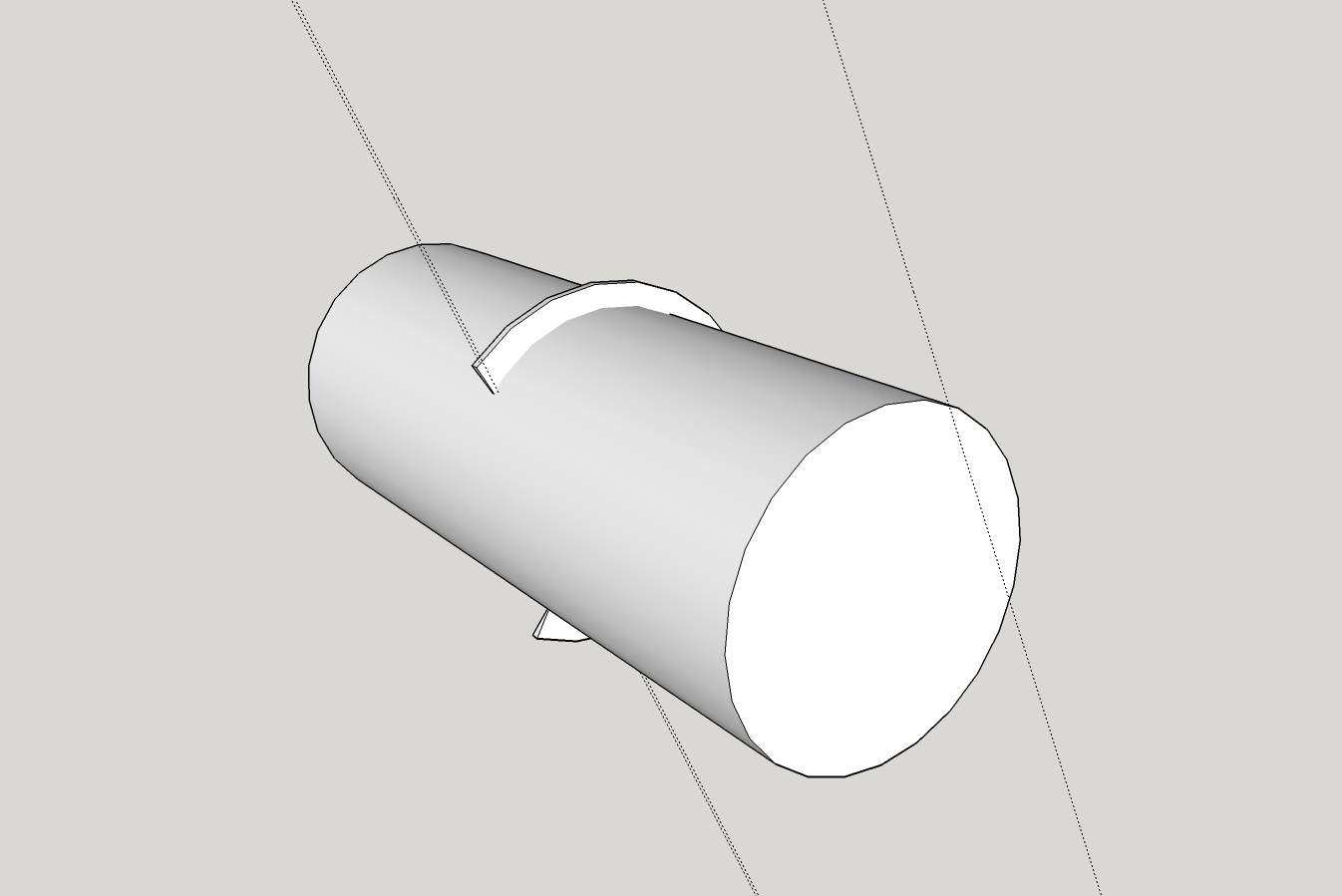
                  Strt-Core and Ring4.jpg

                  Thank you for taking the time.
                  I used the Zorro2 plugin, but had a little difficulty... left open face(s). I did finally get things closed up and SolidSolver verified that it was a Solid 😄

                  Printing it now.

                  PS, I would be interested in seeing your .skp ☀

                  You can lead a horse to water, but you can't make 'em think!

                  1 條回覆 最後回覆 回覆 引用 0
                  • Dave RD 離線
                    Dave R
                    最後由 編輯

                    If you want the flat, you shouldn't print the one from your screen shot. It's easy enough to make it with the flat. Hang on and I'll make some screenshots. In the meantime, here's the model.


                    Core and Ring.skp

                    Etaoin Shrdlu

                    %

                    (THERE'S NO PLACE LIKE)

                    G28 X0.0 Y0.0 Z0.0

                    M30

                    %

                    1 條回覆 最後回覆 回覆 引用 0
                    • mootM 離線
                      moot
                      最後由 編輯

                      Thank you very much... All dimensions/measurements are as in the .skp in my first post.
                      Very tight tolerance required for fit... am still making .00x mm adjustments and do have questions about ability of SU to 'modify' objects, i.e., radius, segments,etc. I'll start another post/thread.

                      123D Design has a 'Smart Scale' that works pretty good, but (can't say it to often) it is just plain hard to use, in my humble opinion 😉

                      I testing a Dremel3D20, got 60 days to torture it... I'm on the cusp as whether to return it or not...

                      You can lead a horse to water, but you can't make 'em think!

                      1 條回覆 最後回覆 回覆 引用 0
                      • Dave RD 離線
                        Dave R
                        最後由 編輯

                        Maybe this will help.

                        Screenshot - 6_22_2016 , 6_24_26 PM.png
                        A circle with a radius of the ring.

                        Screenshot - 6_22_2016 , 6_24_58 PM.png
                        Extrude with Push/Pull to the required thickness.
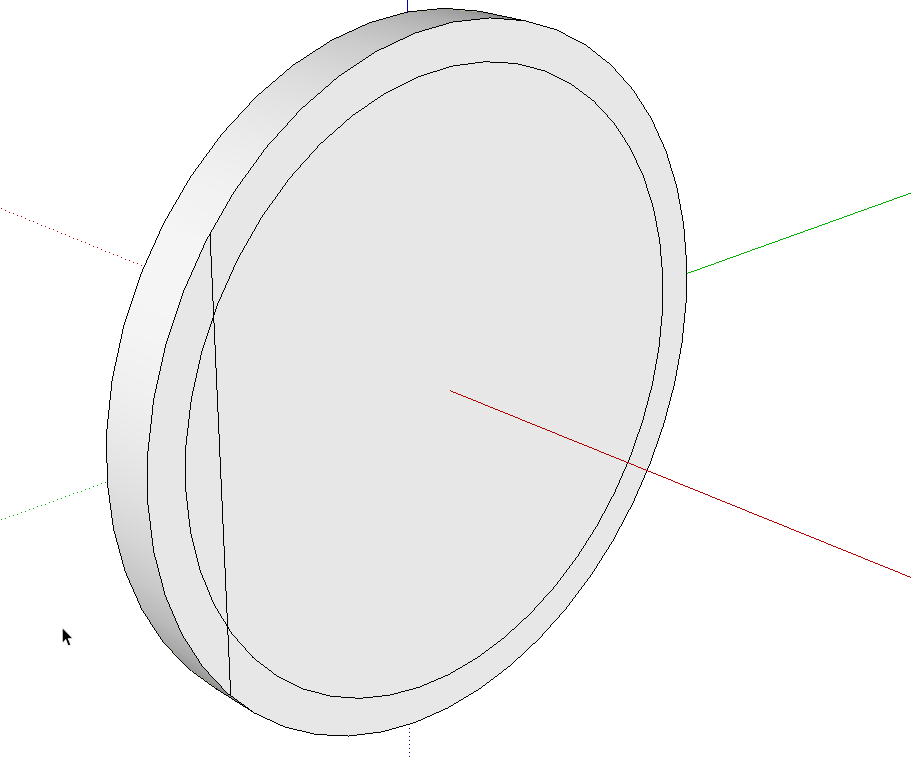
                        Screenshot - 6_22_2016 , 6_26_44 PM.png
                        Use Offset first to delineate the radius of the post. Then draw a line for the flat.
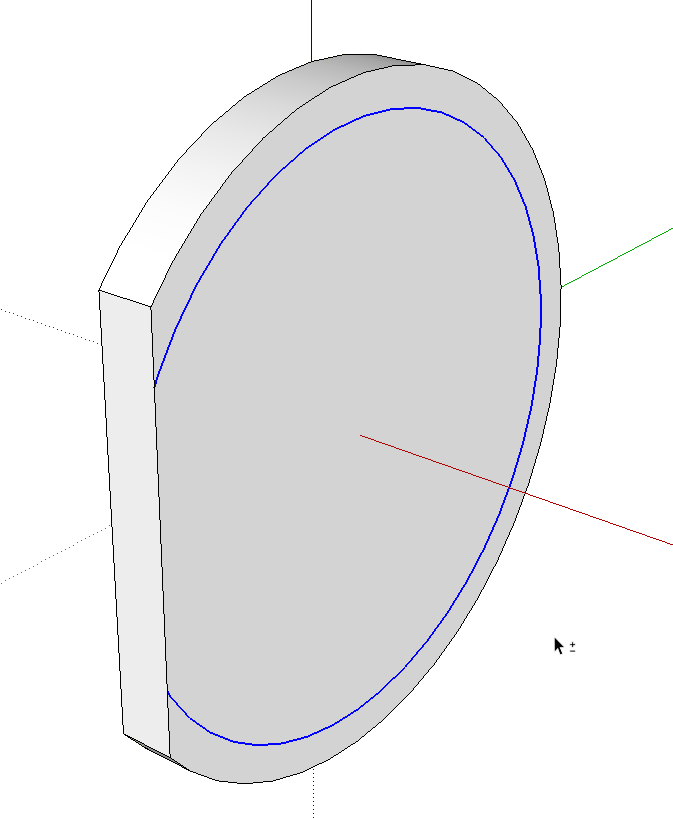
                        Screenshot - 6_22_2016 , 6_27_32 PM.png
                        Push/Pull to get rid of the waste.

                        Screenshot - 6_22_2016 , 6_27_56 PM.png
                        Select the remainder of the offset edge and use Move/Copy to copy it to the opposite side. You could have used Offset on the other side as before but this is quick and easy, too.
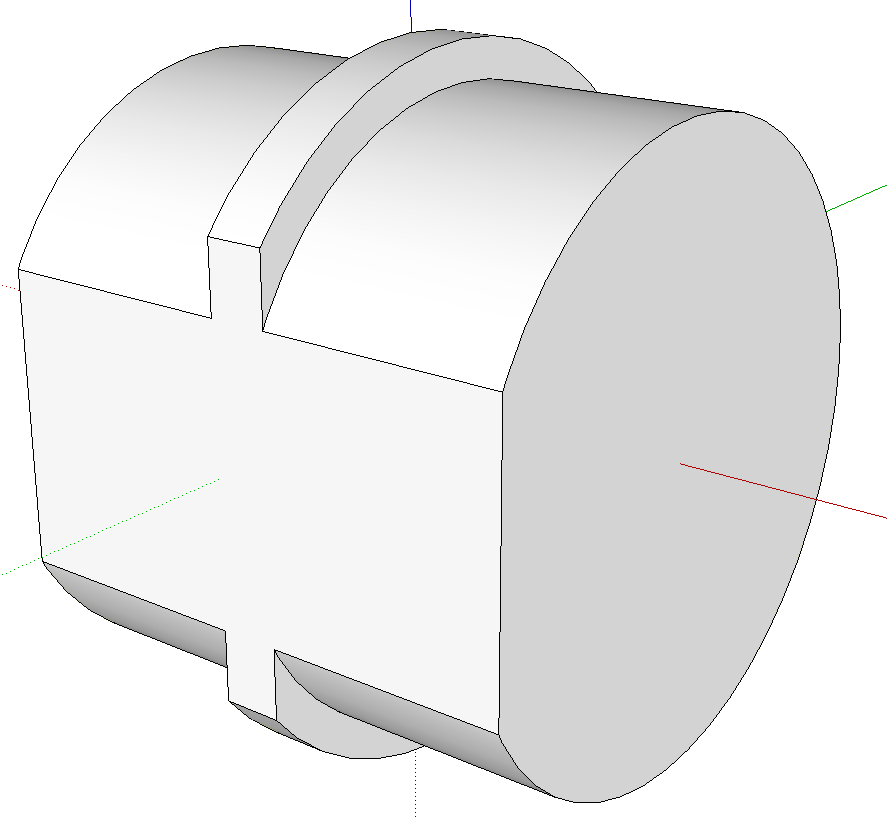
                        Screenshot - 6_22_2016 , 6_28_24 PM.png
                        Push/Pull the inner faces on both sides to make the post.

                        Etaoin Shrdlu

                        %

                        (THERE'S NO PLACE LIKE)

                        G28 X0.0 Y0.0 Z0.0

                        M30

                        %

                        1 條回覆 最後回覆 回覆 引用 0
                        • 1
                        • 2
                        • 2 / 2
                        • 第一個貼文
                          最後的貼文
                        Buy SketchPlus
                        Buy SUbD
                        Buy WrapR
                        Buy eBook
                        Buy Modelur
                        Buy Vertex Tools
                        Buy SketchCuisine
                        Buy FormFonts

                        Advertisement