2016 Pro - Section Cut Problem - need advice
-
OK, I am having a problem with section cuts in 2016. I have a model with car wash equipment inside a building. I am trying to add a section cut so that I can show the equipment inside the building. However I am having problems in that the section cut is showing up in all scenes. Here are the steps and the results:
-
Create Scene 1
-
Click on the + sign to add a new scene (Scene 2)
-
Click on the toolbar icon add a section cut.
-
Some times I get a two section planes as I am moving the mouse
-
Click on the section place to select it and the cursor changes to the Push/Pull icon
-
Hit the space bar to get control of the tool. Then click on the section plane again so I can move the plan to the correct exposure
-
Click on the Update button for Scene 2
-
Click on the Scene 1 tab and the section cut still shows
This is the exact same procedure I have used with a cube model and that works fine.
What the heck am I doing wrong or is there a bug in 2016 related to section cuts?
-
-
This is starting to drive me crazy. I know I must be doing something wrong but I cannot figure it out.
- I saved the model as a 2015 skp file and opened it in 2015
- Got everything working fine in 2015
- Opened the working 2015 file in 2016 and it does not work correctly. I wind up with the section either showing up in both scenes or neither scene
- Tried creating a simple cube with a section cut and 2 scenes and all worked correctly.
- Used the exact same process (and made sure I was using the same style) with my model and it still did not work
- I am also getting the Push/Pull cursor once in a while when I click on either the Display Section Plan or Display Section Cut icon in the toolbar.
Any insight would be greatly appreciated.
-
Yup I got insight:
Click the Gif!
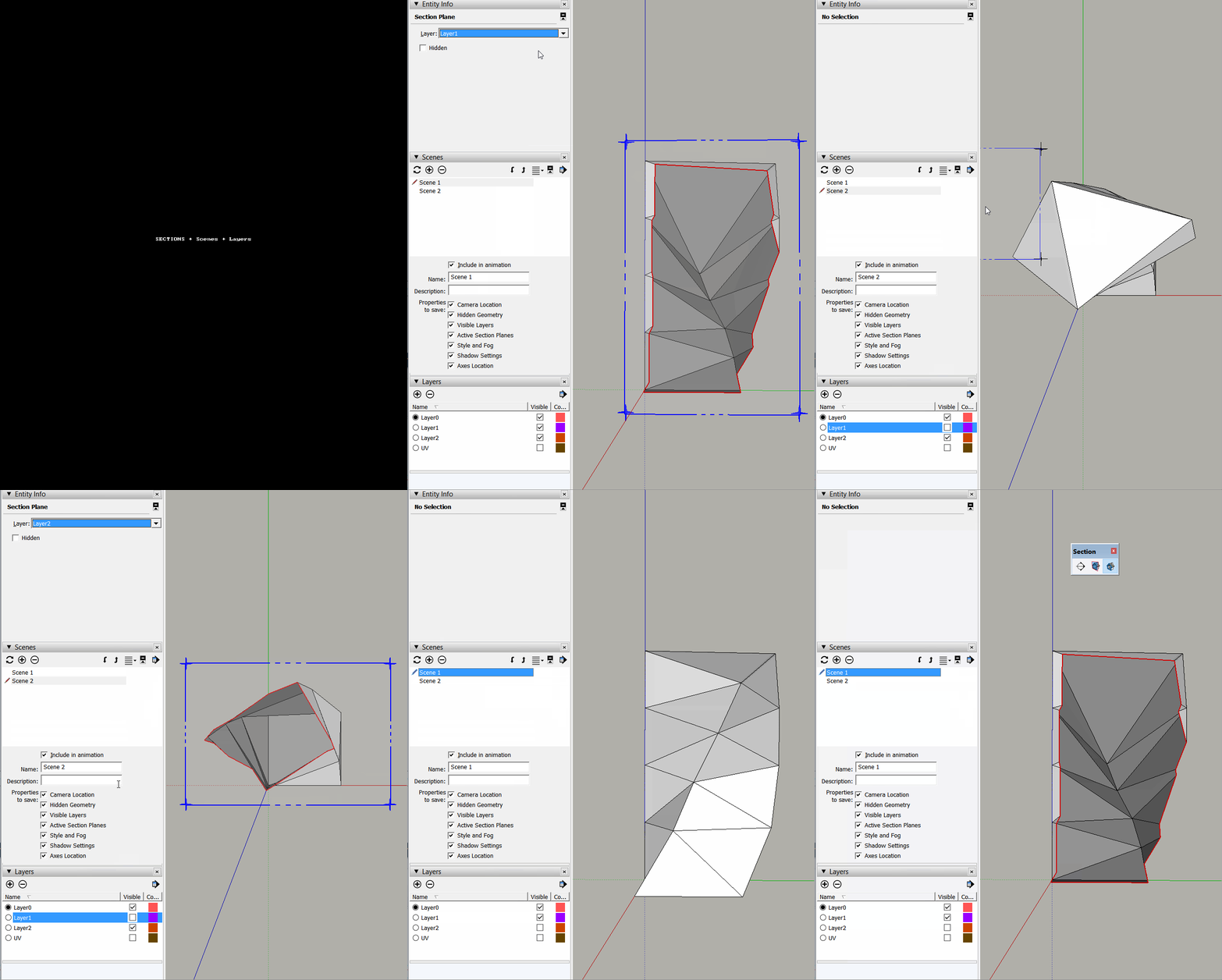
- Create Scene 1 and Scene 2;
- Create Layer 1 and Layer 2;
- Create Section 1 and Section 2;
- Assign Layer 1 to Section 1;
- Assign Layer 2 to Section 2;
- On Scene 1 double click Section 1 to activate it;
- Update Scene 1 making sure Sections is being updated (easier way is to use the Scene Inspector WINDOW > INSPECTOR | Activate Advanced Settings | Click on Scene 1 from the list | Uncheck and then Check "Active Section" property )
- On Scene 2 double click Section 2 to activate it;
- Update Scene 2 making sure Sections is being updated
- Go to Scene 1 and hide Layer 2 on Layers Inspector;
- Update Scene 1 making sure you're updating layer's properties (Best way is again using Scene Inspector to click on Scene 1 | Uncheck+Check Visible Layers Property);
- Go to Scene 2 and hide Layer 1 on Layers Inspector;
- Update Scene 2 making sure you're updating layer's properties;
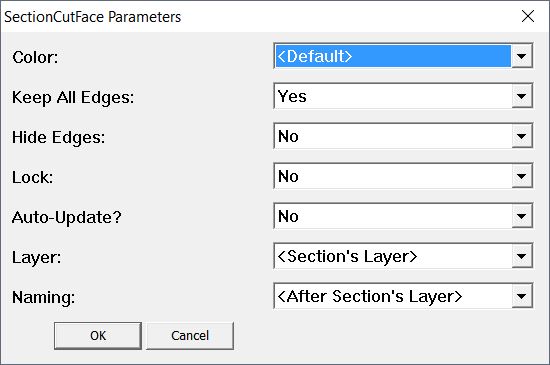
If you now want to add Section Cut Faces, it's super easy now that Tig updated it to v5.
Simply add sections with these default values for Layer and Naming:
-
Thanks - I will try later ( or in the morning) but I do not understand why what I did in 2015 and with the cube in 2016 does not work in my model in 2016. Has something changed in 2016?
-
Nope, nothing's changed. But you might have been using a different style or there might be something you're not aware of and so you're not telling us.
-
@jql said:
Nope, nothing's changed. But you might have been using a different style or there might be something you're not aware of and so you're not telling us.
Well interesting..........
I just took the 2015 file and opened it again in 2016. I noticed that the style icon had the round arrows on it so I updated the style and WaaaLaaa, it worked. So it was a styles issue all along. Do not know why I did not see that yesterday.
Now a couple more interesting things:
- I do not have any layers or section names associated with the section plane
- I added the SectionCutFace and was able to set the color of various portions of the section cut.One interesting showed up that I had not seen before when using the SectionCutFace. Of course it showed all of the cuts to the walls and applied a face which I was able to color to match the texture of the walls and floor. Then a new one showed up in that it applied a face with the default color to the entire rest of the building. I then colored that face white and set the opacity to 0.
Now a couple of questions:
- When trying the SectionCutFace plugin before I had not seen that happen. I did do the update of the plugin yesterday. Is this a bug?
- Even though I got the section cut to work properly today, is this the wrong way to do it? I have seen several other examples and tutorials before where the author (and some of them very advanced authors) did not add a section name and put it on a layer to control the visibility. I suppose (and looking at the parameters of the SectionCutFace plugin) that the best organization is to name the section cut and put it on a layer and control the visibility via the layer.
Just trying to understand the best/correct way because I will be using this for some later endeavors.


Hello! It looks like you're interested in this conversation, but you don't have an account yet.
Getting fed up of having to scroll through the same posts each visit? When you register for an account, you'll always come back to exactly where you were before, and choose to be notified of new replies (either via email, or push notification). You'll also be able to save bookmarks and upvote posts to show your appreciation to other community members.
With your input, this post could be even better 💗
Register Login


Advertisement