sketchucation logo sketchucation
    • Login
    Oops, your profile's looking a bit empty! To help us tailor your experience, please fill in key details like your SketchUp version, skill level, operating system, and more. Update and save your info on your profile page today!
    ⚠️ Update | Sketchucation Tools 5.0.8 released with licensing improvements and bugfixes Download

    What's Wrong with the Tape Measure Tool

    Scheduled Pinned Locked Moved SketchUp Discussions
    sketchup
    24 Posts 7 Posters 6.1k Views 7 Watching
    Loading More Posts
    • Oldest to Newest
    • Newest to Oldest
    • Most Votes
    Reply
    • Reply as topic
    Log in to reply
    This topic has been deleted. Only users with topic management privileges can see it.
    • Dave RD
      Dave R
      last edited by

      SketchUp 5? I can't hardly remember that far back. Are guides turned on in the style or in the View menu?

      Etaoin Shrdlu

      %

      (THERE'S NO PLACE LIKE)

      G28 X0.0 Y0.0 Z0.0

      M30

      %

      1 Reply Last reply
      Reply Quote 0
      • jujuJ
        juju
        last edited by

        which windows OS are you using on the new machine? if I recall the OS of the day was XP when SU5 was around...

        have you tried running the legacy software in microsoft's windows legacy mode to see if it makes a difference?

        Save the Earth, it's the only planet with chocolate.

        1 Reply Last reply
        Reply Quote 0
        • cottyC
          cotty
          last edited by

          You can toggle the creation with ctrl (see little + sign).

          my SketchUp gallery

          1 Reply Last reply
          Reply Quote 0
          • Dave RD
            Dave R
            last edited by

            @cotty said:

            You can toggle the creation with ctrl (see little + sign).

            I think the default behavior has always been to create guides. Could you switch off guides with Ctrl in SU5 and have the setting stay?

            Etaoin Shrdlu

            %

            (THERE'S NO PLACE LIKE)

            G28 X0.0 Y0.0 Z0.0

            M30

            %

            1 Reply Last reply
            Reply Quote 0
            • Joe WoodJ
              Joe Wood
              last edited by

              Yeah I was using XP, now it's Win 7. Sounds like that might be the issue?

              I need to read up on microsoft's windows legacy mode now.

              sorry, don't understand- "You can toggle the creation with ctrl (see little + sign)"

              also "Could you switch off guides with Ctrl " could you explain that a bit more Dave??

              Joe Wood
              woodsshop.com/

              1 Reply Last reply
              Reply Quote 0
              • Dave RD
                Dave R
                last edited by

                Joe, I don't remember when the change occurred but for a long time, by default, the Tape Measure tool creates a guideline. You can toggle the creation off and back on by hitting Ctrl. This can be useful if you just want to take measurements without creating guidelines.

                Did you look in the view menu to see if Guidelines (or Construction Lines) are an option to turn on and off? We're going back so far I don't remember if this was an option in V5 or not.

                Etaoin Shrdlu

                %

                (THERE'S NO PLACE LIKE)

                G28 X0.0 Y0.0 Z0.0

                M30

                %

                1 Reply Last reply
                Reply Quote 0
                • Joe WoodJ
                  Joe Wood
                  last edited by

                  I've looked everywhere for a setting Dave, but,

                  when I select the Tape tool and hold ctrl it makes the guide lines, but that doesn't toggle it on / off because if I try again without ctrl, no lines.

                  Joe Wood
                  woodsshop.com/

                  1 Reply Last reply
                  Reply Quote 0
                  • Dave RD
                    Dave R
                    last edited by

                    Does the guideline stay when you use Ctrl? In later versions, at least, it's a toggle thing. Press and release to toggle the state. And there's nothing in the View menu related to it? What about in Styles? Was that a thing then?

                    Etaoin Shrdlu

                    %

                    (THERE'S NO PLACE LIKE)

                    G28 X0.0 Y0.0 Z0.0

                    M30

                    %

                    1 Reply Last reply
                    Reply Quote 0
                    • JQLJ
                      JQL
                      last edited by

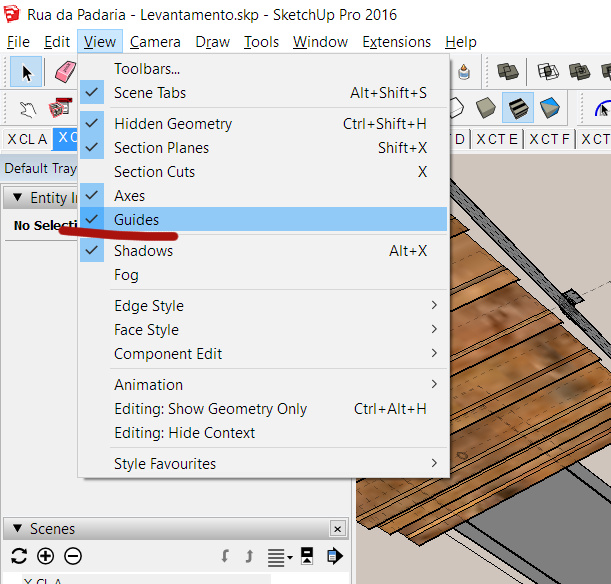
                      View Menu > Guides

                      guides.jpg

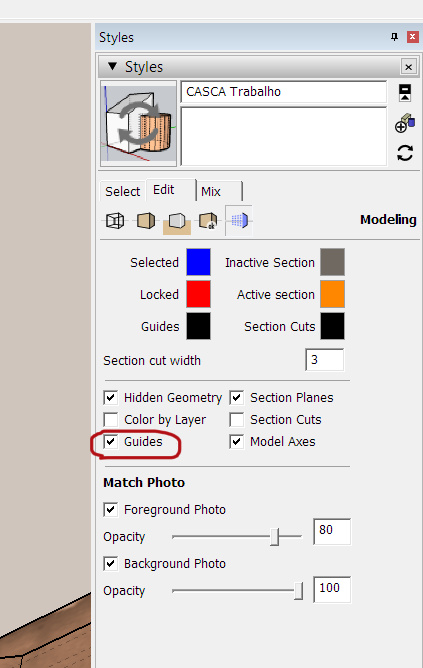
                      It's a style dependent visual effect. You can turn their display off in your current style and some styles have it turned off by default so it's not system dependent. Are you using your own style?

                      I imagine you might have created a lot of Guides without knowing. You might delete them in Edit > Delete Guides

                      www.casca.pt
                      Visit us on facebook!

                      1 Reply Last reply
                      Reply Quote 0
                      • Dave RD
                        Dave R
                        last edited by

                        Is it the same in SU5?

                        Etaoin Shrdlu

                        %

                        (THERE'S NO PLACE LIKE)

                        G28 X0.0 Y0.0 Z0.0

                        M30

                        %

                        1 Reply Last reply
                        Reply Quote 0
                        • Joe WoodJ
                          Joe Wood
                          last edited by

                          No Ver 5 doesn't have that menu, doesn't have Scenes either, has Pages and there's nothing in there I can change
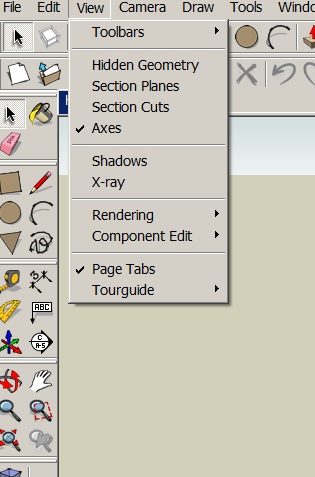

                          View.jpg

                          Joe Wood
                          woodsshop.com/

                          1 Reply Last reply
                          Reply Quote 0
                          • cottyC
                            cotty
                            last edited by

                            Why don't you use a more recent version?

                            my SketchUp gallery

                            1 Reply Last reply
                            Reply Quote 0
                            • JQLJ
                              JQL
                              last edited by

                              And does it have styles?

                              guides.jpg

                              www.casca.pt
                              Visit us on facebook!

                              1 Reply Last reply
                              Reply Quote 0
                              • Joe WoodJ
                                Joe Wood
                                last edited by

                                well part of the reason is, 5 is what I'm familiar with, and it does everything I need it to do, but mainly, Ver 5 is back when it was still @Last Software. There weren't that many users back then, I was probably one of only 5-10 other builders in California, active on the forums, using it. I felt almost betrayed when they sold out to google and all of a sudden everyone was using it.

                                but if I was to upgrade, which version should I go for?

                                Joe Wood
                                woodsshop.com/

                                1 Reply Last reply
                                Reply Quote 0
                                • Dave RD
                                  Dave R
                                  last edited by

                                  Get current and install SketchUp 2016. You can still download SketchUp 2015 but I don't believe you can get a license for it anymore. and you don't want to go back any further.

                                  Etaoin Shrdlu

                                  %

                                  (THERE'S NO PLACE LIKE)

                                  G28 X0.0 Y0.0 Z0.0

                                  M30

                                  %

                                  1 Reply Last reply
                                  Reply Quote 0
                                  • JQLJ
                                    JQL
                                    last edited by

                                    Are you still using the computer from back then? With win 98! I miss that computer but I miss ZX Spectrum even more!

                                    www.casca.pt
                                    Visit us on facebook!

                                    1 Reply Last reply
                                    Reply Quote 0
                                    • Dave RD
                                      Dave R
                                      last edited by

                                      @jql said:

                                      Are you still using the computer from back then? With win 98! I miss that computer but I miss ZX Spectrum even more!

                                      I might be wrong but I think Joe is using Win7.
                                      πŸ˜„

                                      @joe wood said:

                                      Yeah I was using XP, now it's Win 7.

                                      Etaoin Shrdlu

                                      %

                                      (THERE'S NO PLACE LIKE)

                                      G28 X0.0 Y0.0 Z0.0

                                      M30

                                      %

                                      1 Reply Last reply
                                      Reply Quote 0
                                      • JQLJ
                                        JQL
                                        last edited by

                                        πŸ˜„ XP wasn't that bad!

                                        www.casca.pt
                                        Visit us on facebook!

                                        1 Reply Last reply
                                        Reply Quote 0
                                        • Joe WoodJ
                                          Joe Wood
                                          last edited by

                                          yeah I'm on a blazin hot computer now and win 7, which isn't as much of a change from xp as I feared,

                                          I could live with needing to use the ctrl with tape tool, and stay with ver 5, question, why should I upgrade, 5 does what I need it to. What do I get, better performance? I never use plugins / whatever. Don't need to take my modeling to diff heights.

                                          say, how do I Import all my XP textures to this new machine? Go to Library, copy all the skm into a new folder, send it to the new machine, then Import> skm, and select all the skm files at once?

                                          Joe Wood
                                          woodsshop.com/

                                          1 Reply Last reply
                                          Reply Quote 0
                                          • C
                                            Charlie__V
                                            last edited by

                                            Joe,
                                            Could be a graphics card issue too........might try disabling hardware acceleration under preferences........though I am just guessing that is/was an option in V5.

                                            Charlie

                                            Precision M1710/Win 7 Pro 64 bit/i-7 6920 Quad core 2.9 Ghz -3.8/16Gb ram/NVIDIA M5000M 8Gb

                                            1 Reply Last reply
                                            Reply Quote 0

                                            Hello! It looks like you're interested in this conversation, but you don't have an account yet.

                                            Getting fed up of having to scroll through the same posts each visit? When you register for an account, you'll always come back to exactly where you were before, and choose to be notified of new replies (either via email, or push notification). You'll also be able to save bookmarks and upvote posts to show your appreciation to other community members.

                                            With your input, this post could be even better πŸ’—

                                            Register Login
                                            • 1
                                            • 2
                                            • 2 / 2
                                            • First post
                                              Last post
                                            Buy SketchPlus
                                            Buy SUbD
                                            Buy WrapR
                                            Buy eBook
                                            Buy Modelur
                                            Buy Vertex Tools
                                            Buy SketchCuisine
                                            Buy FormFonts

                                            Advertisement