Push/pull double click wrong direction
-
hey guys,
This has been a sporadic problem for me for years, across various PC's.
As we all know, if you've used the push/pull tool you can double click on a face and it will extrude it the same distance as the previous command.
I have a problem (that seems to appear at random, and save into the file/model) that causes the double click operation to extrude in the opposite direction that it ought to. I have of course ruled out normal directions, etc.
Like I said, this has happened for years and years, but always seemingly at random - but once it starts doing it and the model is saved, it seems to keep doing it within that model.
The strangest thing is that if I push the geometry in the opposite direction that I need it to go (to set the distance on the push/pull tool), I can then proceed to go around the model double clicking things and having them extrude in the correct direction. It's like the double click function is reversed.
Is there a setting that I've been overlooking the past decade, or is this a bug? Does anyone else suffer with this? I've never made a topic about it before because it's a rarity, but still annoying.
-
hmm, not sure if that's what you're asking.
The only reason I know for your described push-pull behavior is that su backfaces extrude in the opposite direction at the double-click method...
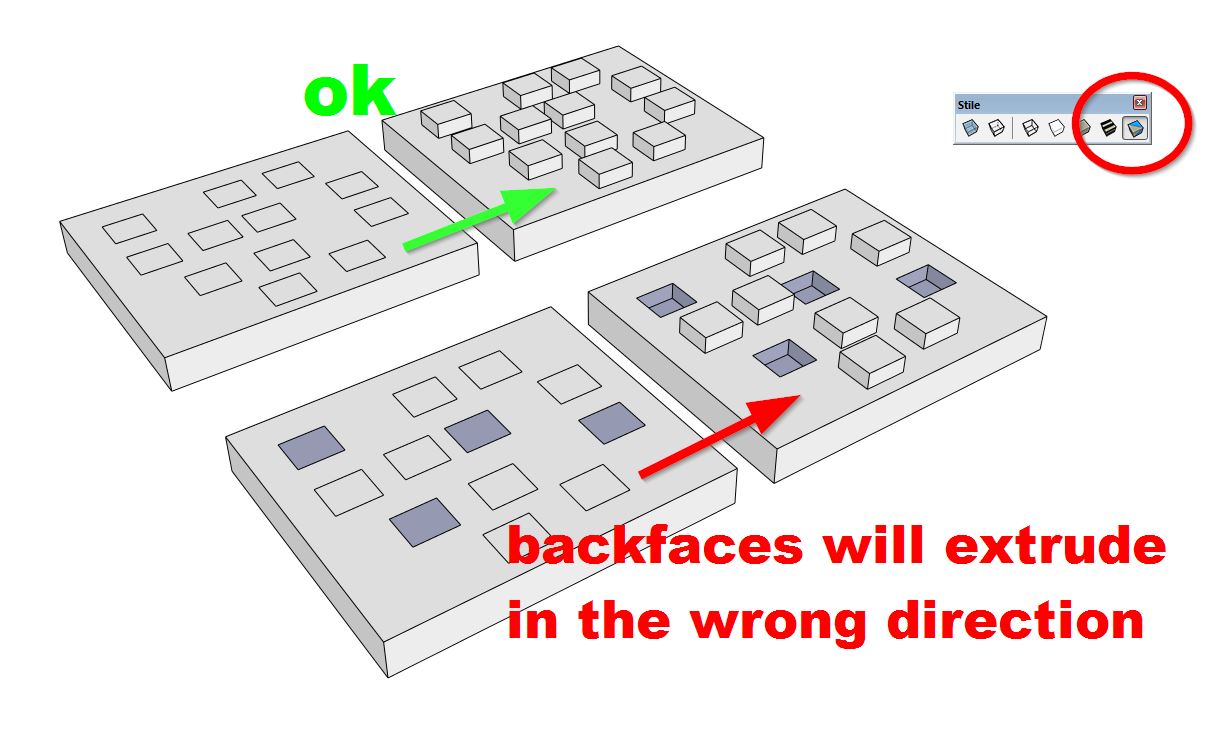
-
No, as per the previous I have ruled out the surface normals direction.
-
You need to post a model where this happens for us to be able to suggest anything.
-
That's weird. I just saved the file with the problem, and opened it... Still a problem. Saw the file size was large, went in and purged it - problem solved. Decided not to save it, and repeat those steps just to test...
Opened the problem file again, no problem now. Even without purging. Issue can't be local to the file, I guess?
-
I see this often.
-
Ok, so since it has been happening randomly for years and years we will look forward to the next occurrence with a file upload.
-
@pbacot said:
I see this often.
Have you ever found a work-around, or solution to it? Glad I'm not the only one.
-
Not really sure why anyone would add a negative to that post. Without an example of the problem there is no way to solve the issue.
-
Given that the previous message I had stated that in all likelihood it isn't a problem within the file, I would have thought such a sarcastic answer wouldn't have been warranted.
-
Your resolution was far from definitive.
The only way to resolve your issue is to look at a specific model when you have the problem.
Currently you are unable to upload such a model.
I look forward to looking at a suitable model when the time comes.
As you've stated the problem is randomly occurring, so when it happens again you'll save and attach the file so we can look at it.Where is the sarcasm?
-
@macker said:
No, as per the previous I have ruled out the surface normals direction.
"...the surface normals direction..."
it took me time to translate and realize that you mean the frontface-backface thing.
I mistook this sentence with something like orthogonal/perpendicular... -
No. I just figured it didn't work right. I just put up with it. Did your drawing have any import of dwg file? Sometimes I think this will happen extruding walls from an imported floor plan. If I can find it happening again, I'll probably remember this thread.
-
This also happens to me once in awhile, really frustrating when it does happen, never could find a pattern or somehow reproduce it, just seems to happen randomly.
-
@alpro said:
......, never could find a pattern or somehow reproduce it, just seems to happen randomly.
Fortunately for SketchUp there seems to be no inconsistency about how the next extrusion will come out. It all depends on what the first P/P did.
You need to determine if the P/P face is enclosed and even that doesn't seem to matter too much unless you you "trow in" using [Ctrl].If you push or pull a face the newly created perpendicular faces do match the push/pulled face as if it were part of a box. This seems pretty much predictable to me.
Now:
- If you p/p a face and see blue (back) inside the box, then all next ones have blue (back) inside.
- If you p/p a face so white (front) ends up inside the box, all next ones do have white (front) inside.
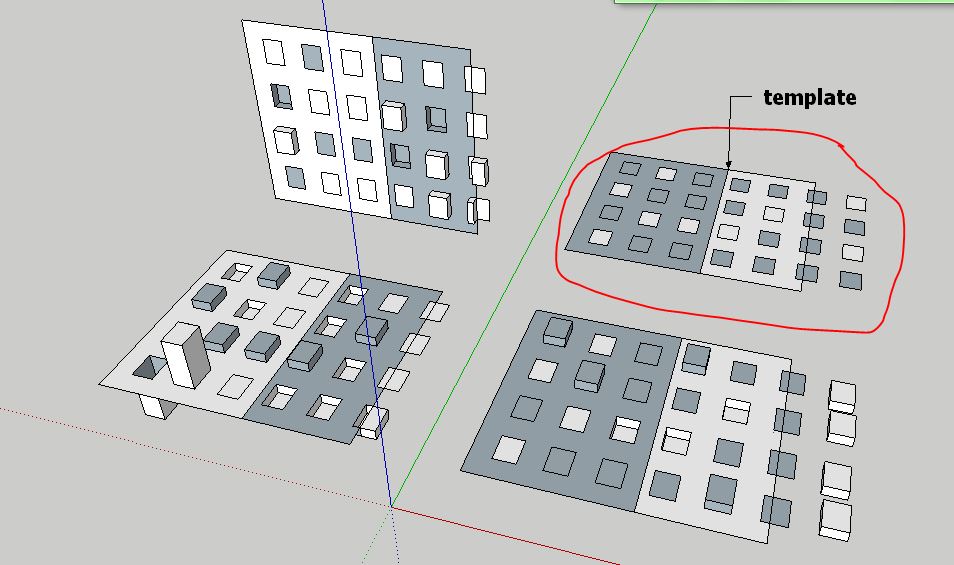
-
@wo3dan said:
@alpro said:
......, never could find a pattern or somehow reproduce it, just seems to happen randomly.
Fortunately for SketchUp there seems to be no inconsistency about how the next extrusion will come out. It all depends on what the first P/P did.
You need to determine if the P/P face is enclosed and even that doesn't seem to matter too much unless you you "trow in" using [Ctrl].If you push or pull a face the newly created perpendicular faces do match the push/pulled face as if it were part of a box. This seems pretty much predictable to me.
Now:
- If you p/p a face and see blue (back) inside the box, then all next ones have blue (back) inside.
- If you p/p a face so white (front) ends up inside the box, all next ones do have white (front) inside.
I am well aware of how the Push/Pull tool works, but this is not the issue that I outlined in my first post.
-
@hornoxx said:
@macker said:
No, as per the previous I have ruled out the surface normals direction.
"...the surface normals direction..."
it took me time to translate and realize that you mean the frontface-backface thing.
I mistook this sentence with something like orthogonal/perpendicular...Yes, sorry. Sketchup is the only 3D software I know of that calls them front/back faces, in everything else they're referred to as "normals".
-
@macker said:
......
I am well aware of how the Push/Pull tool works, but this is not the issue that I outlined in my first post.I'm not saying that you don't know how P/P works on double clicking (except for its direction): it repeats the last value, but which way?
Since SketchUp does consistently follow certain rules the developers rolled out for it (opposed to what some see, that it is randomly doing so) that can't be wrong, can it? It's not unpredictable, as mentioned above.
I agree that these rules are hard to remember so I don't even bother to do so.
The only thing I'm saying is that right from the first P/P you that you make you'll know (or can know) exactly the next one's direction. If you would have wanted it to go the opposite direction, then start in opposite direction.
-
Macker, forget my two posts, I get that some weird changes occure while saving -> reloading your model which makes the direction change. Never experienced that.
I was "triggered" by Alpro's reply with random, taking that for random direction for P/P.
-
@wo3dan said:
The only thing I'm saying is that right from the first P/P you that you make you'll know (or can know) exactly the next one's direction. If you would have wanted it to go the opposite direction, then start in opposite direction.
Now this is the issue. Sometimes it DOESN'T act like this.
There are occasions whereby I may pull a front face by 50mm, and then double click another front face and it will push it 50mm. This is the behaviour that is unexpected.






Advertisement