Header take up 1/3 of the page
-
The header on the free version of sketch up takes up about 1/3 of the page, most of it blank,how can I make it smaller,also make the side bar hidden?
-
It shouldn't be like that.
Can you provide a screen-shot?
Did the installation bring over any toolbars from an earlier version, which have now docked in the top area ? -
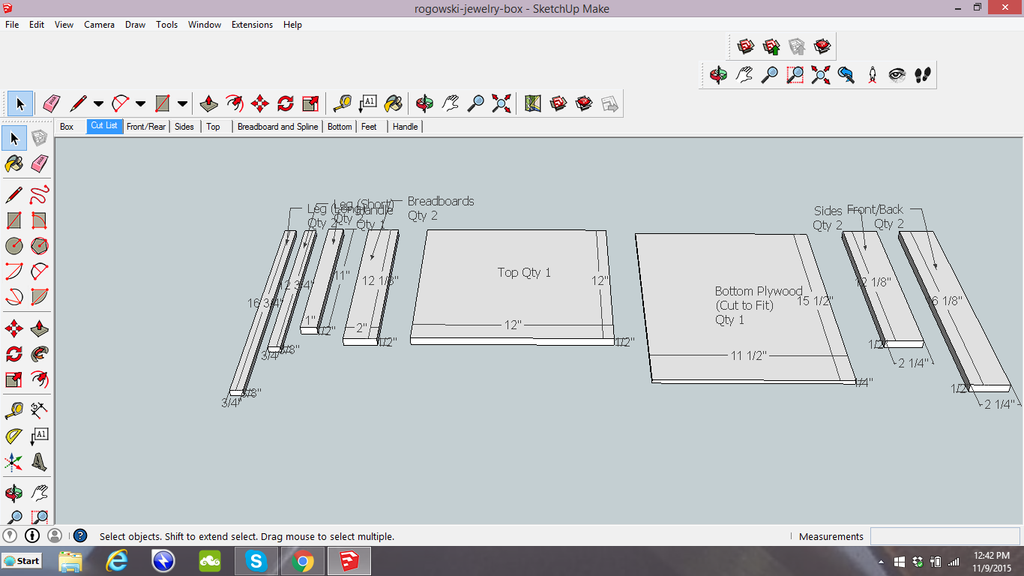
Here it is
-
I like an relatively easy problem

The two lines of docked toolbars nearer the top of the screen have pushed the other [first] docked toolbars downwards.
Simply un-dock the problem ones [drag onto the main screen], then re-dock them in-line with the other toolbar[s] as desired...
You could also dock them on the sides if you prefer...

Hello! It looks like you're interested in this conversation, but you don't have an account yet.
Getting fed up of having to scroll through the same posts each visit? When you register for an account, you'll always come back to exactly where you were before, and choose to be notified of new replies (either via email, or push notification). You'll also be able to save bookmarks and upvote posts to show your appreciation to other community members.
With your input, this post could be even better 💗
Register Login


Advertisement