sketchucation logo sketchucation
    • 登入
    Oops, your profile's looking a bit empty! To help us tailor your experience, please fill in key details like your SketchUp version, skill level, operating system, and more. Update and save your info on your profile page today!
    🔌 Smart Spline | Fluid way to handle splines for furniture design and complex structures. Download

    3D Truss Models

    已排程 已置頂 已鎖定 已移動 Plugins
    1.5k 貼文 31 Posters 981.8k 瀏覽 30 Watching
    正在載入更多貼文
    • 從舊到新
    • 從新到舊
    • 最多點贊
    回覆
    • 在新貼文中回覆
    登入後回覆
    此主題已被刪除。只有擁有主題管理權限的使用者可以查看。
    • jujuJ 離線
      juju
      最後由 編輯

      @medeek said:

      Version 1.6.7 - 07.21.2016

      • Battens (at peak) can be offset from peak.
      • Peak-to-Eave spacing option available when "battens at peak" option is selected.

      I tested this, works as expected, thanks!

      @medeek said:

      This was a very small update so I just tucked it into the latest revision.

      naughty naughty, revision history "paper trail", still thanks none-the-less

      Save the Earth, it's the only planet with chocolate.

      1 條回覆 最後回覆 回覆 引用 0
      • medeekM 離線
        medeek
        最後由 編輯

        If a fix or correction is fairly minor and it is within the same 24 hour period as a new revision I like to bundle it into that revision otherwise it appears I am making leaps and strides with the development when I am not.

        Nathaniel P. Wilkerson PE
        Medeek Engineering Inc
        design.medeek.com

        1 條回覆 最後回覆 回覆 引用 0
        • G 離線
          Garry K
          最後由 編輯

          Sorry Nathaniel,

          I'm with Julu on this.

          In my 34 years of programming - this type of short circuiting general accepted practice more often than not gets programmers into trouble.

          I know I've done it myself - and sometimes I've gotten away with it - and sometimes I've created problems for users. Even alienating a single user due to frustration is simply not worth it !!!

          So naughty naughty it is !!!

          1 條回覆 最後回覆 回覆 引用 0
          • facerF 離線
            facer
            最後由 編輯

            Nathaniel,
            I support the other posts but would not go as far as saying "naughty".

            Within a 24 hr period a lot of downloads could have occurred.
            Now you will have a group of users that may be out of step.
            Not Good!

            Best to keep to the rule of:
            ANY CHANGE THAT IS ISSUED REQUIRES A NEW NUMBER DESIGNATION.

            Having said that "Keep Going" you are on a roll.
            I look forward to your "Manual" which could be released as a "Beta"
            so you get feedback on how it is received.

            1 條回覆 最後回覆 回覆 引用 0
            • medeekM 離線
              medeek
              最後由 編輯

              Okay, you all have a point I will avoid this practice in the future. However I will note that the change log lists every modification to the plugin since I started.

              On a different note I just started a new job and I'm living out of a suitcase right now so I probably won't be able to work on anything for at least a week or two. I would really like to test the trim function I've created but it will have to wait. Once i get my workstation back I will hit it full force.

              Nathaniel P. Wilkerson PE
              Medeek Engineering Inc
              design.medeek.com

              1 條回覆 最後回覆 回覆 引用 0
              • jujuJ 離線
                juju
                最後由 編輯

                Congratulations on the new job! Uprooting/moving is always uncomfortable, so wishing you as little discomfort as possible.

                Looking forward to the future development of both the truss and slab/foundation plugins.

                Save the Earth, it's the only planet with chocolate.

                1 條回覆 最後回覆 回覆 引用 0
                • medeekM 離線
                  medeek
                  最後由 編輯

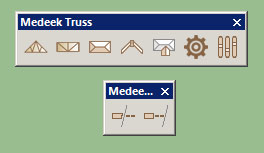
                  I haven't had any time this week or even this weekend to dive back into it yet but the icons for the Medeek Tools Menu (trim and extend for now) will look like this:
                  http://design.medeek.com/resources/images/truss_su_menu_with_tools.jpg

                  Nathaniel P. Wilkerson PE
                  Medeek Engineering Inc
                  design.medeek.com

                  1 條回覆 最後回覆 回覆 引用 0
                  • medeekM 離線
                    medeek
                    最後由 編輯

                    The trim function is a work in progress. I had some help with a developer on the other board but it has a ways to go yet.

                    Nathaniel P. Wilkerson PE
                    Medeek Engineering Inc
                    design.medeek.com

                    1 條回覆 最後回覆 回覆 引用 0
                    • jujuJ 離線
                      juju
                      最後由 編輯

                      How's the new job going? Have you settled in already?

                      Save the Earth, it's the only planet with chocolate.

                      1 條回覆 最後回覆 回覆 引用 0
                      • medeekM 離線
                        medeek
                        最後由 編輯

                        Starting to get my bearings with the new job. Still haven't found a place to live yet, Airbnb has been interesting.

                        Nathaniel P. Wilkerson PE
                        Medeek Engineering Inc
                        design.medeek.com

                        1 條回覆 最後回覆 回覆 引用 0
                        • medeekM 離線
                          medeek
                          最後由 編輯

                          Version 1.6.8 - 08.20.2016

                          • Added the Medeek Tools toolbar with Trim and Extend icons.
                          • Added the trim function for (solid) groups and components.

                          Only the trim function currently works with this latest release. I'm also not completely satisfied with the trim function as it tends to break down when dealing with components that have tranformed instances. I am still working on this one. The main reason I've released it is for a few of my SketchUp mentors to have the ability to test the trim function and hopefully help me work the bugs out of it.

                          Nathaniel P. Wilkerson PE
                          Medeek Engineering Inc
                          design.medeek.com

                          1 條回覆 最後回覆 回覆 引用 0
                          • medeekM 離線
                            medeek
                            最後由 編輯

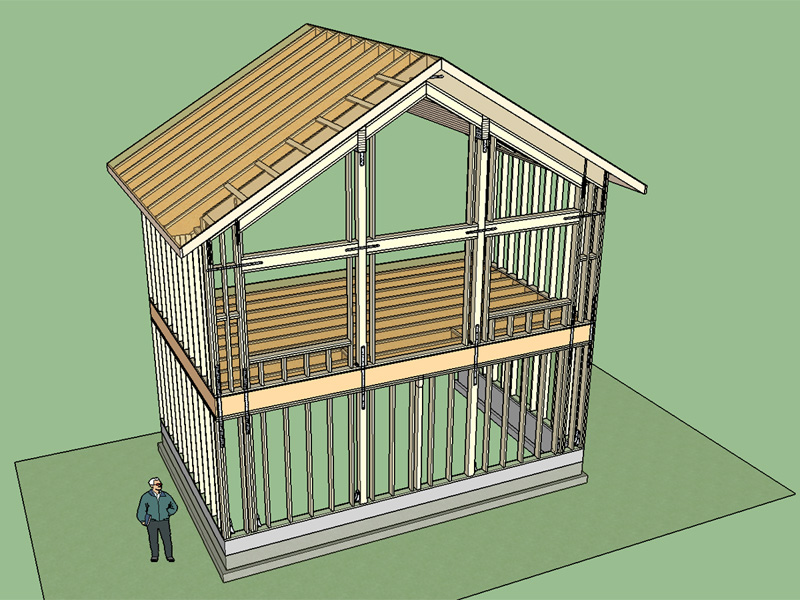
                            I've created a SketchUp model tonight using the truss and foundation plugins to further examine a structural design I am working on.
                            http://design.medeek.com/resources/images/truss_su152_800.jpg

                            View and download model here:

                            Link Preview Image
                            3D Warehouse

                            3D Warehouse is a website of searchable, pre-made 3D models that works seamlessly with SketchUp.

                            favicon

                            (3dwarehouse.sketchup.com)

                            I think I will probably add a TJI roof that allows one to use two glulam beams with cantilevered rafters as shown in this model, this configuration seems to be fairly popular.

                            Nathaniel P. Wilkerson PE
                            Medeek Engineering Inc
                            design.medeek.com

                            1 條回覆 最後回覆 回覆 引用 0
                            • facerF 離線
                              facer
                              最後由 編輯

                              Medeek,

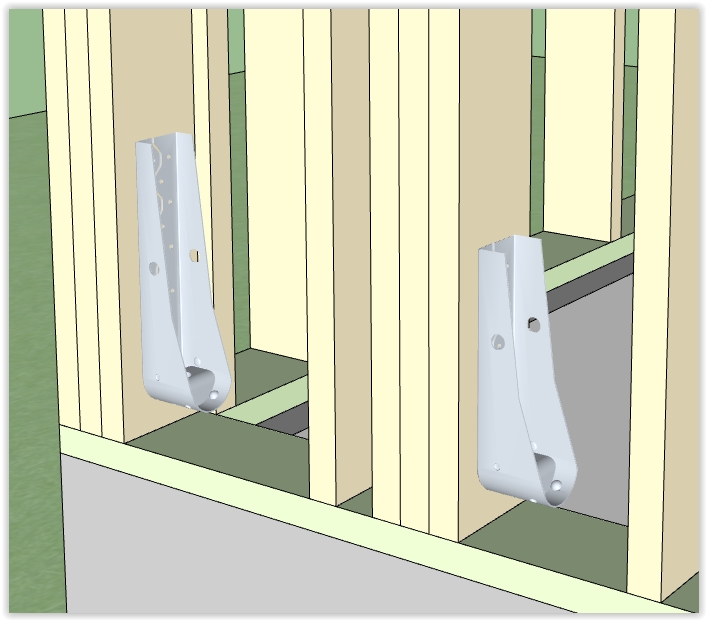
                              What function do the Bracket - Fixings shown in attached jpeg serve?

                              I assume they are Simpson Strong-Tie HDU2-SDS2.5 (as noted in your Skp model - entity info)
                              but why so far from the bottom plate - bolts to be added later or in situ?

                              Good work, keep them coming 😄


                              Brackets purpose?

                              1 條回覆 最後回覆 回覆 引用 0
                              • medeekM 離線
                                medeek
                                最後由 編輯

                                The HDU5 at the corner is primarily for the lower shearwall, the HDU4 about 24" inboard is for the the portal frame load path in the wall above, notice the straps between floors that complete the load path. I have not shown the SB5/8X24 anchor bolts that will be placed in the forms before the concrete is poured. I showed the holdowns about 1-1/2" above the sill plate, actual height will be dictated by the extension of the anchor bolts above the sill plate and is not really critical. The holdowns could just as well sit directly on the bottom plate.

                                What I've shown in this window wall is a site built wood moment frame, what I have not shown is the required nailing patterns. I also forgot to add in the pad footings for the PSL posts, and possibly a few more A35 clips and straps, but overall it is mostly complete. I am still working on the lateral analysis of the total structure which may change the sizing of the straps and holdowns slightly. This is the typical work I do during my day job but its fun to throw together a 3D model to really look at how it all goes together.

                                Nathaniel P. Wilkerson PE
                                Medeek Engineering Inc
                                design.medeek.com

                                1 條回覆 最後回覆 回覆 引用 0
                                • FrederikF 離線
                                  Frederik
                                  最後由 編輯

                                  After having updated the plugin, I now get the following error, when I open SU... 😞

                                  Error Loading File C:/Users/kim/AppData/Roaming/SketchUp/SketchUp 2016/SketchUp/Plugins/medeek_truss_ext_trial/medeek_load.rb
                                  Error: #<NameError: undefined local variable or method pluginserial' for Medeek_Engineering_Inc_Extensions::MedeekTrussPluginModuleLoader:Module> C:/Users/kim/AppData/Roaming/SketchUp/SketchUp 2016/SketchUp/Plugins/medeek_truss_ext_trial/medeek_load.rb:205:in module:MedeekTrussPluginModuleLoader'
                                  C:/Users/kim/AppData/Roaming/SketchUp/SketchUp 2016/SketchUp/Plugins/medeek_truss_ext_trial/medeek_load.rb:22:in <module:Medeek_Engineering_Inc_Extensions>' C:/Users/kim/AppData/Roaming/SketchUp/SketchUp 2016/SketchUp/Plugins/medeek_truss_ext_trial/medeek_load.rb:20:in <top (required)>'
                                  C:/Program Files/SketchUp/SketchUp 2016/Tools/extensions.rb:197:in require' C:/Program Files/SketchUp/SketchUp 2016/Tools/extensions.rb:197:in load'
                                  C:/Users/kim/AppData/Roaming/SketchUp/SketchUp 2016/SketchUp/Plugins/medeek_truss_ext_trial.rb:39:in register_extension' C:/Users/kim/AppData/Roaming/SketchUp/SketchUp 2016/SketchUp/Plugins/medeek_truss_ext_trial.rb:39:in module:MedeekTrussPluginLoader'
                                  C:/Users/kim/AppData/Roaming/SketchUp/SketchUp 2016/SketchUp/Plugins/medeek_truss_ext_trial.rb:23:in <module:Medeek_Engineering_Inc_Extensions>' C:/Users/kim/AppData/Roaming/SketchUp/SketchUp 2016/SketchUp/Plugins/medeek_truss_ext_trial.rb:22:in <top (required)>'

                                  Cheers
                                  Kim Frederik

                                  1 條回覆 最後回覆 回覆 引用 0
                                  • medeekM 離線
                                    medeek
                                    最後由 編輯

                                    I forgot to remove a "#" sign when I removed some debugging code in the trial version. Re-download and install again (Version 1.6.8). Sorry for breaking it.

                                    Nathaniel P. Wilkerson PE
                                    Medeek Engineering Inc
                                    design.medeek.com

                                    1 條回覆 最後回覆 回覆 引用 0
                                    • FrederikF 離線
                                      Frederik
                                      最後由 編輯

                                      No problem...
                                      Glad you've solved the issue... 👍

                                      Cheers
                                      Kim Frederik

                                      1 條回覆 最後回覆 回覆 引用 0
                                      • FrederikF 離線
                                        Frederik
                                        最後由 編輯

                                        Hhhmmm... Although I've downloaded ver 1.6.8, installed it, re-started SU, I still have this issue... ❓

                                        Cheers
                                        Kim Frederik

                                        1 條回覆 最後回覆 回覆 引用 0
                                        • medeekM 離線
                                          medeek
                                          最後由 編輯

                                          Manually remove the plugin folder and files and then do a clean install, let me know if that doesn't fix it.

                                          Nathaniel P. Wilkerson PE
                                          Medeek Engineering Inc
                                          design.medeek.com

                                          1 條回覆 最後回覆 回覆 引用 0
                                          • FrederikF 離線
                                            Frederik
                                            最後由 編輯

                                            I've removed the folder "medeek_truss_ext_trial" from
                                            C:\Users\kim\AppData\Roaming\SketchUp\SketchUp 2016\SketchUp\Plugins
                                            As well as the file "medeek_truss_ext_trial.rb"

                                            Then I opened SU and didn't get any errors...
                                            I opened the Extension Store and installed the plugin again, but after a re-start, I get the exact same issue...

                                            It does say that it's ver. 1.6.8, but are you sure that it's the correct file in the Extension store...??


                                            Cheers
                                            Kim Frederik

                                            1 條回覆 最後回覆 回覆 引用 0
                                            • 1
                                            • 2
                                            • 11
                                            • 12
                                            • 13
                                            • 14
                                            • 15
                                            • 75
                                            • 76
                                            • 13 / 76
                                            • 第一個貼文
                                              最後的貼文
                                            Buy SketchPlus
                                            Buy SUbD
                                            Buy WrapR
                                            Buy eBook
                                            Buy Modelur
                                            Buy Vertex Tools
                                            Buy SketchCuisine
                                            Buy FormFonts

                                            Advertisement