Weird Issue - Multiple Axis Icons
-
Hi all,
Question:
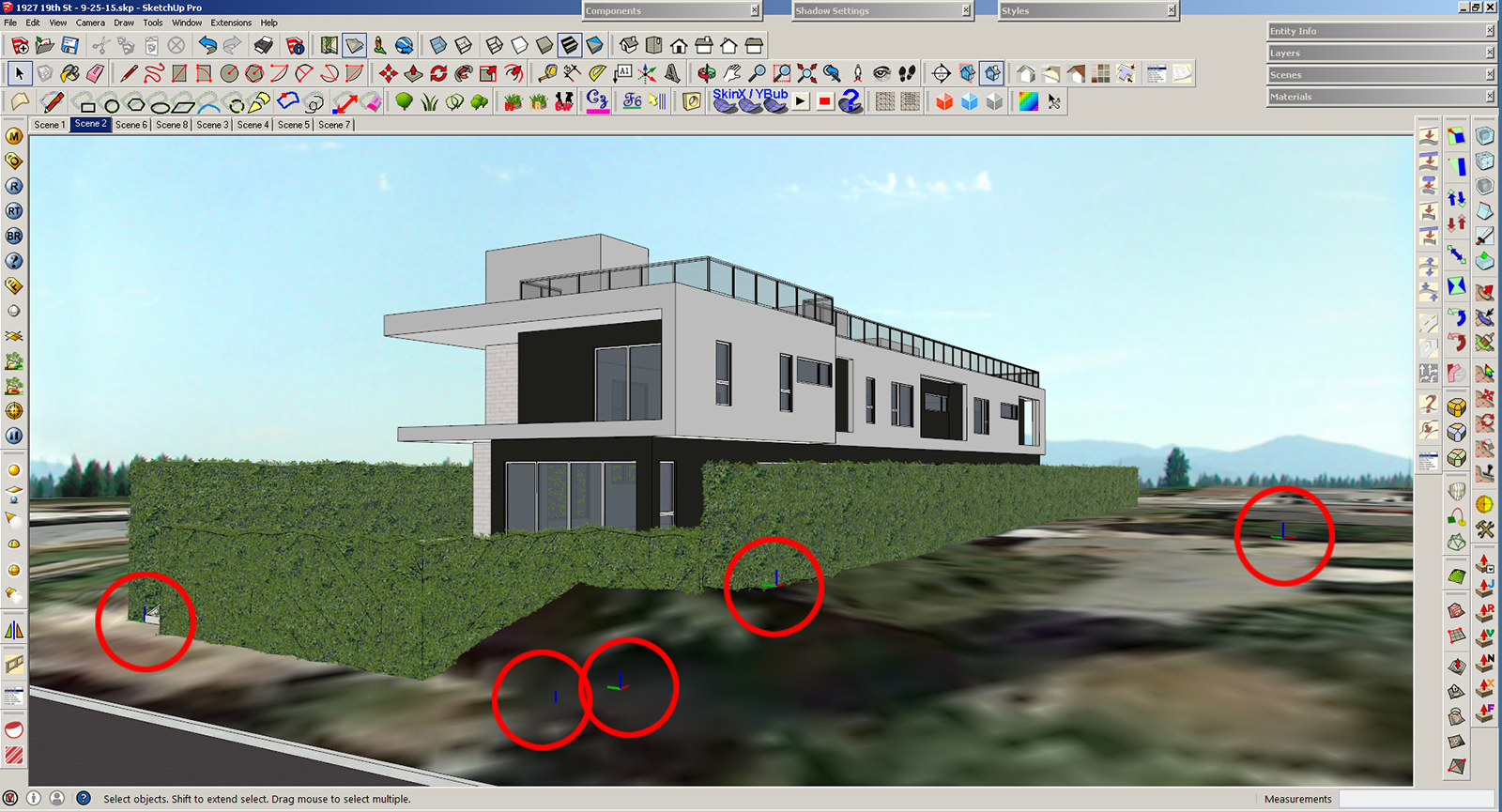
Why does this file have more than one axis icon? A co-worker did a few small changes and then they appeared out of nowhere. She doesn't really know how to use Sketchup, so I'm sure she simply clicked on the wrong thing. However, I can't remove them. It's weird.
I tried unchecking View > Axis and they're still there.
When you right click on them, no dialog box pops up (literally nothing happens).
When I open a group, it goes back to normal only showing the current axis.They don't appear when you export, so it's not a big deal. Just annoying.
Thanks,
Bobby
-
A fairly basic thing. Go to Window>Model Info>Components and untick the box for Show Component Axes.
-
Wow I feel dumb.
Thanks Dave R.



Hello! It looks like you're interested in this conversation, but you don't have an account yet.
Getting fed up of having to scroll through the same posts each visit? When you register for an account, you'll always come back to exactly where you were before, and choose to be notified of new replies (either via email, or push notification). You'll also be able to save bookmarks and upvote posts to show your appreciation to other community members.
With your input, this post could be even better 💗
Register Login


Advertisement