[Plugin] GKWare Cabinet Maker
-
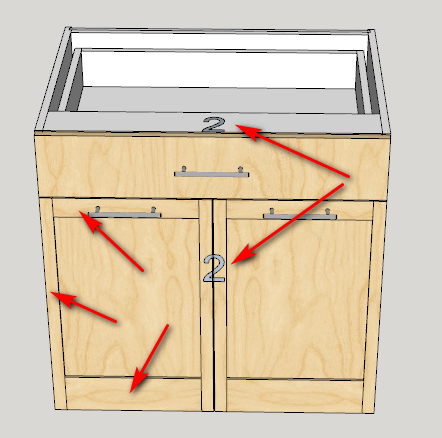
Here is the new Cabinet Labeling. You can turn it off in Edit Config by setting the label height to 0. You can also turn it off in the model using layers.
This also shows a shaker door where you can set the rail heights independently.
-
Here I've set the panel thickness to 0 and CabMaker omits the panel.
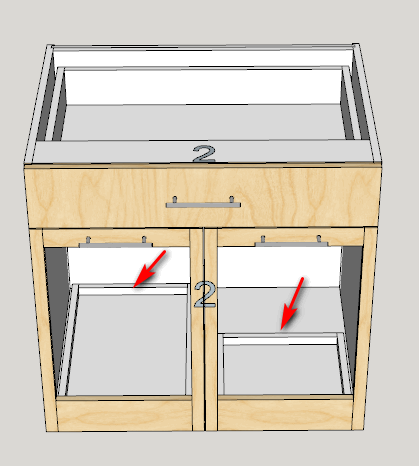
I turned on side by side pullouts. I've set the partition height to 75 mm. You could have multiple pullouts if you wanted.
Also I've set the left pullout depth to 0 (means cabmaker will figure out the deepest pullout that will fit. I've set the right pullout depth to 300. This can help for a sink where there is plumbing on one side of the sink cabinet.
-
HEllo Garry,
I was trying to quickly draw several alternative of door templates for a client, and I figured out that my usual way of doing it (copy the whole 3D, make some component unique, modify) won't work with cabinet made with your plugin.
How would be the right way to do this?
In this case I'd like to male 3 versions of the same set of cabinet, with different doors template (embossed square with mid rail in the middle, or on another height for example).
thanks in advance,
-
One way to make cabinets unique is to:
- Copy and paste the set of cabinets for Version 2
- Paste a second time for Version 3
- Select all the cabinets and perform a batch edit. This will break the connection between all the cabinets.
You can then make door changes to individual cabinets.
I usually save the skp with a different name and then change the doors at the PROJECT level within a batch edit. This is very quick and means you don't have to edit each cabinet separately. Of course you would end up with 3 separate models.
-
CabMaker 3.0.123 and CutMaster 3.0.1.73 are now available on my website.
Added scene automation. Start by setting your perspective and choose from Standard Scenes "Perspective / Plan"
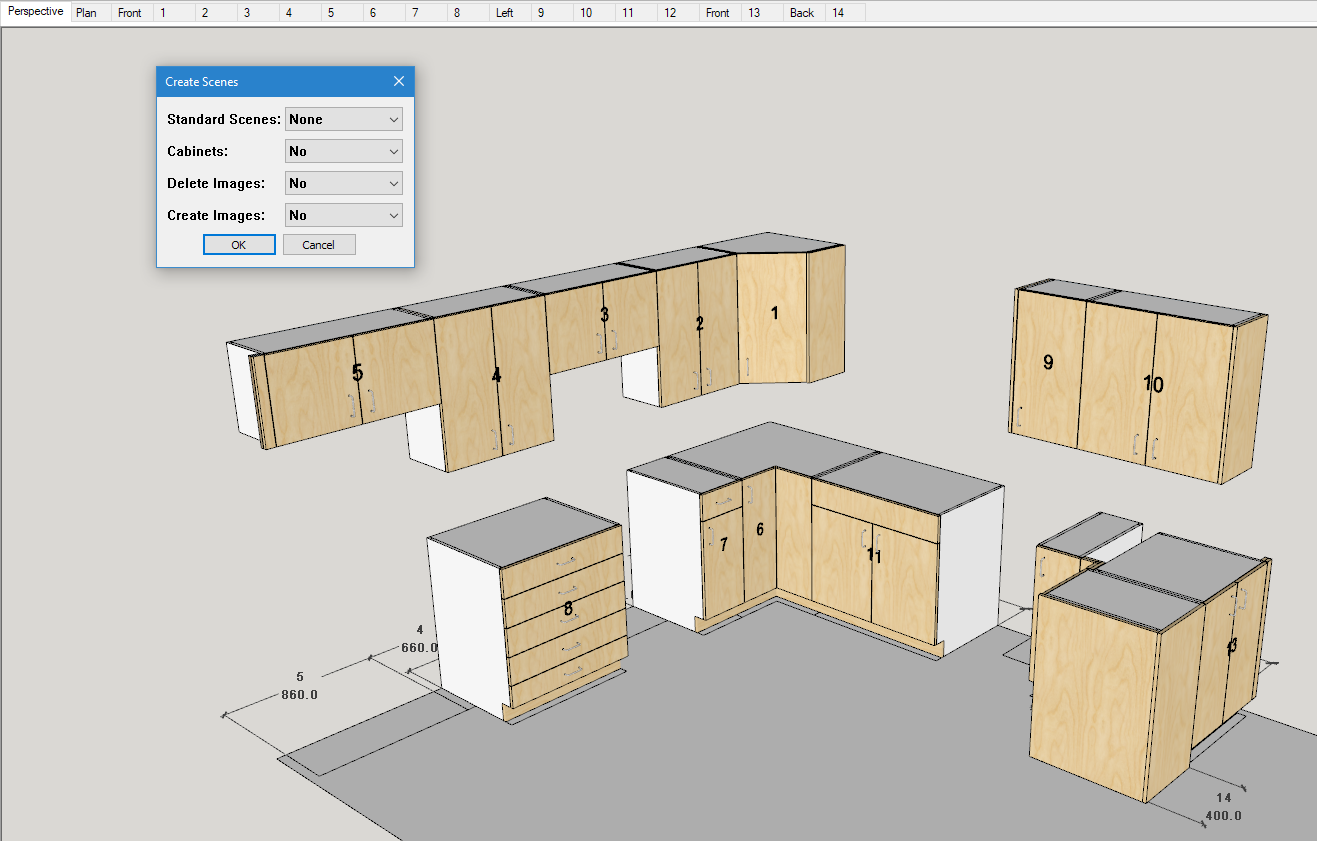
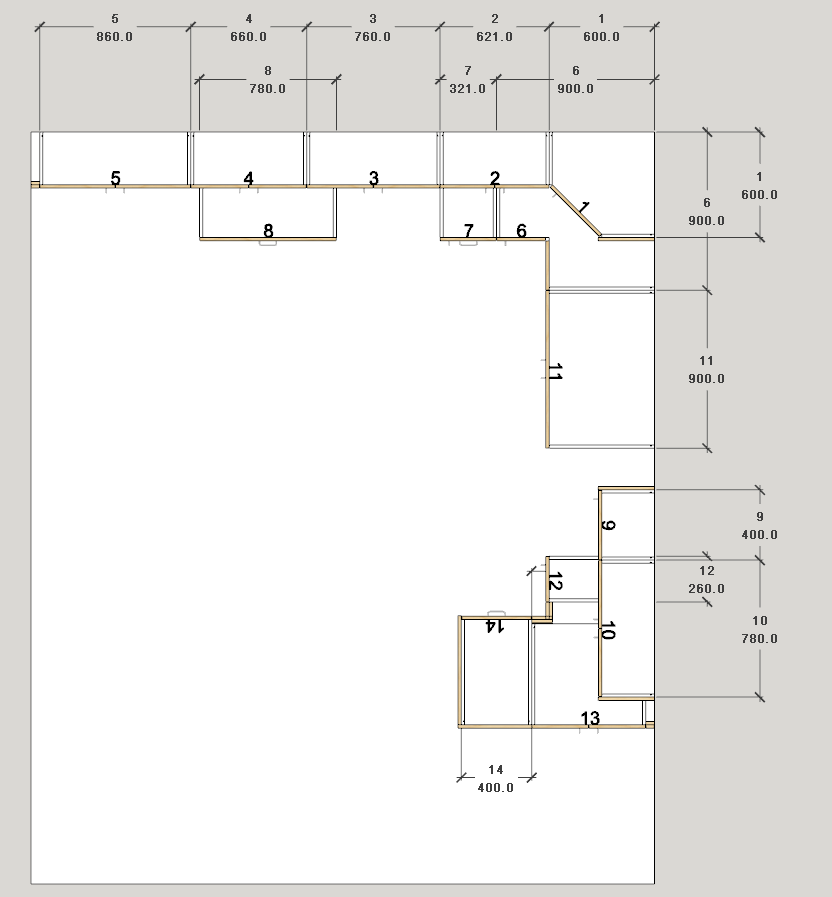
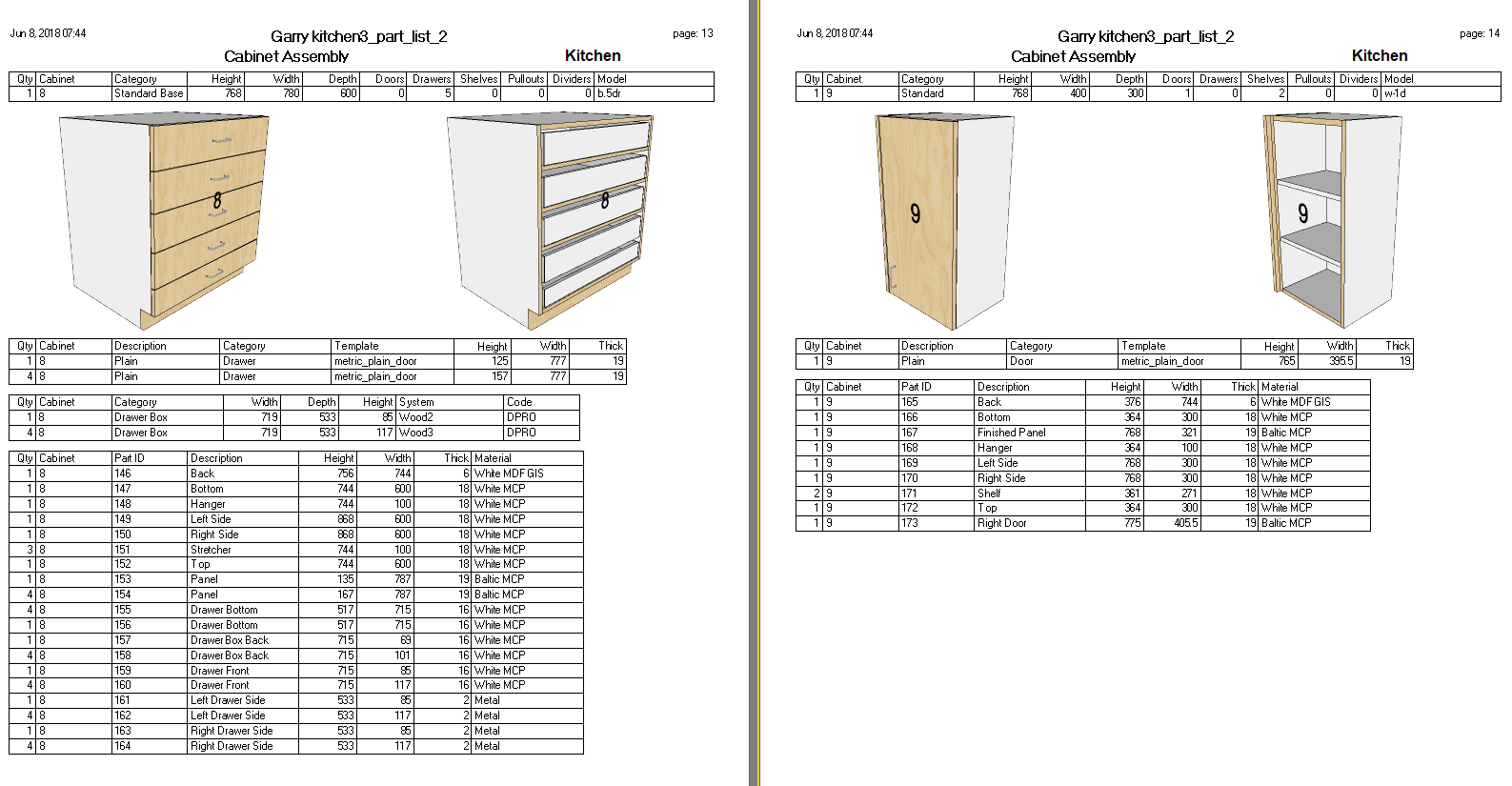
Then I selected cabinets 1 through 8 and then I chose from Standard Scenes the appropriate View. In this case it is the "Front Elevation". I set Cabinets to Yes and this creates 2 images per cabinet - one with doors and one without.
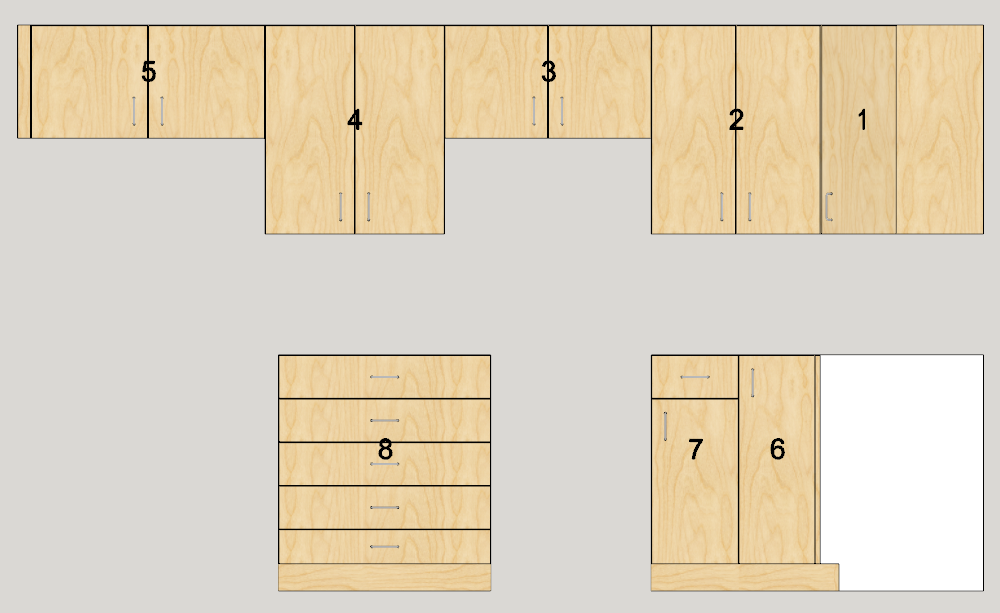
Run the report and CutMaster imports the data. Then click on Assembly reports.
-
-
CabMaker 3.0.126 and CutMaster 3.0.1.76 are now available for download.
Now locking cabinets after a merge.
Cleaned up the workflow for automated scenes.
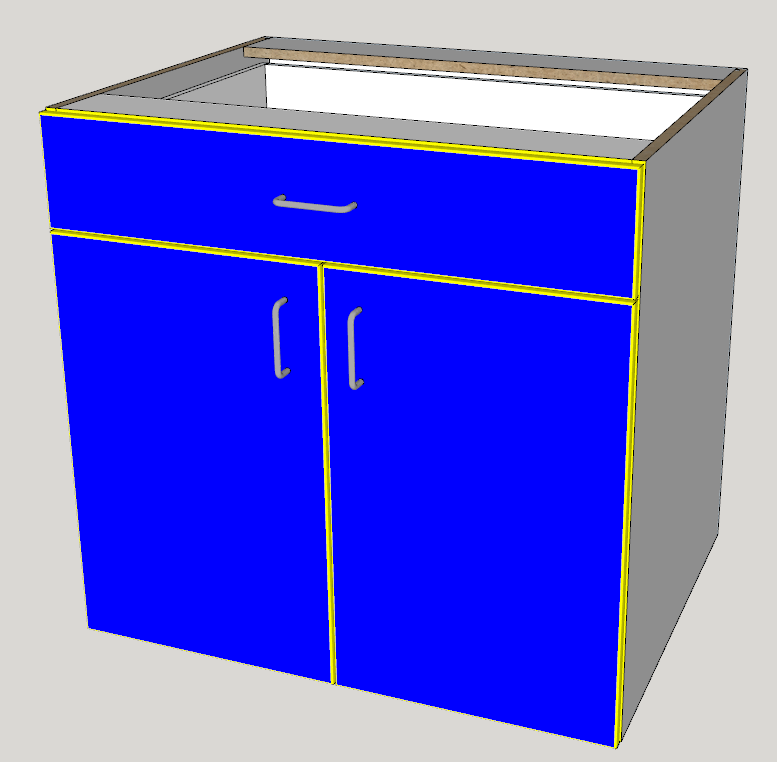
Slab doors have their own edging.Added user control for CutMaster CNC labels.
Here are blue doors and yellow edging. The edge profile takes on the edging color. In this case the doors have a 3 mm radius.
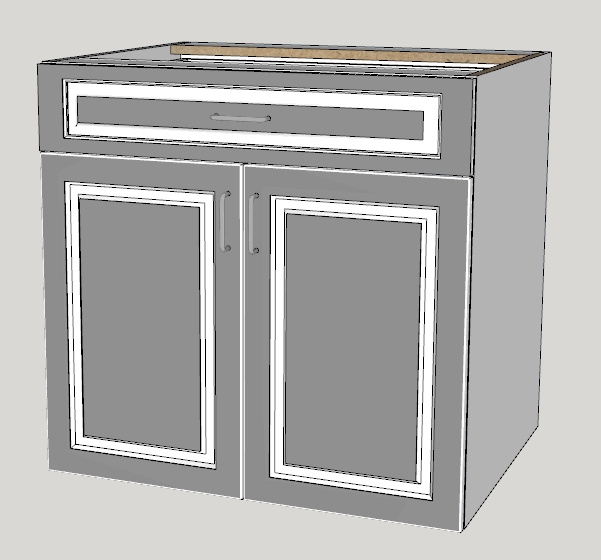
You can achieve different effects with the embossed doors.
-
I am now adding additional support for textures.
- You will be able to add png or jpg files for textures.
- In the Color.txt file you will now be able to add optional opacity for materials.
- In the Color.txt file you will now be able to add your own color names providing you supply either RGB values or Hex value for the actual color.
- You can now specify your own textures for glass, mirror, closet rods and raw edges.
- I'm providing 2 textures for plywood edging for 3/4" (18 to 19 mm) panels.
I am now providing an Ikea.txt file that contains 200 IKEA colors along with RGB vales.
Here are the first 10 IKEA colors
IKEA 001=250,241,231
IKEA 002=240,232,225
IKEA 003=250,242,236
IKEA 004=248,242,235
IKEA 005=237,232,224
IKEA 006=239,231,221
IKEA 007=245,240,229
IKEA 008=241,228,211
IKEA 009=249,243,233
IKEA 010=244,236,222Here is an example of named colors with and without opacity:
my_color_1=255,0,16=0.4
glass=0.3
my_color_2=#FF000F
my_color_3=#DD000F=0.2 -
Hello,
IS there a way to choose between horizontal or vertical texture for wood texture? That would be nice.
br,
-
What some users have done is create their own horizontal texture.
-
[quote="Garry K"]One way to make cabinets unique is to:
- Copy and paste the set of cabinets for Version 2
- Paste a second time for Version 3
- Select all the cabinets and perform a batch edit. This will break the connection between all the cabinets.
You can then make door changes to individual cabinets.
/quote]
HEllo,
I tried this for the second time since a asked the question but i cannot make it happen.
In the 2 different projects I tried, the behavior is the same. When I copy the cabinets and try to bbatch edit the new ones, nothing happen to them... but the first ones moves a little bit!In the first project I had 6 tall cabinet and some of them were moving sideways for 60cm or more. In this project one of the cabinet move along the green axis (it goes behind , just on cabinet depth).
I tried to change materials set, door type, handle type, sizes, it's always the same behavior. No changes happen. There is just those move of the cabinet I'm not editing.
br,
-
Please email me directly and we can set up a time to Skype and solve your problem.
-
Cabmaker 3.0.130 is now available for download. CutMaster 3.0.1.78 is also available.
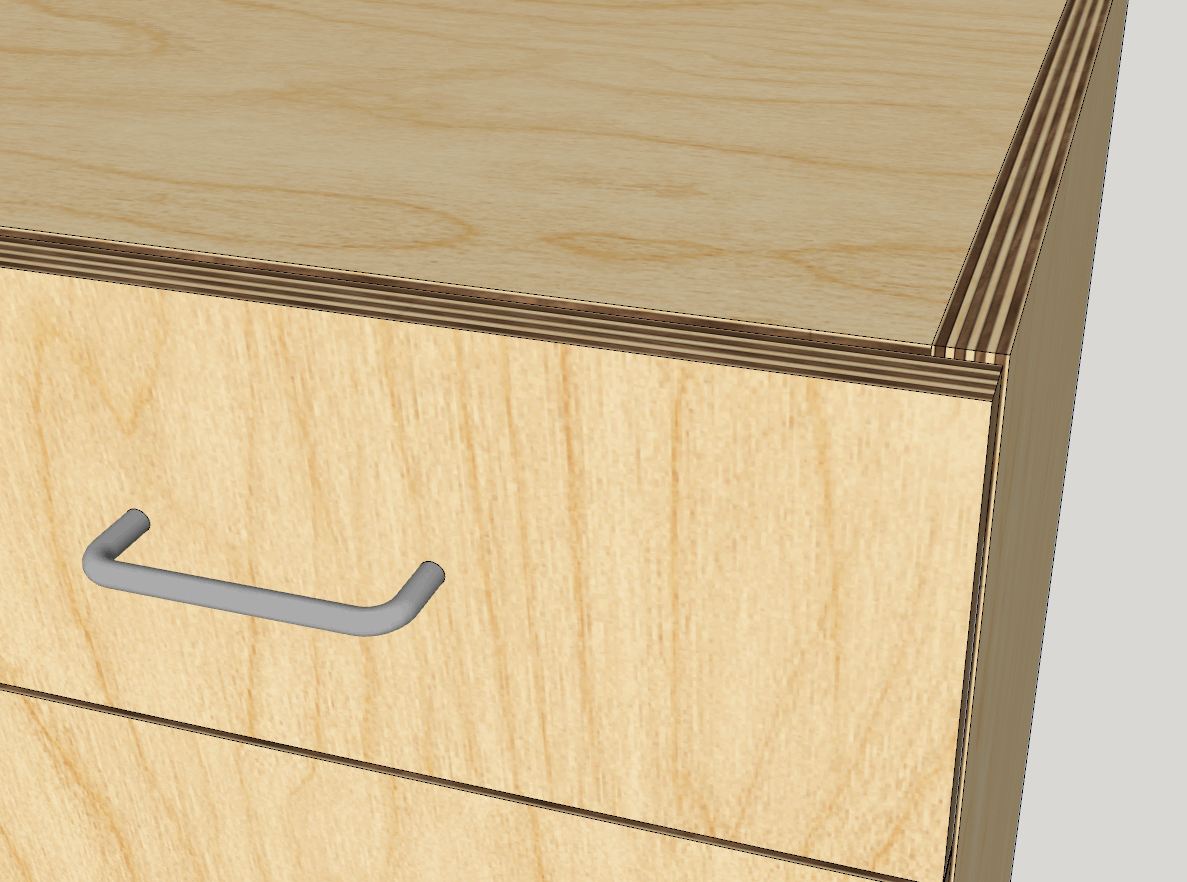
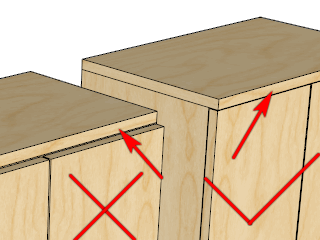
You can now extend an overlay top and adjust the top gap.
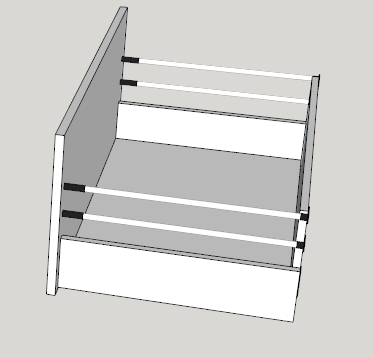
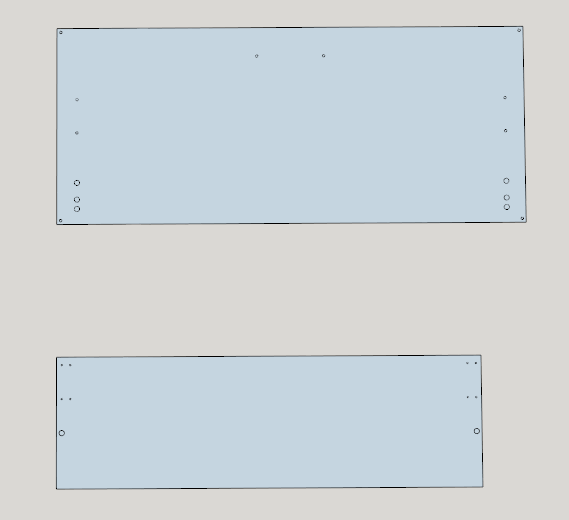
CutMaster now has additional drilling and grooving operations to facilitate drawer systems.
-
CabMaker 3.0.131 and CutMaster 3.0.1.79 now available from my website.
CabMaker
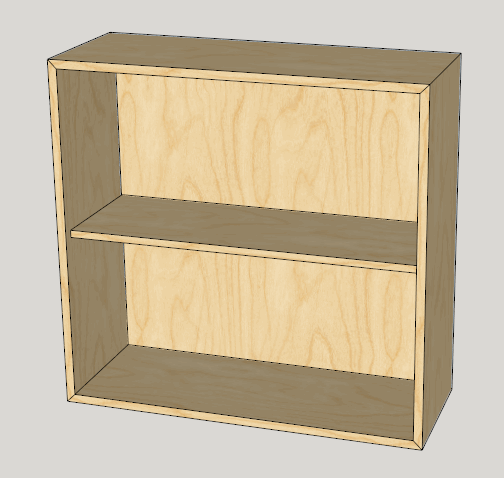
- Added Mitered Corners for Standard Cabinets.
- Added switch in Report Configuration so CabMaker parts report will produce 1 line per part instead of combining all like parts.
CutMaster
- Added Reference from Drawer Box for configuring Drawer Fronts Hole Sets and Pilot holes.
- Fixed bug where spaces in Purpose breaks the configuration.
-
CabMaker 3.0.132 and CutMaster 3.0.1.80 are now available from my website.
- Added Hinge positions for Tall, Mid and Standard doors. You can now have up to 5 hinges on a door. Please note that this information is sent over to CutMaster CNC for machining of the side panels and 1 piece doors.
These CabMaker GIF's (from context help) give examples of what can be accomplished with hinge positions. The GIF's have a 2 second delay between frames.
Box 1
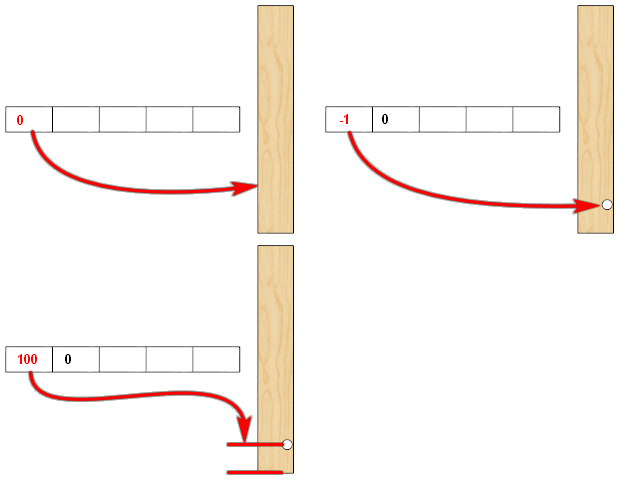
Box 2
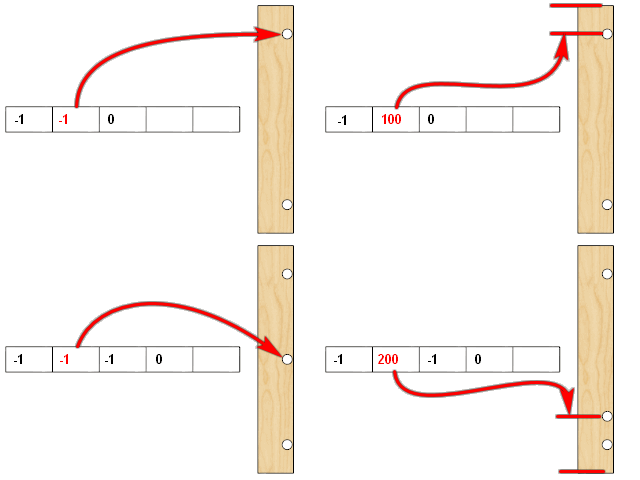
Box 3
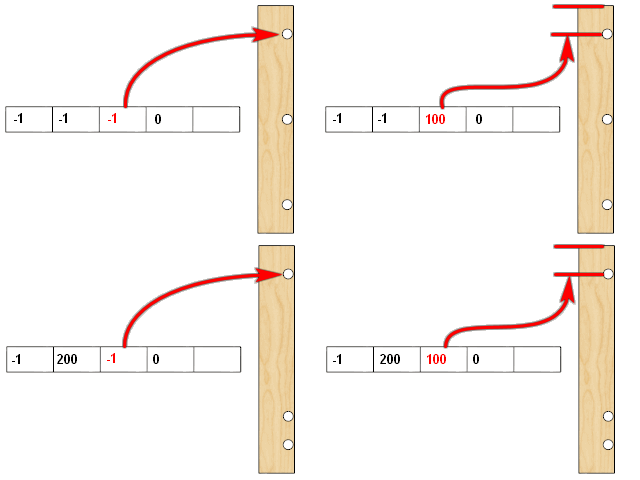
Box 4
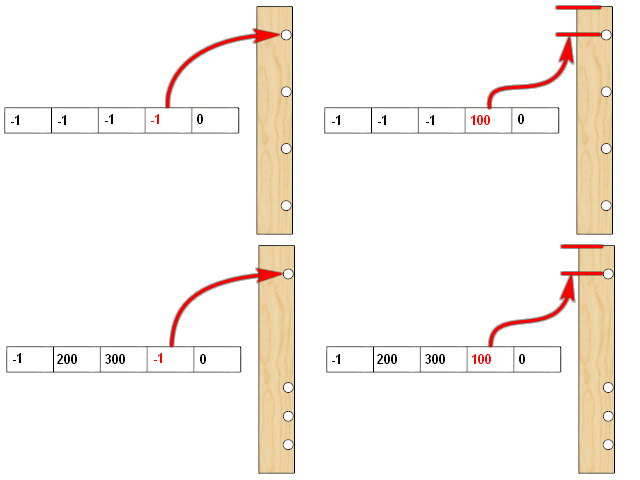
Box 5
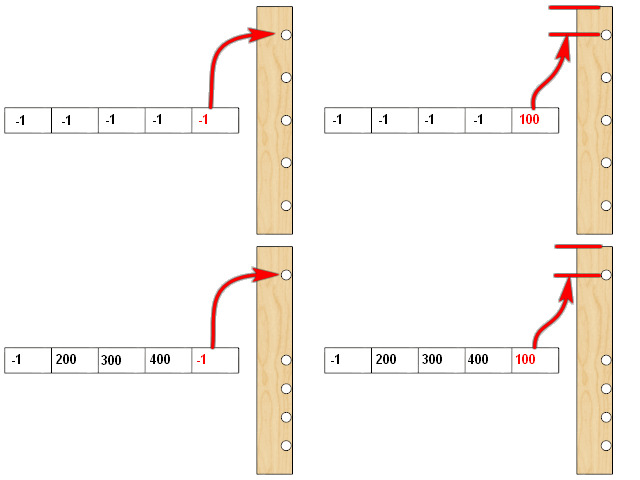
-
Hello,
Am I blind, or there is no way to force handle height for the lower part of a tall cabinet? So not the mid section, not the top one, the "default one".
thanks in advance,
-
The mid door is the only door that allows you to adjust the vertical position of a handle.
I am just finishing up on another feature and was planning to visit Doors next. I can add this as a FR (feature request)
-
HEllo GAry, I don't get how you selected the line about "make full door" as the problem. Why this one among the others?
-
create_door_part is actually the first clue but make_full_door is the high level method which is called from make_door_drawer. This tells us that the problem is with doors / drawers.
The add_face, do_create_part and do_create_vert part are lower level methods which are called many times from many places such as make_top_bottom and make_shelves etc.
In this case the duplicate points error was caused by the Door Stile Width set to 0
-
I have a similar error but I cannot find the problem. HEre is the ruby consol c/p
I understand that there is a problem with the sides (?), but I don't see anythingstart_operation
Duplicate points in array
c:/users/marti/appdata/roaming/sketchup/sketchup 2018/sketchup/plugins/gkware_cabmaker3/cabmaker3.rbe:8666:inadd_face' c:/users/marti/appdata/roaming/sketchup/sketchup 2018/sketchup/plugins/gkware_cabmaker3/cabmaker3.rbe:8666:increate_part'
c:/users/marti/appdata/roaming/sketchup/sketchup 2018/sketchup/plugins/gkware_cabmaker3/cabmaker3.rbe:1170:inmake_sides' c:/users/marti/appdata/roaming/sketchup/sketchup 2018/sketchup/plugins/gkware_cabmaker3/cabmaker3.rbe:8929:indraw_cabinet'
c:/users/marti/appdata/roaming/sketchup/sketchup 2018/sketchup/plugins/gkware_cabmaker3/cabmaker3.rbe:9519:inmake_one_cabinet' c:/users/marti/appdata/roaming/sketchup/sketchup 2018/sketchup/plugins/gkware_cabmaker3/cabmaker3.rbe:9479:inprepare_cabinet'
c:/users/marti/appdata/roaming/sketchup/sketchup 2018/sketchup/plugins/gkware_cabmaker3/cabmaker3_gui.rbe:178:inblock in show_cab_dialog' c:/users/marti/appdata/roaming/sketchup/sketchup 2018/sketchup/plugins/gkware_cabmaker3/cabmaker3_gui.rbe:172:incall'
c:/users/marti/appdata/roaming/sketchup/sketchup 2018/sketchup/plugins/gkware_cabmaker3/cabmaker3_gui.rbe:172:inexecute_script' c:/users/marti/appdata/roaming/sketchup/sketchup 2018/sketchup/plugins/gkware_cabmaker3/cabmaker3_gui.rbe:172:inblock in show_cab_dialog'
c:/users/marti/appdata/roaming/sketchup/sketchup 2018/sketchup/plugins/gkware_cabmaker3/cabmaker3_gui.rbe:172:incall' c:/users/marti/appdata/roaming/sketchup/sketchup 2018/sketchup/plugins/gkware_cabmaker3/cabmaker3_gui.rbe:172:inexecute_script'
c:/users/marti/appdata/roaming/sketchup/sketchup 2018/sketchup/plugins/gkware_cabmaker3/cabmaker3_gui.rbe:172:inblock in show_cab_dialog' c:/users/marti/appdata/roaming/sketchup/sketchup 2018/sketchup/plugins/gkware_cabmaker3/cabmaker3_gui.rbe:172:incall'
c:/users/marti/appdata/roaming/sketchup/sketchup 2018/sketchup/plugins/gkware_cabmaker3/cabmaker3_gui.rbe:172:inexecute_script' c:/users/marti/appdata/roaming/sketchup/sketchup 2018/sketchup/plugins/gkware_cabmaker3/cabmaker3_gui.rbe:172:inblock in show_cab_dialog'
c:/users/marti/appdata/roaming/sketchup/sketchup 2018/sketchup/plugins/gkware_cabmaker3/cabmaker3_gui.rbe:172:incall' c:/users/marti/appdata/roaming/sketchup/sketchup 2018/sketchup/plugins/gkware_cabmaker3/cabmaker3_gui.rbe:172:inexecute_script'
c:/users/marti/appdata/roaming/sketchup/sketchup 2018/sketchup/plugins/gkware_cabmaker3/cabmaker3_gui.rbe:172:inblock in show_cab_dialog' c:/users/marti/appdata/roaming/sketchup/sketchup 2018/sketchup/plugins/gkware_cabmaker3/cabmaker3_gui.rbe:172:incall'
c:/users/marti/appdata/roaming/sketchup/sketchup 2018/sketchup/plugins/gkware_cabmaker3/cabmaker3_gui.rbe:172:inexecute_script' c:/users/marti/appdata/roaming/sketchup/sketchup 2018/sketchup/plugins/gkware_cabmaker3/cabmaker3_gui.rbe:172:inblock in show_cab_dialog'
c:/users/marti/appdata/roaming/sketchup/sketchup 2018/sketchup/plugins/gkware_cabmaker3/cabmaker3_gui.rbe:172:incall' c:/users/marti/appdata/roaming/sketchup/sketchup 2018/sketchup/plugins/gkware_cabmaker3/cabmaker3_gui.rbe:172:inexecute_script'
c:/users/marti/appdata/roaming/sketchup/sketchup 2018/sketchup/plugins/gkware_cabmaker3/cabmaker3_gui.rbe:172:inblock in show_cab_dialog' c:/users/marti/appdata/roaming/sketchup/sketchup 2018/sketchup/plugins/gkware_cabmaker3/cabmaker3_gui.rbe:172:incall'
c:/users/marti/appdata/roaming/sketchup/sketchup 2018/sketchup/plugins/gkware_cabmaker3/cabmaker3_gui.rbe:172:inexecute_script' c:/users/marti/appdata/roaming/sketchup/sketchup 2018/sketchup/plugins/gkware_cabmaker3/cabmaker3_gui.rbe:172:inblock in show_cab_dialog'
c:/users/marti/appdata/roaming/sketchup/sketchup 2018/sketchup/plugins/gkware_cabmaker3/cabmaker3_gui.rbe:172:incall' c:/users/marti/appdata/roaming/sketchup/sketchup 2018/sketchup/plugins/gkware_cabmaker3/cabmaker3_gui.rbe:172:inexecute_script'
c:/users/marti/appdata/roaming/sketchup/sketchup 2018/sketchup/plugins/gkware_cabmaker3/cabmaker3_gui.rbe:172:inblock in show_cab_dialog' c:/users/marti/appdata/roaming/sketchup/sketchup 2018/sketchup/plugins/gkware_cabmaker3/cabmaker3_gui.rbe:172:incall'
c:/users/marti/appdata/roaming/sketchup/sketchup 2018/sketchup/plugins/gkware_cabmaker3/cabmaker3_gui.rbe:172:inexecute_script' c:/users/marti/appdata/roaming/sketchup/sketchup 2018/sketchup/plugins/gkware_cabmaker3/cabmaker3_gui.rbe:172:inblock in show_cab_dialog'
c:/users/marti/appdata/roaming/sketchup/sketchup 2018/sketchup/plugins/gkware_cabmaker3/cabmaker3_gui.rbe:185:incall' c:/users/marti/appdata/roaming/sketchup/sketchup 2018/sketchup/plugins/gkware_cabmaker3/cabmaker3_gui.rbe:185:inshow_modal'
c:/users/marti/appdata/roaming/sketchup/sketchup 2018/sketchup/plugins/gkware_cabmaker3/cabmaker3_gui.rbe:185:inshow_cab_dialog' c:/users/marti/appdata/roaming/sketchup/sketchup 2018/sketchup/plugins/gkware_cabmaker3/cabmaker3.rbe:9112:inload_cabmaker'
c:/users/marti/appdata/roaming/sketchup/sketchup 2018/sketchup/plugins/gkware_cabmaker3/cabmaker3.rbe:454:indo_run_app' c:/users/marti/appdata/roaming/sketchup/sketchup 2018/sketchup/plugins/gkware_cabmaker3/cabmaker3.rbe:404:inactivate'
c:/users/marti/appdata/roaming/sketchup/sketchup 2018/sketchup/plugins/gkware_cabmaker3/cabmaker3.rbe:9640:inselect_tool' c:/users/marti/appdata/roaming/sketchup/sketchup 2018/sketchup/plugins/gkware_cabmaker3/cabmaker3.rbe:9640:ininitialize'
c:/users/marti/appdata/roaming/sketchup/sketchup 2018/sketchup/plugins/gkware_cabmaker3/cabmaker3.rbe:10893:innew' c:/users/marti/appdata/roaming/sketchup/sketchup 2018/sketchup/plugins/gkware_cabmaker3/cabmaker3.rbe:10893:inblock (2 levels) in module:CabMaker3'
SketchUp:1:in `call'
abort_operation


Advertisement