sketchucation logo sketchucation
    • 登入
    Oops, your profile's looking a bit empty! To help us tailor your experience, please fill in key details like your SketchUp version, skill level, operating system, and more. Update and save your info on your profile page today!
    🔌 Smart Spline | Fluid way to handle splines for furniture design and complex structures. Download

    [Plugin] GKWare Cabinet Maker

    已排程 已置頂 已鎖定 已移動 Plugins
    627 貼文 69 Posters 459.4k 瀏覽 70 Watching
    正在載入更多貼文
    • 從舊到新
    • 從新到舊
    • 最多點贊
    回覆
    • 在新貼文中回覆
    登入後回覆
    此主題已被刪除。只有擁有主題管理權限的使用者可以查看。
    • mariochaM 離線
      mariocha
      最後由 編輯

      I also like the settings for the "Talls" being on one column.

      For the Kicks, maybe the top settings should be "Integrate" and "Omit", cause they affects many subsequent settings.

      Oh, also, if the frames are red, maybe the texts having tips, which is red now, should adopt another color so that red is only associated to Rules.

      %(#008000)[Mario C.
      Every rule has exceptions, but some.]

      1 條回覆 最後回覆 回覆 引用 0
      • G 離線
        Garry K
        最後由 編輯

        Version 1.0.35 is now available from my web site.

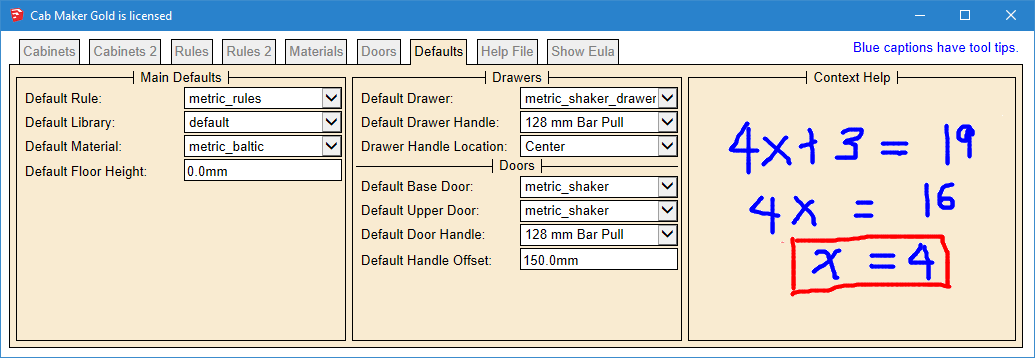
        1. Added Drawer Handle Location to Defaults tab.
        2. Added 6 more reports which are the same as the original 6 but in your model's units.
        1 條回覆 最後回覆 回覆 引用 0
        • A 離線
          abdalmalki
          最後由 編輯

          Thank you Garry for great support 👍

          1 條回覆 最後回覆 回覆 引用 0
          • M 離線
            miikka1978
            最後由 編輯

            @garry k said:

            One of my users has made a suggestion that I group items together a bit better. Currently the first 2 tabs contain cabinet values and the 3'rd and 4'th tab contains rules.

            His suggestion means mixing cabinet values and rules. Up to now I have been against mixing as I think it causes confusion. However, having kick information on 2 tabs and frame information on 2 tabs also causes confusion.

            Batch editing currently ignores the first 2 tabs. When batch editing you can change rules, materials, or defaults and have the changes applied to an entire kitchen.

            What I have come up with is a way to identify rules by changing the color to read for the border of each rule.

            I would like user comments on these proposed changes. This mockup hasn't changed the organization of the rules but does show the borders as red even for a disabled control.

            [attachment=2:h5rb1bkh]<!-- ia2 -->rules red mockup.PNG<!-- ia2 -->[/attachment:h5rb1bkh]

            Here is the proposed change for the rules tab

            [attachment=1:h5rb1bkh]<!-- ia1 -->rules mockup.PNG<!-- ia1 -->[/attachment:h5rb1bkh]

            Here is the Extra tab and the proposed changes

            [attachment=0:h5rb1bkh]<!-- ia0 -->Extra mockup.PNG<!-- ia0 -->[/attachment:h5rb1bkh]

            I have been using this plugin only for 1 day and I have the say that this is just great and price is reasonable!

            As a totally new user I agree that the logic of different settings and rules could be improved to make the plugin even better. At least for beginner like me there is some confusion where different settings are made (Rules, Rules 2, Extra, etc.). For example, I managed to create the below Cabin but I don't have any idea how did I do it. Does anybody know how fix this because I am not able to change the Drawer type back to normal?

            Hopefully I have enough time to experiment this plugin more in the coming weeks so I could give some meaningful feedback.

            http://i.imgur.com/j2csjbt.jpg

            1 條回覆 最後回覆 回覆 引用 0
            • R 離線
              RCD
              最後由 編輯

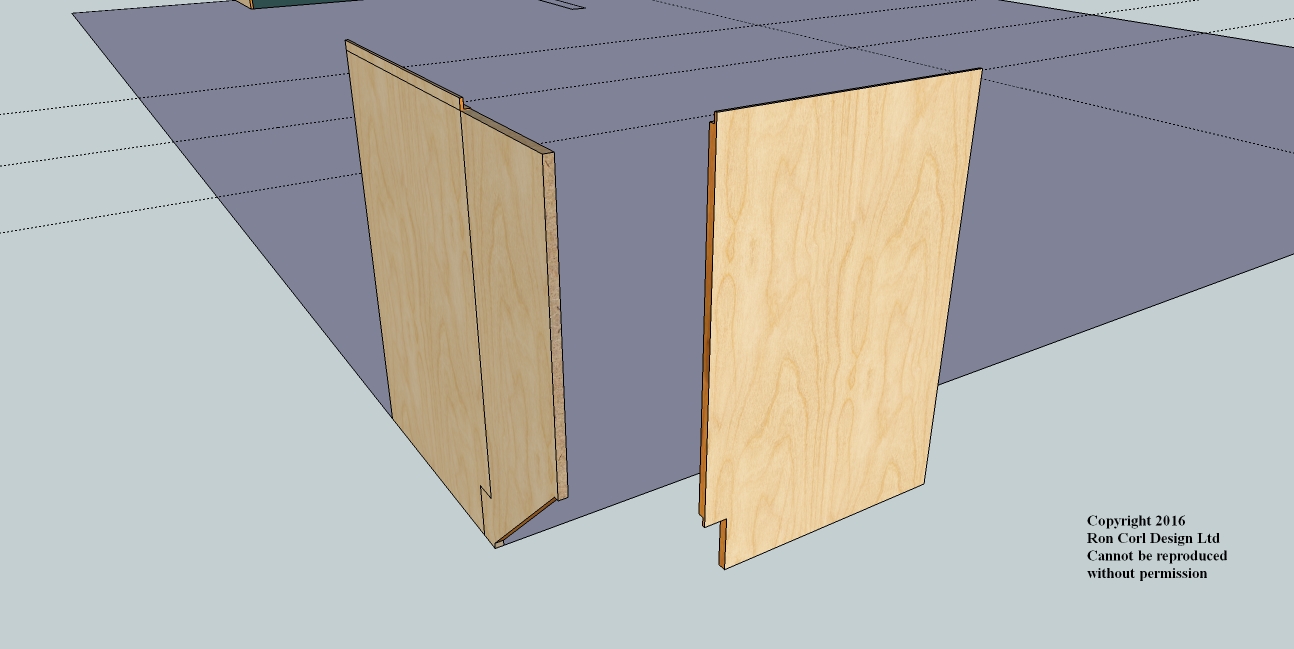
              When I use the angled cabinet, it isn't rendering correctly? Only the sides render and those aren't correct. Help?

              Kitchen 1.jpg

              1 條回覆 最後回覆 回覆 引用 0
              • G 離線
                Garry K
                最後由 編輯

                What's happening is there is an error somewhere and the process is not completed.

                You can startup ruby console before you render the angled cabinet. It should show errors. Often this sort of thing happens when parameters have values that the plugin doesn't handle.

                Please email me the contents of the ruby console.
                http://cabmaker32.com/contact/

                1 條回覆 最後回覆 回覆 引用 0
                • G 離線
                  Garry K
                  最後由 編輯

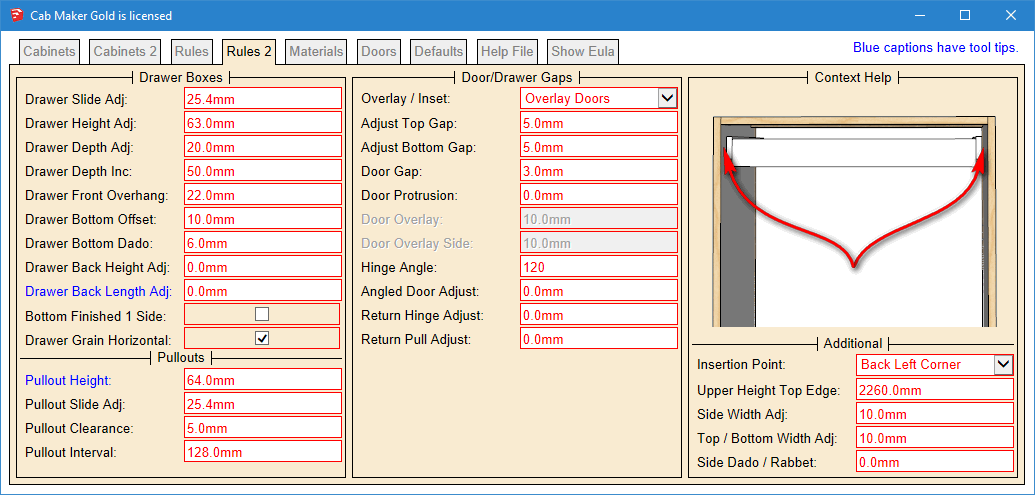
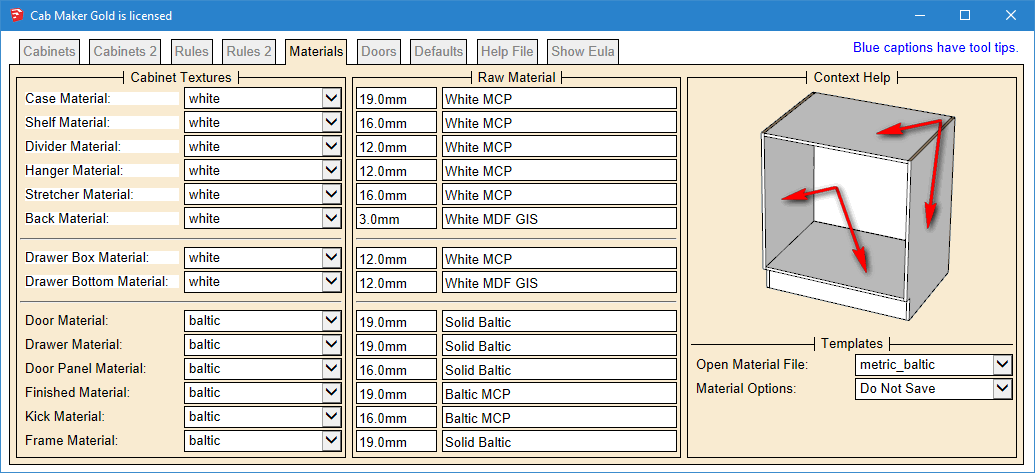
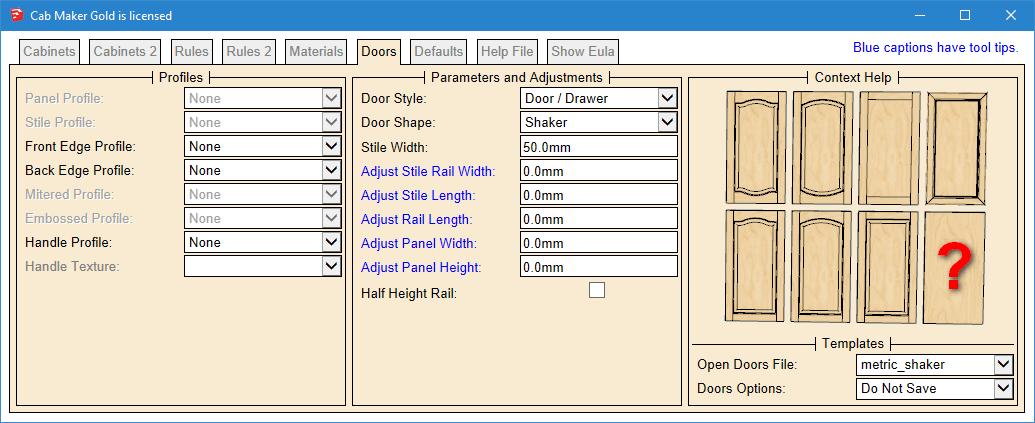
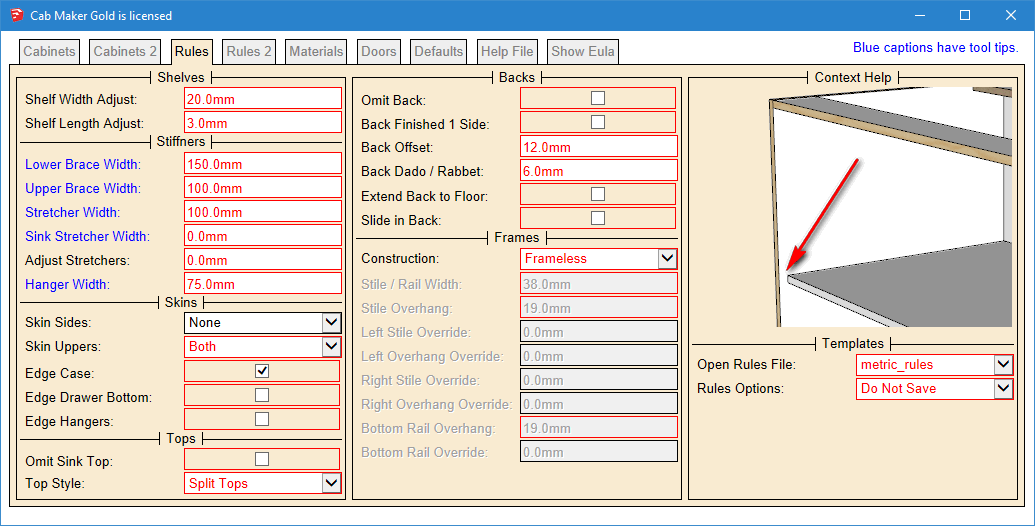
                  Version 1.0.36 will be ready later today. French Translation is complete. Web Dialog is reorganized.
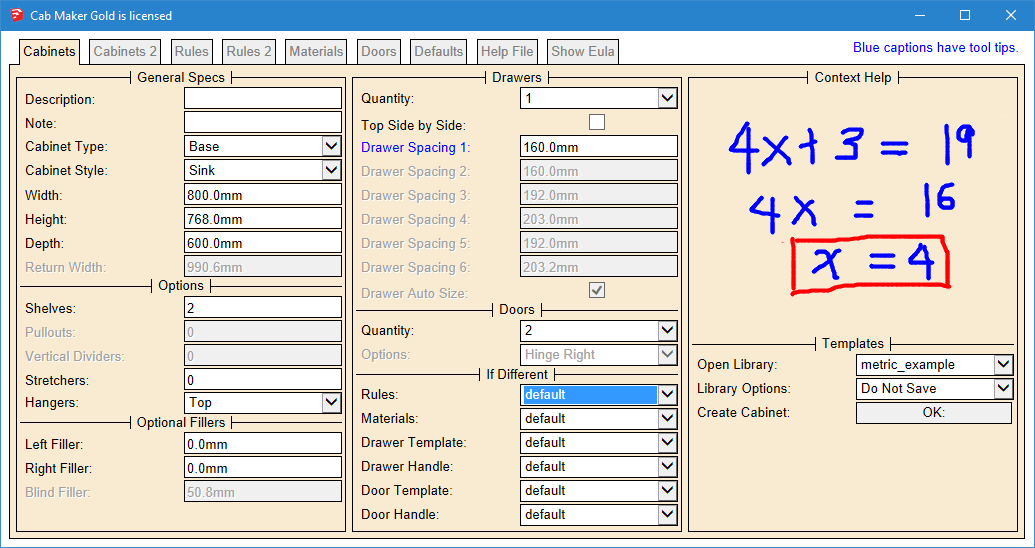
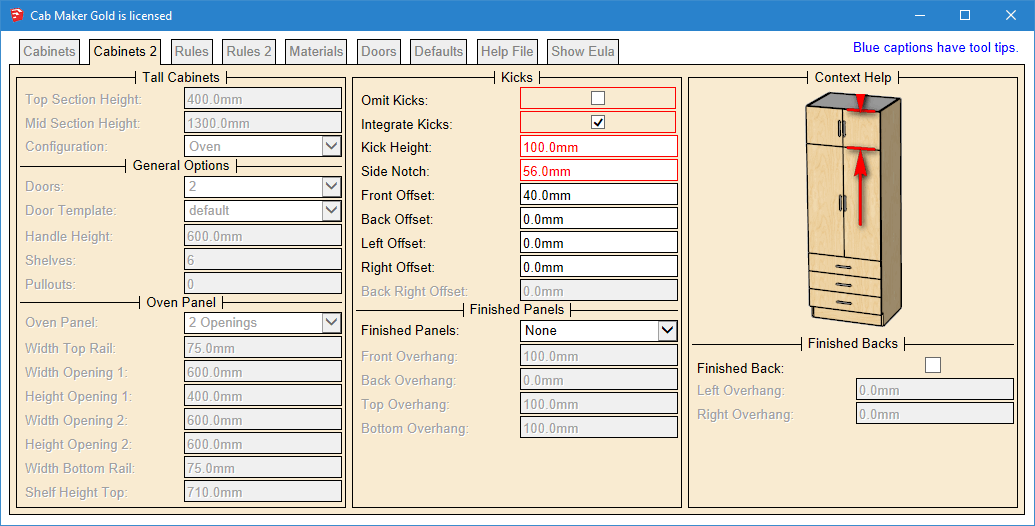
                  Cabinets


                  Cabinets 2


                  Rules


                  Rules 2


                  Materials


                  Doors


                  Defaults

                  1 條回覆 最後回覆 回覆 引用 0
                  • G 離線
                    Garry K
                    最後由 編輯

                    The red borders identify rules. Notice that some rules and some cabinet parameters have been moved around. Hopefully this simplifies the work flow and reduces confusion.

                    1 條回覆 最後回覆 回覆 引用 0
                    • A 離線
                      abdalmalki
                      最後由 編輯

                      This reorganization reduce confusion a lot
                      keep up the good work.

                      1 條回覆 最後回覆 回覆 引用 0
                      • G 離線
                        Garry K
                        最後由 編輯

                        Version 1.0.36 is now available for download from my website

                        Login to my web site
                        http://cabmaker32.com/login/

                        Then go to download page (you need to be logged in to download.

                        1 條回覆 最後回覆 回覆 引用 0
                        • medeekM 離線
                          medeek
                          最後由 編輯

                          I don't know the first thing about cabinets but I will say your web dialogs and overall user interface with this plugin is fantastic stuff. I will be putting your plugin through its paces and perhaps I can learn a thing or two about how to create some exceptional user interfaces for my own plugin. You attention to detail is duly noted.

                          Nathaniel P. Wilkerson PE
                          Medeek Engineering Inc
                          design.medeek.com

                          1 條回覆 最後回覆 回覆 引用 0
                          • G 離線
                            Garry K
                            最後由 編輯

                            Thank you Nathaniel for your kind words.

                            Here is the first tab in French.
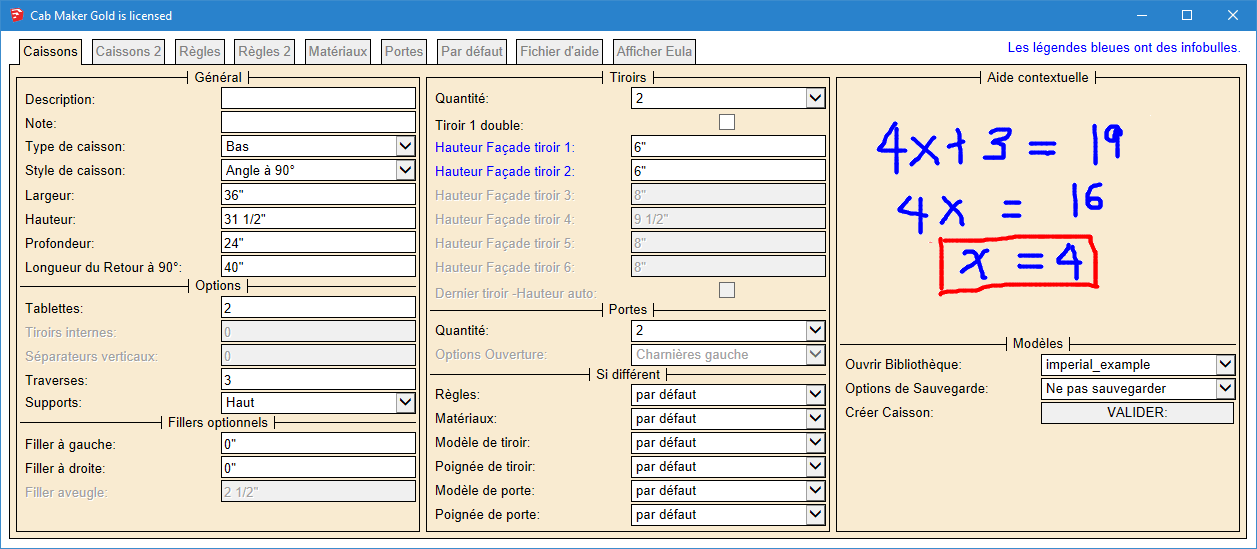

                            _Cabinets Tab French.png

                            1 條回覆 最後回覆 回覆 引用 0
                            • G 離線
                              Garry K
                              最後由 編輯

                              Working on requested features and bug fixes.

                              1. Fillers now work with Face Frame Construction.
                              2. Fixed drawer handle position. Return cabinets had handles on drawer fronts and shouldn't have.
                              3. Embossed Shaker ignored edge profiles. Fixed.
                              4. Added library location so that your libraries can be on a server.
                              5. Added logic to check for other language pdfs. If language is fr then first look for the French help file named 'cabmaker_fr.pdf' and if not found then loads the English 'cabmaker.pdf'. The same for other languages.
                              1 條回覆 最後回覆 回覆 引用 0
                              • G 離線
                                Garry K
                                最後由 編輯

                                1. Toolbar is now restored to previous state for Mac. It is is also now shown on first install.
                                2. Added a handle called 'No Handle' It is simply an invisible line - use where you do not want a handle to show up.
                                3. Added Bottom Gap for Upper Doors. Changed Bottom Gap to Base Bottom Gap. Enter negative amount for door to extend beyond cabinet.
                                1 條回覆 最後回覆 回覆 引用 0
                                • G 離線
                                  Garry K
                                  最後由 編輯

                                  1. Added a handle called 'No Handle' It is simply an invisible line - use where you do not want a handle to show up.
                                  2. Toolbar is now restored to previous state for Mac. Also Tool Bar now shows at first install.
                                  3. Angled Sink cabinets missing tilt out drawer front. Fixed
                                  4. For frame less construction and upper cabinets fillers extend below cabinet if doors extend below cabinet.
                                  1 條回覆 最後回覆 回覆 引用 0
                                  • G 離線
                                    Garry K
                                    最後由 編輯

                                    1. You can now save templates using mixed case.
                                    2. The Defaults Tab now has a default Upper Handle and a default Base Handle.

                                    I've had a request to allow drawer banks with angled cabinets and with return cabinets. Anyone else interested. Any other feature requests?

                                    1 條回覆 最後回覆 回覆 引用 0
                                    • G 離線
                                      Garry K
                                      最後由 編輯

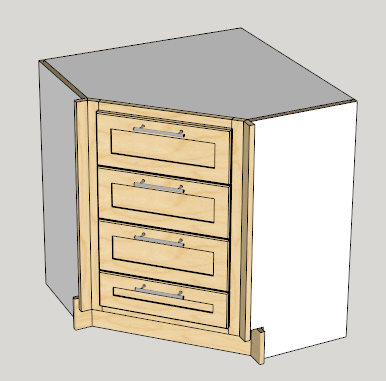
                                      1. Added angled drawer bank.

                                      Angled Drawer Bank.png

                                      1 條回覆 最後回覆 回覆 引用 0
                                      • A 離線
                                        abdalmalki
                                        最後由 編輯

                                        It would be nice if we could add DXF file export to the cabmaker so the CNC users could send it direct to their CAM software.

                                        1 條回覆 最後回覆 回覆 引用 0
                                        • G 離線
                                          Garry K
                                          最後由 編輯

                                          I've alreday started adding dxf export to my cutmaster Gold.

                                          1 條回覆 最後回覆 回覆 引用 0
                                          • A 離線
                                            abdalmalki
                                            最後由 編輯

                                            Great addition Garry
                                            I can't wait to see the gold version of cutmaster.

                                            1 條回覆 最後回覆 回覆 引用 0
                                            • 1
                                            • 2
                                            • 5
                                            • 6
                                            • 7
                                            • 8
                                            • 9
                                            • 31
                                            • 32
                                            • 7 / 32
                                            • 第一個貼文
                                              最後的貼文
                                            Buy SketchPlus
                                            Buy SUbD
                                            Buy WrapR
                                            Buy eBook
                                            Buy Modelur
                                            Buy Vertex Tools
                                            Buy SketchCuisine
                                            Buy FormFonts

                                            Advertisement