Folder for Default Templates in Layout
-
So i'm trying the latest version of Layout (2015), and i saved a file as a template, and now i cannot find it to delete it.
It should have a number on it (page size: A4, A3, so on), but my NumLock wasn't on and i didn't notice it. Then i saved it again with the correct number, so now i have two files in the folder, EXCEPT it saved with the default templates, so it's not on the templates folder, and i can't find it even searching for the name.Does anyone know where the folder for default templates for Layout 2015 is?
(Using Windows 8.1, 64bits)
-
On my machine, it's here...

-
As Baz says...
But the AppData folder tree might be hidden by default on your PC, so use Windows Explorer's Folder Options to make it visible for you... -
No, the folder is there, but it's empty, and the templates i saved show up in the "default templates" instead of "my templates"
The templates folder for the 2014 version works fine (appdata/roaming, so on), i can see and delete my older templates there just fine, but the new ones are saved somewhere else, with the default templates.
-
What are your Layout Edit > Preferences set for Folders > Templates ?
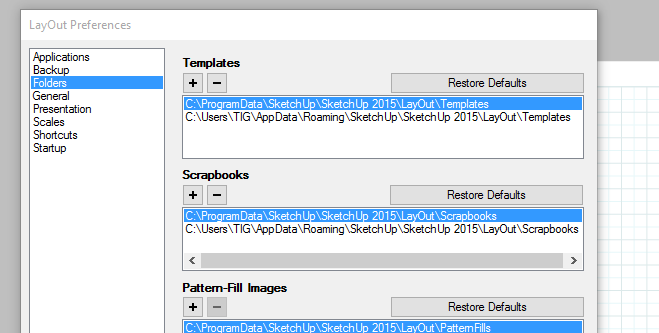
-
Oh, TIG, you life saver, i didn't remember the preferences setup.
It wasn't in the AppData folder, it was in the ProgramData folder, which is hidden.Thanks, guys!


Hello! It looks like you're interested in this conversation, but you don't have an account yet.
Getting fed up of having to scroll through the same posts each visit? When you register for an account, you'll always come back to exactly where you were before, and choose to be notified of new replies (either via email, or push notification). You'll also be able to save bookmarks and upvote posts to show your appreciation to other community members.
With your input, this post could be even better 💗
Register Login


Advertisement