sketchucation logo sketchucation
    • 登入
    Oops, your profile's looking a bit empty! To help us tailor your experience, please fill in key details like your SketchUp version, skill level, operating system, and more. Update and save your info on your profile page today!
    🔌 Smart Spline | Fluid way to handle splines for furniture design and complex structures. Download

    [Plugin] TIG-LayersFromList

    已排程 已置頂 已鎖定 已移動 Plugins
    26 貼文 7 Posters 4.3k 瀏覽 7 Watching
    正在載入更多貼文
    • 從舊到新
    • 從新到舊
    • 最多點贊
    回覆
    • 在新貼文中回覆
    登入後回覆
    此主題已被刪除。只有擁有主題管理權限的使用者可以查看。
    • TIGT 離線
      TIG Moderator
      最後由 編輯

      No, but I'll write its sibling LayersToList 😉

      TIG

      1 條回覆 最後回覆 回覆 引用 0
      • KrisidiousK 離線
        Krisidious
        最後由 編輯

        lol... It's great just the way it is TIG... Thank you.

        Currently I open a sketchup model and find I want the layers from another. So I open a second instance and then copy/paste geometry from old to new and thus transfer layers. Only takes a few clicks.

        By: Kristoff Rand
        Home DesignerUnique House Plans

        1 條回覆 最後回覆 回覆 引用 0
        • KrisidiousK 離線
          Krisidious
          最後由 編輯

          @miner_jeff said:

          Hi TIG,

          After some testing, it appears that I have a weird issue with Notepad++ [under investigation!]

          Using plain Notepad to make the Layers.txt file, the plugin results are as expected.

          Check your encoding on Notepad++ please.
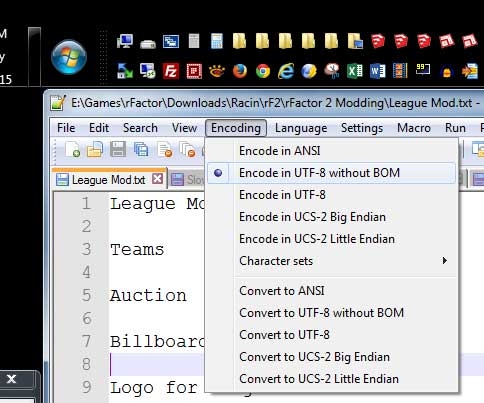

          bom.jpg

          By: Kristoff Rand
          Home DesignerUnique House Plans

          1 條回覆 最後回覆 回覆 引用 0
          • TIGT 離線
            TIG Moderator
            最後由 編輯

            @Kris
            I wrote **TIG-LayersToList** anyway - http://sketchucation.com/forums/viewtopic.php?p=568648#p568648
            You can use it to make Layer-sets for reuse in other Models in conjunction with this tool - TIG-LayersFromList http://sketchucation.com/pluginstore?pln=TIG_LayersFromList ...

            TIG

            1 條回覆 最後回覆 回覆 引用 0
            • jujuJ 離線
              juju
              最後由 編輯

              wow, should be a real great thing if the two were to be combined

              Save the Earth, it's the only planet with chocolate.

              1 條回覆 最後回覆 回覆 引用 0
              • TIGT 離線
                TIG Moderator
                最後由 編輯

                Here is v1.2 http://sketchucation.com/pluginstore?pln=TIG_LayersFromList
                It fixes an issue reported by some Win8 users, where the layers' color were not getting set correctly.

                TIG

                1 條回覆 最後回覆 回覆 引用 0
                • Miner_JeffM 離線
                  Miner_Jeff
                  最後由 編輯

                  Hi Folks,

                  If you need to create a sequence of layers with text and numbers with specific colours I have shared a means to create the text file easily for use with this wonderful ruby of TIG's.
                  It can be used to verify the colour of RGB values too by colouring the cell to RGB values specified.

                  I used MS excel and VBA. It can be found here http://sketchucation.com/forums/viewtopic.php?f=323%26amp;t=63894

                  Cheers,

                  Miner_jeff

                  1 條回覆 最後回覆 回覆 引用 0
                  • sumasterS 離線
                    sumaster
                    最後由 編輯

                    Can we set Default Text file path in this script . . . . . ?

                    Thank you,
                    SUmaster

                    1 條回覆 最後回覆 回覆 引用 0
                    • TIGT 離線
                      TIG Moderator
                      最後由 編輯

                      @sumaster said:

                      Can we set Default Text file path in this script . . . . . ?
                      Please expand on this, so we might understand your question...

                      TIG

                      1 條回覆 最後回覆 回覆 引用 0
                      • D 離線
                        db11
                        最後由 編輯

                        Hi TIG -

                        Thanks for a very useful plugin (along with it's companion).

                        I have a request for a plugin that would build on these two, in order to automatically replace Layers From with Layers To in a SU file. My thought is that the easiest way would be with a simple two column csv file that gives the equivalences: 'From' in col A and 'To' in col B.

                        I would use it to harmonize layer names across models, so that imported components would always land on the right layers, without having to manually delete and merge the newly imported layer(s).

                        Not sure how difficult it would be, but would be a great help.

                        Thanks,

                        Doug

                        1 條回覆 最後回覆 回覆 引用 0
                        • 1
                        • 2
                        • 1 / 2
                        • 第一個貼文
                          最後的貼文
                        Buy SketchPlus
                        Buy SUbD
                        Buy WrapR
                        Buy eBook
                        Buy Modelur
                        Buy Vertex Tools
                        Buy SketchCuisine
                        Buy FormFonts

                        Advertisement