sketchucation logo sketchucation
    • 登入
    Oops, your profile's looking a bit empty! To help us tailor your experience, please fill in key details like your SketchUp version, skill level, operating system, and more. Update and save your info on your profile page today!
    🔌 Smart Spline | Fluid way to handle splines for furniture design and complex structures. Download

    [Plugin][$] Profile Builder 2

    已排程 已置頂 已鎖定 已移動 Plugins
    219 貼文 40 Posters 58.8k 瀏覽 40 Watching
    正在載入更多貼文
    • 從舊到新
    • 從新到舊
    • 最多點贊
    回覆
    • 在新貼文中回覆
    登入後回覆
    此主題已被刪除。只有擁有主題管理權限的使用者可以查看。
    • Bob JamesB 離線
      Bob James
      最後由 編輯

      Decided to go ahead and buy Version 2.2.0.3.
      Gets to the "Install" and hangs up.
      Tried with and without the beta version 2_2_0(1) installed.
      NADA 👎

      i7-4930K 3.4Ghz, 2x GTX780 6GB, 32GB DDR3-1600 ECC, OCZ Vertex 4 500GB, WD Black 3TB, 32TB NAS, 4x 27" Monitors, SpaceMouse Pro, X-keys XK-60

      1 條回覆 最後回覆 回覆 引用 0
      • R 離線
        raineysky
        最後由 編輯

        Dean,

        Yes, you are correct....A "How To" video would teach you how to do a specific task. For example, it would show you all the steps involved in building an Industrial Stairsassembly 😄 That's what I'm working on now.

        Paul

        1 條回覆 最後回覆 回覆 引用 0
        • R 離線
          raineysky
          最後由 編輯

          Bob,

          Same thing happened to me when I downloaded the trial version and the purchased one though the Extension Warehouse. Sketchup would freeze up like it was fixin' to Bugsplat. I would just walk away for a few minutes and it would be installed when I came back. Weird behavior for sure.

          Paul

          1 條回覆 最後回覆 回覆 引用 0
          • TommyKT 離線
            TommyK
            最後由 編輯

            I have found a slightly problematic issue with Profile Builder. I have noticed that when building profiles, profile builder does not respect the axis of the current context - only the main model axis. It gets difficult to use when designing rooms that are not aligned in the same axis as the main model. It would be great if it did!

            Also goes for adding a custom profile - when adding a custom profile using the (+) button, the axis of the profile is taken from the axis of the model, and not the context in which the face is in.

            I hope this issue can get fixed soon. I am being nit picky as Profile Builder 2 is a great plugin, and is only inches away from perfection..,

            1 條回覆 最後回覆 回覆 引用 0
            • W 離線
              Whaat
              最後由 編輯

              @raineysky said:

              Dean,

              Yes, you are correct....A "How To" video would teach you how to do a specific task. For example, it would show you all the steps involved in building an Industrial Stairsassembly 😄 That's what I'm working on now.

              Paul
              Cool! I hope you will be willing to share it so others can learn 👍

              SketchUp Plugins for Professionals

              1 條回覆 最後回覆 回覆 引用 0
              • W 離線
                Whaat
                最後由 編輯

                @tommyk said:

                I have found a slightly problematic issue with Profile Builder. I have noticed that when building profiles, profile builder does not respect the axis of the current context - only the main model axis. It gets difficult to use when designing rooms that are not aligned in the same axis as the main model. It would be great if it did!

                Also goes for adding a custom profile - when adding a custom profile using the (+) button, the axis of the profile is taken from the axis of the model, and not the context in which the face is in.

                I hope this issue can get fixed soon. I am being nit picky as Profile Builder 2 is a great plugin, and is only inches away from perfection..,

                Thanks Tommy, a few others have commented on this issue and I will put in my TODO list. Hopefully, this can be fixed..

                SketchUp Plugins for Professionals

                1 條回覆 最後回覆 回覆 引用 0
                • pbacotP 離線
                  pbacot
                  最後由 編輯

                  I suppose a work around is to save and open that context (component) as a separate model to use Profile builder, then reload?

                  MacOSX MojaveSketchUp Pro v19 Twilight v2 Thea v3 PowerCADD

                  1 條回覆 最後回覆 回覆 引用 0
                  • deaneauD 離線
                    deaneau
                    最後由 編輯

                    @raineysky

                    he he i would do this..however my version is expired. next month i must go to my bank and must pay a visa. my fear is..if i have pay a visa...Whaat have found a way to pay via paypal.

                    @TommyK
                    the first part of ProfileBuilder2 is like followme...however more comfortable.
                    I must confess that i have not really understand what your problem is.

                    pictures could help to understand better.

                    MADE, BORN AND LIVING IN BERLIN
                    Big Thank You to all Programmers
                    Some German words are so long that they have a perspective. M.Twain

                    1 條回覆 最後回覆 回覆 引用 0
                    • M 離線
                      moriturimax
                      最後由 編輯

                      Does it have some way to follow 2 paths? Like a 2-rail sweep in other programs?

                      Just want to make sure I am not missing it.

                      1 條回覆 最後回覆 回覆 引用 0
                      • S 離線
                        sabba
                        最後由 編輯

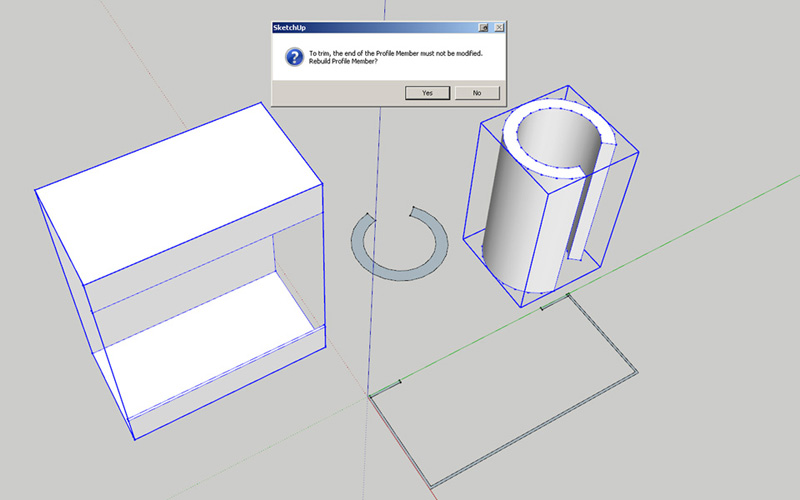
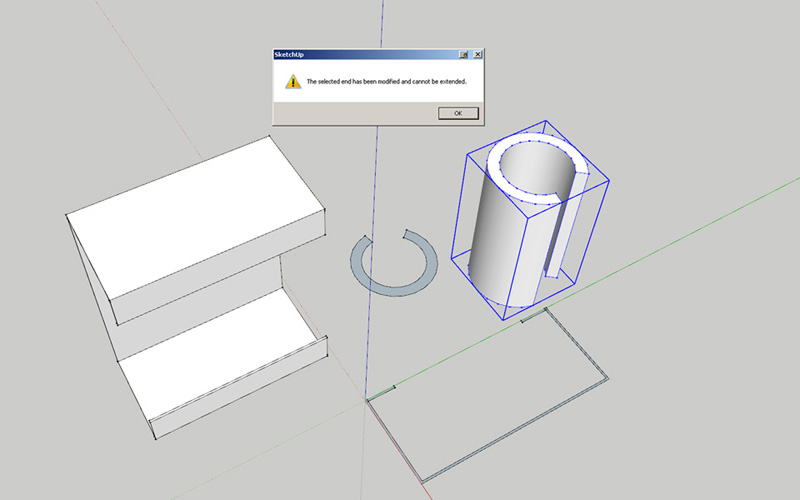
                        Dale: An excellent plugin overall but I have this issue:

                        When I build a member from a profile that has a reversed shape (a "C" shape for example) it can not be edited with the trim or extend tools.

                        Trim Error message:

                        SketchUp

                        To trim, the end of the Profile Member must not be modified. Rebuild Profile Member?

                        Yes No

                        clicking yes has no effect

                        Extend Error message:

                        SketchUp

                        The selected end has been modified and cannot be extended.

                        OK

                        https://www.dropbox.com/s/3qwolfqdexm7140/PB2%20error%20trim.jpg?dl=0
                        https://www.dropbox.com/s/85pt26b8h2ohnau/PB2%20error.jpg?dl=0

                        Workaround / solution?

                        SB


                        PB2 error trim.jpg


                        PB2 error.jpg

                        1 條回覆 最後回覆 回覆 引用 0
                        • W 離線
                          Whaat
                          最後由 編輯

                          @sabba said:

                          Dale: An excellent plugin overall but I have this issue:

                          When I build a member from a profile that has a reversed shape (a "C" shape for example) it can not be edited with the trim or extend tools.

                          Trim Error message:

                          SketchUp

                          To trim, the end of the Profile Member must not be modified. Rebuild Profile Member?

                          Yes No

                          clicking yes has no effect

                          Extend Error message:

                          SketchUp

                          The selected end has been modified and cannot be extended.

                          OK

                          https://www.dropbox.com/s/3qwolfqdexm7140/PB2%20error%20trim.jpg?dl=0
                          https://www.dropbox.com/s/85pt26b8h2ohnau/PB2%20error.jpg?dl=0

                          Workaround / solution?

                          SB

                          Thanks for reporting! It could be a bug. I'll look into it.

                          SketchUp Plugins for Professionals

                          1 條回覆 最後回覆 回覆 引用 0
                          • W 離線
                            Whaat
                            最後由 編輯

                            @moriturimax said:

                            Does it have some way to follow 2 paths? Like a 2-rail sweep in other programs?

                            Just want to make sure I am not missing it.

                            Sorry, there is no such feature in PB2.

                            SketchUp Plugins for Professionals

                            1 條回覆 最後回覆 回覆 引用 0
                            • Bob JamesB 離線
                              Bob James
                              最後由 編輯

                              If you search for Profile Builder 2 or profilebuilder2 on Extension Warehouse you get "Not Found"

                              i7-4930K 3.4Ghz, 2x GTX780 6GB, 32GB DDR3-1600 ECC, OCZ Vertex 4 500GB, WD Black 3TB, 32TB NAS, 4x 27" Monitors, SpaceMouse Pro, X-keys XK-60

                              1 條回覆 最後回覆 回覆 引用 0
                              • W 離線
                                Whaat
                                最後由 編輯

                                @bob james said:

                                If you search for Profile Builder 2 or profilebuilder2 on Extension Warehouse you get "Not Found"

                                Thanks Bob, I am aware of this and so is EW. I have been told that a fix is in the queue.

                                SketchUp Plugins for Professionals

                                1 條回覆 最後回覆 回覆 引用 0
                                • Bob JamesB 離線
                                  Bob James
                                  最後由 編輯

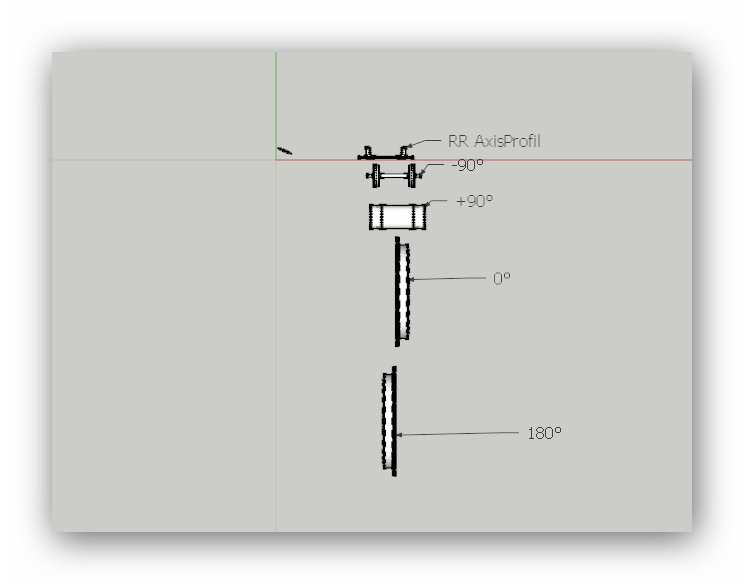
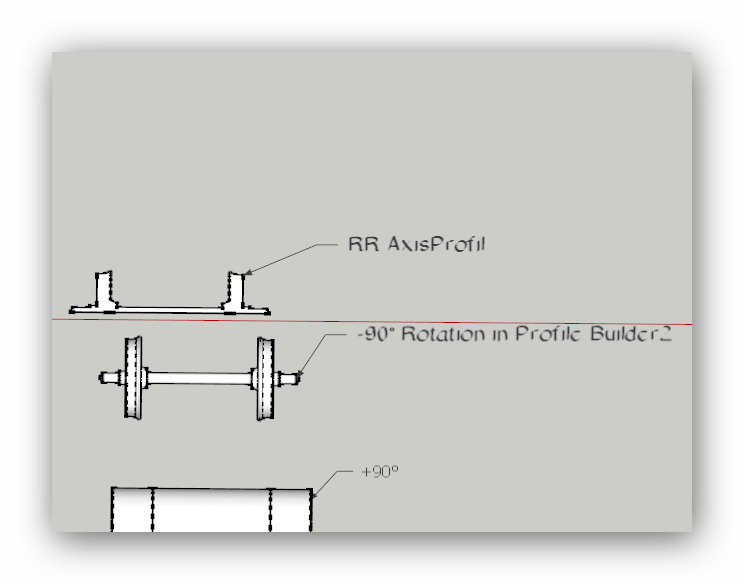
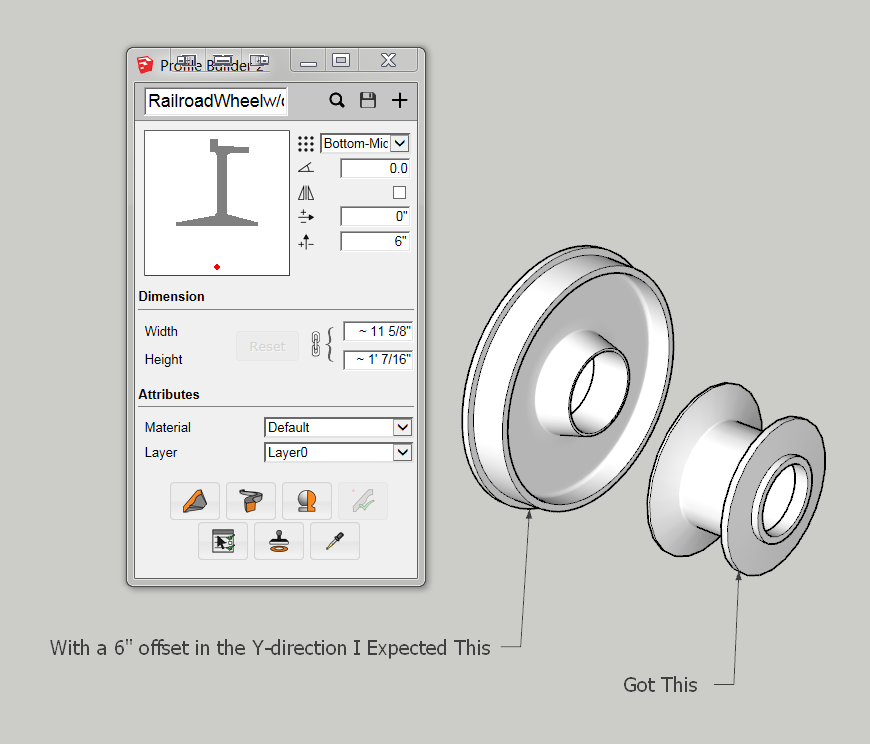
                                  I'm experimenting with making a Railroad wheel. What am I doing wrong?
                                  Railroad Wheel.PNG

                                  i7-4930K 3.4Ghz, 2x GTX780 6GB, 32GB DDR3-1600 ECC, OCZ Vertex 4 500GB, WD Black 3TB, 32TB NAS, 4x 27" Monitors, SpaceMouse Pro, X-keys XK-60

                                  1 條回覆 最後回覆 回覆 引用 0
                                  • kenK 離線
                                    ken
                                    最後由 編輯

                                    Will, Bob, draw a centerline, everything on the sides of the centerline is going to spin around and create a circular part. So get rid of the both short ends, just need the smaller section.

                                    Ken

                                    Fight like your the third monkey on Noah's Ark gangway.

                                    1 條回覆 最後回覆 回覆 引用 0
                                    • Bob JamesB 離線
                                      Bob James
                                      最後由 編輯

                                      @unknownuser said:

                                      Will, Bob, draw a centerline, everything on the sides of the centerline is going to spin around and create a circular part. So get rid of the both short ends, just need the smaller section.Ken

                                      Ken: Thank you for your response. Unfortunately, I don't understand.

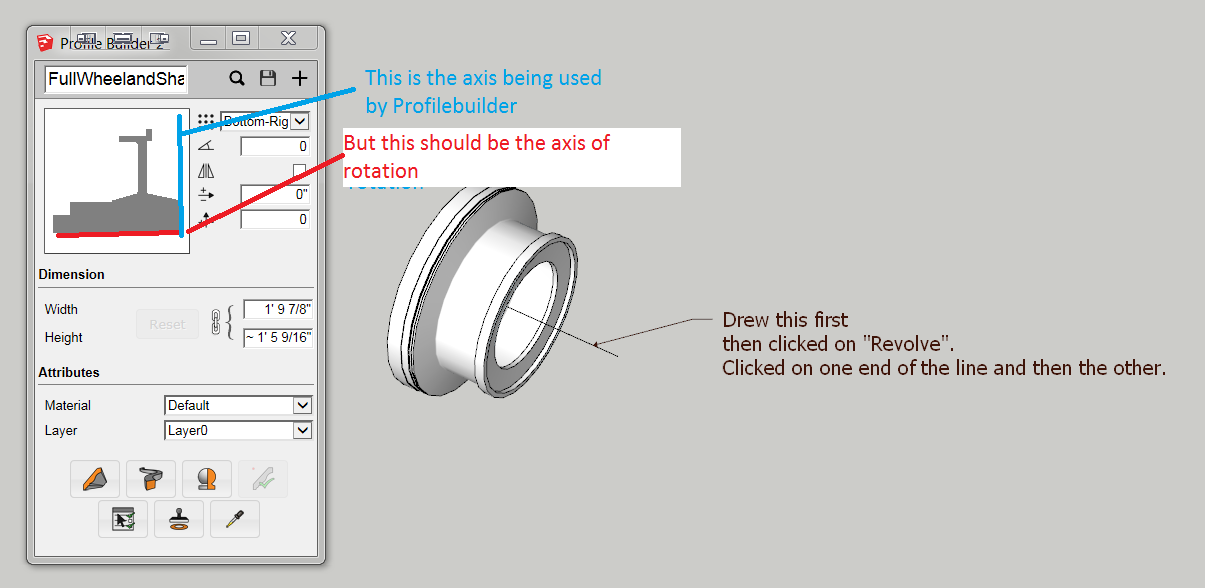
                                      1. I draw a horizontal centerline first and then click on revolve? (that didn't seem to make any difference)
                                      2. What do you mean by the "short ends"?
                                      3. What do you mean by the "smaller section"?

                                      The complete wheel on the left of the previous post was created in the "normal" way: create a circle and follow that path with the profile (with no offset).

                                      What is "Offset" supposed to do? I assumed it would offset the profile axis of revolution.

                                      It makes no difference whether the "Revolve Profile" axis is drawn vertically or horizontally, it still revolves the profile around the axis shown in blue.
                                      Railroad Wheel 2.PNG

                                      i7-4930K 3.4Ghz, 2x GTX780 6GB, 32GB DDR3-1600 ECC, OCZ Vertex 4 500GB, WD Black 3TB, 32TB NAS, 4x 27" Monitors, SpaceMouse Pro, X-keys XK-60

                                      1 條回覆 最後回覆 回覆 引用 0
                                      • deaneauD 離線
                                        deaneau
                                        最後由 編輯

                                        @Bob James

                                        try to use the rotation 90°

                                        wheel_new.skp


                                        Wheel.skp

                                        MADE, BORN AND LIVING IN BERLIN
                                        Big Thank You to all Programmers
                                        Some German words are so long that they have a perspective. M.Twain

                                        1 條回覆 最後回覆 回覆 引用 0
                                        • kenK 離線
                                          ken
                                          最後由 編輯

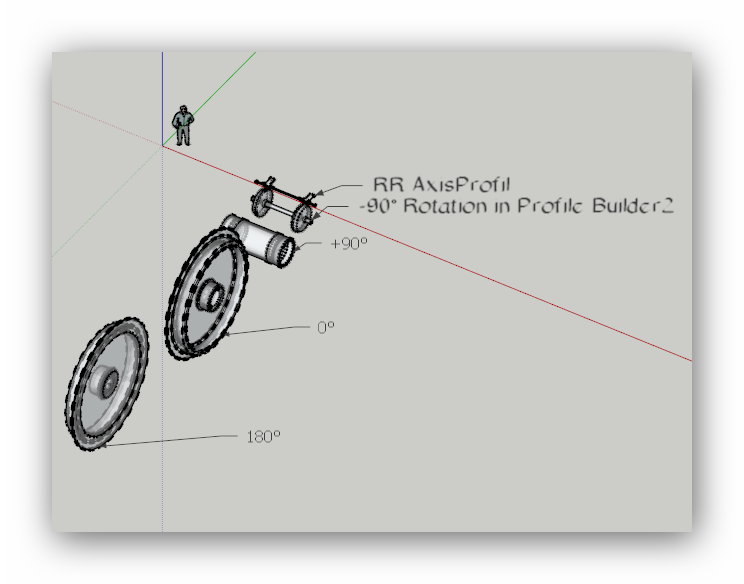
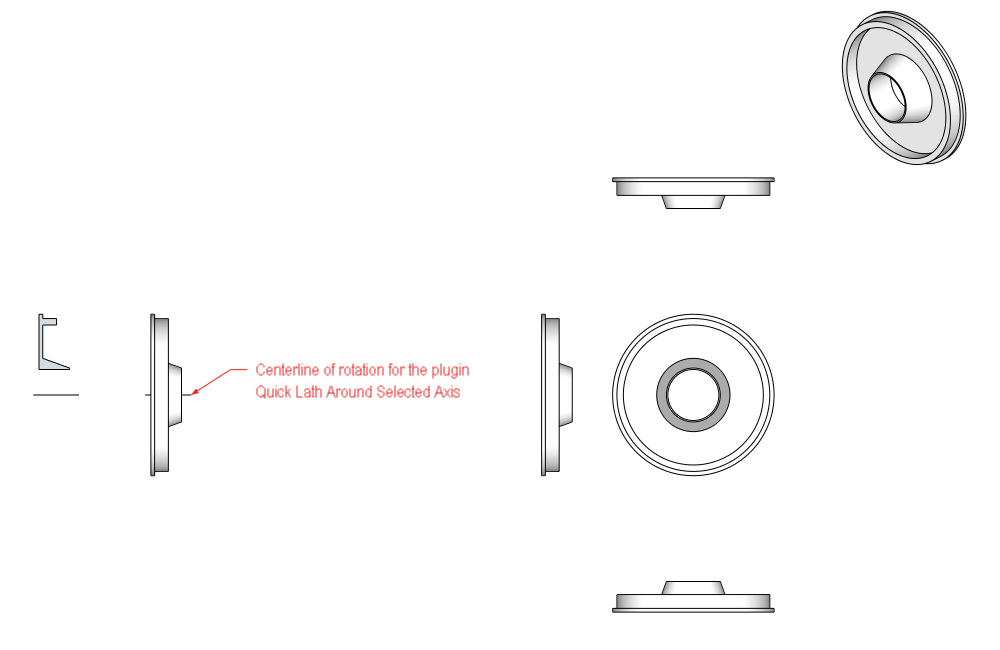
                                          Oops, my bad. I gave these instruction using Quick Lath Around Selected Axis. So I guess I have confused the issue.

                                          Note, I work with ACAD drawing of pipelines, flanges and other round parts. I use the plugin "Quick Lath around Selected Axis". I just copy over the lines, get the center line and presto, I have a flange, pipe whatever.

                                          I didn't mean to confuse the issue, sorry.

                                          Ken

                                          Wheel.png

                                          Fight like your the third monkey on Noah's Ark gangway.

                                          1 條回覆 最後回覆 回覆 引用 0
                                          • deaneauD 離線
                                            deaneau
                                            最後由 編輯

                                            here some samples


                                            YellowDoor_Snap_2015.05.12_17h19m42s_001_.jpg


                                            YellowDoor_Snap_2015.05.12_17h24m33s_003_.jpg


                                            YellowDoor_Snap_2015.05.12_17h25m42s_004_.jpg

                                            MADE, BORN AND LIVING IN BERLIN
                                            Big Thank You to all Programmers
                                            Some German words are so long that they have a perspective. M.Twain

                                            1 條回覆 最後回覆 回覆 引用 0
                                            • 1
                                            • 2
                                            • 7
                                            • 8
                                            • 9
                                            • 10
                                            • 11
                                            • 11 / 11
                                            • 第一個貼文
                                              最後的貼文
                                            Buy SketchPlus
                                            Buy SUbD
                                            Buy WrapR
                                            Buy eBook
                                            Buy Modelur
                                            Buy Vertex Tools
                                            Buy SketchCuisine
                                            Buy FormFonts

                                            Advertisement