Rest of model disappears when I select a group/component
-
Hi
Quite new to SkUp, have recently started modeling and have found that when I select a group or component (to move it or modify it etc.), the rest of the model completely disappears rather than just greying out, which makes it impossible to make the change I want as I can't see where to move it to!
What am I doing wrong?Thanks
Rich.
-
Kind of disconcerting, isn't it?
Go to Window>Model Info>Components and untick the boxes labeled Hide.
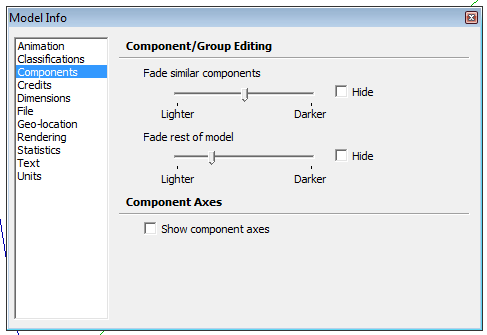
If this happens with every model you create, you'll probably want to change that in a blank file and then use File>Save as template... to create a new default template that doesn't show that. Make sure Use as default is ticked when you save the template.
-
@dave r said:
Kind of disconcerting, isn't it?
Go to Window>Model Info>Components and untick the boxes labeled Hide.
[attachment=0:9ul8nm5h]<!-- ia0 -->Model Info.png<!-- ia0 -->[/attachment:9ul8nm5h]If this happens with every model you create, you'll probably want to change that in a blank file and then use File>Save as template... to create a new default template that doesn't show that. Make sure Use as default is ticked when you save the template.
This is spot on, works exactly as you say, thanks.
Rich.
-
Later on you'll eventually want to find a shortcut for View > Component Edit... > Hide Rest of Model...
It's very handy to be inside a group/component and well... hide the rest of model sometimes. (wich is what you are setting at model info)


Hello! It looks like you're interested in this conversation, but you don't have an account yet.
Getting fed up of having to scroll through the same posts each visit? When you register for an account, you'll always come back to exactly where you were before, and choose to be notified of new replies (either via email, or push notification). You'll also be able to save bookmarks and upvote posts to show your appreciation to other community members.
With your input, this post could be even better 💗
Register Login


Advertisement