sketchucation logo sketchucation
    • Login
    Oops, your profile's looking a bit empty! To help us tailor your experience, please fill in key details like your SketchUp version, skill level, operating system, and more. Update and save your info on your profile page today!
    FredoBend | Powerful new bending tool for SketchUp Download

    Follow me tool: Cannot extrude curve

    Scheduled Pinned Locked Moved Newbie Forum
    sketchup
    5 Posts 3 Posters 3.2k Views 3 Watching
    Loading More Posts
    • Oldest to Newest
    • Newest to Oldest
    • Most Votes
    Reply
    • Reply as topic
    Log in to reply
    This topic has been deleted. Only users with topic management privileges can see it.
    • R Offline
      Risu1988
      last edited by

      I drew this shape in 2D with the plan to use the follow me tool to make a lathed shape for 3D printing. Unfortunately, I can't seem to get it to properly extrude the dome at the top. Can anybody tell me what I'm doing wrong?
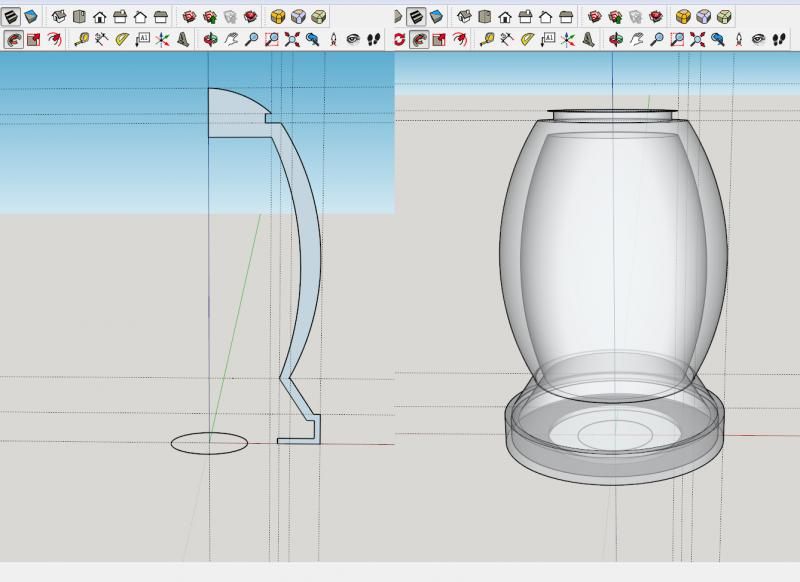

      http://img.photobucket.com/albums/v328/NinjaRisu/FollwoMeProblem_zpse1bbfada.jpg

      1 Reply Last reply Reply Quote 0
      • Dave RD Offline
        Dave R
        last edited by

        Very likely it's because the line segments in the arc at the top are too short and/or the segments in the circular path. SketchUp doesn't make tiny little faces although they can exist. Scale the model up by a factor of 100 or so and run Follow Me. Then scale back down.

        Etaoin Shrdlu

        %

        (THERE'S NO PLACE LIKE)

        G28 X0.0 Y0.0 Z0.0

        M30

        %

        1 Reply Last reply Reply Quote 0
        • D Offline
          driven
          last edited by

          Dave answered and it didn't warn me...
          so, same answer twice...
          your segments are probably too small...
          scale everything up x 10...
          when it's done scale everything x 0.1...

          look for 'scaling' tutorials for better explanations...
          john

          learn from the mistakes of others, you may not live long enough to make them all yourself...

          1 Reply Last reply Reply Quote 0
          • R Offline
            Risu1988
            last edited by

            Thank you both so much. I'll look up scaling.

            1 Reply Last reply Reply Quote 0
            • Dave RD Offline
              Dave R
              last edited by

              You can see the way I handle drawing smaller pieces with Follow Me here.

              Etaoin Shrdlu

              %

              (THERE'S NO PLACE LIKE)

              G28 X0.0 Y0.0 Z0.0

              M30

              %

              1 Reply Last reply Reply Quote 0

              Hello! It looks like you're interested in this conversation, but you don't have an account yet.

              Getting fed up of having to scroll through the same posts each visit? When you register for an account, you'll always come back to exactly where you were before, and choose to be notified of new replies (either via email, or push notification). You'll also be able to save bookmarks and upvote posts to show your appreciation to other community members.

              With your input, this post could be even better đź’—

              Register Login
              • 1 / 1
              • First post
                Last post
              Buy SketchPlus
              Buy SUbD
              Buy WrapR
              Buy eBook
              Buy Modelur
              Buy Vertex Tools
              Buy SketchCuisine
              Buy FormFonts

              Advertisement
