Autoinstall not working
-
I hate to post such a basic question, but I've been trying to get "autoinstall" to work on the new sketchUcation ruby extension menu, and when I click the "autoinstall", nothing happens.
What am I missing? I've looked around and can't seem to find any answers.
Thanks for any help!
Tim -
Hi Tim,
When you say not working what are you installing that is not working?
What SU version and OS are you on?
What version of SketchUcation Tools are you using?
-
You should get some error messages when things fail...

Are you using the most current version of the SketchUcation Toolset [i.e. >= v2.6.1]
If you open the Ruby Console before trying it are there any messages there ?
When we know your OS/version we might have more insight [please add them to your SCF-Member-Profile details]
Do you mean when using the Plugins > SketchUcation submenu item to 'AutoInstall from Archive' [which is for RBZ or ZIP, but NOT RB/RBS !] ?
Does the red AutoInstall button in the dialog itself work ?
Are the issues associated with a particular plugin or general ?
If you have PC-Windows with v8, is it the latest update and have you fixed the permissions to its Plugins folder to be FULL ?
Newer versions of SketchUp ought to avoid the permissions issues
-
Same issue here. I am running SU2014, and running V2.6.1 of the SketchUcation plugin store, all from a Mac. When I click on auto install, nothing happens. I am assuming its the same problem, hopefully we can fix both our problems!
-
If you have the Ruby Console open what happens ?
Any error messages when trying AutoInstall ?When you click AutoInstall what happens exactly ?
If you download the equivalent RBZ archive from the PluginStore page - accessed through this site, and use the SketchUp SketchUcation submenu item 'Install Archive...' and choose the RBZ file what happens ?
If you use the SketchUp > Preferences > Extensions > Install... and choose the RBZ file button what happens ? -
Hello I have the same problem
In console get this :
Error: #<NoMethodError: undefined methodset_choi' for RBZtool:Module> c:/users/schalk/appdata/roaming/sketchup/sketchup 2014/sketchup/plugins/sketchucation/scf_dialog.rbs:522:inchooseplugins'
c:/users/schalk/appdata/roaming/sketchup/sketchup 2014/sketchup/plugins/sketchucation/scf_dialog.rbs:473:inautoinstall_dlg' c:/users/schalk/appdata/roaming/sketchup/sketchup 2014/sketchup/plugins/sketchucation/scf_dialog.rbs:405:inset_autoinstall_choice'
c:/users/schalk/appdata/roaming/sketchup/sketchup 2014/sketchup/plugins/sketchucation/scf_dialog.rbs:73:inblock in new' SketchUp:1:incall' -
@scalas
Consider manually removing the
SketchUcationsubfolder from within thePlugins folder, and also removing the!SketchUcation_loader.rbfile.
Please [re]download the latest SketchUcation PluginStore Toolset version from the Resources menu link above, or its PluginStore entry [v2.6.1].
Use the SketchUp nativeWindow > Preferences > Extensions > Install...button to install it.
Restart SketchUp.
Now, with the 'Ruby Console' open, try using theSketchUcation PluginStoredialog from within SketchUp...
If you choose toAutoInstall a Plugin what happens ?Your error message suggests that the SCF toolset was somehow not correctly installed.
TheSCF_dialogRBS's code calls someRBZtool functions - these should have been loaded at the start from another RBS in the../Plugins/SketchUcationsubfolder...
So the error...undefined methodset_choi' for RBZtool:Module` should NEVER happen, because it does indeed include that method in its code !This is what the correctly installed subfolder should look like...
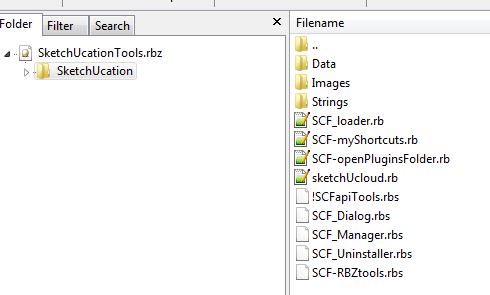
Report back...


Hello! It looks like you're interested in this conversation, but you don't have an account yet.
Getting fed up of having to scroll through the same posts each visit? When you register for an account, you'll always come back to exactly where you were before, and choose to be notified of new replies (either via email, or push notification). You'll also be able to save bookmarks and upvote posts to show your appreciation to other community members.
With your input, this post could be even better 💗
Register Login


Advertisement