Can't see Plugins - I know: Not again!!!!
-
well, it is not worked out yet... so far SU2014 not recognizing the symbolic link for some reason. i am working through the details in another thread and will post back to here with the link.
And thank you for the raise and vacation time. i am telling my principals that i am leaving now as per your authority. I'm sure it will work out well!! You sir, are a gentleman and a scholar!

bob@dave r said:
Happy you've got it all worked out now.

Vacation? OK. Take the next two weeks off and relax. Enjoy yourself. You can have a raise, too.

-
wow. there are several threads on this issue now and i just realized i never posted my solution to using dropbox as a source for plugins to enable synchronization between multiple machines.
I figured it out shortly after our conversation here, so thanks again guys!
THE COMMAND THAT WORKED FOR ME in cmd.exe
mklink /J "C:\Users\rachristman\AppData\Roaming\SketchUp\SketchUp 2014\SketchUp\plugins" "D:\Dropbox\SketchUp Resources_SU Plugins\Plugins"
I am not sure if /D did not work because i was linking from
to d: but the /J did the trick. FULLY OPERATIONAL mklink, directory junction, is reading the plugins folder from my drop box as soon as i open Sketchup 2014.THE PROCESS:
i had "successfully" created a symbolic link in cmd using mklink, however the tutorial thread i used had differing syntax. it took a while to determine that i had to use BOTH the existing path AND the new path in the mklink command as well as using "" around the paths. this was not mentioned in this post:
http://sketchucation.com/forums/viewtopic.php?f=15%26amp;t=40866 (this post did not work for me)so i found some other references concerning the syntax:
http://www.sevenforums.com/customization/149054-symbolic-folder-linking.htmli will also share the info i came across while attempting this
windows file junctions and symbolic links:
http://devtidbits.com/2009/09/07/windows-file-junctions-symbolic-links-and-hard-links/links description:
http://devtidbits.com/2009/09/07/windows-file-junctions-symbolic-links-and-hard-links/syncronize two windows folders in real time:
http://superuser.com/questions/65524/how-do-i-synchronise-two-folders-in-real-time-in-windows-7 -
I used to use a similar process using shell extension whereby I chose the Dropbox plugin folder as the "link source" and dropped it into SU as a "symblolic link". This did not require and cmd input. Worked like a charm until SU 2014/2015 and now, for some reason, symbolic links no longer work. Maybe it has something to do with the SU plugin folder being in a different location.
In addition SketchUcation came up with the sketchUcloud to replace the bundle approach, but I've been unsuccessful in getting someone to describe the process of setting that up.
http://sketchucation.com/forums/viewtopic.php?f=372%26amp;t=59539 -
sketchucloud sounds interesting. i hope it comes to light soon. my only question about the bundle was would it work with scripts from other sources. a while back the answer was no. maybe this new approach addresses that.
thanks,
bob -
@bob james said:
In addition SketchUcation came up with the sketchUcloud to replace the bundle approach, but I've been unsuccessful in getting someone to describe the process of setting that up.
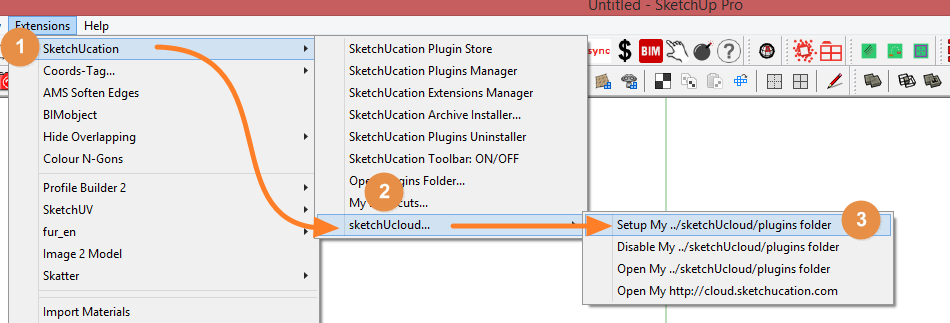
It uses the same methos as Fredo's Additional Folders to define where plugins are installed and synced.
As long as the sketchucloud client installed on any machine has the same plugins location setup they will sync.

You need to use the cloud install to tell the PluginStore to send that install to your cloud directory.
-
Thank you, Rich.
@unknownuser said:
You need to use the cloud install to tell the PluginStore to send that install to your cloud directory.
Can I just move all of my plugins/extensions from my plugins folder to the cloud folder?
As I recall from my previous use of Fredo's Additional Folders, some plugins/extensions only work in the "home" folder. -
I'd need to check that out before I can answer.
Currently we are stretched a tad on another project.
But soon we hope to throw bodies at v3.
Framework is done. All we need is time.
-
@unknownuser said:
Currently we are stretched a tad on another project.
You're amazing!
As if it weren't enough with the agonizing wait for Skatter. Now more angst wondering what new marvel you're creating. -
sssshhhh
-
-
Alas, when trying to set up my cloud I get

I have encountered no place where it gives me the opportunity to do that?? -
Also, when I open http://cloud.sketchucation.com/ there are no plugins in the folder
-
Finally: when I click on "Open my http://cloud.sketchucation.com, I get
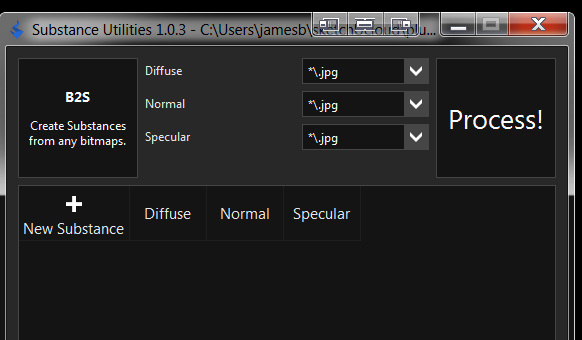
I tried disabling my ...sketchucloud/plugins folder and re-enabling, but that did not change anything.
 Help
Help -





Advertisement