sketchucation logo sketchucation
    • 登入
    Oops, your profile's looking a bit empty! To help us tailor your experience, please fill in key details like your SketchUp version, skill level, operating system, and more. Update and save your info on your profile page today!
    ⚠️ Important | Libfredo 15.6b introduces important bugfixes for Fredo's Extensions Update

    Can't see Plugins - I know: Not again!!!!

    已排程 已置頂 已鎖定 已移動 Plugins
    30 貼文 6 Posters 1.7k 瀏覽 6 Watching
    正在載入更多貼文
    • 從舊到新
    • 從新到舊
    • 最多點贊
    回覆
    • 在新貼文中回覆
    登入後回覆
    此主題已被刪除。只有擁有主題管理權限的使用者可以查看。
    • Dave RD 離線
      Dave R
      最後由 編輯

      So you've got it sorted? That's good.

      Why don't you just make a bundle of plugins using the SCF Plugin Store and use that to keep all your machines up to date?

      Etaoin Shrdlu

      %

      (THERE'S NO PLACE LIKE)

      G28 X0.0 Y0.0 Z0.0

      M30

      %

      1 條回覆 最後回覆 回覆 引用 0
      • BoxB 離線
        Box
        最後由 編輯

        Bob, not mentioning that you were using a symbolic link would seem to be a rather crucial bit of info.
        Your real issue here is not that your plugins aren't working but that the symbolic link isn't working.
        Perhaps someone has a solution for that.

        1 條回覆 最後回覆 回覆 引用 0
        • tt_suT 離線
          tt_su
          最後由 編輯

          Can you describe exactly how you set up the symbolic links?
          The BugSplats disappeared when you removed the symlink?

          1 條回覆 最後回覆 回覆 引用 0
          • Bob JamesB 離線
            Bob James
            最後由 編輯

            @tt_su said:

            Can you describe exactly how you set up the symbolic links?
            The BugSplats disappeared when you removed the symlink?

            1. Went to Dropbox and picked link source
              Renamed original plugins folder to Plugins-original
              Dropped as symbolic link in C:\Users\Robert\AppData\Roaming\SketchUp\SketchUp\2014\SketchUp
              That was the configuration that did not work so I deleted the link and copied my backup folder of plugins to replace the link folder and that allowed the plugins folder to appear and also load plugins from SketchUcation

            i7-4930K 3.4Ghz, 2x GTX780 6GB, 32GB DDR3-1600 ECC, OCZ Vertex 4 500GB, WD Black 3TB, 32TB NAS, 4x 27" Monitors, SpaceMouse Pro, X-keys XK-60

            1 條回覆 最後回覆 回覆 引用 0
            • Bob JamesB 離線
              Bob James
              最後由 編輯

              @box said:

              Bob, not mentioning that you were using a symbolic link would seem to be a rather crucial bit of info.
              Your real issue here is not that your plugins aren't working but that the symbolic link isn't working.
              Perhaps someone has a solution for that.

              Since that is how I've always done it, it never occurred to me to mention it. Sorry.

              i7-4930K 3.4Ghz, 2x GTX780 6GB, 32GB DDR3-1600 ECC, OCZ Vertex 4 500GB, WD Black 3TB, 32TB NAS, 4x 27" Monitors, SpaceMouse Pro, X-keys XK-60

              1 條回覆 最後回覆 回覆 引用 0
              • Bob JamesB 離線
                Bob James
                最後由 編輯

                @dave r said:

                So you've got it sorted? That's good.

                Why don't you just make a bundle of plugins using the SCF Plugin Store and use that to keep all your machines up to date?

                Don't know how to do that - never had the occasion to learn.

                i7-4930K 3.4Ghz, 2x GTX780 6GB, 32GB DDR3-1600 ECC, OCZ Vertex 4 500GB, WD Black 3TB, 32TB NAS, 4x 27" Monitors, SpaceMouse Pro, X-keys XK-60

                1 條回覆 最後回覆 回覆 引用 0
                • Bob JamesB 離線
                  Bob James
                  最後由 編輯

                  Since, for some reason, I can't get symbolic links to work with SU 2014 plugin, components and materials folders, I need some alternative (at least for plugins). SketchUcation Bundles seem to be the answer (except there is no synchronization to one folder on, say, Dropbox).

                  I assume that Bundles puts each machine's plugins in the cloud, but only those plugins in the default folder [C:\Users\jamesb\AppData\Roaming\SketchUp\SketchUp 2014\SketchUp\Plugins]. To minimize the files on my 😄 drive (an SSD), I use Fredo6's Additional Plugin folder on Dropbox for most of my plugins, but many plugins/extensions don't work unless they are installed in the default folder.

                  1. I have three computers: work, home and laptop. Currently, each has a different bundle. How do I get all bundles loaded with the same plugins. If I'm on my home machine do I click on the Work machine's bundle icon for "autoinstall all plugins in the bundle" (after assuring that work machine has all the plugins that must be loaded in the default folder)?

                    1. If I add a new plugin to one computer is there a way to update the other computers for just that new plugin or do I have to reinstall all the plugins and extensions?

                    2. How do I tailor a bundle? I tried clicking on individual plugins in the bundle list to delete them, but that doesn't work.

                  i7-4930K 3.4Ghz, 2x GTX780 6GB, 32GB DDR3-1600 ECC, OCZ Vertex 4 500GB, WD Black 3TB, 32TB NAS, 4x 27" Monitors, SpaceMouse Pro, X-keys XK-60

                  1 條回覆 最後回覆 回覆 引用 0
                  • maxhouserocksM 離線
                    maxhouserocks
                    最後由 編輯

                    so...2014 wont read symbolic links?? im pretty sure i have the link setup correctly but SU is not finding any plugins.

                    what exactly is the "SCF Plugin Store" ?

                    thanks,
                    bob

                    Robert A. Christman
                    http://rachristman.blogspot.com/

                    1 條回覆 最後回覆 回覆 引用 0
                    • Dave RD 離線
                      Dave R
                      最後由 編輯

                      @maxhouserocks said:

                      so...2014 wont read symbolic links?? im pretty sure i have the link setup correctly but SU is not finding any plugins.

                      what exactly is the "SCF Plugin Store" ?

                      thanks,
                      bob

                      Click on the button at the top right corner of the forum page.

                      Etaoin Shrdlu

                      %

                      (THERE'S NO PLACE LIKE)

                      G28 X0.0 Y0.0 Z0.0

                      M30

                      %

                      1 條回覆 最後回覆 回覆 引用 0
                      • maxhouserocksM 離線
                        maxhouserocks
                        最後由 編輯

                        ah yes, of course. So i can use that plugin to sync different pc's plugins just by installing and logging in?

                        Robert A. Christman
                        http://rachristman.blogspot.com/

                        1 條回覆 最後回覆 回覆 引用 0
                        • Dave RD 離線
                          Dave R
                          最後由 編輯

                          @maxhouserocks said:

                          ah yes, of course. So i can use that plugin to sync different pc's plugins just by installing and logging in?

                          well, yeah, that too. And it gives you access to hundreds of plugins and automatically installs them.

                          Etaoin Shrdlu

                          %

                          (THERE'S NO PLACE LIKE)

                          G28 X0.0 Y0.0 Z0.0

                          M30

                          %

                          1 條回覆 最後回覆 回覆 引用 0
                          • maxhouserocksM 離線
                            maxhouserocks
                            最後由 編輯

                            Oh My, i must need a vacation. Just realized we were discussing this not too long ago! Sorry about that.

                            The key issue for me was this clarification:

                            @box said:

                            One small thing to note, Plugins from other sources won't be included in Bundles. It can only recognize ones you have downloaded through the Sketchcation tool.

                            You'll find a handy tutorial for bundles here.
                            http://sketchucation.com/resources/tutorials/beginner/1147-use-pluginstore-bundles-to-sync-your-extensions-in-sketchup

                            full thread here.
                            http://sketchucation.com/forums/viewtopic.php?f=15%26amp;t=59421%26amp;p=540740#p540740

                            Thanks AGAIN, Dave 😉

                            bob

                            Robert A. Christman
                            http://rachristman.blogspot.com/

                            1 條回覆 最後回覆 回覆 引用 0
                            • Dave RD 離線
                              Dave R
                              最後由 編輯

                              Happy you've got it all worked out now. 👍

                              Vacation? OK. Take the next two weeks off and relax. Enjoy yourself. You can have a raise, too. 😉

                              Etaoin Shrdlu

                              %

                              (THERE'S NO PLACE LIKE)

                              G28 X0.0 Y0.0 Z0.0

                              M30

                              %

                              1 條回覆 最後回覆 回覆 引用 0
                              • maxhouserocksM 離線
                                maxhouserocks
                                最後由 編輯

                                well, it is not worked out yet... so far SU2014 not recognizing the symbolic link for some reason. i am working through the details in another thread and will post back to here with the link.

                                And thank you for the raise and vacation time. i am telling my principals that i am leaving now as per your authority. I'm sure it will work out well!! You sir, are a gentleman and a scholar!
                                😄
                                bob

                                @dave r said:

                                Happy you've got it all worked out now. 👍

                                Vacation? OK. Take the next two weeks off and relax. Enjoy yourself. You can have a raise, too. 😉

                                Robert A. Christman
                                http://rachristman.blogspot.com/

                                1 條回覆 最後回覆 回覆 引用 0
                                • maxhouserocksM 離線
                                  maxhouserocks
                                  最後由 編輯

                                  wow. there are several threads on this issue now and i just realized i never posted my solution to using dropbox as a source for plugins to enable synchronization between multiple machines.

                                  I figured it out shortly after our conversation here, so thanks again guys!

                                  THE COMMAND THAT WORKED FOR ME in cmd.exe

                                  mklink /J "C:\Users\rachristman\AppData\Roaming\SketchUp\SketchUp 2014\SketchUp\plugins" "D:\Dropbox\SketchUp Resources_SU Plugins\Plugins"

                                  I am not sure if /D did not work because i was linking from 😄 to d: but the /J did the trick. FULLY OPERATIONAL mklink, directory junction, is reading the plugins folder from my drop box as soon as i open Sketchup 2014.

                                  THE PROCESS:
                                  i had "successfully" created a symbolic link in cmd using mklink, however the tutorial thread i used had differing syntax. it took a while to determine that i had to use BOTH the existing path AND the new path in the mklink command as well as using "" around the paths. this was not mentioned in this post:
                                  http://sketchucation.com/forums/viewtopic.php?f=15%26amp;t=40866 (this post did not work for me)

                                  so i found some other references concerning the syntax:
                                  http://www.sevenforums.com/customization/149054-symbolic-folder-linking.html

                                  i will also share the info i came across while attempting this

                                  windows file junctions and symbolic links:
                                  http://devtidbits.com/2009/09/07/windows-file-junctions-symbolic-links-and-hard-links/

                                  Just a moment...

                                  favicon

                                  (www.sevenforums.com)

                                  links description:
                                  http://devtidbits.com/2009/09/07/windows-file-junctions-symbolic-links-and-hard-links/

                                  syncronize two windows folders in real time:
                                  http://superuser.com/questions/65524/how-do-i-synchronise-two-folders-in-real-time-in-windows-7

                                  Robert A. Christman
                                  http://rachristman.blogspot.com/

                                  1 條回覆 最後回覆 回覆 引用 0
                                  • Bob JamesB 離線
                                    Bob James
                                    最後由 編輯

                                    I used to use a similar process using shell extension whereby I chose the Dropbox plugin folder as the "link source" and dropped it into SU as a "symblolic link". This did not require and cmd input. Worked like a charm until SU 2014/2015 and now, for some reason, symbolic links no longer work. Maybe it has something to do with the SU plugin folder being in a different location.

                                    In addition SketchUcation came up with the sketchUcloud to replace the bundle approach, but I've been unsuccessful in getting someone to describe the process of setting that up.
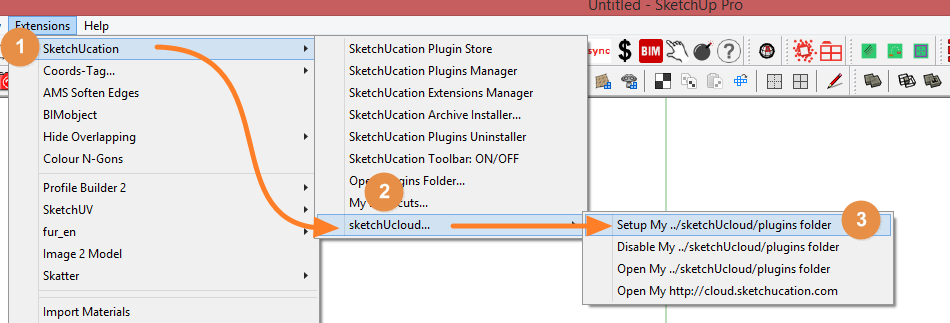
                                    http://sketchucation.com/forums/viewtopic.php?f=372%26amp;t=59539

                                    i7-4930K 3.4Ghz, 2x GTX780 6GB, 32GB DDR3-1600 ECC, OCZ Vertex 4 500GB, WD Black 3TB, 32TB NAS, 4x 27" Monitors, SpaceMouse Pro, X-keys XK-60

                                    1 條回覆 最後回覆 回覆 引用 0
                                    • maxhouserocksM 離線
                                      maxhouserocks
                                      最後由 編輯

                                      sketchucloud sounds interesting. i hope it comes to light soon. my only question about the bundle was would it work with scripts from other sources. a while back the answer was no. maybe this new approach addresses that.

                                      thanks,
                                      bob

                                      Robert A. Christman
                                      http://rachristman.blogspot.com/

                                      1 條回覆 最後回覆 回覆 引用 0
                                      • Rich O BrienR 離線
                                        Rich O Brien Moderator
                                        最後由 編輯

                                        @bob james said:

                                        In addition SketchUcation came up with the sketchUcloud to replace the bundle approach, but I've been unsuccessful in getting someone to describe the process of setting that up.

                                        Image 1.png

                                        It uses the same methos as Fredo's Additional Folders to define where plugins are installed and synced.

                                        As long as the sketchucloud client installed on any machine has the same plugins location setup they will sync.

                                        Image 2.png

                                        You need to use the cloud install to tell the PluginStore to send that install to your cloud directory.

                                        Download the free D'oh Book for SketchUp 📖

                                        1 條回覆 最後回覆 回覆 引用 0
                                        • Bob JamesB 離線
                                          Bob James
                                          最後由 編輯

                                          Thank you, Rich.

                                          @unknownuser said:

                                          You need to use the cloud install to tell the PluginStore to send that install to your cloud directory.

                                          Can I just move all of my plugins/extensions from my plugins folder to the cloud folder?
                                          As I recall from my previous use of Fredo's Additional Folders, some plugins/extensions only work in the "home" folder.

                                          i7-4930K 3.4Ghz, 2x GTX780 6GB, 32GB DDR3-1600 ECC, OCZ Vertex 4 500GB, WD Black 3TB, 32TB NAS, 4x 27" Monitors, SpaceMouse Pro, X-keys XK-60

                                          1 條回覆 最後回覆 回覆 引用 0
                                          • Rich O BrienR 離線
                                            Rich O Brien Moderator
                                            最後由 編輯

                                            I'd need to check that out before I can answer.

                                            Currently we are stretched a tad on another project.

                                            But soon we hope to throw bodies at v3.

                                            Framework is done. All we need is time.

                                            Download the free D'oh Book for SketchUp 📖

                                            1 條回覆 最後回覆 回覆 引用 0
                                            • 1
                                            • 2
                                            • 1 / 2
                                            • 第一個貼文
                                              最後的貼文
                                            Buy SketchPlus
                                            Buy SUbD
                                            Buy WrapR
                                            Buy eBook
                                            Buy Modelur
                                            Buy Vertex Tools
                                            Buy SketchCuisine
                                            Buy FormFonts

                                            Advertisement




