.rbz files not working in SU8
-
Good day guys,
I can't get .rbz files to work in my sketchup program. I download them straight into my SU8?plugins folder but when i start su8 they don't appear in windows/preferences/extension. am i doing anything wrong?
thank you
-
@van sittert said:
am i doing anything wrong?
Yes.
See http://help.sketchup.com/de/article/38583 for example (for SketchUp version >= 8 M2)
-
As Cotty says - please read the linked article...
You must INSTALL the RBZ file - you don't put it into a Plugins folder.
All SketchUp versions since v8M2 have a Preferences > Extensions > Install... button to do that for you...
If you Sketchup v8 is not up to date fix it here...
http://www.sketchup.com/download/all -
Thanks for the help so far guys. There is no 'install extensions' button at Window>Preferences>Extensions. See attachment.
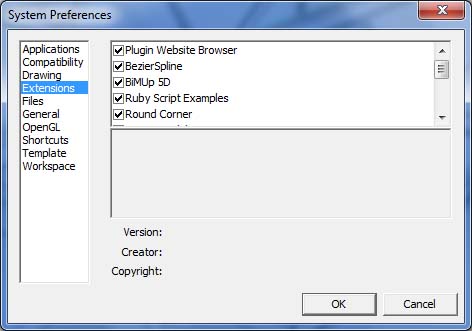
-
So... get the up to date version of v8 from the link I gave you...
Then it WILL have a button.


Hello! It looks like you're interested in this conversation, but you don't have an account yet.
Getting fed up of having to scroll through the same posts each visit? When you register for an account, you'll always come back to exactly where you were before, and choose to be notified of new replies (either via email, or push notification). You'll also be able to save bookmarks and upvote posts to show your appreciation to other community members.
With your input, this post could be even better 💗
Register Login


Advertisement