Reading and drawing textures
-
@tt_su said:
I'm confused - when you say "external tool" - you mean a custom Ruby Tool? Or some third party software?
And "load in memory" you mean for reading the bitmap data? ... I guess you want the bitmap data - since you talked about this earlier.Yes sorry I meant "external third party library" and yes I want to read bitmap data.
Ok so there is absolutely no way to read bitmap data of loaded textures in Sketchup!?
Does that mean I need to double memory usage by reloading textures with an external library (probably OpenCv since I am working with a C extension).
-
You can also use the ImageMagick libraries. (It is Open Source.) .. or maybe GIMP libraries ?
OR... FreeImage which SketchUp uses, and may already be loaded.
http://freeimage.sourceforge.net/ -
@marc477 said:
Ok so there is absolutely no way to read bitmap data of loaded textures in Sketchup!?
Does that mean I need to double memory usage by reloading textures with an external library (probably OpenCv since I am working with a C extension).
Correct. I think we have a feature request to access the DIB data - but right now it's not possible.
-
The Ruby gem creates a wrapper around the almost complete ImageMagick API. For use with SketchUp, the major (and time&resource consuming) task is to export the texture image to a file in a temporary location, read it again and clean it up when not needed anymore. To improve performance, you would even need a caching mechanism.
All this is not provided by the Ruby gem.
For long image manipulations you would also want to run ImageMagick asynchronously, including the Ruby code that you run afterwards. Since I usually use only one or two ImageMagick commands (not the whole API) I once made a library that does the caching and asynchronous stuff.
Still, calling an external program is not ideal if you want to do a very interactive tool (see here). Then you would rather nudge Thomthom to include some more pixel reading/manipulation methods to the API. They could already be designing for the next version.
-
@Andreas: I got an error, trying to compile the latest RMagick gem, under Windows, using the latest 32bit Ruby Devkit, for Ruby 2.0, against the latest 32bit ImageMagick (installed in "C:/ImageMagick".)
Were you able to compile such a so file ? If so can ya share it ?
-
@tt: For a Ruby C extension, is it possible to get a handle on the FreeImage library that SketchUp has loaded ?
Or.. is it better to just re-load it when needed, and free it when done ?
-
Hi, I am new to the community and also have a thing I don't understand how it should be done. For example, I can get filename of texture which is saved inside .skp file using
Sketchup.active_model.materials[0].texture.filenameIs there a way to rename it? (and keep reference of associated material to it)
-
The texture is a property of the
Material.Save the material's size (if width and height differ,) so you can restore that.
Then re-assign the material's texture using:
matl.texture="new/path/to/renamed/imagefile"
Lastly restore the size needed. -
I've answered this in your parallel thread http://sketchucation.com/forums/viewtopic.php?p=524826#p524826
-
Thank you all, now I know how to do the first step (Reading texture data) but now I still wonder how to do the second step: drawing textures.
As discussed above it doesn't seem to be possible to draw them in the viewport so I tought I could create a new window and display an image in it. I found that there is a WebDialog class that could be useful to create the new window, but now does anyone know how I can draw an image in those dialogs? I would like to avoid reloading the texture from Hard Drive everytime I refresh the image (since the image will be edited).
I could load the texture only one time from the Hard Drive using ImageMajik (Thanks Dan), then update the "in memory" buffer directly and display it in the WebDialog. Is it possible to do that ? How do I draw in a web dialog an image loaded with ImageMajik ?
-
Not sure I understand what you mean by reading textures, but you can at least extract them from Sketchup and show them as images in a web dialog.
TIG's method is the right one to go.Here is a screenshot of my plugin ReportLabelArea
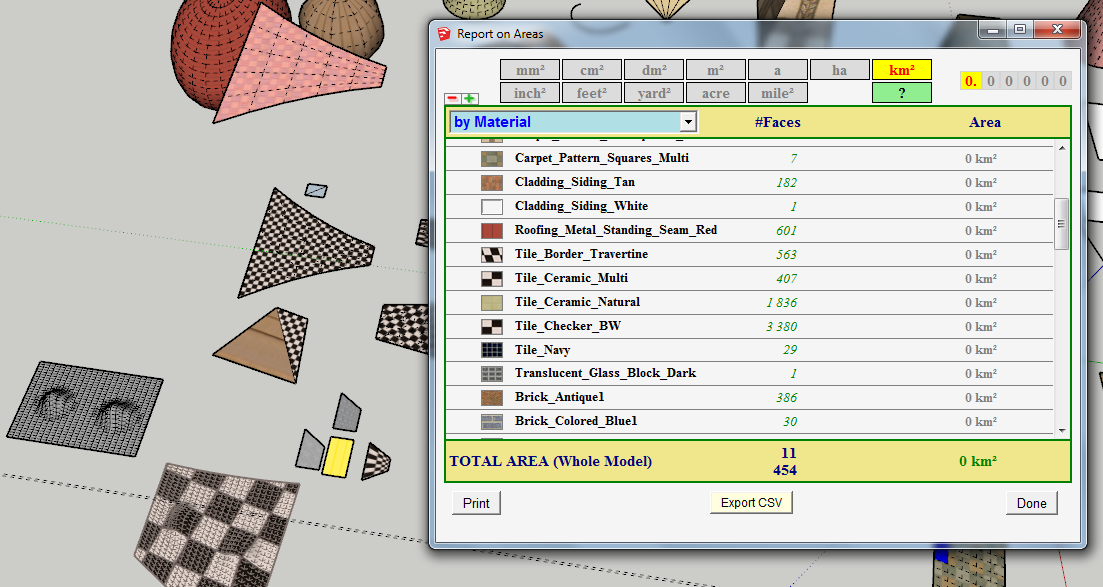
Fredo
-
@marc477 said:
I could load the texture only one time from the Hard Drive using ImageMajik (Thanks Dan), then update the "in memory" buffer directly and display it in the WebDialog. Is it possible to do that ? How do I draw in a web dialog an image loaded with ImageMajik ?
I do not think anyone has ever done it.
The HTML5 Canvas element will not work well on PC yet because SketchUp uses the MSIE WebBrowser control for WebDialogs. Microsoft is lagging behind in their IE support of the specification.
You CAN use the RMagick gem to draw, and save the edits to disk, and MSIE knows how to natively render image file formats, but you'll need to refresh the web dialog, to re-render the imagefile. (or have a html IMG element within a HTML file.)
See the doc: http://studio.imagemagick.org/RMagick/doc/
Also note there IS aRVGclass that is based upon SVG. -
@dan rathbun said:
The HTML5 Canvas element will not work well on PC yet because SketchUp uses the MSIE WebBrowser control for WebDialogs. Microsoft is lagging behind in their IE support of the specification.
You can test by loading the HTML5 Bejeweled game into a WebDialog.
It most likely will not run under XP. But runs fine under Win7 with MSIE v11 installed.






Advertisement