sketchucation logo sketchucation
    • Login
    Oops, your profile's looking a bit empty! To help us tailor your experience, please fill in key details like your SketchUp version, skill level, operating system, and more. Update and save your info on your profile page today!
    ⚠️ Update | Sketchucation Tools 5.0.8 released with licensing improvements and bugfixes Download

    Ask for spesific plugin

    Scheduled Pinned Locked Moved Newbie Forum
    sketchup
    12 Posts 5 Posters 789 Views 5 Watching
    Loading More Posts
    • Oldest to Newest
    • Newest to Oldest
    • Most Votes
    Reply
    • Reply as topic
    Log in to reply
    This topic has been deleted. Only users with topic management privileges can see it.
    • Dave RD
      Dave R
      last edited by

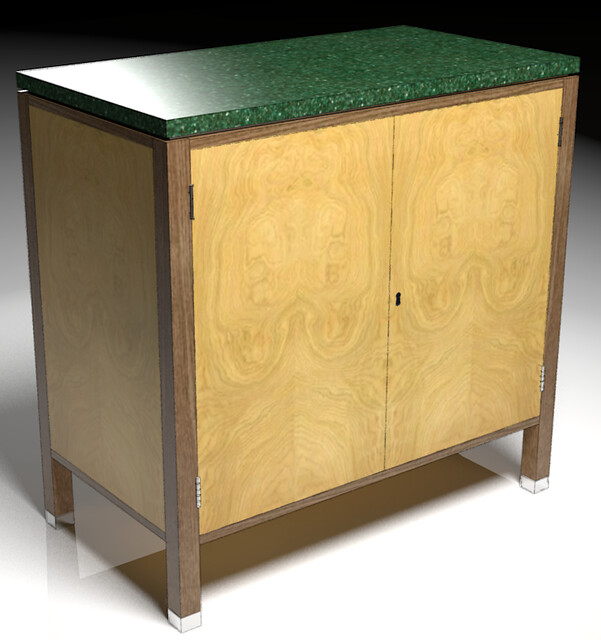
      I have an alternative approach that works well enough for me. Instead of adding a gap between the doors, I just make a Hidden Line export which I overlay on top of the rendered image. the line dividing the doors provides enough of a clue that there are two doors without adding much in the way of additional geometry.

      In this example the entire cabinet is drawn as a single "piece" and the doors are just one face on the box. In the render by itself the door panel looks like one piece.

      https://farm4.staticflickr.com/3430/13045179863_57e40d26b5_z.jpg

      With an overlay which only takes seconds to do, it becomes clear there are two doors.
      https://farm8.staticflickr.com/7401/13044341694_ce7d10a56e_z.jpg

      Even when I draw a fully detailed model, inset doors and drawers are drawn without gaps so the hidden line export does the trick.

      Etaoin Shrdlu

      %

      (THERE'S NO PLACE LIKE)

      G28 X0.0 Y0.0 Z0.0

      M30

      %

      1 Reply Last reply
      Reply Quote 0
      • Dave RD
        Dave R
        last edited by

        @frankflafy said:

        yes we can use component only if the size of doors is all the same.

        Well, not quite right.

        @frankflafy said:

        maybe some of our friend here can help make this simple plugin if there is none. i think its an easy and simple one.

        As pbacot mentioned, it's been discussed before but the solution wasn't an easy one for a plugin.

        Etaoin Shrdlu

        %

        (THERE'S NO PLACE LIKE)

        G28 X0.0 Y0.0 Z0.0

        M30

        %

        1 Reply Last reply
        Reply Quote 0
        • frankflafyF
          frankflafy
          last edited by

          @pbacot said:

          It's been discussed, a plugin, for example, to take a edge on a surface and make a trough. Don't think a real quick one step solution is there. There are many plugins that can help though. tubes on path perhaps. Often I have found my doors are all components so I design them to be able to leave a gap between them, but still many occasions I wish I had a plugin as above.

          yes we can use component only if the size of doors is all the same.

          maybe some of our friend here can help make this simple plugin if there is none. i think its an easy and simple one.

          @dave r said:

          I have an alternative approach that works well enough for me. Instead of adding a gap between the doors, I just make a Hidden Line export which I overlay on top of the rendered image. the line dividing the doors provides enough of a clue that there are two doors without adding much in the way of additional geometry.

          In this example the entire cabinet is drawn as a single "piece" and the doors are just one face on the box. In the render by itself the door panel looks like one piece.

          https://farm4.staticflickr.com/3430/13045179863_57e40d26b5_z.jpg

          With an overlay which only takes seconds to do, it becomes clear there are two doors.

          https://farm8.staticflickr.com/7401/13044341694_ce7d10a56e_z.jpg

          Even when I draw a fully detailed model, inset doors and drawers are drawn without gaps so the hidden line export does the trick.

          how? i cant get what u tell me. thanx

          1 Reply Last reply
          Reply Quote 0
          • KrisidiousK
            Krisidious
            last edited by

            Nice matched face door fronts...

            By: Kristoff Rand
            Home DesignerUnique House Plans

            1 Reply Last reply
            Reply Quote 0
            • Dave RD
              Dave R
              last edited by

              Thanks. I think they look like an MRI scan of someone's skull. πŸ˜„ Or half of an English walnut.

              Etaoin Shrdlu

              %

              (THERE'S NO PLACE LIKE)

              G28 X0.0 Y0.0 Z0.0

              M30

              %

              1 Reply Last reply
              Reply Quote 0
              • KrisidiousK
                Krisidious
                last edited by

                I saw two ant heads with pincers...

                By: Kristoff Rand
                Home DesignerUnique House Plans

                1 Reply Last reply
                Reply Quote 0
                • boofredlayB
                  boofredlay
                  last edited by

                  I see a rabbit sitting on a photocopier.

                  http://www.coroflot.com/boofredlay

                  1 Reply Last reply
                  Reply Quote 0
                  • Dave RD
                    Dave R
                    last edited by

                    @boofredlay said:

                    I see a rabbit sitting on a photocopier.

                    🀣 🀣
                    I wonder what Freud would say. πŸ˜†

                    Etaoin Shrdlu

                    %

                    (THERE'S NO PLACE LIKE)

                    G28 X0.0 Y0.0 Z0.0

                    M30

                    %

                    1 Reply Last reply
                    Reply Quote 0
                    • frankflafyF
                      frankflafy
                      last edited by

                      so no solution yet? ic. thanx

                      1 Reply Last reply
                      Reply Quote 0
                      • boofredlayB
                        boofredlay
                        last edited by

                        Well Dave gave you an alternate solution above. Having a plugin that specific does not seem very practical. Either take the time to model the gap between cabinet doors or fake it. Either Dave's way or after the rendering just strike a line in your photo editor of choice. Personally I would just take the extra time to model the details I want to see in the rendering. It makes for a more realistic result.

                        My 2 cents.

                        http://www.coroflot.com/boofredlay

                        1 Reply Last reply
                        Reply Quote 0

                        Hello! It looks like you're interested in this conversation, but you don't have an account yet.

                        Getting fed up of having to scroll through the same posts each visit? When you register for an account, you'll always come back to exactly where you were before, and choose to be notified of new replies (either via email, or push notification). You'll also be able to save bookmarks and upvote posts to show your appreciation to other community members.

                        With your input, this post could be even better πŸ’—

                        Register Login
                        • 1 / 1
                        • First post
                          Last post
                        Buy SketchPlus
                        Buy SUbD
                        Buy WrapR
                        Buy eBook
                        Buy Modelur
                        Buy Vertex Tools
                        Buy SketchCuisine
                        Buy FormFonts

                        Advertisement