sketchucation logo sketchucation
    • Login
    Oops, your profile's looking a bit empty! To help us tailor your experience, please fill in key details like your SketchUp version, skill level, operating system, and more. Update and save your info on your profile page today!
    ⚠️ Important | Libfredo 15.6b introduces important bugfixes for Fredo's Extensions Update

    Cannot get Default Material Back on Faces

    Scheduled Pinned Locked Moved SketchUp Bug Reporting
    sketchup
    3 Posts 2 Posters 1.1k Views 2 Watching
    Loading More Posts
    • Oldest to Newest
    • Newest to Oldest
    • Most Votes
    Reply
    • Reply as topic
    Log in to reply
    This topic has been deleted. Only users with topic management privileges can see it.
    • Mistro11M Offline
      Mistro11
      last edited by

      Using SU 2014 Pro:
      By mistake I colored a model from the group level and all faces that had default material was colored with dark grey. When I try to put the faces back to default color, nothing is happening. Even when I go in and select a face directly, the dark grey will not change. Any help is appreciated.

      Edit: The reason I want to get back to default is to make sure I know where the back faces are before I export to render.

      i7-4930k @3.4/3.7GHz, 32Gb RAM, NVidia GTX 980Ti 6Gb, Windows 7 Pro 64bit
      Structural Integrity is Not Just Physical...It's in the Design and Purpose

      1 Reply Last reply Reply Quote 0
      • cottyC Offline
        cotty
        last edited by

        @mistro11 said:

        When I try to put the faces back to default color, nothing is happening.

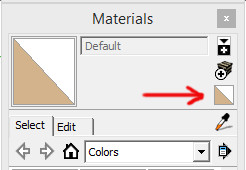
        How did you try? With this:
        defaultmat.jpg

        @mistro11 said:

        The reason I want to get back to default is to make sure I know where the back faces are before I export to render.

        For this, you can switch to monochrome view.

        my SketchUp gallery

        1 Reply Last reply Reply Quote 0
        • Mistro11M Offline
          Mistro11
          last edited by

          Thanks Cotty. I did try changing the face styles. The style of the model did change but not for what was already colored. I made a model outside the group and the default colors applied. But I don't understand why I cannot paint the default color back to the colored surfaces. I did it before plenty of times. Sometimes it is necessary when working with the UV plugins.

          I will try and remember about the monochrome view. Thanks again.

          i7-4930k @3.4/3.7GHz, 32Gb RAM, NVidia GTX 980Ti 6Gb, Windows 7 Pro 64bit
          Structural Integrity is Not Just Physical...It's in the Design and Purpose

          1 Reply Last reply Reply Quote 0
          • 1 / 1
          • First post
            Last post
          Buy SketchPlus
          Buy SUbD
          Buy WrapR
          Buy eBook
          Buy Modelur
          Buy Vertex Tools
          Buy SketchCuisine
          Buy FormFonts

          Advertisement