Soften / Smooth Edges dialog error
-
Hello there.
SU 2014 Pro
First post for help. I searched the forums but found no topic related, so here it goes:
As of today, when I open the Soften / Smooth Edges dialog, only the slider is present and the box is kind of minimized; I have to drag the bottom border to see the slider, but the real problem is that the "Soften Normals" and "Smooth Coplanar" checkboxes are missing; can't resize the dialog any further.I tried restarting SU to no avail. Starting as Admin (what difference would it make?) still no game.
Anyone knows about this?
Thanks in advance. -
try 'Sketchup' >> 'Preferences' >> 'WorkSpace' >> 'Reset WorkSpace'
it works for many things, maybe this as well?
john
-
I would also recommend that you try John's suggestion. I haven't seen this problem before. It looks just fine on my PC.
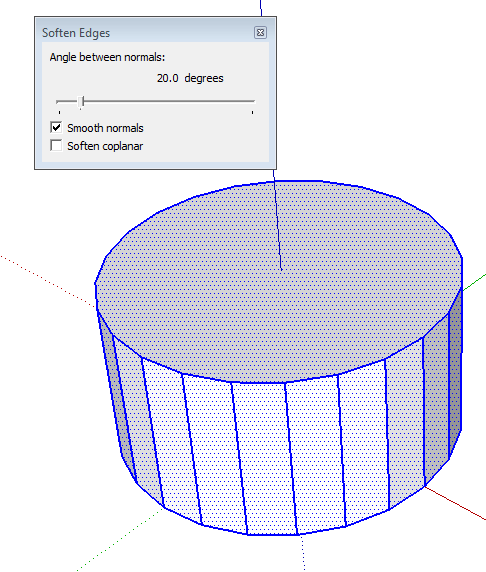
-
Thanks for the reply guys.
I actually re-installed SU. I also needed to do some cleanup with the tools and plugins. Yet, this is a great tip. I'll try in the future.
Consider this thread closed. Cheers !!!

-
actually double clicking on poping window should be ok

Hello! It looks like you're interested in this conversation, but you don't have an account yet.
Getting fed up of having to scroll through the same posts each visit? When you register for an account, you'll always come back to exactly where you were before, and choose to be notified of new replies (either via email, or push notification). You'll also be able to save bookmarks and upvote posts to show your appreciation to other community members.
With your input, this post could be even better 💗
Register Login


Advertisement