Trying to add material collection OSX Mavericks
-
Hi there
Trying to add a material collection (Groundcover) and cannot for the life of me find the 'materials' folder in the FINDER window.
Tried the Ruby script
Sketchup.find_support_file('materials')
which led indicated it was in
/Applications/SketchUp 2013/SketchUp.app/Contents/Resources/Content/materials
But this is all I get on that path
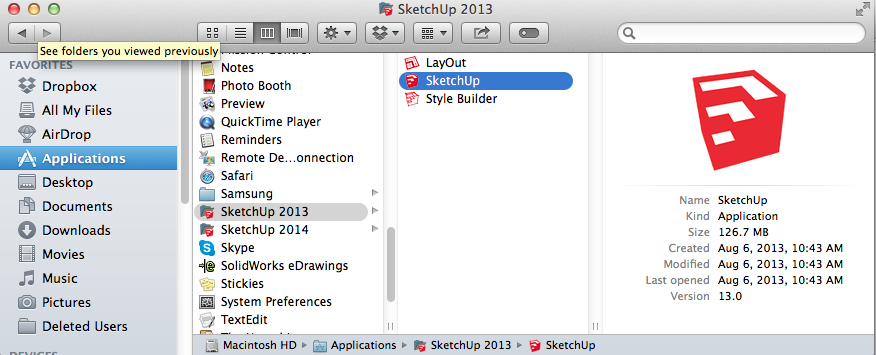
-
right click on SketchUp.app and choose 'Show package contents.' You'll be able to continue from there.
-
the problem with adding material collections to the .app contents is that they will be overwritten when you install a sketchup update.. (there is no longer a sketchup installer for mac.. it's just drag&drop so it's a simple replace as opposed to having the ability to search&keep certain items etc in the .app package)..
the path for user materials in su2013 and 2014 is
(user)~ /Library/ Application Support/ SketchUp201X/ SketchUp/ Materials
this material folder isn't created until a user creates/saves a custom material from within sketchup.. you can create it manually though. (then, in your case, place the 'Groundcover' folder inside the Materials folder)
-
Jeff
Awesome, thanks, had found the (hidden) library folder but at the end of the path there was no "Materials" folder. Added it manually and worked like a charm. Thanks again, was beginning to get very frustrated.
-
@makover said:
Jeff
Awesome, thanks, had found the (hidden) library folder but at the end of the path there was no "Materials" folder. Added it manually and worked like a charm. Thanks again, was beginning to get very frustrated.
hey Mark.. in mavericks, you can unhide the user library folder.. (you can in lion and ML too-- it's just that apple made it a little more user friendly to do it in mavericks instead of needing to use terminal)
in Finder, click on your user directory (probably an icon looking like a house/home)
the view options (cmmd-J or via menus- View-> Show View Options) for this folder has an option to show the user library instead of it being hidden.
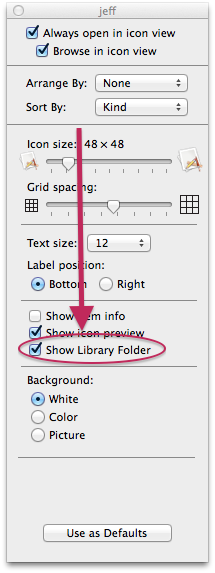
-
It was noticed earlier (maybe version 13) that if you place a custom material folder with the same name as a SU default folder into your user/materials folder, then SU will only show the default folder. I rename all my custom folders so then the material browser will show both.
My browser is full of cladding (the default) and cladding 1 (my cladding folder that I have been adding to for years), roofing and roofing 1 etc. It makes the browser crowded but it works.


Hello! It looks like you're interested in this conversation, but you don't have an account yet.
Getting fed up of having to scroll through the same posts each visit? When you register for an account, you'll always come back to exactly where you were before, and choose to be notified of new replies (either via email, or push notification). You'll also be able to save bookmarks and upvote posts to show your appreciation to other community members.
With your input, this post could be even better 💗
Register Login


Advertisement