sketchucation logo sketchucation
    • 登入
    Oops, your profile's looking a bit empty! To help us tailor your experience, please fill in key details like your SketchUp version, skill level, operating system, and more. Update and save your info on your profile page today!
    ⚠️ Important | Libfredo 15.6b introduces important bugfixes for Fredo's Extensions Update

    [Plugin] Add comments to your file

    已排程 已置頂 已鎖定 已移動 Plugins
    104 貼文 20 Posters 20.4k 瀏覽 20 Watching
    正在載入更多貼文
    • 從舊到新
    • 從新到舊
    • 最多點贊
    回覆
    • 在新貼文中回覆
    登入後回覆
    此主題已被刪除。只有擁有主題管理權限的使用者可以查看。
    • inteloideI 離線
      inteloide
      最後由 編輯

      Hello Lê,

      Please download the latest update of BGSketchup Library from the store (version 2.3.1).
      It may solve your issue.

      To answer your question, comments are saved inside Model (let's say Inside skp file).
      If you loose some comment, you can send me your file (even if you delete everyhting inside) and I will try to recover it.

      Inteloide

      Humanity will do a huge step when the IT professionals will understand that computers are tools...

      1 條回覆 最後回覆 回覆 引用 0
      • B 離線
        bharralure
        最後由 編輯

        Bonjour Inteloide,
        J’utilise depuis quelques semaines votre plugin "Comments v2.3.7".
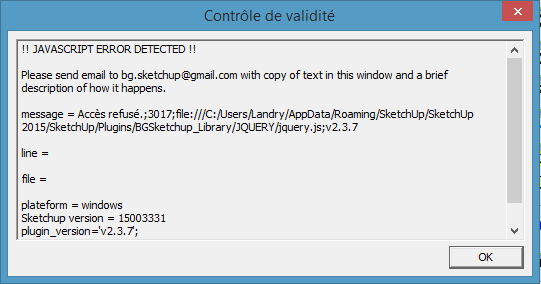
        Il fonctionne correctement sauf qu’à chaque lancement d’un modèle SketchUp comportant des commentaires enregistrés s’affiches les messages tels que les montres les captures d’écrans ci-après :
        Est-il possible de solutionner ce problème ?
        Merci.
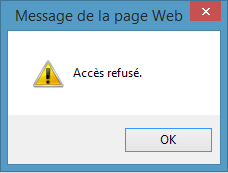

        2015-03-27 21_25_29-Message de la page Web.png


        2015-03-27 21_26_03-Contrôle de validité.png

        1 條回覆 最後回覆 回覆 引用 0
        • B 離線
          bharralure
          最後由 編輯

          Bonjour Inteloide,
          Je viens de solutionner mon problème en installant la version 2.3.2 de BG_Sketchup_Library (j'utilisais la version 2.0.7 sans avoir vu la mise à jour...).
          Tout fonctionne.

          1 條回覆 最後回覆 回覆 引用 0
          • inteloideI 離線
            inteloide
            最後由 編輯

            Bonjour,

            Il vous faut télécharger la dernière version de BGSketchup_Library (la version 2.3.2).
            Pour cela, vous pouvez allez, dans Sketchup, dans le menu Extension puis BGSketchup puis BGSketchup update manager.
            Là vous tomberez sur l'interface qui vous permettra de mettre à jour vos plugins.

            Sinon, vous pouvez passer par le PluginStore de SketchUcation.

            Cordialement
            Inteloide

            Humanity will do a huge step when the IT professionals will understand that computers are tools...

            1 條回覆 最後回覆 回覆 引用 0
            • greenskpG 離線
              greenskp
              最後由 編輯

              Default installation is fine but an installation with a custom folder always ask me to install BGSketchup Library.

              I am using

              require_all('path\to\custom\folder')
              

              inside default plugins folder.

              1 條回覆 最後回覆 回覆 引用 0
              • inteloideI 離線
                inteloide
                最後由 編輯

                Hello,

                New version 2.3.9 should correct this issue.
                Please download it from the store (with new version of BGSketchup Library)

                Inteloide

                Humanity will do a huge step when the IT professionals will understand that computers are tools...

                1 條回覆 最後回覆 回覆 引用 0
                • greenskpG 離線
                  greenskp
                  最後由 編輯

                  @unknownuser said:

                  New version 2.3.9 should correct this issue.

                  Thank you!!!

                  Could you to correct this issue for Component Manager too? Maybe for all BGSketchup family?

                  1 條回覆 最後回覆 回覆 引用 0
                  • greenskpG 離線
                    greenskp
                    最後由 編輯

                    inteloid,

                    sometimes i need to change the tab for make another annotation but the icon of options is very close and opens the window. It's possible to put a delay or increase the distance between the tab name and the icon of options?

                    Take a look on my screen recorder.

                    http://i.imgur.com/oJMp2th.gif

                    1 條回覆 最後回覆 回覆 引用 0
                    • greenskpG 離線
                      greenskp
                      最後由 編輯

                      Good Evening inteloid,

                      I did for me a translation pt-br for the file Translation.rb and also correct few things in the file pt-br.js.

                      If you think this is good, please add for the next update 😄

                      Translation pt-br

                      1 條回覆 最後回覆 回覆 引用 0
                      • inteloideI 離線
                        inteloide
                        最後由 編輯

                        Hello Greenskp,

                        Please find here a new version that include requested improvements.
                        Please, keep me informed if it's ok for you.

                        Best regards
                        Inteloide


                        Version 2.3.10

                        Humanity will do a huge step when the IT professionals will understand that computers are tools...

                        1 條回覆 最後回覆 回覆 引用 0
                        • greenskpG 離線
                          greenskp
                          最後由 編輯

                          Happened some behaviors that not exists in official version. This version 2.3.10 seems incompatible with the library 3.6.
                          If i make 7 tabs:

                          • the tab 2 froze

                          • change the language unfreezes the tab 2 but freezes the tab 6

                          • From right to left is good but from left to right one tab is skipped

                          I think is better forget this and only include the translation. Or perhaps force the tab to shrink before of the mouse be released.

                          custom version 2.3.10

                          1 條回覆 最後回覆 回覆 引用 0
                          • inteloideI 離線
                            inteloide
                            最後由 編輯

                            Hello Greenskp,

                            Everything is working fine on my computer.
                            According your screen recorder, you have an issue "$ not defined" : it looks like jquery is not working correctly. Also, the height of the area where to enter text is smaller than expected.

                            Please try to install again the plugin. Sometimes it works.

                            If you have the same error, replace the pt-br.js file you send me by the previous version.

                            Keep me informed.

                            Inteloide

                            Humanity will do a huge step when the IT professionals will understand that computers are tools...

                            1 條回覆 最後回覆 回覆 引用 0
                            • greenskpG 離線
                              greenskp
                              最後由 編輯

                              I replace with pt-br.js file that i sent to you and worked very well!

                              Do you think about include in the Plugin Store on next update? I am really happy and waiting to tell my colleagues about all features.

                              1 條回覆 最後回覆 回覆 引用 0
                              • greenskpG 離線
                                greenskp
                                最後由 編輯

                                Hello Inteloid, it's me again

                                i was working today and i found some bugs in 2.3.9 version.

                                1. Double click or Ctrl + mouse click doesn't open a hyperlink

                                2. After change a language, if i change again, the javascript side remains the same and just Localization.rb does the change.
                                  I erased the Library and Comments_2.3.9 and reinstall both, also i cleaned the cookies on Internet Explorer but this behaviour remains.

                                3. The last tab and penultimate tab doesn't save if not contain an image annexed.

                                1 條回覆 最後回覆 回覆 引用 0
                                • S 離線
                                  Seilo
                                  最後由 編輯

                                  @bmoffa said:

                                  I would really like to use this plug-in, but it seems to not save or not load comments that I add. At first it lost comments from one of the two tabs I set up, then it lost everything.

                                  I'm using version 2.3.5 in SketchUp 2015 Pro 64 bit (current build). I really hope you can fix this as I really like it.

                                  Hi, I'm having the same problem as BMoffa. The data in Tab1 is always deleted after I close and reopen a file. Tab2 seems to be fine...

                                  Using version 2.3.10 on a 64Bit Win7 machine

                                  1 條回覆 最後回覆 回覆 引用 0
                                  • 1
                                  • 2
                                  • 3
                                  • 4
                                  • 5
                                  • 6
                                  • 5 / 6
                                  • 第一個貼文
                                    最後的貼文
                                  Buy SketchPlus
                                  Buy SUbD
                                  Buy WrapR
                                  Buy eBook
                                  Buy Modelur
                                  Buy Vertex Tools
                                  Buy SketchCuisine
                                  Buy FormFonts

                                  Advertisement