sketchucation logo sketchucation
    • Login
    Oops, your profile's looking a bit empty! To help us tailor your experience, please fill in key details like your SketchUp version, skill level, operating system, and more. Update and save your info on your profile page today!
    Mac User? | Join the Rayscaper Beta for Mac Learn More

    [Plugin] Add comments to your file

    Scheduled Pinned Locked Moved Plugins
    104 Posts 20 Posters 30.7k Views 20 Watching
    Loading More Posts
    • Oldest to Newest
    • Newest to Oldest
    • Most Votes
    Reply
    • Reply as topic
    Log in to reply
    This topic has been deleted. Only users with topic management privileges can see it.
    • inteloideI
      inteloide
      last edited by

      Hello Box,

      I just see your post...after I upload version 1.5.0.

      So please try version 1.5.0 add please tell me if your bug remains.

      Regards
      Inteloide

      Humanity will do a huge step when the IT professionals will understand that computers are tools...

      1 Reply Last reply
      Reply Quote 0
      • BoxB
        Box
        last edited by

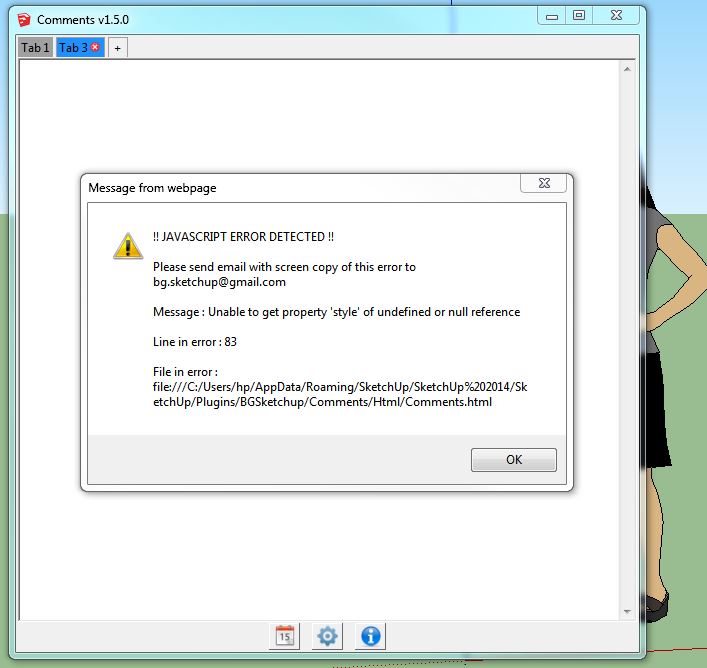
        Still getting the same error.


        Same error.JPG

        1 Reply Last reply
        Reply Quote 0
        • BoxB
          Box
          last edited by

          Sorry, I just noticed that it has a second error, thought it was a repeat but it is a different line.
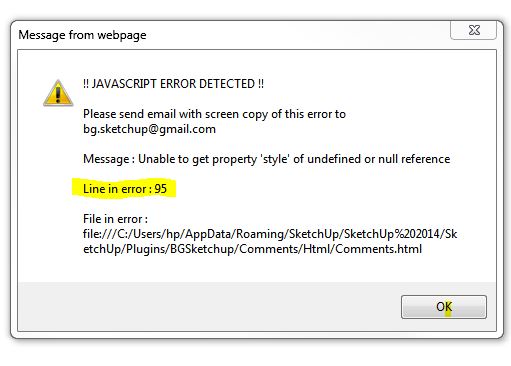

          Error95.JPG

          1 Reply Last reply
          Reply Quote 0
          • inteloideI
            inteloide
            last edited by

            @box said:

            Sorry, I just noticed that it has a second error, thought it was a repeat but it is a different line.

            There were a lot of bugs actually... Thanks for raising the error you had.
            Version 1.5.1, just posted, corrects the tab deletion issue.

            Inteloide

            Humanity will do a huge step when the IT professionals will understand that computers are tools...

            1 Reply Last reply
            Reply Quote 0
            • G
              glro
              last edited by

              just downloaded the 1.5.1 version

              found out you have to press on "TAB" to link a tab to a scene

              but actually no link seems to be made on my computer, because when i clic on the tab in comment window, it doesn't show the linked scene in sketchup, and when i clic on the scene tab in sketchup, it does'nt show the linked tab comment

              i am probably missing something...

              1 Reply Last reply
              Reply Quote 0
              • G
                glro
                last edited by

                error
                @inteloide said:

                @box said:

                Sorry, I just noticed that it has a second error, thought it was a repeat but it is a different line.

                There were a lot of bugs actually... Thanks for raising the error you had.
                Version 1.5.1, just posted, corrects the tab deletion issue.

                Inteloide

                1 Reply Last reply
                Reply Quote 0
                • inteloideI
                  inteloide
                  last edited by

                  Hello Glro,

                  Actually, the plugin should works like this : when selecting a scene in Sketchup, the linked (if defined) tab in plugin is shown.

                  The opposite (when clicking on a tab in plugin, show the scene in Sketchup) is not implemented yet. I could, if you need it.

                  About the javascript error you have, could you please tell me more : when do you have this error, what did you do before ?

                  Inteloide

                  Humanity will do a huge step when the IT professionals will understand that computers are tools...

                  1 Reply Last reply
                  Reply Quote 0
                  • G
                    glro
                    last edited by

                    @inteloide said:

                    Hello Glro,

                    Actually, the plugin should works like this : when selecting a scene in Sketchup, the linked (if defined) tab in plugin is shown.

                    The opposite (when clicking on a tab in plugin, show the scene in Sketchup) is not implemented yet. I could, if you need it.

                    About the javascript error you have, could you please tell me more : when do you have this error, what did you do before ?

                    Inteloide

                    when i clic on a scene tab in sketchup, it doesn't change anything in the comment window, even if i previously set a link between a comment tab and a scene tab

                    the error message i sent, i don't remember how it popped up

                    here is a new one: it appeared when i clicked on the comment button to show again the comment window, after closing it using the cross in the upper left corner
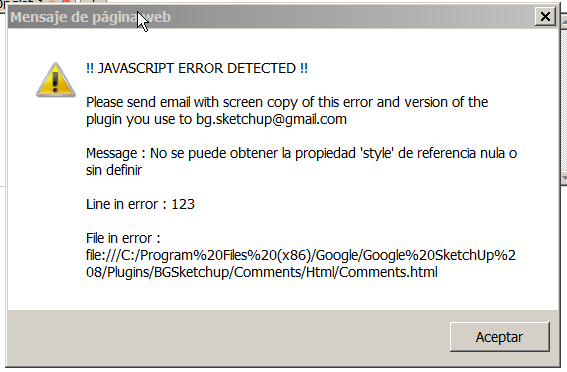

                    2014-04-06 19_07_21-Commentaires v1.5.1.png

                    1 Reply Last reply
                    Reply Quote 0
                    • inteloideI
                      inteloide
                      last edited by

                      tiiuuuu !!!!
                      I've same bug when changing the language.... not good

                      Humanity will do a huge step when the IT professionals will understand that computers are tools...

                      1 Reply Last reply
                      Reply Quote 0
                      • inteloideI
                        inteloide
                        last edited by

                        okay, version 1.5.2 should solve javascript issue.
                        About your tab-scene issue, I tried from an empty file : it works.

                        Could you please open the ruby consol window (Window/Ruby Consol) to see if error appear Inside, when setting the link and changing the scene in SU ?

                        Thank you.
                        Inteloide

                        Humanity will do a huge step when the IT professionals will understand that computers are tools...

                        1 Reply Last reply
                        Reply Quote 0
                        • G
                          glro
                          last edited by

                          @inteloide said:

                          okay, version 1.5.2 should solve javascript issue.
                          About your tab-scene issue, I tried from an empty file : it works.

                          Could you please open the ruby consol window (Window/Ruby Consol) to see if error appear Inside, when setting the link and changing the scene in SU ?

                          Thank you.
                          Inteloide

                          no error message in the ruby console ... because it works perfectly!

                          i clic on the scene tab and the comment window shows the corresponding tab, as said

                          after installation, i had to close sketchup and open it again, though; just after the installation, it didn't work

                          thank you, seems operational; i am not sure about the use of a backward link between the comment window and the scenes...

                          1 Reply Last reply
                          Reply Quote 0
                          • inteloideI
                            inteloide
                            last edited by

                            @glro said:

                            @inteloide said:

                            after installation, i had to close sketchup and open it again, though; just after the installation, it didn't work

                            I don't know how to proceed to make it work for the first time. I think, it's the same of some other extension (from other developers) I installed in the past.

                            No big problem, I think.

                            I just add an help file in first post of this thread, in pdf format.

                            Inteloide

                            Humanity will do a huge step when the IT professionals will understand that computers are tools...

                            1 Reply Last reply
                            Reply Quote 0
                            • G
                              glro
                              last edited by

                              @inteloide said:

                              No big problem, I think.

                              Inteloide

                              i agree; you just have to know it

                              the plugin seems to be ready for use; adding an active link to a web page would be nice, but the link can be added and copied/pasted in an internet browser also, so it is not very important

                              1 Reply Last reply
                              Reply Quote 0
                              • A
                                alexanor
                                last edited by

                                Great plugin!
                                Made translation for the Russian language.

                                elsif @option_langue=="ru" then
                                @strWindowName="Заметки"
                                @strButtonsTitles=["Добавить текущую дату и время", "Настройки", "О Плагине"]
                                @strModifyTabName="Настройки Вкладки"
                                @strDeleteTab="Удалить Вкладку"
                                @strButtonsTexts=["Сохранить","Отмена"]
                                @strAbout="О Плагине"
                                @strTexts=["Язык",
                                "Автоматически открывать окно, если существуют заметки",
                                "Автоматически открывать окно, даже если заметок нет",
                                "Показывать окончание заметки при открытии вкладки"]
                                @strTabName="Название Заметки: "
                                @strTab=""
                                @strSureToDeleteTab = "Вы уверены, что хотите УДАЛИТЬ эту вкладку?"
                                @strTabOptionName="Настройки вкладки"
                                @strNoLink="-- Не связывать со Сценой --"
                                @strTextsOptionsTab=["Имя Вкладки :","Связка со Сценой :","Применить","Отмена"]

                                1 Reply Last reply
                                Reply Quote 0
                                • inteloideI
                                  inteloide
                                  last edited by

                                  Hello

                                  Thanks alexanor for this translation.
                                  For Glro, in version 1.5.4, I optimized the code in order have the text area more reactive.
                                  I hope it will works, I just have one model at works that slow down the text area, so I cannot check at home.

                                  Regards.
                                  Inteloide

                                  Humanity will do a huge step when the IT professionals will understand that computers are tools...

                                  1 Reply Last reply
                                  Reply Quote 0
                                  • inteloideI
                                    inteloide
                                    last edited by

                                    See life in colors !!

                                    New version added : set colors to your tabs :
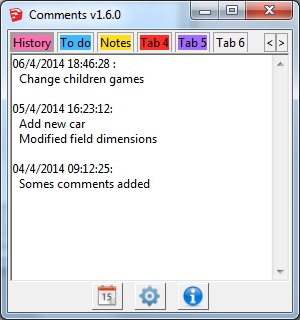
                                    Colored tabs

                                    Enjoy !

                                    Inteloide

                                    Humanity will do a huge step when the IT professionals will understand that computers are tools...

                                    1 Reply Last reply
                                    Reply Quote 0
                                    • A
                                      alexanor
                                      last edited by

                                      I can not find a link to download version 1.6.1...

                                      1 Reply Last reply
                                      Reply Quote 0
                                      • inteloideI
                                        inteloide
                                        last edited by

                                        Correcto !
                                        Just update the post...

                                        Inteloide

                                        Humanity will do a huge step when the IT professionals will understand that computers are tools...

                                        1 Reply Last reply
                                        Reply Quote 0
                                        • A
                                          alexanor
                                          last edited by

                                          Excellent! Now it works!

                                          1 Reply Last reply
                                          Reply Quote 0
                                          • A
                                            alexanor
                                            last edited by

                                            Inteloide whether you can connect to the script calculator? It would be convenient to make calculations and take notes in one window ...


                                            1 Reply Last reply
                                            Reply Quote 0

                                            Hello! It looks like you're interested in this conversation, but you don't have an account yet.

                                            Getting fed up of having to scroll through the same posts each visit? When you register for an account, you'll always come back to exactly where you were before, and choose to be notified of new replies (either via email, or push notification). You'll also be able to save bookmarks and upvote posts to show your appreciation to other community members.

                                            With your input, this post could be even better 💗

                                            Register Login
                                            • 1
                                            • 2
                                            • 3
                                            • 4
                                            • 5
                                            • 6
                                            • 5 / 6
                                            • First post
                                              Last post
                                            Buy SketchPlus
                                            Buy SUbD
                                            Buy WrapR
                                            Buy eBook
                                            Buy Modelur
                                            Buy Vertex Tools
                                            Buy SketchCuisine
                                            Buy FormFonts

                                            Advertisement