MSPhysics 1.0.3 (16 October 2017)
-
@anton_s said:
Okay, those loading and encoding issues should be fixed now. Upgrade to 0.9.7.
Thanks Anton that has sorted the loading issue with Sketchup 2017.
Regards
-
Hello, I can't download MSPhysics 0.9.7 plugin from your link!
-
First of all thanks for sharing this great plugin
Please I need help. with chains. -
I installed the last version 0.9.7 and it appears this message:
Error al cargar archivo /Users/Oxer/Library/Application Support/SketchUp 2017/SketchUp/Plugins/MSPhysics/main.rb
Error; #<Exception; An exception occurred while loading MSPhysics 0.9.7! The exception occurred due to one or more of the following reasons;
- LoadError; dlopen(/Users/Oxer/Library/Application Support/SketchUp 2017/SketchUp/Plugins/MSPhysics/osx64/2.2/msp_lib.bundle, 9); Library not loaded; @loader_path/../libSDL2-2.0.0.dylib
  Referenced from; /Users/Oxer/Library/Application Support/SketchUp 2017/SketchUp/Plugins/MSPhysics/osx64/libSDL2_mixer-2.0.0.dylib
  Reason; image not found - /Users/Oxer/Library/Application Support/SketchUp 2017/SketchUp/Plugins/MSPhysics/osx64/2.2/msp_lib.bundle
- LoadError; MSPhysics library file, "/Users/Oxer/Library/Application Support/SketchUp 2017/SketchUp/Plugins/MSPhysics/osx64/2.2/msp_lib_no_sdl.bundle", is missing!
>
/Applications/SketchUp 2017/SketchUp.app/Contents/Resources/Content/Tools/extensions.rb;197;in `require'
/Applications/SketchUp 2017/SketchUp.app/Contents/Resources/Content/Tools/extensions.rb;197;in `load'
/Users/Oxer/Library/Application Support/SketchUp 2017/SketchUp/Plugins/MSPhysics.rb;90;in `register_extension'
/Users/Oxer/Library/Application Support/SketchUp 2017/SketchUp/Plugins/MSPhysics.rb;90;in `<module;MSPhysics>'
/Users/Oxer/Library/Application Support/SketchUp 2017/SketchUp/Plugins/MSPhysics.rb;72;in `<top (required)>'
SU2017 & OSX 10.11.6
-
Hello !!!
I think most stable version is MSPhysics_0.9.4 for now ... in MSPhysics_0.9.7 "Drag to orbit" does not work when the simulation is runing...
Emersonvip - you can browse through this forum about chains ( http://sketchucation.com/forums/search.php?keywords=chain%26amp;t=56852%26amp;sf=msgonly ). Here you have a file, see how it was done this chain piece by piece and you will understand how MSPhysics it works with chains.
as Anton wrote in a reply "You can adjust Update Timestep, Solver Model, and Update Rate for the desired speed, performance, and stability."
-
Hi Anton and thanks for MSPhysics your done a great job so far congratulations.
only problem for me is new MS scripts are confusing....old sketcky user
waiting on more models with script examples in them.Scaled down my j-pod/cable car model from Eneroth Railroad plugin
Curvy piston joint testing

thx again
-
The same here - Orbit doesn't work during simulation. Zooming in and out works.
-
@faust07 said:
The same here - Orbit doesn't work during simulation. Zooming in and out works.
Yes, For me also don't works the Middle click in 0.9.5+
-
Hi,
Oxer, I fixed the loading issue on Mac OS X.
Cristyan, Faust07, PituPhysics the orbiting issue should be fixed new.Please upgrade to 0.9.8.
Thanks y'all for reporting!
Anton
-
Thanks!!

All works fine right now on Mac. -
-
Hi Anton
Please, please could you help me.
Firstly thanks for making it possible for us all to have this plugin. I really appreciate your work.
I have one little problem which I am sure is easily remedied. In my models the groups or components are falling through each (like in the following post) a lot of the time.
http://sketchucation.com/forums/viewtopic.php?f=61%26amp;t=64189
I need to change a setting somewhere I guess but I have no idea which. I hope I haven't missed something obvious, I have tried looking for the solution online without success and I have tried systematically changing setting also without success.
Many thanks once again.
-
Hi Anton
Is there a way I can tidy up the collision wireframe for Compound from CD shapes in the UI. Both the rack and the pinion I have drawn are not getting a very good collision detection wireframe so the gears are jumping out of the rack.
I have checked the geometry in the models and they appear to be sound so I am assuming this is related to the way the wireframe is generated/calculated.
Thanks again for this great plug in.
-
Hi, DonDeEs,
The Collision from CD shape is not reliable. Its ability to calculate proper collision is limited. What you can do is manually divide sub-geometry of the gear into convex-hull groups. Then assign Compound shape to the top level group. So, for the gear, every tooth should have its own group. The top level group, of Compound shape, should contain all the teeth.
For the chains, using collision as the constraint for keeping the objects from falling apart is not a viable approach. Yes, increasing the density of all chain links can get all pieces to hold tight, but they will break once a certain amout of force is applied. What would be a better solution is having every peace of chain interconnected by a ball-and-socket joint. There is a very efficient way to do it. Here, check out this example:
artificial_chains.skp
I might create a YouTube tutorial for it later.Anton
-
Hi Anton
Many thanks for your reply. The solution makes sense. It will make modelling gears a little more complicated but that is ok. I guess I could also let the gears run as cylinders on a box collision shape for the rack (so they roll effectively) and null the gear teeth on both.
I don't know if it helps you to know that when Collision Wireframe is enabled on the simulation it shows fine but if you use orbit the wireframes are lost. It means you effectively have to stop the simulation, orbit to where you want to see and restart in order to get the view you want with wireframe.
It is a minor problem for me but maybe it is a bug that you are not aware of and can fix.
Thanks again for your help.
-
Hi Anton just reporting this little bug im getting with your ams windowsettingsv4.2.0
plugin and MSphysics keeps jumping out of fullscreen.
im using MSPhysics_0.9.8/Win 8.1/Sketchup 2016 and ae-toolbar editor plugin
Before

After

any info would help
Tez -
Hi Anton
That makes sense of the geared joints option. I had not really worked out what they were about but this is absolutely the solution I needed so many thanks.
-
Thanks for reporting this, SketchyPhysicsNut. I came across it but forgot about it the next moment. Now I got it logged.
DonDeEs, for the geared effect, you can try connecting joints to joints. They are called geared joints. For your rack and pinion gear, you can connect slider to the rack group and hinge to the pinion group. Then connect slider with the hinge. After that, using UI you can adjust distance-to-angle ratio. Geared joints allows user to utilize gears without having any collision at all. I even tried making a differential gear using the geared joints. It worked very well. Once I get some free time, I will definitely make a tutorial about it. At the moment, here is an example of geared joints:
MSPhysics Geared JointsEdit: At the moment geared joints yield improper behavior under certain cases, but I'm intending to address the issue in the next release.
Also, I'm aware of the collision wireframe not drawing when the orbit tool is activated. The collision wireframe stops being drawn whenever the simulation is suspended. However, it starts drawing again whenever it is resumed. That's how SketchUp API works and I don't have much control over it. So, while having an orbit tool, if you right click and select Exit the simulation should resume the drawing.
-
Hi Anton
I hope it is OK to report a possible bug with MSPhysics 0.9.8.
I am using it with Sketchup 2017 on a Surface Pro running Windows 10.
It seems the UI opens in a different resolution and does not therefore display in full. The maximise button is disabled so I wondered if there is anything that I can do to fix this.
I have attached a screen shot for you if it helps.
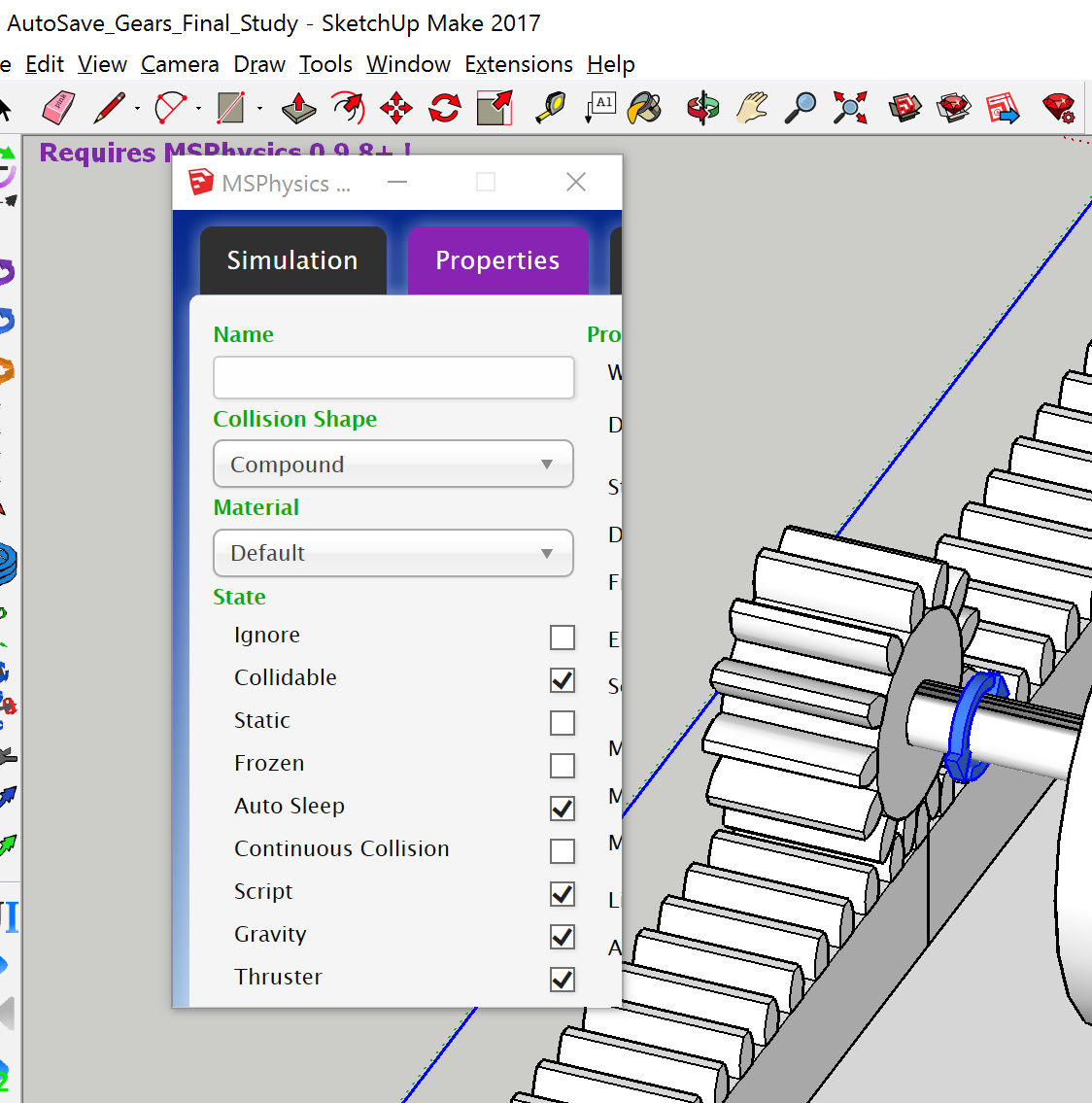
-
I just checked and this only seems to be a problem with S2017. Seems to work fine in 2016.



Advertisement