sketchucation logo sketchucation
    • Login
    Oops, your profile's looking a bit empty! To help us tailor your experience, please fill in key details like your SketchUp version, skill level, operating system, and more. Update and save your info on your profile page today!
    ⚠️ Update | Sketchucation Tools 5.0.8 released with licensing improvements and bugfixes Download

    MSPhysics 1.0.3 (16 October 2017)

    Scheduled Pinned Locked Moved Plugins
    930 Posts 173 Posters 1.4m Views 174 Watching
    Loading More Posts
    • Oldest to Newest
    • Newest to Oldest
    • Most Votes
    Reply
    • Reply as topic
    Log in to reply
    This topic has been deleted. Only users with topic management privileges can see it.
    • cottyC
      cotty
      last edited by

      How can these (groups of) bodies collide? If the lower group is exploded, the individual parts collide but not as a group/component.

      click to animate


      coll_example.skp

      my SketchUp gallery

      1 Reply Last reply
      Reply Quote 0
      • cottyC
        cotty
        last edited by

        If I assign the hinge to the ground instead of the group of objects, the collision works, but I need the assignment to that group for this case:

        MSP_collide2.gif


        coll_example2.skp

        my SketchUp gallery

        1 Reply Last reply
        Reply Quote 0
        • A
          Anton_S
          last edited by

          Cotty, joint properties can be editted. Select the desired joint, open MSPhysics UI, and enable 'connected collide' option.

          1 Reply Last reply
          Reply Quote 0
          • cottyC
            cotty
            last edited by

            Thank you, Anton, that helped!

            my SketchUp gallery

            1 Reply Last reply
            Reply Quote 0
            • R
              RobiBue
              last edited by

              Just a heads up replying to my post:

              @robibue said:

              Hi, I'm using SU2015 and with
              ams_Lib 3.1.2 and
              MSPhysics 0.2.1
              I get the following errors:

              [pre:1doxyosj]Error Loading File ...[/pre:1doxyosj]

              Please help

              thanks

              Thank you,

              the new version "0.3.0" runs smoothly on SU 15 and 16

              Great work ❗ πŸ‘

              1 Reply Last reply
              Reply Quote 0
              • P
                PituPhysics
                last edited by

                Hello Anton! For me it's not working. New installed SU16-x64 and AMS 3.1.3.

                404 Not Found

                favicon

                (sketchucation.com)


                weew.png

                1 Reply Last reply
                Reply Quote 0
                • F
                  faust07
                  last edited by

                  Initial tests are promising. Great work Anton! πŸ‘ I can not resist to carry out detailed experiments with joints and scripts. Extreme wishes are an import function for SketchyPhysics models and detection of replay data by the Twilight renderer. 😐

                  1 Reply Last reply
                  Reply Quote 0
                  • P
                    PituPhysics
                    last edited by

                    @pituphysics said:

                    Hello Anton! For me it's not working. New installed SU16-x64 and AMS 3.1.3.

                    404 Not Found

                    favicon

                    (sketchucation.com)

                    I'm sorry, my fault. 😞 Now work perfectly πŸ‘

                    aa.png

                    1 Reply Last reply
                    Reply Quote 0
                    • pilouP
                      pilou
                      last edited by

                      Seems terrific! 😎

                      Nothing for multi-Languages System ?

                      GIF_msphysics.gif
                      MSPhysics.jpg

                      MS_dialog.jpg

                      Frenchy Pilou
                      Is beautiful that please without concept!
                      My Little site :)

                      1 Reply Last reply
                      Reply Quote 0
                      • D
                        Deano45
                        last edited by

                        Hello, New to MsPhysics. I've installed SU16-x64 and AMS 3.1.3. But keep getting bug splats.
                        I thought it might be my Desktop, So i tried my laptop and got the same bug splat. The install is pretty simple am i missing a step?

                        Thanks Deano

                        1 Reply Last reply
                        Reply Quote 0
                        • A
                          Anton_S
                          last edited by

                          Just in case if it's installing issues, try deleting both plugins - ams_Lib and MSPhysics - and try installing them again.

                          1 Reply Last reply
                          Reply Quote 0
                          • pilouP
                            pilou
                            last edited by

                            About Multi-languages ?
                            I can translate it in French but in easy way (ressource), not in swimming in any file! πŸ˜‰

                            http://s6.postimg.org/n7ej65ma9/GIF_msp01.gif

                            Frenchy Pilou
                            Is beautiful that please without concept!
                            My Little site :)

                            1 Reply Last reply
                            Reply Quote 0
                            • A
                              Anton_S
                              last edited by

                              Thanks Pilou, there are still changes and additions that need to be done. I might contact you once the project is suitable for localization. Thanks again.

                              1 Reply Last reply
                              Reply Quote 0
                              • pilouP
                                pilou
                                last edited by

                                Perfect! πŸ‘

                                Does the Universal, and CorkScrew Joints are now working ?

                                Frenchy Pilou
                                Is beautiful that please without concept!
                                My Little site :)

                                1 Reply Last reply
                                Reply Quote 0
                                • pcberdwinP
                                  pcberdwin
                                  last edited by

                                  I've installed the latest files into Sketchup 2015 and get a bugsplat every time I run a simulation. Is there an error log I can post or send you? Thanks.

                                  1 Reply Last reply
                                  Reply Quote 0
                                  • pilouP
                                    pilou
                                    last edited by

                                    Motors on wheels!
                                    On a Static Ground
                                    **Draw a Joint (motor) on the axe of the piece (wheel) who will run!
                                    Group this joint (motor) with this piece (wheel)! (SU Group)

                                    CONNECTE this Joint (motor) to the parent piece (car) with MAJ &/or CTRL !
                                    (Connection MSPhysics)**

                                    Miracle we can Copy / rotate etc...the wheel + motor around the car!

                                    Each motor can have different acceleration etc...

                                    Better to put all joints on the same layer for hide them

                                    And use component for at the end when all works fine replace the box car by a Bugatti! πŸ˜„

                                    http://s6.postimg.org/6d57679xt/GIF_auto.gif

                                    Frenchy Pilou
                                    Is beautiful that please without concept!
                                    My Little site :)

                                    1 Reply Last reply
                                    Reply Quote 0
                                    • pilouP
                                      pilou
                                      last edited by

                                      πŸ’š

                                      http://s6.postimg.org/wt8k5tudt/GIF_bugatti.gif

                                      Frenchy Pilou
                                      Is beautiful that please without concept!
                                      My Little site :)

                                      1 Reply Last reply
                                      Reply Quote 0
                                      • F
                                        FikeFab
                                        last edited by

                                        Can someone help. Ive tried deleting and reloading the MSphysics and ams files but keep getting this load error.

                                        Error Loading File C:/Users/Brian/AppData/Roaming/SketchUp/SketchUp 2016/SketchUp/Plugins/MSPhysics/main.rb
                                        Error: #<LoadError: 126: The specified module could not be found. - C:/Users/Brian/AppData/Roaming/SketchUp/SketchUp 2016/SketchUp/Plugins/MSPhysics/win64/2.0/msp_lib.so>
                                        C:/Program Files/SketchUp/SketchUp 2016/Tools/RubyStdLib/rubygems/core_ext/kernel_require.rb:45:in require' C:/Program Files/SketchUp/SketchUp 2016/Tools/RubyStdLib/rubygems/core_ext/kernel_require.rb:45:in require'
                                        C:/Users/Brian/AppData/Roaming/SketchUp/SketchUp 2016/SketchUp/Plugins/MSPhysics/main.rb:23:in <top (required)>' C:/Program Files/SketchUp/SketchUp 2016/Tools/extensions.rb:197:in require'
                                        C:/Program Files/SketchUp/SketchUp 2016/Tools/extensions.rb:197:in load' C:/Users/Brian/AppData/Roaming/SketchUp/SketchUp 2016/SketchUp/Plugins/MSPhysics.rb:119:in register_extension'
                                        C:/Users/Brian/AppData/Roaming/SketchUp/SketchUp 2016/SketchUp/Plugins/MSPhysics.rb:119:in <module:MSPhysics>' C:/Users/Brian/AppData/Roaming/SketchUp/SketchUp 2016/SketchUp/Plugins/MSPhysics.rb:101:in <top (required)>'

                                        1 Reply Last reply
                                        Reply Quote 0
                                        • R
                                          RobiBue
                                          last edited by

                                          @fikefab said:

                                          Can someone help. Ive tried deleting and reloading the MSphysics and ams files but keep getting this load error.

                                          Error Loading File C:/Users/Brian/AppData/Roaming/SketchUp/SketchUp 2016/SketchUp/Plugins/MSPhysics/main.rb
                                          Error: #<LoadError: 126: The specified module could not be found. - C:/Users/Brian/AppData/Roaming/SketchUp/SketchUp 2016/SketchUp/Plugins/MSPhysics/win64/2.0/msp_lib.so>

                                          have you made sure that the file msp_lib.so exists in the above mentioned directory/folder?

                                          1 Reply Last reply
                                          Reply Quote 0
                                          • P
                                            PituPhysics
                                            last edited by

                                            @fikefab said:

                                            Can someone help. Ive tried deleting and reloading the MSphysics and ams files but keep getting this load error.

                                            Me too. I re-installed the Windows 10 x64 + SU16 and again this is a problem. But the last time it worked. I don't understand.
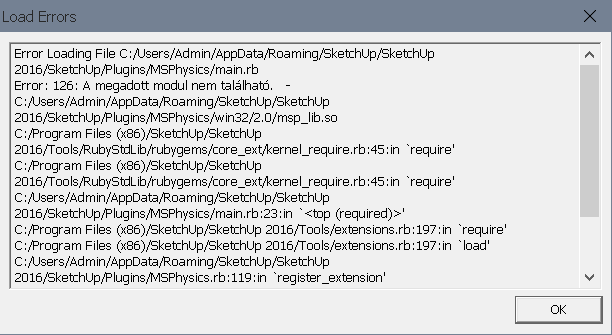
                                            error.png

                                            1 Reply Last reply
                                            Reply Quote 0

                                            Hello! It looks like you're interested in this conversation, but you don't have an account yet.

                                            Getting fed up of having to scroll through the same posts each visit? When you register for an account, you'll always come back to exactly where you were before, and choose to be notified of new replies (either via email, or push notification). You'll also be able to save bookmarks and upvote posts to show your appreciation to other community members.

                                            With your input, this post could be even better πŸ’—

                                            Register Login
                                            • 1
                                            • 2
                                            • 8
                                            • 9
                                            • 10
                                            • 11
                                            • 12
                                            • 46
                                            • 47
                                            • 10 / 47
                                            • First post
                                              Last post
                                            Buy SketchPlus
                                            Buy SUbD
                                            Buy WrapR
                                            Buy eBook
                                            Buy Modelur
                                            Buy Vertex Tools
                                            Buy SketchCuisine
                                            Buy FormFonts

                                            Advertisement