MAC - Entity Info Window
-
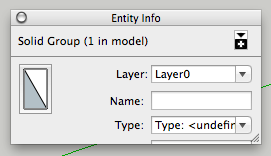
I have tried everything including disabling plugins, reinstalling and rebooting, even just loading a standard template but I can't get the volume to display, I can only adjust the width of the info box. I can modify the shape of other windows but this one seems fixed.

Any suggestions for a fix as I use this for quick quantity take offs?
O.S.: MAC OS X Mavericks 10.9.2
-
hi,
your plist entry is probably broken...
you could bin the whole thing, empty your trash, the do a mac restart...
or you could try to fix it from 'Ruby Console', may not work, but may...
copy/past these into 'RC' and hit return/enter
first see whats already there...
1:%x(defaults read ~/Library/Preferences/com.sketchup.SketchUp.2014.plist EntityInfoPanel_viewsize 2>&1))mine returns
250, 118
2:%x(defaults delete ~/Library/Preferences/com.sketchup.SketchUp.2014.plist EntityInfoPanel_viewsize)3: run 1 again by using the up arrow twice...
4: add a sightly silly size...%x(defaults write ~/Library/Preferences/com.sketchup.SketchUp.2014.plist EntityInfoPanel_viewsize '200,800')5: run 1 again
Drag the edge triangle and run 1 again, it should be updated...
YMMV, but report back either way
john
-
I've also had luck fixing this using Reset Workspace in Preferences.
-
@ John. Thanks for the suggestions I do go into panic mode when I see code. The suggestions are appreciated and would have been tried but...
@ Dave, "Reset Workspace" in preferences seems to have cleared it for now and was simple to implement. I was also relieved to find my custom toolbar remained intact.

Thank you both. Problem fixed.

Hello! It looks like you're interested in this conversation, but you don't have an account yet.
Getting fed up of having to scroll through the same posts each visit? When you register for an account, you'll always come back to exactly where you were before, and choose to be notified of new replies (either via email, or push notification). You'll also be able to save bookmarks and upvote posts to show your appreciation to other community members.
With your input, this post could be even better 💗
Register Login


Advertisement