sketchucation logo sketchucation
    • Login
    Oops, your profile's looking a bit empty! To help us tailor your experience, please fill in key details like your SketchUp version, skill level, operating system, and more. Update and save your info on your profile page today!
    โš ๏ธ Update | Sketchucation Tools 5.0.8 released with licensing improvements and bugfixes Download

    2014 Make edit material MAC

    Scheduled Pinned Locked Moved SketchUp Discussions
    sketchup
    36 Posts 8 Posters 4.7k Views 8 Watching
    Loading More Posts
    • Oldest to Newest
    • Newest to Oldest
    • Most Votes
    Reply
    • Reply as topic
    Log in to reply
    This topic has been deleted. Only users with topic management privileges can see it.
    • H
      Hendrik_G
      last edited by

      I didn't have an application specified. I just tried specifying Photoshop CC, and then Preview - no change.

      I think the problem your describing would potentially be an issue if I could even get the image to open. The problem is that I right click a texture, select "Edit Texture" and receive the error message "Failed to Save File" and nothing opens.

      1 Reply Last reply
      Reply Quote 0
      • jeff hammondJ
        jeff hammond
        last edited by

        @hendrik_g said:

        I didn't have an application specified. I just tried specifying Photoshop CC, and then Preview - no change.

        for clarity.. you do have an editor assigned at SketchUp-> Preferences-> Applications ,right?
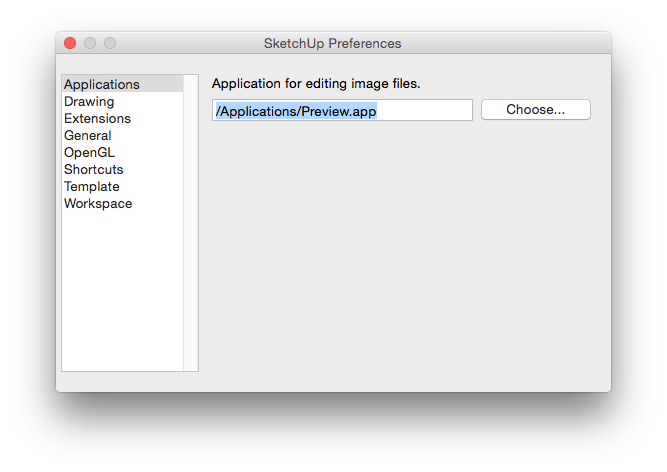
        Screen Shot 2015-01-23 at 12.51.37 PM.png

        dotdotdot

        1 Reply Last reply
        Reply Quote 0
        • H
          Hendrik_G
          last edited by

          Yes, I have tried assigning both Photoshop and Preview

          1 Reply Last reply
          Reply Quote 0
          • S
            slbaumgartner
            last edited by

            @hendrik_g said:

            I'm having the same "Failure to Save File" issue when I tried to edit any of my textures in SU2015 running Mac Yosemite. I've read this discussion, and I'm still unable to resolve my issue. I'm hoping someone can help me or let me know what I'm missing. I've tried the following:

            When, as suggested above, I entered this into SU's Ruby Console:
            = ENV["TMPDIR" + "com.sketchup.SketchUp 2014." + ENV["USER"]
            UI.openpanel(path, path)]

            I received the following error: %(#FF0000)[Error: #<SyntaxError: <main>: syntax error, unexpected '='
            = ENV["TMPDIR"] + "com.sketchup.SketchUp 2014." + ENV["USER"]
            ^>
            SketchUp:1:in `eval']

            I searched and found "com.sketchup/SketchUp 2015/" in this location:
            Library/Caches/com.sketchup.SketchUp.2015/

            I've attached a screenshot of the contents of this folder.

            I confirmed in the Get Info window that my user had Read/Write access to that entire folder path and the contents within.

            I'm still having issues. Any help would be greatly appreciated.

            Not sure about the root cause of your issue, but the problems with the code above are that you missed part of it and need to alter it for 2015:

            <code>
            path=ENV["TMPDIR"] + "com.sketchup.SketchUp.2015." + ENV["USER"]
            File.writeable?(path)
            </code>

            1 Reply Last reply
            Reply Quote 0
            • D
              driven
              last edited by

              check if SU agrees with you about which editor to use...

              %x(defaults  read  com.sketchup.SketchUp.20#{Sketchup.version.to_i} "Preferences").match(/"Image.+$/)
              

              mine defaults to 'Preview' if none is set...

              post your result, and we can go on from there...

              john

              learn from the mistakes of others, you may not live long enough to make them all yourself...

              1 Reply Last reply
              Reply Quote 0
              • D
                driven
                last edited by

                There is definitely a 'trick' to to using with 'Preview'...

                the catch 22 is I can't save or navigate to where SU places the file for copying because 'Preview' considers it a 'no go' area...

                however, if I put that folder in my sidebar, I can navigate to it from 'Preview', 'click' on the same name image [to fix the name], then save...

                to get the folder into your 'Sidebar', run this and 'drag' the 'com.sketchup...' folder to the sidebar...

                 path = ENV["TMPDIR"] + "com.sketchup.SketchUp.20#{Sketchup.version.to_i}." + ENV["USER"]
                %x(open -R "#{path}")


                not sure what happens with photoshop...

                john

                learn from the mistakes of others, you may not live long enough to make them all yourself...

                1 Reply Last reply
                Reply Quote 0
                • D
                  driven
                  last edited by

                  on a mac copy paste this into 'Rudy Console'

                  path = ENV["TMPDIR"] + "com.sketchup.SketchUp.20#{Sketchup.version.to_i}." + ENV["USER"]
                  UI.openpanel(path, path)
                  

                  and keystroke enter/return

                  john

                  UPDATED: should now work for any 20+ version of SU...

                  learn from the mistakes of others, you may not live long enough to make them all yourself...

                  1 Reply Last reply
                  Reply Quote 0
                  • D
                    driven
                    last edited by

                    @dave r said:

                    the folder that is being created is a temporary one but I wonder if the problem, Walt, is that one of the container folders needs Read and Write permission granted.

                    @Dave && @walt

                    that folder is ok, but you can confirm with

                     path = ENV["TMPDIR"] + "com.sketchup.SketchUp.20#{Sketchup.version.to_i}." + ENV["USER"]
                    #UI.openpanel(path, path)
                    File.writable?(path)
                    

                    @Walt, have you re-added an editor to 'Preferences' , mine is failing with 'Graphics Convertor' and 'Preview', but works with 'Image Tricks'

                    john

                    UPDATED: should now work for any 20+ version of SU

                    learn from the mistakes of others, you may not live long enough to make them all yourself...

                    1 Reply Last reply
                    Reply Quote 0
                    • H
                      Hendrik_G
                      last edited by

                      @driven said:

                      check if SU agrees with you about which editor to use...

                      %x(defaults  read  com.sketchup.SketchUp.20#{Sketchup.version.to_i} "Preferences").match(/"Image.+$/)
                      

                      mine defaults to 'Preview' if none is set...

                      post your result, and we can go on from there...

                      john

                      SU agrees. I have Preview assigned in Preferences and this was returned in Ruby Console:
                      %x(defaults read com.sketchup.SketchUp.20#{Sketchup.version.to_i} "Preferences").match(/"Image.+$/)
                      "Image Editor" = "/Applications/Preview.app"

                      1 Reply Last reply
                      Reply Quote 0
                      • H
                        Hendrik_G
                        last edited by

                        @driven said:

                        There is definitely a 'trick' to to using with 'Preview'...

                        the catch 22 is I can't save or navigate to where SU places the file for copying because 'Preview' considers it a 'no go' area...

                        however, if I put that folder in my sidebar, I can navigate to it from 'Preview', 'click' on the same name image [to fix the name], then save...

                        to get the folder into your 'Sidebar', run this and 'drag' the 'com.sketchup...' folder to the sidebar...

                         path = ENV["TMPDIR"] + "com.sketchup.SketchUp.20#{Sketchup.version.to_i}." + ENV["USER"]
                        > %x(open -R "#{path}")
                        >     
                        

                        not sure what happens with photoshop...

                        john

                        This allowed me to navigate to the folder, however there no images in there for me to open (see attached screenshot).
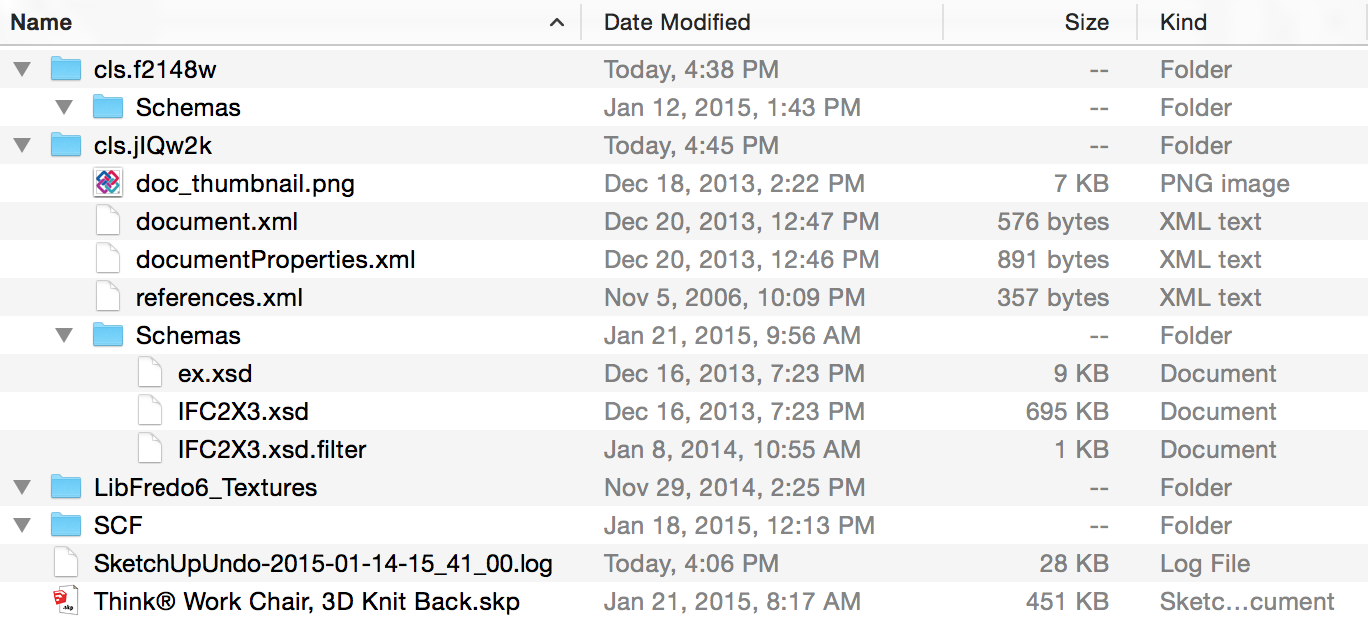

                        Screen Shot 2015-01-23 at 4.45.04 PM.png

                        1 Reply Last reply
                        Reply Quote 0
                        • H
                          Hendrik_G
                          last edited by

                          @mwm5053 said:

                          Ok works now must have been a permission thing like Dave said but thanks Dave and John ๐Ÿ˜„

                          @MWM - what did you do exactly that fixed your issue? I think I have the same issue that you were experiencing.

                          1 Reply Last reply
                          Reply Quote 0
                          • D
                            driven
                            last edited by

                            something you could try...

                            your screenshot shows a 'doc thumbnail.png' in the temp folder...

                            double click it and see if 'Preview' asks for permission...

                            john

                            learn from the mistakes of others, you may not live long enough to make them all yourself...

                            1 Reply Last reply
                            Reply Quote 0
                            • S
                              slbaumgartner
                              last edited by

                              I noticed that SketchUp reports ENV["TMPDIR"] as starting with /var. That path is actually a link to /private/var. I wonder if you have a permissions tangle involving that link? Try ls -l /var in a Terminal and see what permissions it has. I get

                              lrwxr-xr-x@ 1 root wheel 11 Nov 26 16:26 /var -> private/var

                              Steve

                              1 Reply Last reply
                              Reply Quote 0
                              • D
                                driven
                                last edited by

                                considering that SU is having no issues writing other stuff to that folder, and that is the fail point in this case, the permissions issue may be with the actual 'material' path...

                                what is the path to the material your trying to edit?

                                do any from your User material folder work?

                                or SU Materials folder?

                                I remember having to change permissions on downloaded materials in the past as they have a 'downloaded flag' on them...

                                thinking out load..
                                john

                                learn from the mistakes of others, you may not live long enough to make them all yourself...

                                1 Reply Last reply
                                Reply Quote 0
                                • romboutR
                                  rombout
                                  last edited by

                                  Im seeing this problem on a model in su2015. Ive added permission, a second admin "read&write", didnt help. I also set "everybody" as a test to "read&write", also didnt help.

                                  Are there any options left? Ive used this item before with issues.

                                  using osx 10.11.2

                                  1 Reply Last reply
                                  Reply Quote 0
                                  • romboutR
                                    rombout
                                    last edited by

                                    My work around for now is using UV tool on a simple plane and export this as OBJ. The tex file will be set aside of the OBJ... Voila! Eat this SU!

                                    id did add this URL as file name, some windows path of the original builder. Perhaps this causes issues. I think those forward and backward slash at the beginning cause problems on mac

                                    "C/\Users\Adam\Documents\Adam Models\SpringLeafBoxwood01.png"

                                    1 Reply Last reply
                                    Reply Quote 0

                                    Hello! It looks like you're interested in this conversation, but you don't have an account yet.

                                    Getting fed up of having to scroll through the same posts each visit? When you register for an account, you'll always come back to exactly where you were before, and choose to be notified of new replies (either via email, or push notification). You'll also be able to save bookmarks and upvote posts to show your appreciation to other community members.

                                    With your input, this post could be even better ๐Ÿ’—

                                    Register Login
                                    • 1
                                    • 2
                                    • 1 / 2
                                    • First post
                                      Last post
                                    Buy SketchPlus
                                    Buy SUbD
                                    Buy WrapR
                                    Buy eBook
                                    Buy Modelur
                                    Buy Vertex Tools
                                    Buy SketchCuisine
                                    Buy FormFonts

                                    Advertisement