Requesting help skewing a 3D object
-
Hi all,
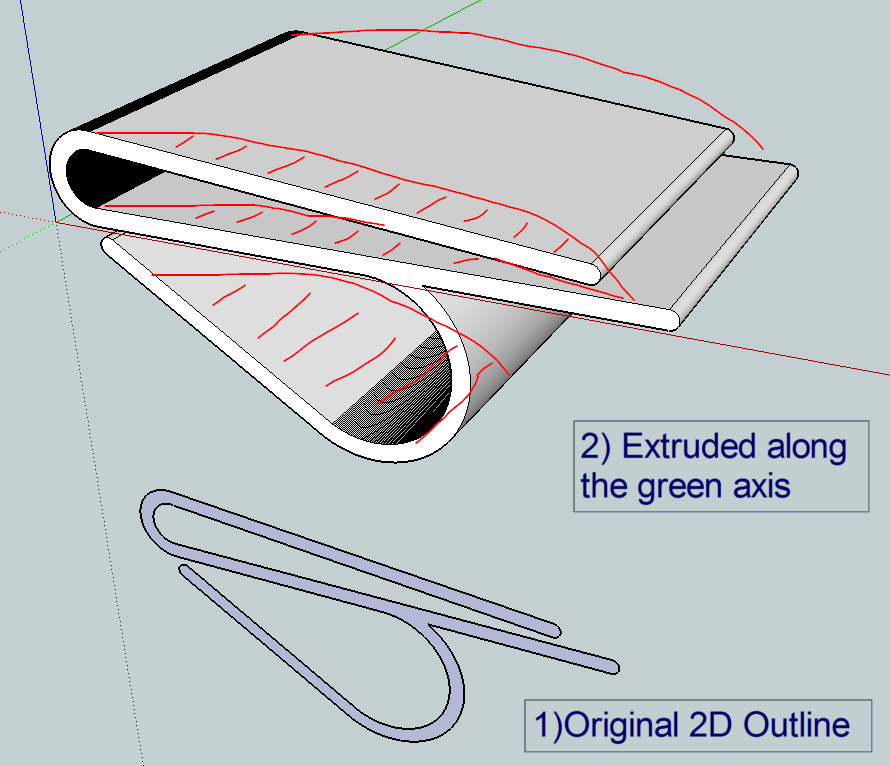
New to Sketchup and sadly at the lower end of the learning curve. I have a problem drawing an object (see attached image). I drew a profile/outline in 2D (step 1, at bottom of image) then used the push/pull tool to extrude along the green axis (step 2, at top of image). So far so good, but I now want to create a curve in the face of the 3D image, along the green axis (see red freehand lines, sorry its a bit clumsy) AND have the curve bulge out of the back. Not sure what you would call this - I guess its kinda a curved skew along the green axis. Another way to imagine it would be taking a bite out the the face, as if it was a sandwich, and somehow adding the same bite to the back face. Hope this makes sense.I've been struggling for hours with this, with no success. I tried making a 3D cylinder, intersecting it with the model then deleting the bits I didn't want - but this resulted in a horrible mess, with hundred of sector lines each of which had to be deleted individually, and even then I lost faces in the bits of the moel I want. There is likely a simple way to do this, just I don't know what it is. Please could some kind soul advise?
-
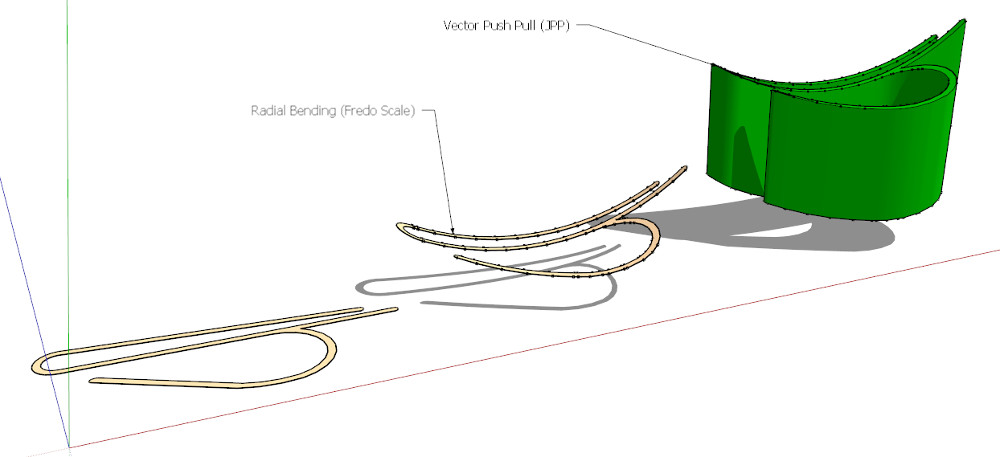
Probably not the best way, but a quick one...
(An alternative to radial bending can be shape bender)
-
And maybe you will have more speedy answsers if you had linked an skp file!

Because your first lines lost five minutes to draw to Cotty!
An image is yet cool but an image + a file is a lot of better in many cases! -
When you intersect geometry, often it is helpful to scale up 10 or 100x to avoid small units in your model. If you are working at a small scale, often SU won't properly intersect bits of the model.
-
Hi Cotty, Pilou & andybot - thanks for taking the time to offer advice. Sorry I didn't post the skp file - I thought that a pic was easier, my mistake. I have attached the skp this reply.
@ andybot - the model is scaled by a factor of 100 from its final required size (final width @ 60mm, current width @ 6000mm/6m) - is that sufficient? I'm aware that Sketchup was originaly conceived for architecture, and in that contect 6m may still be viewed as quite small.
@ Cotty, thanks for taking the time to both draw my model from the pic and suggest solutions. I tried using shape bender to create a curve in the 2D profile, then Fredo's vector push-pull to extrude it into 3D. It kinda works, but the problem is it does skew the curves. If you look at the first pic I posted, the bottom part of the model is a half circle, and I want to retain the circular profile when its extruded. Using the above method, the circular section is skewed. However, this may be my mis-use of shape bender - it is very sensitive to where the object and target lines are placed, and I can't seem to get it quite right.
The best way I can describe what I want to achieve is to visualise the extuded model in the first pic, and take a bite out of the profile from the front edge - this would leave the half circle geometrically correct along the green axis. It seemed a no-brainer to intersect the model with a tube, then delete the bits I didn't want, but it takes forever as described in my first post. Is there any other way of doing it?
Thanks for your help
-
@rich o brien said:
Like this?
[attachment=0:3i19b2e6]<!-- ia0 -->Test Outline 100x v2.skp<!-- ia0 -->[/attachment:3i19b2e6]
Your version of SU?


-
Huh?
-
-
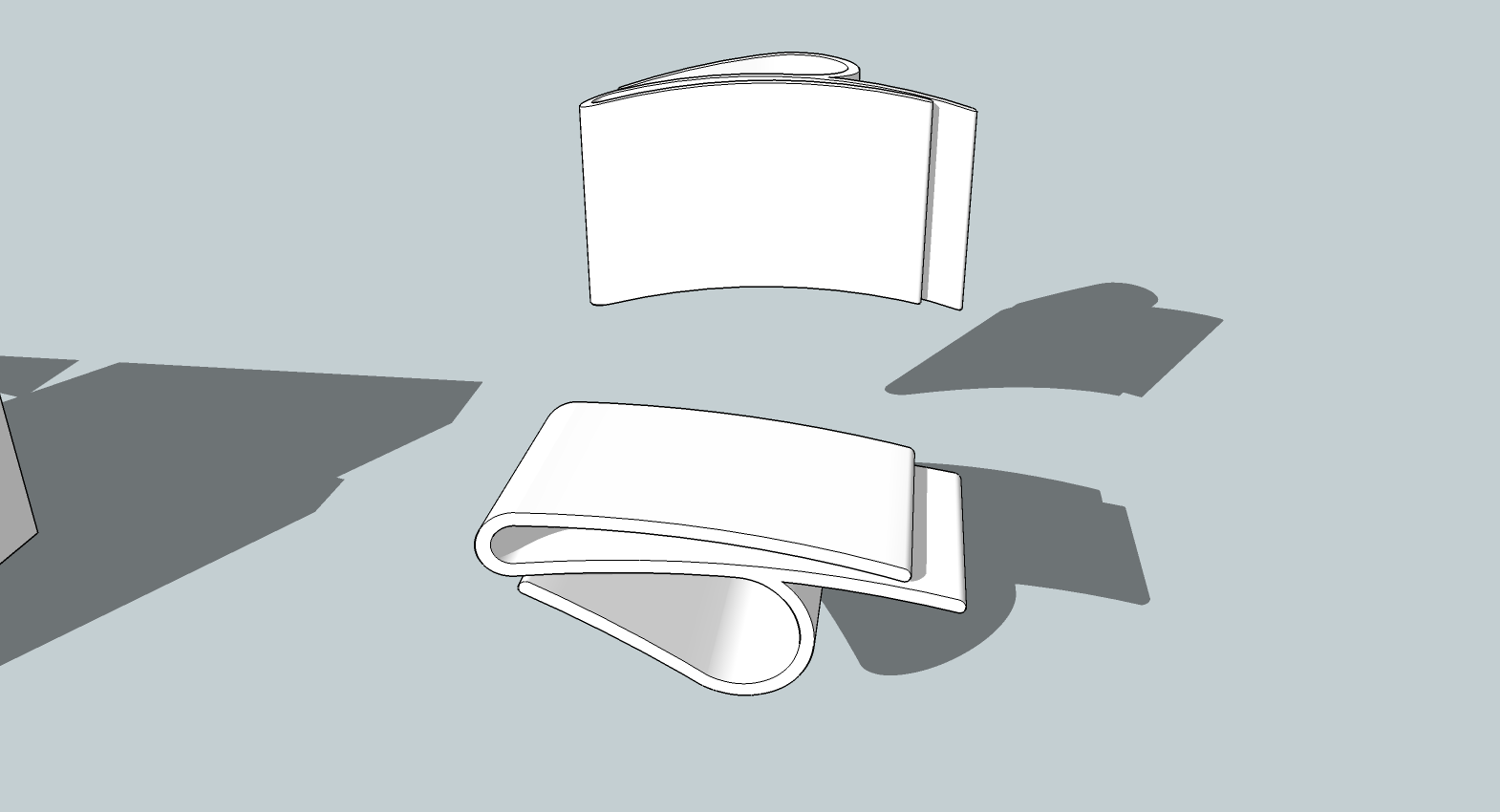
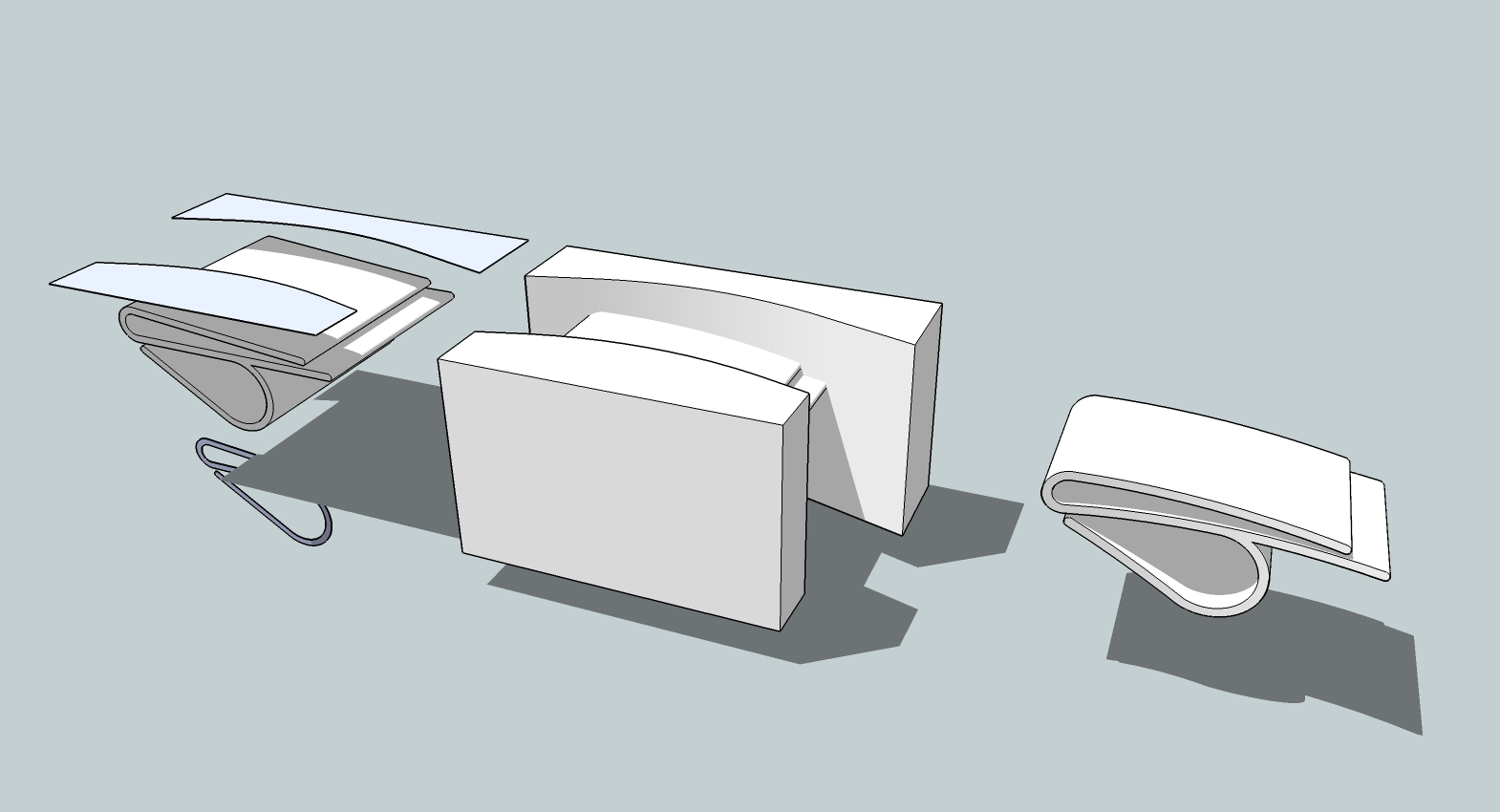
Like this? No plugins required. Simply draw cutters to the appropriate shape, intersect them with the model, remove the waste, scale it back down, done.
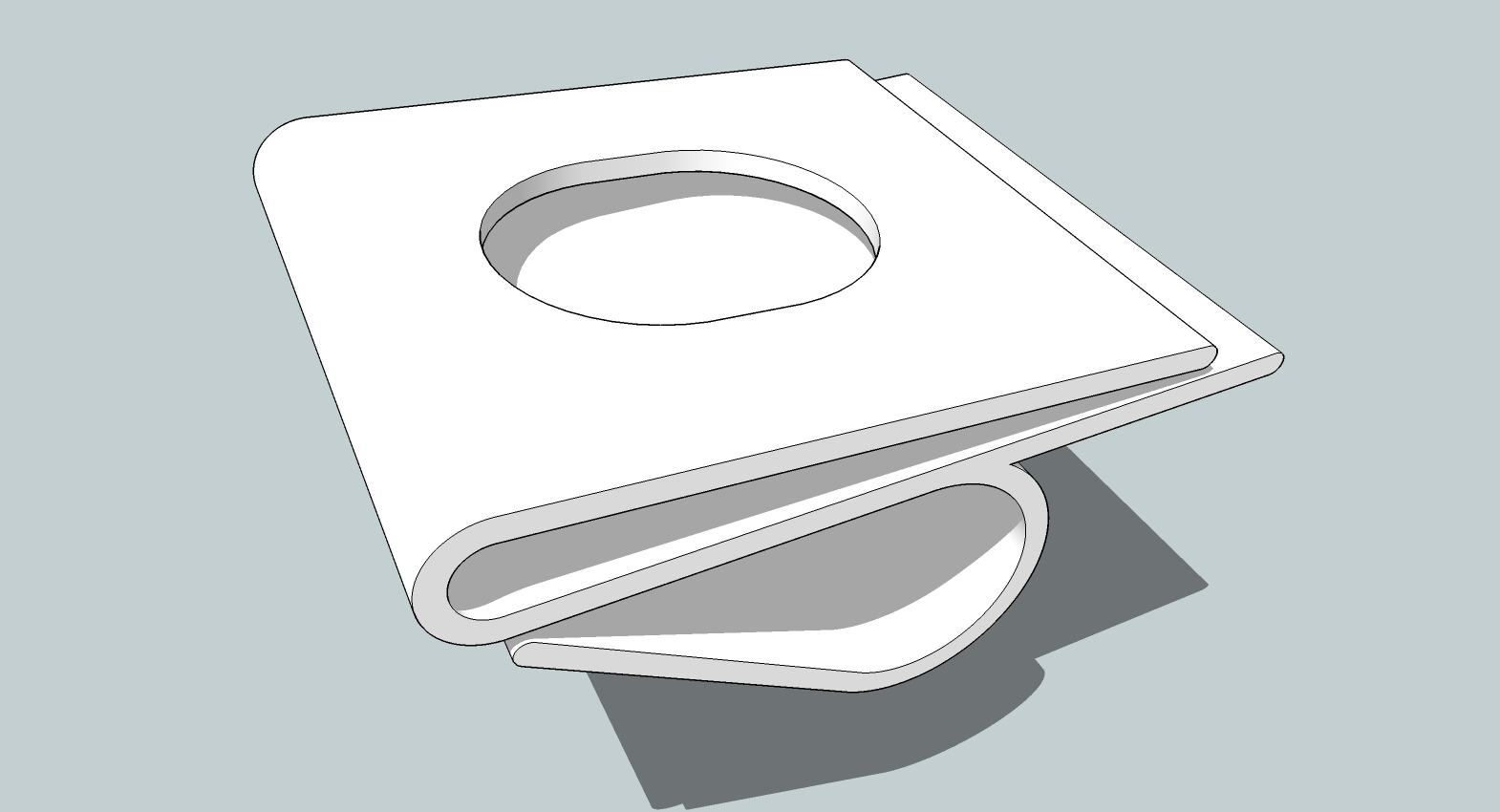
-
Hi Dave,
Yes! thats exactly what I need to do - I get the intersecting bit, but what I don't get is how to delete the unwanted bits. I end up having to select each line individually, which is a real pain on the circular sections. Presumably there is a quick and easy way of deleting the intersected bits? Thet don't seem to be grouped, so how do you do it?
Thanks a lot for taking the time to help out
-
In the case of your listtle clip, I switched to Parallel Projection and chose the standard top view. Then I used the Select tool to drag a right to left selection around the part that I wanted to delete. When you do that, you want to avoid getting any geometry you want to keep. The selection boxes would be about like this. Remember, right to left.
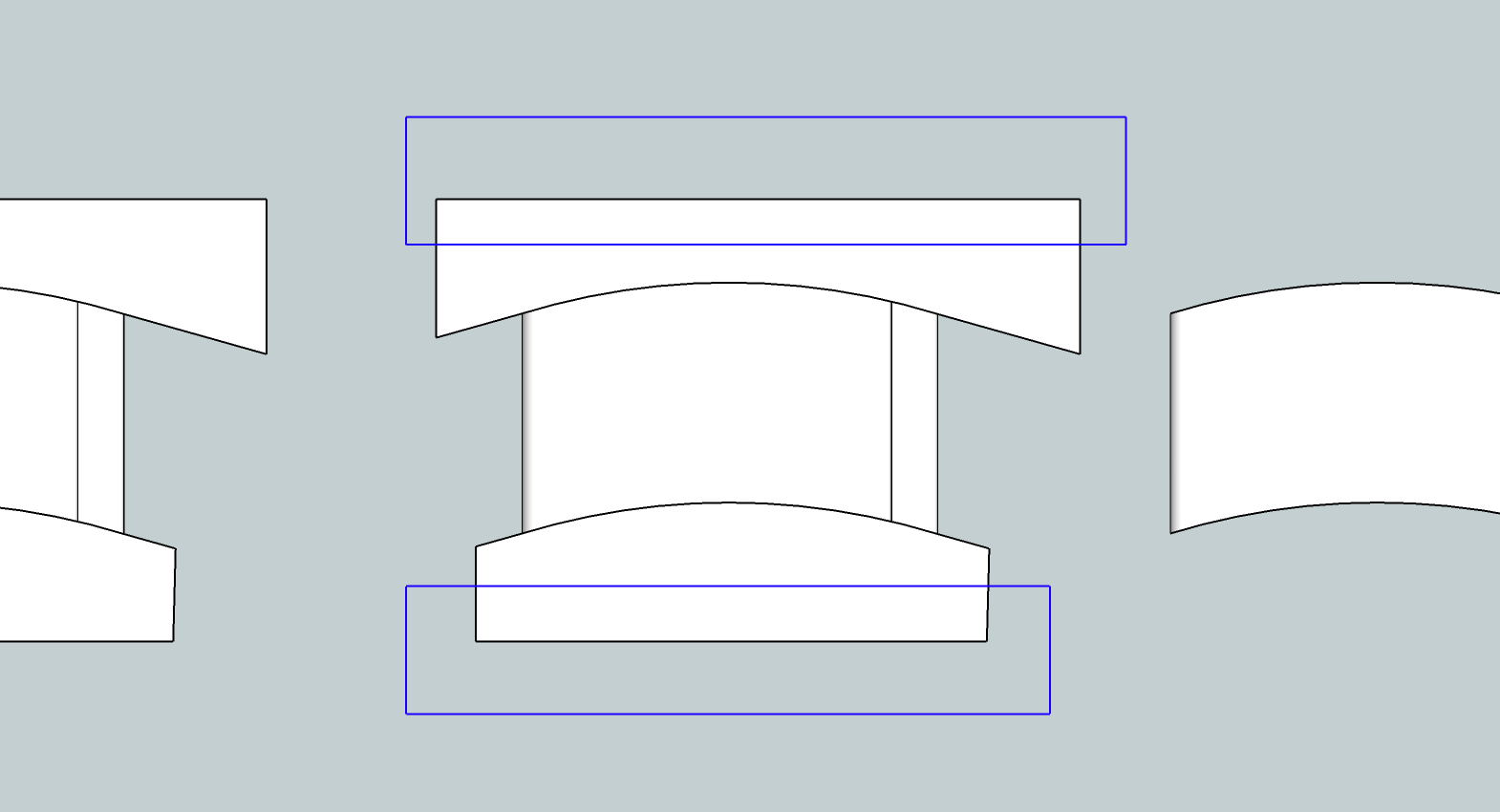
After making the selection, hit the Delete key to get rid of the unwanted bits. You'll still have the curved faces outside the perimeter of the clip to delete but the selection will take care of most of it. When you've finished erasing what you don't need, make sure to correct the face orientation as needed so it's all white faces out. Blue faces should be inside.
-
Maybe Dave has a Pro version has shown on his profil so boolean diff operations are more easy (all volume solids must be "waterproof") else you must use the or the delete key
Ps I forget to say you that you must "save as V6" (or V7 if you have Dynamic Components) for a more large audience!
Pss What is your design object ?

-
Pilou, I do have the pro version of SketchUp but what I showed was done without the Solid tools. It was done with the native Intersect Faces which is available in the free version as well. If I was showing an operation that required something only available in the pro version, I would have explicitly said so. Not every operation in SketchUp requires a plugin.
-
Sure!

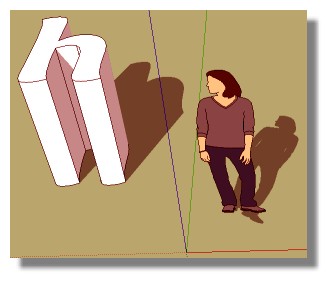
A funny thing will be not use curves - surface - extrude but just letters so !
-
Boolean tools for free version:
http://sketchucation.com/forums/viewtopic.php?p=112055%23p112055#p112055
-
Normally, Ken would jump in at ths point and suggest "Hole on Solid", which is perfect for this situation.
see screencast...
(Is there a way to embed a screencast like with screenr?)
-
Learning and understanding how to using the standard tools within SU as Dave has described is far more useful than wandering off into the world of Plugins. Starting to use Boolean tools etc means you need to understand how to make solids, and to understand how to make solids you need to understand the basics.........Relying on plugins to do simple things restricts your ability to understand fully how the program works. Use plugins to automate processes and speed up workflow once you know what you are doing.
Personally I think plugins should only be mentioned in the newbie forum when specifically needed, weld for example, when it can't be done using normal tools, or when specifically asked for.
-
You are right, beginners should learn to do such things without plugins (but there are more advanced Sketchuppers reading these questions and answers too and maybe they can find some hints to improve their workflows...)
-
@box said:
Learning and understanding how to using the standard tools within SU as Dave has described is far more useful than wandering off into the world of Plugins. Starting to use Boolean tools etc means you need to understand how to make solids, and to understand how to make solids you need to understand the basics.........Relying on plugins to do simple things restricts your ability to understand fully how the program works. Use plugins to automate processes and speed up workflow once you know what you are doing.
Personally I think plugins should only be mentioned in the newbie forum when specifically needed, weld for example, when it can't be done using normal tools, or when specifically asked for.
I agree but, sometimes doing these cleaning operation you just forget this little (so little) tiny segment which will make problems later so you will have to run cleanUp or solid inspector, etc... which are Plugins.
Sometimes you just don't want to spend hours on tedious labour.
-
And if you haven't learnt about all those segments and how to deal with them you won't know what to do about them unless you know which plugin you need.
My point being, Newbie forum, beginner user, help them learn how to use the program from the ground up, don't tell them they need to use yet another complicated addition to make something work. Some people constantly recommend plugins unnecessarily and often irrelevant ones. In any other section I have no issue with it, but here in the Newbie Forum it should be the very basics unless otherwise asked for or absolutely essential. Plus the thread belongs to the Original Poster and what anyone else learns from it is incidental, it should be directed towards the beginner user not the advanced user.












Advertisement