[plugin] multiple dimension tool
-
The Sketchup original dimension tool adds dimension between 2 points only at a time
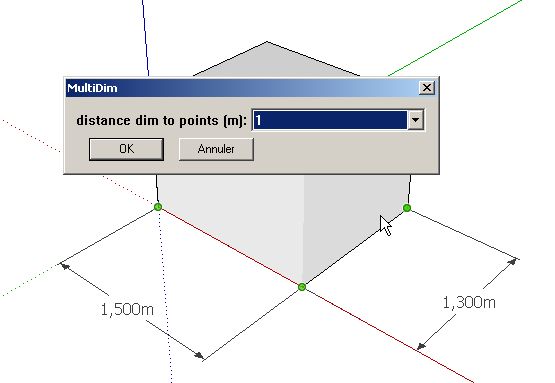
Here is a plugin, that adds dimension between 11 points max in a row
a video:
https://dl.dropboxusercontent.com/u/52719814/videos/multiple_dimension_tool.webmOnly a part of the code is original; it is mostly a compilation of different ideas:
TIG suggestion somewhere (i don't remember the thread) to use a dimension as a component and scale it
Eneroth's code from 3D Rotate Tool, to set the points
http://extensions.sketchup.com/en/content/eneroth-3d-rotate-toolJ FOLTZ's inputbox.rb, to store the previous value in the registry
http://sketchucation.com/forums/viewtopic.php?t=19103
it is included in mult_dim_tool folderTo use the plugin:
Launch it from the plugin menu "mult_dim_tool"
clic on the points (11 max)
press the "space" bar when enough points have been set
a dialog box pops up to choose the leaders length (in meters)
clic OK and the dimensions are added to the modelThere are limitations:
in meters
PC only
10 dimensions at a time maximumI needed such a plugin to indicate the columns foundation position
Maybe somebody can find it useful tooI tried to follow the rules; the plugin is packed using .rbz convention
Hope i didn't write anything wrong that would mess up the plugins folderIf so, i am ready to correct
-
Unfortunately it won't load on my Mac OSX latest version of SU, below is the Load Error screen:
Error Loading File /Users/kmead/Library/Application Support/SketchUp 2014/SketchUp/Plugins/mult_dim_tool/multiple_dimension_tool_loader.rb
Error: #<LoadError: cannot load such file -- inputbox>
/Applications/SketchUp 2014/SketchUp.app/Contents/Frameworks/Ruby.framework/Versions/2.0/lib/ruby/2.0.0/rubygems/core_ext/kernel_require.rb:45:inrequire' /Applications/SketchUp 2014/SketchUp.app/Contents/Frameworks/Ruby.framework/Versions/2.0/lib/ruby/2.0.0/rubygems/core_ext/kernel_require.rb:45:inrequire'
/Users/kmead/Library/Application Support/SketchUp 2014/SketchUp/Plugins/mult_dim_tool/multiple_dimension_tool_loader.rb:8:in<top (required)>' /Applications/SketchUp 2014/SketchUp.app/Contents/Resources/Content/Tools/extensions.rb:197:inrequire'
/Applications/SketchUp 2014/SketchUp.app/Contents/Resources/Content/Tools/extensions.rb:197:inload' /Users/kmead/Library/Application Support/SketchUp 2014/SketchUp/Plugins/multiple_dimension_tool.rb:17:inregister_extension'
/Users/kmead/Library/Application Support/SketchUp 2014/SketchUp/Plugins/multiple_dimension_tool.rb:17:in `<top (required)>'Thanks, hope this helps you get to the next iteration.
Karl
-
KArl
You also need to install
inputbox.rbby Jim Foltz's - from his site.
It was an experimental helper script/class, which a few users have integrated with their own plugins.
It is bad form not to explain clearly to others that it is essential, and where to get it from...
FYI it can be downloaded directly from here...
http://sketchuptips.blogspot.co.uk/2008/03/inputbox-class.html -
@tig said:
KArl
You also need to install
inputbox.rbby Jim Foltz's - from his site.
It was an experimental helper script/class, which a few users have integrated with their own plugins.
It is bad form not to explain clearly to others that it is essential, and where to get it from...
FYI it can be downloaded directly from here...
http://sketchuptips.blogspot.co.uk/2008/03/inputbox-class.htmlI am sorry but you are wrong on this TIG
If you read again what i wrote, you'll see this:
"> J FOLTZ's inputbox.rb, to store the previous value in the registry
http://sketchucation.com/forums/viewtopic.php?t=19103"i did mention inputbox.rb
I mentionned you also, by the way; because the first idea is yours; thank you for your help
-
You are correct in that you have 'almost' explained it in your post.
However, what it says is that you have used ideas from others, and not that the user MUST get and install another script: the text should have been bolder/red etc to draw attention to it - many downloaders are very lazy and will never read instructions anyway - let alone ambiguous ones:roll: - also a direct link would have been helpful.
I have edited your post for you...
-
@tig said:
You are correct in that you have 'almost' explained it in your post.
However, what it says is that you have used ideas from others, and not that the user MUST get and install another script: the text should have been bolder/red etc to draw attention to it - many downloaders are very lazy and will never read instructions anyway - let alone ambiguous ones:roll: - also a direct link would have been helpful.
I have edited your post for you...
OK
i assumed people would not be lazy, and english is not my native language
i'll do better next time
anyway, i discovered how inputbox.rb is useful, because it enables to store the previous answers in a dialogue box, without having to write it down in a file outside the "program files" folder
-
FYI, these are the main ways to store data...
@variablein a Module, remembered for reuse that session.
@@variablein a Module or Class, remembered for reuse that session.For each model - saved across opening for any user:
Sketchup.active_model.set_attribute(dictionary_name, 'key', value) Sketchup.active_model.get_attribute(dictionary_name, 'key', optional_default_value)
which is stored in the model.For every model opened in SketchUp by that user:
Sketchup.write_default(section_name, key, value) Sketchup.read_default(section_name, key, optional_default_value)
which is stored in the PC's 'Registry' [or 'plist' on MAC].Alternatively settings for a complex tool can be saved into a file, per User.
This file[s] can be made/updated/read, located in a custom-folder for that plugin, which you make [if it doesn't already exist] in theENV['TEMP']folder for a PC - on a MACENV['TMPDIR']- useRUBY_PLATFORM.downcase=~/darwin/to see if it's a MAC - or similar User accessible folder.
Don't use a folder within Plugins as it might not be fully accessible to the User. -
I updated the plugin
http://sketchucation.com/forums/viewtopic.php?p=505840#p505840
[mod=:mjnka2at]I added the correct link - taken from the small tag below the title of the first-page.
TIG[/mod:mjnka2at]11 points instead of 6
in a horizontal plane only
but following any direction
J FOLTZ's inputbox.rb is included in the folder.


Hello! It looks like you're interested in this conversation, but you don't have an account yet.
Getting fed up of having to scroll through the same posts each visit? When you register for an account, you'll always come back to exactly where you were before, and choose to be notified of new replies (either via email, or push notification). You'll also be able to save bookmarks and upvote posts to show your appreciation to other community members.
With your input, this post could be even better 💗
Register Login


Advertisement